Supergrow positions itself as an all-in-one AI growth tool for LinkedIn -- AI writing, carousel creation, scheduling, and trending topic analysis bundled into a single platform. The appeal is obvious: one subscription that covers everything a LinkedIn creator needs.
The reality is more nuanced. After spending several weeks testing Supergrow alongside nine other platforms, I found that its jack-of-all-trades approach comes with a predictable trade-off: it does many things adequately without truly excelling at any one of them. The AI writing leans heavily on templates, the carousel builder feels basic next to dedicated design tools, and the voice learning barely scratches the surface of what's possible in 2026. For creators who have outgrown the beginner stage, these gaps start to compound quickly.
If you're looking for a tool that goes deeper on the things that actually move the needle -- AI personalization, visual content quality, or team workflows -- this guide will help you find the right Supergrow alternative for your specific needs.
TL;DR -- Quick Picks by Use Case:
| Your Need | Best Supergrow Alternative | Why |
|---|---|---|
| Brand-trained AI + carousels | Postiv AI | AI learns your voice from your own content, integrated carousel designer, team workflows |
| Content database + CRM | Taplio | Millions of viral posts for inspiration, lead tracking (AI from $69/mo Growth) |
| Free scheduling | Buffer | 3 channels free, OAuth-safe, multi-platform |
| Post formatting + hooks | AuthoredUp | Rich text editor, 300+ hook templates, cross-device preview |
| Agency teams | Postiv AI | Multi-client workspaces, approval workflows, per-client brand libraries |
| Content research | Kleo | Content discovery, creator analysis, engagement patterns ($99/mo) |
| Multi-platform text | Typefully | LinkedIn + X + Bluesky + Threads from one writing app |
| API-safe posting | MagicPost | Official LinkedIn API partner, fast posting workflow |
| Deep analytics | Shield | LinkedIn-specific analytics, audience demographics, content trends |
| Enterprise social | Hootsuite | Advanced permissions, compliance, 8+ platforms |
Why Look for Supergrow Alternatives

Supergrow works well enough when you're getting started with LinkedIn content. It lowers the barrier to entry with its template-driven AI and all-in-one approach. But as your LinkedIn strategy matures, certain limitations start to surface -- and they tend to cluster around the same pain points.
Most users who begin exploring alternatives do so for one of these reasons:
- Voice Training Without a Content Library: Supergrow's Content DNA feature does voice-train the AI, but it relies on interview-style sessions (Postcast) rather than ingesting your existing content library -- PDFs, blog posts, transcripts, case studies. If your voice already lives in documents you've created, tools that ingest that material directly tend to produce more accurate first drafts.
- Carousel Locked Behind Pro: The carousel designer is not available on the Starter plan. Users who sign up at $19/month for the "all-in-one" promise sometimes discover this after the fact and need to upgrade to $39/month sooner than expected.
- Limited Carousel Design: The built-in carousel builder covers the basics, but it lacks the design flexibility, brand template systems, and typography controls that professional content demands. Many users end up switching to Canva anyway, which fragments the workflow.
- Basic Team Features: For agencies or marketing teams managing multiple accounts, Supergrow's collaboration features feel underdeveloped. There are no proper approval workflows, no granular role permissions, and no way to maintain separate brand libraries per client.
- Feature Gating at Entry Tier: Supergrow's Starter ($19/mo) covers text posts and scheduling, but the carousel designer, infographic generator, and full analytics are locked behind the Pro plan ($39/mo). Users often discover this after signing up.
The core tension with Supergrow is this: it tries to cover the entire LinkedIn workflow but spreads itself thin in the process. Once you need professional-grade output in any single area -- AI writing, design, or team management -- you hit a ceiling.
What Supergrow Does Well
To be fair, Supergrow has genuine strengths that make it a solid entry-level tool:
- Voice-Trained AI (Content DNA): Supergrow's Content DNA feature voice-trains the AI from the start, including an AI interview tool (Postcast) that turns a 10-minute talk into multiple posts. This is a genuine differentiator versus tools that rely entirely on generic prompts.
- Official API Safety: Supergrow connects through LinkedIn's official API with no cookies and no extension-based scraping, making it one of the safer tools in the space.
- Affordable Entry Point: At $19/month, the Starter plan is one of the more accessible options for getting voice-trained AI writing and scheduling in one place.
- Quick Setup: You can go from signup to your first scheduled post in minutes. The interface is clean and the learning curve is gentle.
These qualities make it a reasonable starting point. The question is whether they're enough once your content standards -- and your business -- start to grow.
Key Limitations at a Glance
| Limitation Area | Common Supergrow Challenge | What a Better Alternative Offers |
|---|---|---|
| AI Writing Quality | Voice-trained via interview sessions (Postcast/Content DNA), but no persistent content library ingestion (PDFs, blog posts, transcripts). | AI trained on your existing content library -- PDFs, blog posts, transcripts -- that captures your unique voice from documents you've already written. |
| Carousel Design | Available on Pro ($39/mo) only. Basic builder with limited templates. | Integrated designer with brand presets, custom fonts, and one-click export, included from the start. |
| Voice Personalization | Interview-session-based voice capture. Good starting point, but doesn't draw from your existing written content. | Deep learning from your PDFs, transcripts, and blog posts -- ingests content you've already produced. |
| Team Collaboration | No approval workflows or client-specific brand libraries. | Role-based permissions, approval flows, and isolated brand workspaces. |
| Pricing Clarity | Carousel and analytics gated behind $39/mo Pro tier; Starter ($19/mo) is text and scheduling only. | Transparent pricing with core features available from the start. |
What Supergrow Actually Costs in 2026
| Plan | Monthly Price | Annual (per-mo equiv.) | What's Included |
|---|---|---|---|
| Starter | $19/mo | $16/mo | Voice-trained AI writing (Content DNA), scheduling, calendar, first-comment scheduler |
| Pro | $39/mo | $31/mo | Everything in Starter plus carousel maker, infographic generator, full analytics |
| Teams | $139/mo | $133/mo | 4 accounts, approval workflows, team analytics, employee advocacy features |
| Enterprise | Custom | Custom | Dedicated support, custom limits |
The important detail: the carousel maker is a Pro-only feature. Starter ($19/mo) covers AI writing and scheduling only. Users who want carousels or deeper analytics need to budget for the $39/mo Pro plan. Note that Supergrow does include genuine voice-trained AI (not just generic prompts) even on the Starter tier, which is a meaningful differentiator versus many budget tools.
How We Evaluated the Top Supergrow Alternatives
Selecting the right LinkedIn tool is a decision that affects your content quality, workflow efficiency, and account safety. To find the best Supergrow alternatives, we tested each platform against five pillars that reflect what serious LinkedIn creators actually need in 2026.

The Five Pillars of Our Evaluation Framework
- AI Content Quality & Personalization: Does the AI produce content that sounds like a real person -- specifically, you? Can it learn from your existing materials, or is it limited to generic prompts?
- Content Format Versatility: Can it handle more than text posts? We prioritized tools with built-in carousel designers, visual editors, and multi-format support that eliminate the need for separate design apps.
- Scheduling & Analytics: How intelligent is the scheduling? Does it offer data-backed timing, clear multi-account views, and analytics that inform your next move?
- Team Collaboration & Workflow: Can teams work together effectively? We looked for approval workflows, role-based permissions, shared brand assets, and client management capabilities.
- Account Safety & Compliance: How does the tool connect to LinkedIn? We gave top marks to platforms using OAuth 2.0 authentication and operating within LinkedIn's official API guidelines.
This framework enabled direct comparisons across platforms with very different feature sets. It also revealed the subtle differences that determine whether a tool becomes a long-term asset or a subscription you cancel after two months.
Feature Comparison: Supergrow vs Top Alternatives
| Feature | Supergrow | Postiv AI | Taplio | AuthoredUp | Kleo | Buffer | MagicPost | Typefully |
|---|---|---|---|---|---|---|---|---|
| AI Content Generation | Yes (voice-trained, all plans) | Yes (brand-trained) | Yes (from $69/mo Growth) | No | No | Yes (basic) | Yes (template) | Yes (AI assist) |
| Built-in Carousel Designer | Yes (Pro $39 only) | Yes (integrated) | Yes (from $69/mo Growth) | No | No | No | No | No |
| Brand Voice Training | Yes (Content DNA, all plans) | Yes (from your content) | No | No | No | No | No | No |
| Content Discovery | Limited | Yes (from your sources) | Yes | Yes (hook library) | Yes ($99/mo) | No | No | No |
| Post Scheduling | Yes | Yes | Yes | No | No | Yes | Yes | Yes |
| Team Workflows & Approvals | Teams plan only | Yes (roles + approvals) | Basic | Basic | No | Yes | Basic | Yes |
| Analytics | Pro + Teams | Yes | Basic | Preview only | Creator analysis | Yes | Basic | Basic |
| Multi-Platform | LinkedIn only | LinkedIn + X | 8+ platforms | 5 platforms | ||||
| Authentication | OAuth (official API) | OAuth 2.0 | Cookie + OAuth | Cookie-free | Web app | OAuth 2.0 | Official API | Official API |
| Starting Price | $19/mo | 7-day free trial | $39/mo (0 AI) | ~$20/mo | $99/mo | Free (3 ch.) | ~$21/mo | Free plan |
The pattern is clear: the market is moving toward integrated, all-in-one platforms. The ability to handle creation, design, and distribution in a single workspace is becoming table stakes for professionals who take LinkedIn seriously.
The 10 Best Supergrow Alternatives in 2026
1. Postiv AI -- Best for Brand-Trained AI Content & Carousel Design
Postiv AI is built for professionals who refuse to compromise between AI convenience and content authenticity. Where Supergrow generates content from generic prompts and templates, Postiv AI takes a fundamentally different approach: you train the AI on your own materials so that first drafts already carry your voice, expertise, and perspective.
The difference is immediately noticeable. You upload PDFs of white papers, video transcripts from webinars, blog posts, and other content that captures your tone. The AI absorbs this material and uses it as the foundation for every post it generates. The result is drafts that require minutes of editing rather than a full rewrite -- which is the problem that drives most people away from Supergrow's templated output.
The integrated carousel designer is equally impressive. Instead of writing in one tool and designing in another, you go from AI-generated text to a fully designed, on-brand carousel without ever leaving the platform. Brand templates lock in your logos, colors, and typography so every piece of content is consistent -- even when different team members create it.
For agencies, separate client workspaces with isolated brand libraries mean you never accidentally post with the wrong voice or visual identity. Approval workflows and role-based permissions round out a team experience that Supergrow simply doesn't match.
Best for: Founders, agencies, and marketing teams who need brand-consistent content at scale.
Key strengths:
- Brand-trained AI that learns your unique voice from your own content
- Integrated carousel designer with brand templates and typography controls
- Team collaboration with approval workflows and role-based permissions
- OAuth 2.0 authentication for complete account safety
- Smart scheduling with performance analytics
Limitations: Newer platform with a growing user community. No multi-platform support beyond LinkedIn.
2. Taplio -- Best for Content Database & CRM Features
Taplio is one of the most recognized names in the LinkedIn tool space, offering a large content inspiration database, AI writing, and CRM-style features for managing your LinkedIn network. If you're coming from Supergrow and want a more established ecosystem with a broader feature set, Taplio is the obvious comparison.
However, Taplio has its own pricing complexity that you should understand upfront. The $39/month Starter plan includes zero AI credits -- no AI writing, no carousel building, nothing. To actually use the features Taplio is known for, you need the Growth plan at $69/month, which caps you at 250 AI credits per month. Unlimited AI requires the Pro plan at $199/month. We covered this in detail in our Taplio alternatives guide.
Taplio's AI is prompt-based rather than trained on your brand, so the personalization gap that exists with Supergrow exists here too -- just at a higher price point. Still, Taplio's content inspiration database and lead tracking features give it an edge for users who want research and light CRM in one tool.
Best for: Creators who value content inspiration databases and want light CRM features alongside scheduling.
Key strengths:
- Large content inspiration database with millions of LinkedIn posts
- CRM-style lead tracking and engagement management
- AI writing and carousel builder (from $69/mo Growth plan)
- Established platform with active community
Limitations: AI credits are hidden behind higher tiers. No brand voice training. Cookie-based authentication for some features carries risk after LinkedIn's 2025 crackdown. Carousel builder requires the $69/mo Growth plan.
Pricing: Starter $39/mo (0 AI credits), Growth $69/mo (250 credits), Pro $199/mo (unlimited).
3. AuthoredUp -- Best for Post Formatting & Hook Templates
AuthoredUp fills a very specific niche: it makes your LinkedIn posts look polished. The platform provides rich text formatting options that LinkedIn's native editor lacks, a library of 300+ hook templates, and cross-device preview so you can see exactly how your post renders on mobile and desktop before publishing.
AuthoredUp uses a cookie-free authentication model, so there's minimal account risk -- a meaningful advantage after LinkedIn's 2025 enforcement actions. If your writing is strong but you want professional presentation and faster starts, AuthoredUp delivers. For more options in this space, check out our upcoming AuthoredUp alternatives guide.
The trade-off is clear: AuthoredUp has no AI writing, no scheduling, and no carousel design. It's a formatting and inspiration tool that you'll need to pair with something else for a complete workflow.
Best for: Experienced writers who want polished formatting and proven hook structures.
Key strengths:
- Rich text editor with custom spacing and formatting
- 300+ hook and template library for faster drafts
- Cross-device post preview
- Cookie-free approach for account safety
Limitations: No AI content generation. No scheduling. No carousel design. Must be combined with other tools.
Pricing: Starts around $20/month per profile.
4. Kleo -- Best for Content Research & Discovery
Kleo is a LinkedIn content research platform that helps you discover high-performing posts in your niche, analyze what top creators are doing, and understand the patterns behind viral content. If Supergrow's trending topic feature is the part you rely on most, Kleo goes significantly deeper on the research side.
Kleo relaunched in 2026 as a paid web platform (Kleo 3.0) after its original Chrome extension was shut down. The platform surfaces posts filtered by date, engagement metrics, and topic, giving you a data-driven view of what resonates with your target audience. Creator analysis shows posting frequency, format preferences, and engagement trends. For a broader look at this category, see our Kleo alternatives guide.
However, Kleo is purely a research tool. No AI writing, no scheduling, no carousel design, no team features. Many creators pair Kleo with a creation platform like Postiv AI, using Kleo for inspiration and Postiv AI for the actual writing, design, and scheduling.
Best for: Creators who want data-driven content research and competitive analysis to inform their content strategy.
Key strengths:
- Content discovery filtered by date, engagement, and topic
- Creator performance analysis and benchmarking
- Insights into posting patterns of successful creators
- Web-based platform (no Chrome extension dependency)
Limitations: No content creation, scheduling, carousel design, or team features. Research only. No free tier.
Pricing: $99/month (or $999/year).
5. Buffer -- Best Multi-Channel Scheduler with a Free Plan
Buffer is one of the longest-standing names in social media management, supporting LinkedIn alongside X, Instagram, Facebook, Pinterest, and more. If you're managing a presence across multiple platforms and want a single dashboard for scheduling, Buffer is a dependable workhorse.
Buffer's LinkedIn-specific features are less sophisticated than dedicated tools -- there's no carousel designer, no brand-trained AI, and analytics are general rather than LinkedIn-focused. But the free plan supporting up to three channels makes it an accessible option for solopreneurs, and the paid plans scale reasonably.
Best for: Users managing multiple social platforms who need a reliable, affordable scheduling hub.
Key strengths:
- Free plan for up to 3 social channels
- Multi-platform scheduling from one dashboard
- Team collaboration on paid plans
- Basic AI writing assistant
- OAuth 2.0 authentication
Limitations: Not LinkedIn-specialized. No carousel design, no brand voice training, no LinkedIn-specific analytics. General-purpose tool.
Pricing: Free tier available; paid plans from $5/month per channel.
6. Typefully -- Best for Cross-Platform Text Creators
Typefully started as a Twitter/X writing tool and has expanded to cover LinkedIn, Bluesky, Threads, and Mastodon. If you write across multiple text-based platforms and want a single, distraction-free environment for drafting and scheduling, Typefully fits that niche well.
The writing interface is minimal and focused -- no visual clutter, just you and your words. The AI assist feature helps expand ideas and improve drafts, though it's a general-purpose AI rather than one trained on your specific voice or materials.
Best for: Creators active across LinkedIn, X, Bluesky, and Threads who want one writing tool for all of them.
Key strengths:
- Multi-platform support (LinkedIn, X, Bluesky, Threads, Mastodon)
- Clean, distraction-free writing interface
- AI writing assist for expanding ideas
- Generous free plan
- Collaborative features for teams
Limitations: Not LinkedIn-specialized. No carousel designer. No brand-trained AI. No LinkedIn-specific analytics. Best for text-only content.
Pricing: Free plan available; paid plans from $12.50/month.
7. MagicPost -- Best for API-Safe, Fast Posting
MagicPost has earned attention as one of the few LinkedIn tools operating as an official LinkedIn API partner. This means it connects through LinkedIn's most approved channels, making it one of the safest options for users who prioritize account protection above everything else.
The tool focuses on speed -- you can generate and publish posts quickly using templates and AI assistance. The interface is refreshingly simple, and the entry price is lower than most alternatives. The trade-off is that AI writing is template-driven rather than personalized, there is no built-in carousel designer, and analytics are more limited than established platforms.
Best for: Creators who prioritize account safety and want a fast, affordable posting workflow.
Key strengths:
- Official LinkedIn API connection
- Fast post creation with templates
- Clean, straightforward interface
- Accessible entry price
Limitations: No carousel designer. AI is template-based, not trained on your brand. Limited analytics. No voice learning or knowledge base features.
Pricing: Starts around $21/month.
8. Hootsuite -- Best for Enterprise Social Management
Hootsuite is the enterprise heavyweight of social media management. If you're a large team or organization managing LinkedIn alongside half a dozen other platforms with complex approval chains, Hootsuite has the infrastructure. It offers advanced reporting, robust team management, and compliance features that smaller tools can't match.
For most individual creators or small teams, Hootsuite is significant overkill. Its starting price of $99/month puts it well above Supergrow, and its LinkedIn-specific features (no carousel designer, no brand-trained AI) don't justify the premium for creators focused solely on LinkedIn.
Best for: Enterprise teams managing social media at scale across multiple platforms.
Key strengths:
- Advanced analytics and custom reporting
- Robust team management with complex approval workflows
- Multi-platform support with enterprise-grade compliance
- Established track record and extensive integrations
Limitations: Starting at $99/month -- expensive for small teams. Not LinkedIn-focused. No carousel designer. No brand-trained AI. Complex setup for simple use cases.
Pricing: Professional plan starts at $99/month.
9. ContentStudio -- Best for Content Curation & Scheduling
ContentStudio combines content curation with scheduling across multiple platforms. Its discovery engine surfaces trending articles and posts in your industry, which you can then repurpose, comment on, or use as inspiration. If Supergrow's trending topic feature is important to you but you also want broader multi-platform scheduling, ContentStudio is worth a look.
The platform supports LinkedIn alongside several other social networks, offers team collaboration, and includes an AI writing assistant. However, its LinkedIn-specific capabilities -- particularly around carousel design and brand voice -- are limited compared to dedicated tools.
Best for: Marketers who want content curation and multi-platform scheduling in one dashboard.
Key strengths:
- Content discovery and curation from across the web
- Multi-platform scheduling with team collaboration
- AI writing assistant for post drafts
- Affordable pricing with good feature coverage
Limitations: No dedicated carousel designer. No brand voice training. LinkedIn features are basic compared to specialized tools. Better for broad social management than LinkedIn-specific growth.
Pricing: Starts around $25/month.
10. Shield -- Best for LinkedIn Analytics
Shield is a dedicated LinkedIn analytics platform that goes far deeper than what Supergrow, Taplio, or most creation tools offer on the analytics side. If understanding your LinkedIn performance at a granular level -- content trends, audience demographics, engagement patterns over time -- is your priority, Shield is the specialist.
Shield doesn't create content, schedule posts, or generate carousels. It's purely an analytics layer that sits on top of your LinkedIn activity. Many serious creators use it alongside their creation tool to get the performance insights they need to refine their strategy.
Best for: Data-driven creators and teams who want deep LinkedIn analytics beyond what creation tools provide.
Key strengths:
- Deep LinkedIn-specific analytics and reporting
- Content performance tracking over time
- Audience demographic insights
- Team and company page analytics
- Clean data visualization and export
Limitations: No content creation, scheduling, or carousel design. Analytics only. Must be combined with other tools.
Pricing: Starts around $25/month.
Other Notable Supergrow Alternatives
Beyond the ten tools above, several newer platforms have entered the LinkedIn content space and appear in competitor comparison lists. Here is a quick overview of the ones worth knowing about:
Contentdrips positions itself as a direct Supergrow replacement with carousels available on all plans, Instagram support alongside LinkedIn, and over 1,000 design templates. It offers a permanent free plan, which gives it an edge over Supergrow's 7-day trial. However, its AI writing is template-driven and there is no brand voice training. Pricing starts at around $15/month for paid features.
Socialsonic focuses on AI content generation with a trending topic engine and engagement features. It markets itself as a growth-oriented tool with features like AI-suggested comments and content ideas. Pricing varies, and the AI quality is prompt-based rather than trained on your content.
Bluecast is a newer entrant that emphasizes AI writing with voice learning capabilities and includes scheduling and basic analytics. Its feature set overlaps heavily with Supergrow, though users report the AI output quality is somewhat better. Pricing starts around $20/month.
EasyGen takes a straightforward approach to AI LinkedIn post generation. It is fast for producing text content but lacks carousel design, team features, and deep brand personalization. It works best for solo creators who primarily write text-only posts.
These tools fill specific niches, but none offer the combination of brand-trained AI, integrated carousel design, and team workflows that platforms like Postiv AI provide. If your priority is a complete content creation system rather than a point solution, the ten tools in our main list cover the strongest options.
Pricing Comparison Table
| Tool | Free Plan | Starting Price | AI Included? | Best For |
|---|---|---|---|---|
| Postiv AI | 7-day free trial | 7-day free trial | Yes (brand-trained) | Agencies, founders, content teams |
| Taplio | No | $39/mo (0 AI credits) | Only from $69/mo Growth | Content database + light CRM |
| AuthoredUp | No | ~$20/mo | No | Formatting-focused creators |
| Kleo | No | $99/mo | No | Content research and discovery |
| Buffer | Yes (3 channels) | $5/mo per channel | Yes (basic) | Multi-platform schedulers |
| Typefully | Yes (free plan) | $12.50/mo | Yes (AI assist) | Cross-platform text creators |
| MagicPost | Free trial | ~$21/mo | Yes (template-based) | Safety-first creators |
| Hootsuite | No | $99/mo | Yes (basic) | Enterprise social teams |
| ContentStudio | No | ~$25/mo | Yes (basic) | Content curation + scheduling |
| Shield | No | ~$25/mo | No (analytics only) | LinkedIn analytics specialists |
| Contentdrips | Yes (permanent) | ~$15/mo | Yes (template-based) | Carousel-focused creators |
| Socialsonic | No | Varies | Yes (prompt-based) | AI content + engagement |
| Bluecast | No | ~$20/mo | Yes (with voice learning) | Solo AI writers |
| EasyGen | No | Varies | Yes (prompt-based) | Quick text post generation |
| Supergrow | 7-day trial | $19/mo (Starter) / $39/mo (Pro) | Yes (voice-trained, all plans; carousel on Pro) | Solo creators wanting voice AI + scheduling |
A Closer Look at Postiv AI
When the search for Supergrow alternatives goes beyond finding a cheaper option and becomes about finding a genuinely better content system, Postiv AI is where the conversation gets interesting. It was designed specifically to solve the problems that prompt-based AI tools create -- the generic output, the design fragmentation, the lack of real personalization.
Brand-Trained AI That Actually Sounds Like You
The difference between Supergrow's prompt-based AI and Postiv AI's brand-trained approach is the difference between a form letter and a personal note. With Postiv AI, you build a knowledge library from your existing content:
- PDFs of your white papers, case studies, and strategy documents
- Video transcripts from webinars, podcasts, and product demos
- Articles and blog posts that already capture your tone and expertise
The AI uses this library as its foundation, learning your specific phrasing, your point of view, and the topics you care about most. First drafts come out sounding remarkably like something you'd actually write -- which transforms the editing process from a full rewrite to quick refinements.
For anyone frustrated by Supergrow's generic output, this is the single biggest upgrade you can make.
Carousel Design Without the Tool-Hopping
Supergrow includes a carousel builder, but it's limited in templates, typography options, and brand customization. Many users end up switching to Canva for anything beyond the basics, which fragments the workflow and introduces brand consistency issues.
Postiv AI's carousel designer is built into the content creation workflow. You can generate a post idea with AI, convert it into a carousel, apply your brand templates, adjust typography and layout, and schedule it -- all within the same platform. Brand presets ensure every carousel matches your visual identity, even when different team members create content. For more on this, see our guide to the best LinkedIn carousel makers.
The ability to go from idea to designed carousel to scheduled post in a single workflow is the kind of efficiency gain that compounds over weeks and months. It's not just about saving time on one post -- it's about removing friction from your entire content operation.
Team Workflows Built for Agencies
This is where the gap between Supergrow and Postiv AI becomes a chasm. Supergrow offers basic team access, but Postiv AI provides the infrastructure agencies actually need: separate client workspaces with isolated brand libraries, role-based permissions, approval workflows, and the ability to train the AI separately for each client's voice.
If you manage multiple LinkedIn accounts for clients, the ability to switch between brand contexts without mixing up voices, visual identities, or content calendars is essential. Postiv AI treats this as a core feature rather than an afterthought. For related strategies on creating LinkedIn infographics and other visual content types, those integrations work seamlessly within the same workspace.
Matching the Right Tool to Your LinkedIn Goals
Choosing the right Supergrow alternative depends entirely on what you're trying to accomplish. A B2B founder building thought leadership has very different needs from an agency managing ten client accounts. Let's match the tools to the scenarios.
The Founder Building Personal Authority
You're the face of your company. Your LinkedIn presence directly impacts deal flow, partnerships, and hiring. You don't have hours to spend crafting posts, but every piece of content needs to sound authentically like you -- not like an AI template.
- Primary Challenge: Turning deep expertise into authentic content without it consuming your day.
- Must-Have Feature: AI that learns from your actual content, not just generic prompts.
- Best-Fit Tool: Postiv AI. Feed it your presentations, blog posts, and interview transcripts. Get back first drafts that already sound like you, then refine and schedule in minutes. For tips on your overall approach, our guide on building a personal brand on LinkedIn covers the strategy side.
The Marketer Scaling Content Output
You need volume and quality. Carousels, text posts, thought leadership pieces -- all on a consistent schedule, all on-brand, all without a large team. Your workflow can't involve bouncing between four different apps.
- Primary Challenge: Producing diverse, high-quality content formats at scale with limited resources.
- Must-Have Feature: Integrated creation and design in one platform, with a visual carousel builder.
- Best-Fit Tool: Postiv AI. The unified workflow from AI writing to carousel design to scheduling eliminates the tool-hopping that kills productivity. You can also check our LinkedIn post creator guide for format-specific strategies.
The Agency Managing Multiple Clients
Brand separation, approval workflows, different voices, different visual identities, different posting schedules -- and you need to keep it all organized without mixing anything up. Basic tools simply don't have the infrastructure.
- Primary Challenge: Managing multiple client brands with distinct voices and approval requirements.
- Must-Have Features: Client-specific brand libraries, team roles, approval workflows, and separately trained AI per account.
- Best-Fit Tool: Postiv AI. The platform's agency features -- isolated brand workspaces, role-based permissions, per-client AI training -- are built for exactly this scenario.
The Budget-Conscious Solopreneur
You're just getting started on LinkedIn and need affordable tools that deliver real value. You'd rather invest time than money at this stage, and you're willing to combine free tools if it keeps costs down.
- Best-Fit Combination: Buffer (free scheduling for 3 channels) gets you started at zero cost. When you're ready to add AI writing and carousel design, Postiv AI's free trial lets you test the premium experience before committing. Solopreneurs graduating past Supergrow and evaluating the more expensive category leader should also read our honest best Taplio alternative guide -- it highlights the hidden $69/month AI-credit floor that catches most first-time buyers off guard.
Why Account Safety Still Matters in 2026
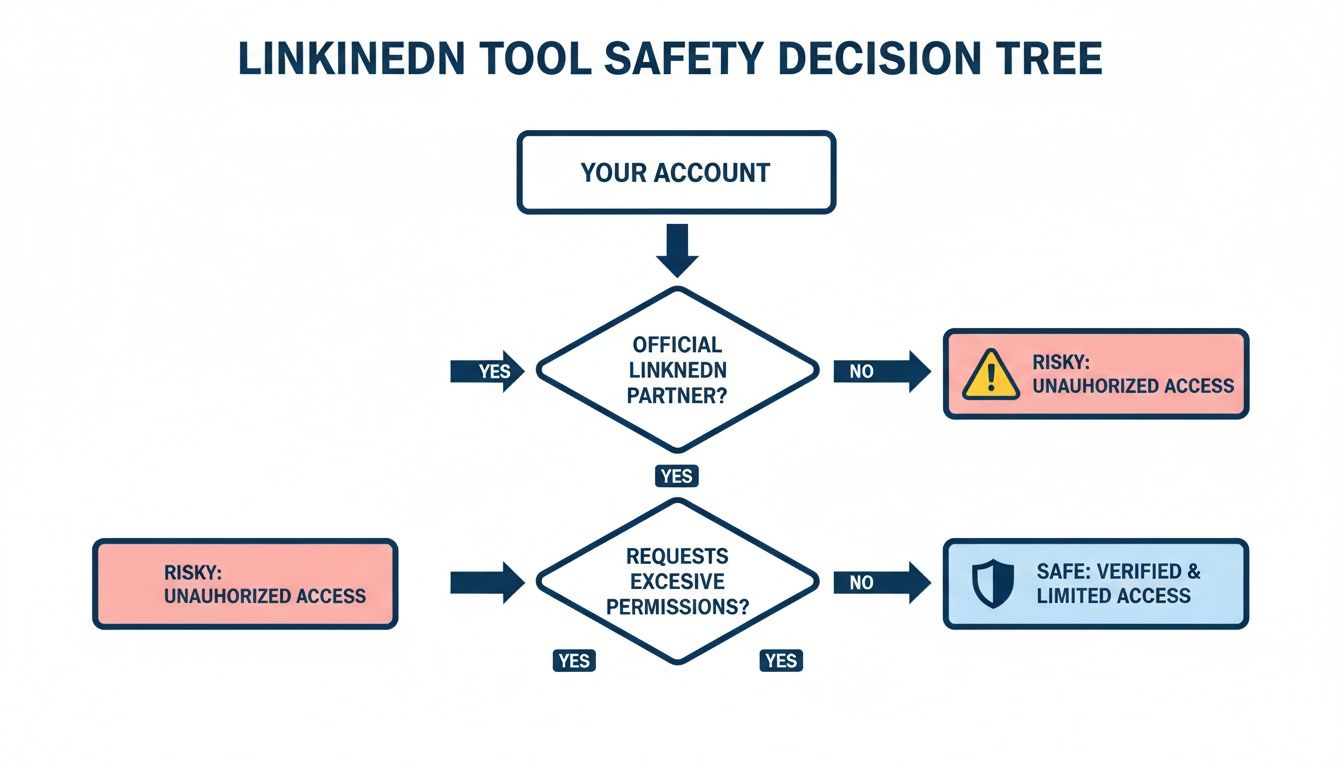
After LinkedIn's April 2025 crackdown on third-party automation tools, account safety moved from "nice to have" to "non-negotiable." Tools that relied on cookie-based authentication, browser extension overlays, or engagement automation saw users hit with restrictions and suspensions.
When evaluating any Supergrow alternative, check how the tool connects to your LinkedIn account. The gold standard is OAuth 2.0 -- LinkedIn's official, approved method for third-party access. You authenticate directly through LinkedIn, never share your password with the tool, and can revoke access at any time.
Postiv AI, Buffer, MagicPost, and Typefully all use compliant API-based connections. This is the foundation you should build on before comparing any other features. For a broader look at safe tools, see our guide to the best LinkedIn automation tools.
How to Choose Your Supergrow Alternative
The decision comes down to three questions:
- What's your biggest bottleneck? If it's AI quality, prioritize brand-trained AI (Postiv AI). If it's multi-platform scheduling, consider Buffer or Typefully. If it's research, Kleo is the specialist (paid, $99/mo, no free tier).
- Do you need visual content? If carousels and visual posts are part of your strategy, you need a tool with an integrated designer. Postiv AI is the clear choice here; most others (including MagicPost) require a separate design tool.
- Are you working with a team? Solo creators have more flexibility. Teams and agencies need approval workflows, role-based permissions, and brand isolation -- features that only a few platforms offer at the level required.
Our Top Recommendations
- Best All-in-One Content & Design: Postiv AI -- Brand-trained AI, integrated carousel designer, team workflows, and safe OAuth authentication in a single platform. The strongest overall upgrade from Supergrow.
- Best Free Starting Point: Buffer -- Buffer's free plan (3 channels) covers basic scheduling at zero cost. Upgrade to Postiv AI when you're ready for AI writing and carousel design.
- Best for Multi-Platform Creators: Typefully -- If LinkedIn is just one of several text-based platforms you post on, Typefully's cross-platform drafting and scheduling keeps everything in one place.
Your LinkedIn tool should feel like a creative accelerator, not a bottleneck. If you're spending more time working around your tool's limitations than creating content, it's time to switch.
Frequently Asked Questions About Supergrow Alternatives
Is there a free Supergrow alternative?
Buffer offers a free plan covering up to three social channels with basic scheduling. Kleo previously had a free Chrome extension but relaunched in 2026 as a paid web platform at $99/month. Free tools generally lack AI writing, carousel design, and team collaboration. For a full content workflow, Postiv AI offers a free trial that includes brand-trained AI and carousel design so you can evaluate before committing.
Is Supergrow safe to use with LinkedIn?
Supergrow connects via OAuth, which is the approved method for third-party LinkedIn access. However, any tool that automates engagement actions carries some risk after LinkedIn's 2025 enforcement actions. The safest approach is to use tools that stick strictly to content creation, scheduling, and analytics through the official API. Postiv AI, Buffer, and MagicPost all follow this compliant approach.
What is the best Supergrow alternative for agencies?
Postiv AI is the strongest option for agencies. It supports multiple client workspaces, each with its own brand library so the AI never confuses voices across accounts. Team roles with approval workflows create a professional content process, and the built-in carousel designer eliminates the need for separate design subscriptions per client.
How does Supergrow compare to Taplio?
Both are AI-powered LinkedIn tools, but they serve different needs. Taplio offers a larger content database and CRM-style features but locks AI credits behind the $69/month Growth plan. Supergrow is more affordable -- $19/month for AI writing and scheduling on Starter, $39/month for carousels and full analytics on Pro. Supergrow also includes genuine voice-training (Content DNA) from the entry tier; Taplio does not. If integrated visual content is a priority, Postiv AI covers brand-trained AI writing, carousel design, and scheduling in one platform. For a full breakdown, see our Taplio alternatives guide.
Can Supergrow alternatives create LinkedIn carousels?
Some can. Postiv AI has the most integrated carousel workflow -- generate text with AI, convert to a designed carousel using brand templates, and schedule it without leaving the platform. Taplio includes a carousel builder from its $69/month Growth plan. Most other alternatives (AuthoredUp, Kleo, Buffer, MagicPost, Typefully, Hootsuite) require a separate design tool like Canva. For a deeper comparison, check our guide to the best LinkedIn carousel makers.
Is Supergrow worth the price in 2026?
Supergrow offers reasonable value for its tier. The Starter at $19/month includes genuine voice-trained AI writing (Content DNA) and scheduling, which is a meaningful step above purely prompt-based tools. The friction appears when you need carousels or full analytics -- those require the Pro plan at $39/month. Team features (approval workflows, employee advocacy) require the $139/month Teams plan. Alternatives like Postiv AI offer deeper brand-library AI and a more integrated carousel designer, while Buffer offers free scheduling for basic needs.
What is the best LinkedIn tool for personal branding?
For personal branding, you need a tool that captures your authentic voice. Postiv AI leads here with brand-trained AI that learns from your existing content -- PDFs, blog posts, video transcripts -- so drafts sound like you from the start. Supergrow offers voice training through its Content DNA feature, which is a genuine step above purely prompt-based tools, but its approach relies on interview-style sessions rather than a persistent content library. Taplio relies on generic prompts. AuthoredUp helps with formatting but has no AI generation.
Can I use multiple LinkedIn tools together?
Absolutely, and it's often a smart strategy. Many creators combine a research tool like Kleo with a creation and scheduling platform like Postiv AI. Kleo handles content discovery while Postiv AI handles AI writing, carousel design, and scheduling. You could also pair AuthoredUp for formatting with Buffer for scheduling, though managing multiple subscriptions adds cost and complexity compared to using a single all-in-one platform.
Does Supergrow offer a lifetime deal?
Supergrow does not currently offer a lifetime deal. Its pricing follows a monthly subscription model starting at around $19/month for the Starter plan. Some LinkedIn tools run limited-time lifetime deals through AppSumo or similar platforms, but availability changes frequently. If upfront cost is a concern, alternatives like Buffer (free plan) or Postiv AI (free trial) let you get started without a subscription commitment.
What do Reddit users say about Supergrow?
Reddit users generally praise Supergrow's affordable price point, clean interface, and the Content DNA voice-training feature. The most common complaints center on the carousel maker being locked behind the $39/month Pro plan, basic team features at lower tiers, and the need to upgrade sooner than expected. Some users note that the voice training works better after feeding it substantial content. For a more content-library-grounded AI experience, tools like Postiv AI let you train the AI on your PDFs, transcripts, and blog posts rather than relying on interview-style sessions.
Supergrow vs Taplio -- which is better?
Both target LinkedIn creators, but they take different approaches. Supergrow has voice-trained AI (Content DNA) from $19/month and carousels on its $39/month Pro plan. Taplio offers a larger viral post database and CRM-style lead tracking but locks AI features behind its $69/month Growth plan. Supergrow is meaningfully cheaper if your priority is voice-trained content; Taplio wins on content research depth. Neither offers the brand-depth AI or the integrated carousel designer that Postiv AI provides. If you want the full picture, our Taplio vs Supergrow comparison covers the details, and our Taplio alternatives guide puts both tools in a broader context.
How much does Supergrow cost in 2026?
Supergrow's pricing starts at $19/month for the Starter plan, which includes voice-trained AI writing (Content DNA) and scheduling. The Pro plan at $39/month adds the carousel designer, infographic generator, and full analytics. A Teams plan at $139/month covers four accounts with approval workflows and employee advocacy features. Annual billing lowers those to $16, $31, and $133 per month. There is no $49 or $99 individual tier. The main upgrade trigger is carousels, which are Pro-only.