

ResearchPrompt 1
Find the strongest educational posts in my inspiration library from the last 90 days. Group them by hook type and format, then explain the patterns without copying the wording.
Postiv LinkedIn MCP server
Turn the ideas in your Claude or ChatGPT conversations into LinkedIn content. Postiv's hosted MCP server connects through LinkedIn's official API, so there is no scraping and no shared password. Your voice, brand knowledge, visuals, scheduling, and analytics stay in one workflow.
Already use Postiv? Connect your AI app
Works with
LinkedIn MCP answers
As far as we can tell, LinkedIn has not published an official MCP server. LinkedIn does offer apps inside ChatGPT for looking up professionals and reading ad results, but they do not write, schedule or analyze your posts. The LinkedIn MCP servers available today are built by third parties. Postiv's hosted server is one of them: it is run by Postiv, not LinkedIn, and focuses on content research, drafting, scheduling, and analytics.
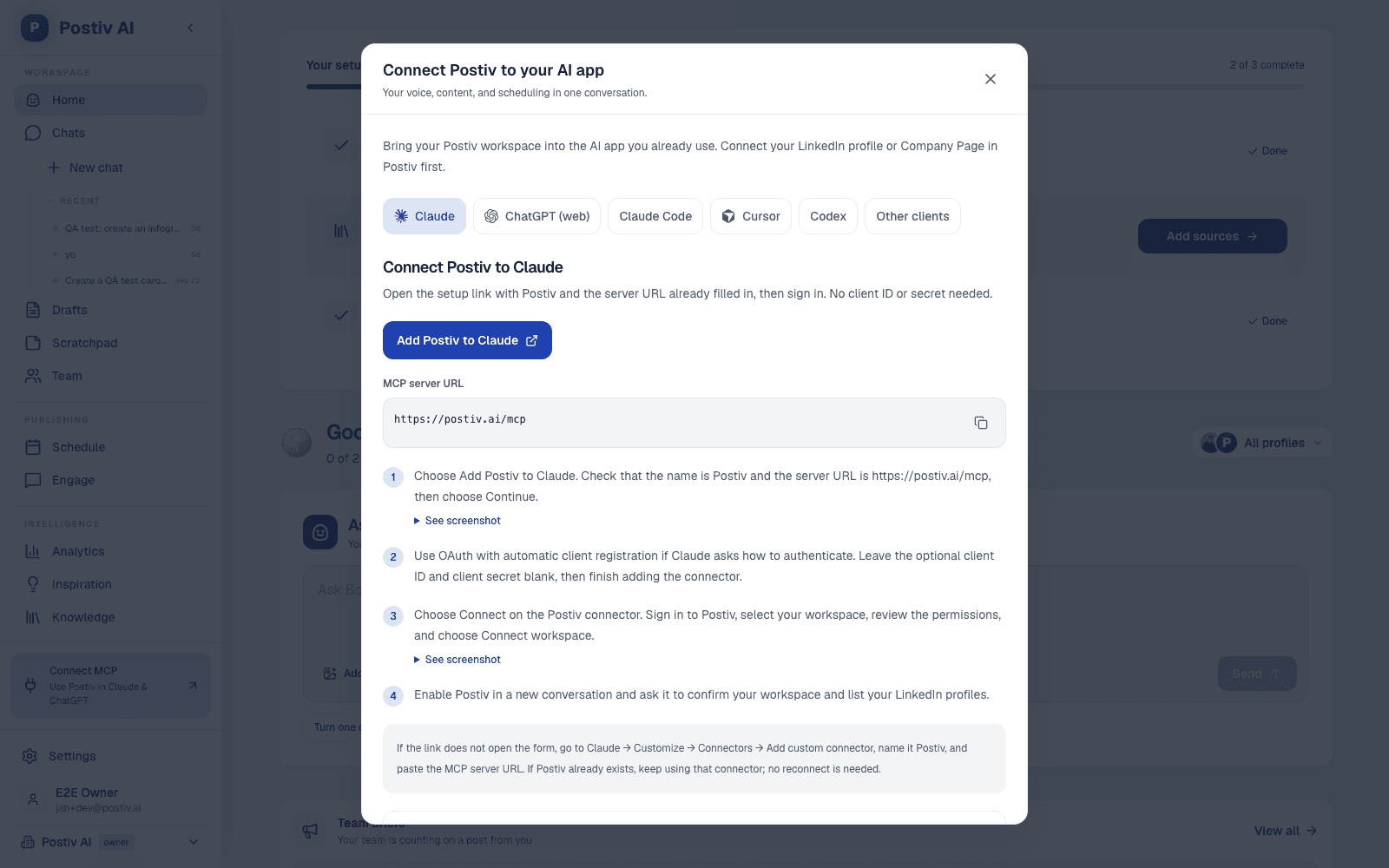
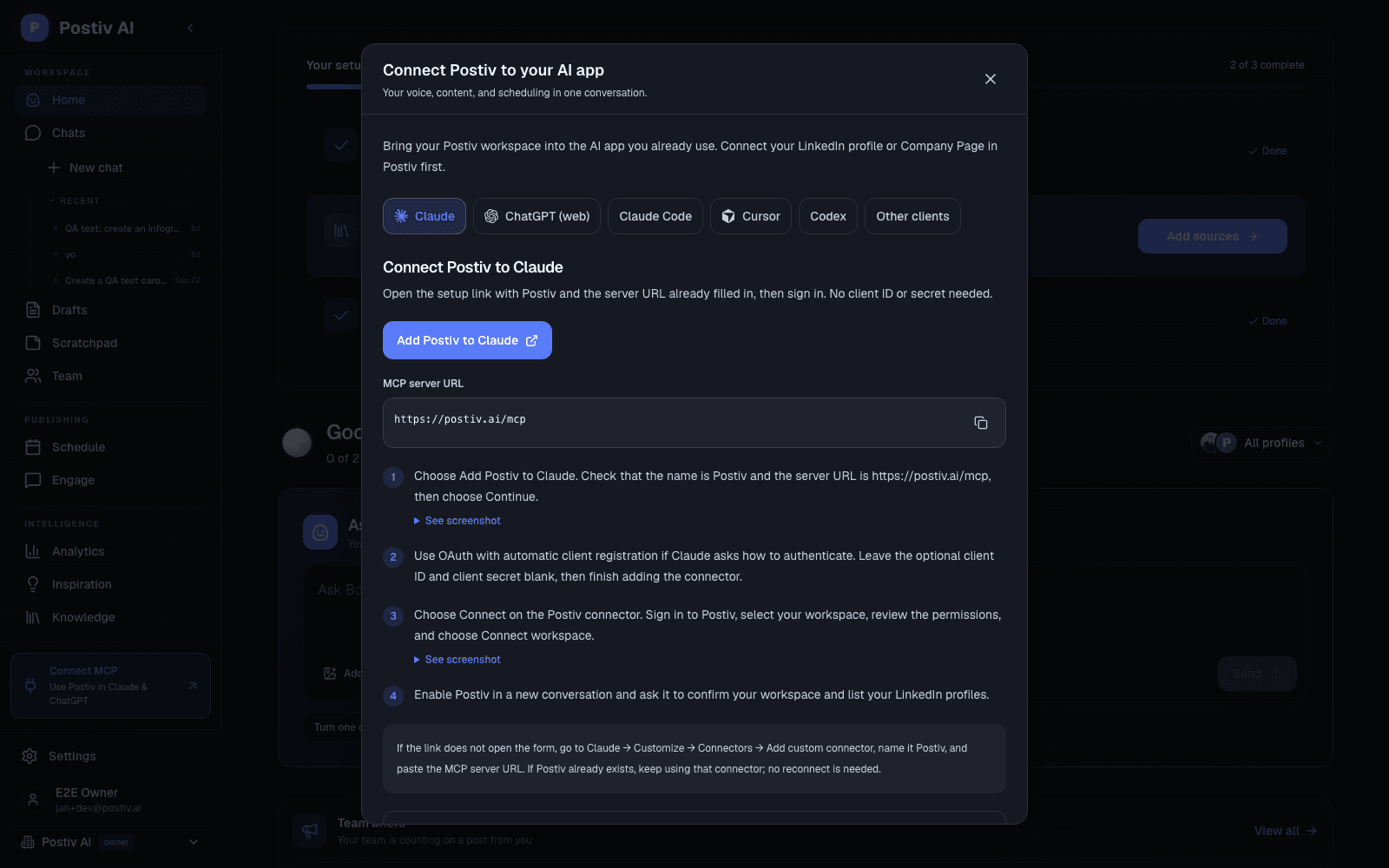
The Postiv LinkedIn MCP server URL is https://postiv.ai/mcp. Add it to your AI app as a remote MCP server, then sign in to Postiv and choose a workspace. Postiv hosts it for you, so there is nothing to install from GitHub, and Claude and ChatGPT do not need an API key.
In Claude, open Customize, then Connectors, and choose Add custom connector. Name it Postiv, paste https://postiv.ai/mcp as the server URL, and select Connect. Sign in to Postiv, choose your workspace, and approve access. Then enable Postiv in a new conversation and ask Claude to list your LinkedIn profiles.
In Claude Code, run claude mcp add --transport http postiv https://postiv.ai/mcp with your Postiv API key in an Authorization Bearer header. In ChatGPT, open Plugins, choose Add, then Create MCP App, paste the same server URL, and keep OAuth selected. Availability depends on your ChatGPT plan.
Yes. Postiv's hosted LinkedIn MCP works as a custom connector in Claude on the web and desktop, and in Claude Code. Claude can then research ideas, write and edit posts, create carousels, schedule content and read your LinkedIn analytics inside your Postiv workspace. Open-source alternatives exist, but most of them log in to LinkedIn with your session cookie.
Not on its own. LinkedIn pages sit behind a login, and LinkedIn's User Agreement prohibits scraping and automated access. Scraper MCPs work around that with your session cookie or a headless browser, which can get your account restricted. Postiv connects your profile through LinkedIn's official API instead and never asks for your password or cookie.
One server URL for every client: https://postiv.ai/mcp. Claude and ChatGPT sign in with your Postiv account. Other clients use an organization API key from Settings.
| AI app | Where to add it | Sign-in |
|---|---|---|
| Claude (web and desktop) | Customize, then Connectors, then Add custom connector. Paste https://postiv.ai/mcp. | Sign in to Postiv (OAuth) |
| ChatGPT | Plugins, then Add, then Create MCP App. Paste the same server URL. | Sign in to Postiv (OAuth), depends on your plan |
| Claude Code | claude mcp add --transport http postiv https://postiv.ai/mcp with an Authorization header | Postiv API key |
| Cursor | Settings, then Tools & MCP, then New MCP Server, with the server URL and an Authorization header | Postiv API key |
| Codex and other MCP clients | Add https://postiv.ai/mcp as a remote HTTP server | Postiv API key |
Need the full walkthrough? Open the hosted MCP setup guide.
See the workflow
See Claude research ideas, create a draft, and explore LinkedIn performance with your Postiv workspace connected.
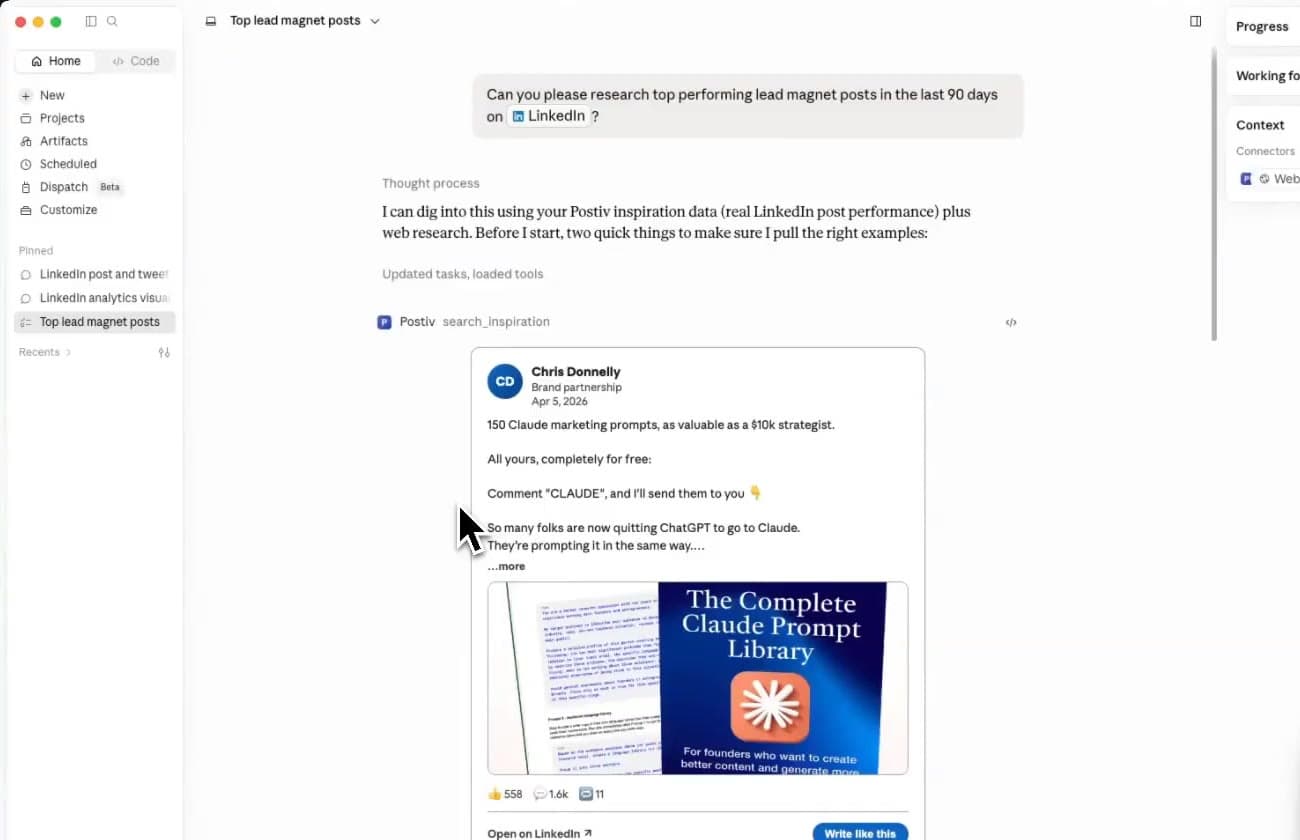
Research
Ask Claude to search Postiv's inspiration library, group winning hooks and formats, and turn the patterns into original ideas.
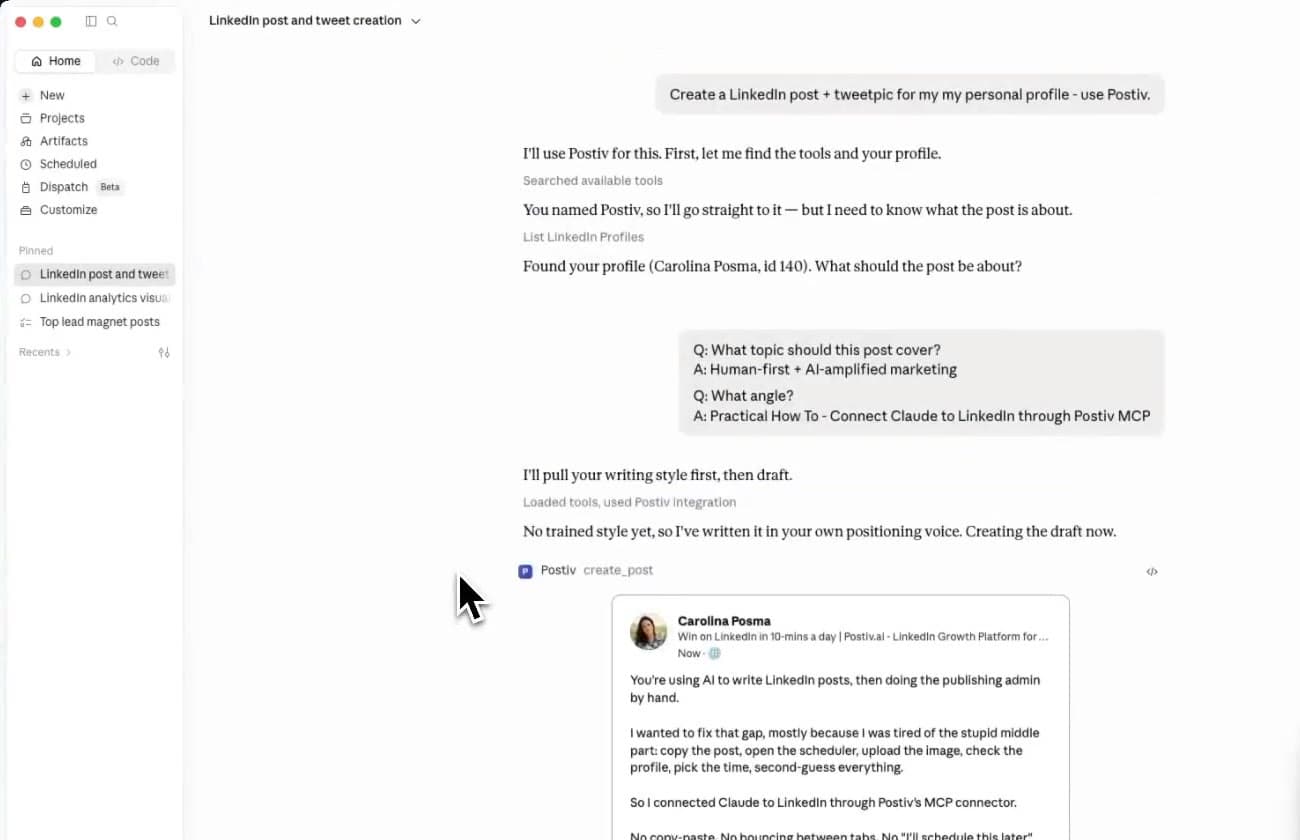
Create
Create a post in the correct Postiv workspace, refine it in Claude, then open the saved draft for visual review.
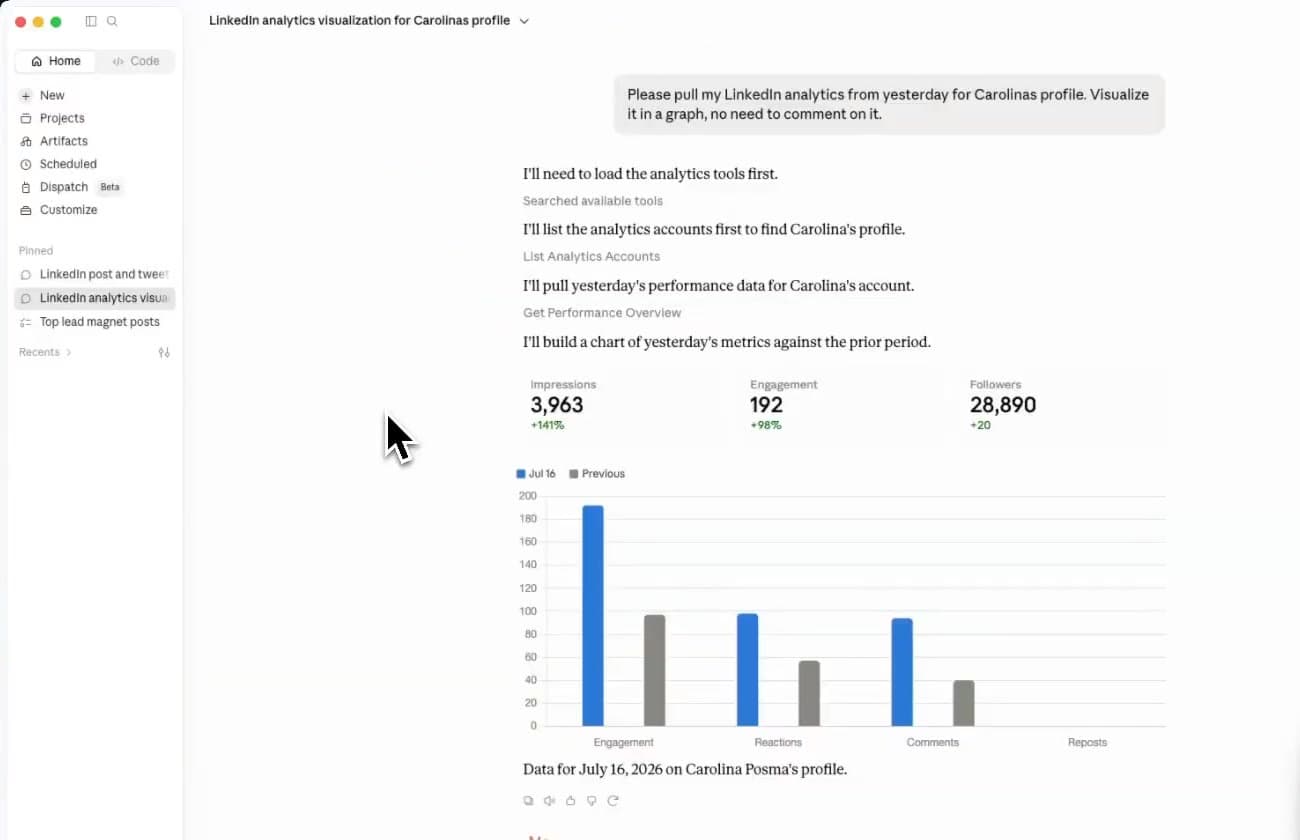
Analyze
Pull cached LinkedIn metrics into Claude, compare periods, and identify the content experiments worth testing next.
Official API, no scraping
LinkedIn has not published its own MCP server, so every LinkedIn MCP is built by a third party. They differ most in how they reach your account, and that decides what they can do and how much risk your profile carries.
| Type | How it reaches LinkedIn | What it can do | Account risk |
|---|---|---|---|
| Browser or cookie scraper | Logs in as you with a session cookie or a headless browser | Reads profiles, jobs and the feed. Some send DMs and connection requests. | High. Automated access breaks LinkedIn's User Agreement and can get the account restricted. |
| Data extraction service | Serves profile and company data collected by a third party | Read-only lookups of people and companies | No posting. Raises personal-data questions for your team. |
| Generic automation connector | Uses a workflow platform's LinkedIn integration | A few actions, such as sharing a post | Low, but no drafting, visuals, approvals or analytics. |
| Postiv LinkedIn MCP | LinkedIn's official API through OAuth, inside your Postiv workspace | Research, write, design, schedule, approve and analyze content | Low. No password, no cookie, no browser automation. |
Postiv also reads your performance through LinkedIn's official analytics access. See what the LinkedIn analytics dashboard tracks, or follow the step-by-step guide to connecting Claude to LinkedIn. Weighing a specific server? See LinkedIn MCP servers compared.
What your assistant can do
Your assistant sees a tool list grouped by job. Read tools work with either access level; write tools need Read & write access, and approval rules on the target profile still apply.
| Area | Example tools | Access |
|---|---|---|
| Workspace | get_workspace, list_social_accounts | Read |
| Research | search_inspiration, get_top_posts, search_knowledge, list_pillars | Read |
| Write | create_post, update_post, get_writing_style | Write |
| Visuals | create_carousel, edit_carousel_slide, generate_post_image, create_infographic | Write |
| Plan and schedule | list_content_plans, schedule_post, reschedule_post | Write |
| Approvals | list_pending_approvals, approve_scheduled_post, request_approval_changes | Write |
| Analytics | get_analytics_summary, get_performance_overview, get_post_analytics | Read |
| Comments | get_post_comments, reply_to_comment, comment_on_post | Write |
Not included by design: direct messages, connection requests, job search, and profile lookups. The full list with scopes is in the MCP tool reference. For the rest of the workspace, from the ideation agent to scheduling and analytics, see all Postiv features.
Choose the right connector
Many tools use the phrase LinkedIn MCP for different jobs. Postiv is designed for content teams that want controlled research, creation, visuals, scheduling, and analytics. It does not automate DMs or connection requests.
| Capability | Postiv MCP | Scraper MCP | Analytics connector |
|---|---|---|---|
| Research content inspiration | Yes | Varies | Usually no |
| Create grounded LinkedIn posts | Yes | Varies | Usually no |
| Generate images and carousels | Yes | Usually no | No |
| Schedule and reschedule posts | Yes | Varies | Usually no |
| Respect human approval rules | Yes | Varies | No |
| Analyze content performance | Yes | Varies | Yes |
| Automate DMs or connection requests | No | Often | No |
Make your next idea a post
Start with a Postiv account, connect your LinkedIn profile, and bring your favorite assistant along. Draft in your voice, create branded visuals, and schedule when you’re ready.
Already have an account? Open the connection guide
Copy and try
Start with a read-only research request. Move to creation and scheduling only after you have confirmed the correct Postiv workspace and LinkedIn profile.
Find the strongest educational posts in my inspiration library from the last 90 days. Group them by hook type and format, then explain the patterns without copying the wording.
Show my top five LinkedIn posts from the last 90 days and explain the topics, structures, and calls to action they have in common.
Draft a LinkedIn post about [topic] using my workspace knowledge and normal voice. Ask me two clarifying questions before creating the draft.
Take my best-performing post from the last 90 days and propose three new angles. Keep the core insight, but do not reuse the original wording.
Turn the approved post into a five-slide LinkedIn carousel outline. Show me the slide copy first and wait for approval before rendering it.
List my approved, unscheduled drafts and recommend a balanced publishing order for next week. Do not schedule anything until I confirm the plan.
One connected content workflow
Give your assistant your trained writing voice and real business knowledge, so each draft starts with your context.
Turn your ideas into branded images, carousels, and infographics without moving between design tools.
Save drafts, schedule your approved posts, and use your LinkedIn results to decide what to write next.
Security and control
The MCP makes capabilities available to your agent. Your Postiv workspace, key scopes, target profile, and approval rules determine what happens next.
Choose the workspace and permissions during sign-in. New connections default to Read & write; Read only is also available.
Ask Claude to show the final copy, target profile, date, and time before it queues a post.
Posts still wait for approval when the selected LinkedIn profile has approvers configured.
Manage connected apps in Postiv to revoke an OAuth connection. Existing API-key connections can still be revoked by regenerating their key.
LinkedIn MCP FAQ
A LinkedIn MCP server is a connector that gives an AI assistant a defined set of LinkedIn-related capabilities. Postiv's hosted server focuses on content workflows such as research, drafting, visuals, scheduling, approvals, and analytics.
Yes. Claude can connect to Postiv's hosted LinkedIn MCP server. Postiv then gives Claude controlled access to the LinkedIn content workflows and connected profiles available in your Postiv workspace.
Claude can research inspiration, use workspace knowledge, create and edit posts, generate images and carousels, schedule approved content, and analyze cached LinkedIn performance data.
Postiv's schedule action queues a post instead of publishing it instantly. If the target profile has approvers configured, its existing approval workflow still applies. You can also instruct Claude to show the final post before scheduling.
No. Postiv's LinkedIn MCP is built for content research, creation, scheduling, and performance workflows. It is not designed for profile scraping, connection requests, or automated direct messages.
Yes. Use your Postiv workspace from Claude Code to research ideas, create content, and manage your publishing workflow. Follow the connection guide when you are ready to set it up.
Yes, provided the Company Page is connected to your Postiv workspace and your account has permission to manage it. Confirm the target profile before creating or scheduling content.
No. Sign in with your Postiv account, choose a workspace, and approve access. API keys remain available for the REST API, Claude Code, and other clients. Existing keys keep working.
Yes. Bring your Postiv content workflow into ChatGPT, Cursor, and other compatible AI apps. Availability depends on your AI app’s plan and workspace settings. Our connection guide walks you through setup.
Yes. Postiv exposes cached analytics for connected LinkedIn accounts, including performance summaries, top posts, account trends, and individual post analytics. Ask your assistant to compare a specific period and identify patterns in your best-performing posts. These are the metrics available in Postiv, not a live scrape of arbitrary LinkedIn profiles.
Postiv’s hosted MCP server is provided by Postiv, not by LinkedIn. It connects an MCP-compatible assistant to the content workflows and LinkedIn accounts in your Postiv workspace. Your approved workspace permissions determine the available access, and the target profile’s configured approval rules still apply to scheduling.
No. Postiv hosts and maintains the connection. Create your Postiv workspace, connect LinkedIn, and follow the guide for your preferred AI app.
Yes. Ask Claude to draft the post, review it, then ask it to schedule the post for a date and time on the LinkedIn profile or Company Page you choose. Postiv queues it and publishes it through LinkedIn's official API. If the profile has approvers, the post waits for their approval first.
No. Postiv's LinkedIn MCP is built for content: research, writing, visuals, scheduling, approvals, comments, and analytics. It does not search jobs, look up people, send direct messages, or send connection requests.
The MCP server is part of a Postiv subscription, with nothing separate to install or host. You can try it, together with the rest of Postiv, during the 7-day free trial.
Claude stores a connector's tool list. After Postiv adds or changes tools, open the Postiv connector's menu in Claude and choose Refresh tools list. Starting a new conversation alone does not refresh it.
As far as we can tell, LinkedIn has not published an official MCP server. LinkedIn does offer apps inside ChatGPT for looking up professionals and reading ad results, but they do not write, schedule or analyze your posts. The LinkedIn MCP servers available today are built by third parties. Postiv's hosted server is one of them: it is run by Postiv, not LinkedIn, and focuses on content research, drafting, scheduling, and analytics.
The Postiv LinkedIn MCP server URL is https://postiv.ai/mcp. Add it to your AI app as a remote MCP server, then sign in to Postiv and choose a workspace. Postiv hosts it for you, so there is nothing to install from GitHub, and Claude and ChatGPT do not need an API key.
In Claude, open Customize, then Connectors, and choose Add custom connector. Name it Postiv, paste https://postiv.ai/mcp as the server URL, and select Connect. Sign in to Postiv, choose your workspace, and approve access. Then enable Postiv in a new conversation and ask Claude to list your LinkedIn profiles.
In Claude Code, run claude mcp add --transport http postiv https://postiv.ai/mcp with your Postiv API key in an Authorization Bearer header. In ChatGPT, open Plugins, choose Add, then Create MCP App, paste the same server URL, and keep OAuth selected. Availability depends on your ChatGPT plan.
Yes. Postiv's hosted LinkedIn MCP works as a custom connector in Claude on the web and desktop, and in Claude Code. Claude can then research ideas, write and edit posts, create carousels, schedule content and read your LinkedIn analytics inside your Postiv workspace. Open-source alternatives exist, but most of them log in to LinkedIn with your session cookie.
Not on its own. LinkedIn pages sit behind a login, and LinkedIn's User Agreement prohibits scraping and automated access. Scraper MCPs work around that with your session cookie or a headless browser, which can get your account restricted. Postiv connects your profile through LinkedIn's official API instead and never asks for your password or cookie.
Create your Postiv workspace and turn the conversations you’re already having into content worth sharing.
Get started
Start your free 7-day trial. Connect LinkedIn, set up your brand and plan your first week in one sitting.
Start free trial
