While Taplio is a household name in the world of LinkedIn tools, a growing number of professionals are hitting its limits and looking for Taplio alternatives. After LinkedIn's 2025 crackdown on third-party automation tools, account safety has become just as important as features when choosing your LinkedIn stack.
I spent several weeks testing 10 alternatives head-to-head, comparing everything from AI content quality to pricing transparency. One thing that surprised me: Taplio's advertised $39/month Starter plan includes zero AI credits. You actually need the $69/month Growth plan to use AI features, which changes the value equation significantly. Tools like Postiv AI step in with better AI personalization, built-in design tools for carousels, and much stronger team features, often at a more transparent price point.
Quick Pick: The Best Taplio Alternatives at a Glance
Short on time? Here's the fast answer based on what you need most. Full breakdowns of each tool follow below.
| If you want... | Best pick | Starting price | Why |
|---|---|---|---|
| Best overall (AI + carousels + teams) | Postiv AI | Free trial | Brand-trained AI, built-in carousel designer, and agency workspaces in one tool |
| Best for agencies / multiple clients | Postiv AI | Free trial | Separate client workspaces, brand isolation, roles and approvals |
| Best free / budget option | Supergrow | ~$20/mo (AI included) | Voice-trained AI and scheduling without Taplio's $69/mo AI gate |
| Best for post formatting | AuthoredUp | ~$20/mo | Rich text formatting, hook library, multi-device preview |
| Best for multi-platform scheduling | Buffer | Free (3 channels) | Schedule across 8+ networks, not LinkedIn-only |
| Safest (official LinkedIn API) | MagicPost | ~$21/mo | API-based posting with no Chrome extension or cookie risk |
Why Look for Taplio Alternatives

Many founders, marketers, and agency owners start looking for a new tool when their LinkedIn game gets serious. Taplio is often a great starting point for content ideas, but its workflow can create real friction once you’re focused on building a standout personal brand or juggling multiple client accounts.
The hunt for a replacement usually kicks off when a few common needs surface. These are the tell-tale signs that you’ve graduated from a beginner tool to needing a true content engine.
LinkedIn’s 2025 Crackdown Changed Everything
Before we get into the specific reasons people switch, it’s worth addressing the elephant in the room. In April 2025, LinkedIn blocked several major third-party automation tools and restricted accounts connected to them. Tools that rely on cookie-based authentication, Chrome extension overlays, or engagement automation were the primary targets.
This crackdown sent shockwaves through the LinkedIn creator community. Users who had been comfortably using tools like Taplio suddenly found themselves with restricted accounts or warnings. While Taplio itself has acknowledged this risk on its own blog, noting that automation tools can result in accounts being "flagged, restricted, or permanently banned", the event forced many professionals to re-evaluate which tools they trust with their most valuable professional asset.
The bottom line: the tool you choose matters more in 2026 than it ever has. Account safety is no longer an afterthought, it’s a primary selection criterion.
Common Reasons to Switch
When people decide to move on from Taplio, their reasons usually fall into four main buckets. Each one is a critical piece of a sophisticated LinkedIn strategy.
- Account Safety Concerns: After LinkedIn’s crackdown, tools using cookie-based authentication and engagement automation carry real risk. Many professionals are switching to platforms that use LinkedIn’s official API and OAuth authentication exclusively.
- Generic AI Output: A frequent complaint is that Taplio’s AI posts sound, well, like they were written by AI. This forces users to spend a lot of time rewriting and injecting personality, which kind of defeats the purpose of having an AI assistant in the first place.
- Hidden Pricing Reality: Taplio’s $39/month Starter plan includes zero AI credits. Most users who want AI-powered content creation are realistically starting at $69/month on the Growth plan, which still caps you at 250 AI credits per month. Unlimited AI requires the $199/month Pro plan.
- Workflow Inefficiencies: If you want to create a carousel, you’re stuck bouncing between Taplio and another design tool like Canva. This fragmented process is slow, clunky, and makes it a real headache to keep everything on-brand.
- Limited Team Collaboration: For agencies or in-house marketing teams, just scheduling posts isn’t nearly enough. They need proper approval workflows, different permission levels, and a central dashboard to manage multiple brands. These are features where simpler tools just don’t cut it.
The heart of the problem is this: a modern LinkedIn strategy is about more than just text. It’s an integrated system of text, visuals, scheduling, and approvals. When your main tool makes you juggle multiple platforms to get one thing done, it’s no longer a help, it’s a bottleneck.
This is exactly why so many people are exploring other options. They’re looking for a single platform that offers a smoother, more powerful, and safer way to build authority and drive business on LinkedIn.
Key Limitations at a Glance
This table sums up the specific pain points that send users looking for a more robust solution. Knowing these limitations makes it easier to spot the right alternative.
| Limitation Area | Common Taplio Challenge | Desired Alternative Feature |
|---|---|---|
| Content Quality | AI drafts feel generic and need a ton of editing. | AI that’s been trained on your brand to learn your unique voice. |
| Pricing Transparency | $39/mo Starter has 0 AI credits; real AI cost starts at $69/mo (Growth). | Honest pricing with AI features included from the start. |
| Visual Content | No built-in tool for creating carousels or visuals. | An integrated designer with branded templates and one-click export. |
| Team Management | Collaboration is basic, with no real approval process. | Advanced team seats, specific user roles, and client approval portals. |
| Account Safety | Cookie-based auth and engagement automation risk LinkedIn flags. | Modern OAuth authentication via LinkedIn’s official API. |
What Taplio Actually Costs in 2026
Before we compare alternatives, it helps to understand exactly what you're paying for with Taplio. The pricing isn't as straightforward as it first appears.
| Plan | Monthly Price | Annual Price | AI Credits | Key Limitations |
|---|---|---|---|---|
| Starter | $39/mo | $32/mo | 0 credits | No AI writing, no carousel creator |
| Growth | $69/mo | $49/mo | 250/month | Credits run out fast for active posters |
| Pro | $199/mo | $149/mo | Unlimited | Includes lead database and auto-DMs |
The critical detail: Taplio's most-advertised $39/month Starter plan does not include AI credits at all. That means no AI post generation, no AI hook creation, and no carousel building. Most users who want the features Taplio is known for are realistically paying $69/month or more on the Growth plan.
This pricing context is important because several alternatives on this list offer AI features at lower price points.
Is Taplio Worth It in 2026? An Honest Verdict
After testing Taplio against every alternative in this guide, here is the short answer: Taplio is still a capable tool, but it is no longer the obvious default in 2026. Three things have shifted the market against it.
First, the pricing math has gotten harder to defend. Paying $69/month for 250 AI credits on the Growth plan (which many active creators burn through in under two weeks) feels steep when Supergrow includes unlimited-feeling AI writing at $19/month, Kleo bundles everything at $99/month with no credit ceiling, and Postiv AI includes brand-trained AI plus carousel design in a single plan.
Second, the Chrome extension and cookie-based authentication that power some of Taplio's best features are exactly the patterns LinkedIn targeted in its 2025 enforcement wave. Even if your account is fine today, you are betting that LinkedIn does not tighten the screws further. Most serious creators are no longer willing to take that bet with their professional network.
Third, the workflow is incomplete. A 2026 LinkedIn strategy needs text, visuals, and scheduling in one place. Taplio still requires you to bounce to Canva for carousels on the lower tiers, and its team/agency features are thin compared to purpose-built alternatives.
Verdict: Taplio is worth the price only if you specifically need its viral post library or the Pro plan's lead database. For every other use case, solo creators, agencies, founders building authority, the better Taplio alternative costs less, carries less risk, or gives you more features per dollar. Often all three.
What Taplio Does Well (Credit Where It's Due)
Being a fair reviewer means acknowledging what Taplio genuinely gets right. It became a category leader for real reasons, and some of those reasons still hold up in 2026.
- Viral post library depth. Taplio's database of 5M+ high-performing LinkedIn posts is genuinely one of the largest in the category. If your workflow revolves around studying what works and swiping angles, the library remains a meaningful asset.
- Lead generation on the Pro plan. The built-in LinkedIn lead database, audience filters, and CRM exports on the $199/month Pro tier are useful for B2B teams that want content plus outreach in one tool. Most alternatives on this list focus purely on content.
- Creator analytics. Taplio's analytics around engagement patterns, best-performing hooks, and comparison against other creators are more polished than the basic dashboards some cheaper alternatives ship with.
- Established ecosystem. Taplio has been around long enough that there is a healthy community of tutorials, YouTube walkthroughs, and integrations. Newer tools, including Postiv AI, are still building that surface area.
The point is not that Taplio is bad. The point is that the category has moved, and several newer tools solve specific problems (voice-trained AI, carousel design, agency workflows, account safety) better and cheaper than Taplio can in its current form.
How We Evaluated the Top Taplio Alternatives
Choosing the right tool to build your LinkedIn presence is a big decision. It’s not just about scheduling posts; it’s about finding a partner that truly gets your voice, makes your workflow smoother, and, most importantly, keeps your account safe. To help you find the best Taplio alternatives, we went way beyond the typical feature lists and dug deep, evaluating each platform against five core pillars of what it takes to succeed on LinkedIn today.
Our mission was to figure out which tools actually deliver on their promises. We put ourselves in the shoes of solopreneurs, marketing managers, and agencies to see how these platforms hold up under real-world pressure. This hands-on approach means our recommendations are based on practical use, not just marketing fluff.
The Five Pillars of Our Evaluation Framework
We broke down our analysis into the essential ingredients that separate a good tool from a great one. Each pillar represents a make-or-break function for anyone serious about growing their influence and business on LinkedIn.
- AI Content Quality & Personalization: How well does the AI actually sound like a human, specifically your brand's human? Can you train it on your own content, or are you stuck with generic, obviously-AI text?
- Content Format Versatility: Is the tool a one-trick pony for text posts, or can it handle more? We looked for platforms that let you create carousels, long-form articles, and other visual formats without having to jump over to another app.
- Scheduling & Analytics: How smart is the scheduler? Does it give you data-backed timing suggestions, a clear view of multiple accounts, and analytics that actually tell you what to do next?
- Team Collaboration & Workflow: Can you work with a team? We tested for must-haves like approval workflows, different user roles, shared brand assets, and easy ways to manage client accounts.
- Account Safety & Compliance: How does the tool connect to your LinkedIn profile? This one's a big deal. We gave top marks to platforms using modern OAuth authentication and playing by LinkedIn’s rules. Account security is non-negotiable.
Using this framework, we could make direct, apples-to-apples comparisons. It helped us spot the subtle but critical differences that determine whether a tool becomes a long-term asset or just a short-term headache.
AI Content Quality: The Battle Against Generic Posts
Let's be honest: the biggest complaint about most AI writing tools is that they produce bland, robotic content. A great alternative has to solve this by offering real personalization. We specifically looked for platforms that let you train the AI on your unique style, whether from blog posts, videos, or even internal PDFs.
This is where Postiv AI really stood out. Its brand-trained AI goes beyond simple prompts. You build a library of your content, and it learns your specific tone, your go-to phrases, and your core topics. Suddenly, the AI isn't just a content generator; it's a true writing assistant that sounds like you from the very first draft.
A powerful LinkedIn presence is built on authenticity. If your AI tool can't replicate your unique voice, it's just creating noise. The best platforms act as a scalpel for refining your ideas, not a hammer that makes everything sound the same.
In contrast, many other tools still lean on basic prompts that force you into heavy editing just to inject some personality. While that's better than staring at a blank page, it doesn't solve the efficiency problem that led you to an AI tool in the first place. If you're looking for more strategies on this, we've got a great guide on how to scale your content creation.
Content Format Versatility: Beyond the Text Post
LinkedIn is a visual playground now. Carousels, in particular, have become the gold standard for sharing deep insights and grabbing attention. A major frustration with Taplio is having to create your post idea there, then jump over to a design tool like Canva to build the actual visuals. It completely breaks the creative flow.
We gave high marks to platforms with built-in design tools. An all-in-one solution where you can write the post and design a slick, matching carousel in the same window is a total game-changer for speed and brand consistency.
Feature Comparison: Taplio vs Top Alternatives
To give you a quick snapshot, here's how Taplio and its top competitors stack up on the features that matter most. This table is designed to help you quickly spot the key differences for your workflow.
| Feature | Taplio | Postiv AI | AuthoredUp | Kleo | Supergrow | Buffer | MagicPost | Typefully |
|---|---|---|---|---|---|---|---|---|
| AI Content Generation | Yes (from $69/mo Growth) | Yes (brand-trained) | No | Yes (voice-trained) | Yes (prompt-based) | Yes (basic) | Yes (template) | Yes (AI assist) |
| Built-in Carousel Designer | Yes (from $69/mo Growth) | Yes (integrated) | No | No | Yes (basic) | No | No (no native maker) | No |
| Content Discovery | Yes | Yes (from your sources) | Yes (hook library) | Yes (swipe file) | Yes (trending topics) | No | No | No |
| Post Scheduling | Yes | Yes | No | Yes | Yes | Yes | Yes | Yes |
| Team Workflows & Approvals | Basic | Yes (roles + approvals) | Basic | No | Basic | Yes | Basic | Yes |
| Analytics | Basic | Yes | Preview only | Yes (dashboard) | Yes | Yes | Basic | Basic |
| Multi-Platform | LinkedIn only | LinkedIn + X | 8+ platforms | 5 platforms | ||||
| Authentication | Cookie + OAuth | OAuth 2.0 | Cookie-free | Extension (swipe) | OAuth | OAuth 2.0 | Official API | Official API |
| Starting Price | $39/mo (0 AI) | Free trial | ~$20/mo | $99/mo | ~$20/mo | Free (3 ch.) | ~$21/mo | Free plan |
The move toward integrated, all-in-one solutions is the major dividing line. The ability to handle content creation, visual design, and scheduling in one place is becoming less of a luxury and more of a necessity for serious LinkedIn creators.
The 10 Best Taplio Alternatives in 2026
Now let's break down each alternative individually so you can see exactly what each tool does well, where it falls short, and who it's the best fit for.
1. Postiv AI, Best for Brand-Trained AI Content & Carousels
Postiv AI is purpose-built for professionals who want their LinkedIn content to sound authentically like them, not like a generic AI. Unlike Taplio's prompt-based approach, Postiv AI lets you train the AI on your own materials, PDFs, blog posts, video transcripts, so first drafts already match your voice and expertise.
The integrated carousel designer is a major advantage. You can go from an AI-generated idea to a fully designed, on-brand carousel without leaving the platform. For agencies, separate brand libraries per client mean you never mix up voices across accounts.
Best for: Founders, agencies, and marketers who need brand-consistent content at scale.
Key strengths:
- Brand-trained AI that learns your unique voice from your own content
- Integrated carousel designer with brand templates
- Team collaboration with approval workflows and roles
- OAuth 2.0 authentication for account safety
- Smart scheduling with analytics
Limitations: Newer platform, so the user community is still growing.
2. AuthoredUp, Best for Post Formatting & Hooks
AuthoredUp is a Chrome extension and web app focused on making your LinkedIn posts look polished. It provides rich text formatting options that LinkedIn's native editor lacks, plus a library of 300+ content hooks and templates to help you start writing faster.
Where AuthoredUp shines is in its accurate cross-device preview, you can see exactly how your post will look on mobile and desktop before publishing. It uses a cookie-free authentication model, so there's minimal account risk.
Best for: Creators who already know what to write but want better formatting and presentation tools.
Key strengths:
- Rich text editor with custom spacing and formatting
- 300+ hook and template library for inspiration
- Cross-device post preview
- Zero account risk with cookie-free approach
Limitations: No AI content generation, no scheduling, and no carousel design. You'll need to pair it with another tool for a complete workflow. For a full breakdown of what's available, see our guide to the best AuthoredUp alternatives.
Pricing: Starts around $20/month per profile.
3. Kleo, Best for Voice-Trained AI with Knowledge Base
Kleo has evolved significantly from its origins as a free Chrome extension. In 2026 (Kleo 3.0), it is now a full AI content platform priced at $99/month that includes personalized AI writing, a knowledge base, scheduling, an image creator, and analytics. The old free Chrome extension was shut down; a swipe-file extension is still included as part of the paid subscription, but there is no standalone free product.
What makes Kleo stand out is its memory layer. The AI learns from your posting history, your knowledge base, and your writing style over time. Every time you post, the output gets a bit sharper. You can also feed it call transcripts, blog posts, and notes to build a comprehensive understanding of your expertise.
Kleo now supports both LinkedIn and X, making it one of the few tools on this list with multi-platform support. For a deeper look at tools in this space, see our guide to the best Kleo alternatives.
Is Kleo better than Taplio? They now compete more directly than before. Kleo's $99/month gets you unlimited AI with deep personalization, while Taplio's comparable unlimited tier costs $199/month. However, Kleo lacks carousel support, and Postiv AI offers the most complete package by combining research, brand-trained AI, carousel design, and scheduling.
Best for: Creators who want AI that compounds in quality over time and are willing to invest in a premium tool.
Key strengths:
- Knowledge base that learns your voice, expertise, and identity
- Memory layer that improves AI output over time
- All features included at one price with no credit limits
- Multi-platform support (LinkedIn + X)
- Built-in image creator and swipe file
Limitations: No carousel support. No free trial available. At $99/month, it's a significant investment for solo creators. No team collaboration features.
Pricing: $99/month for everything. No tiers, no credit limits.
4. Supergrow, Best Budget-Friendly AI Option
Supergrow has positioned itself as a safe, affordable alternative to Taplio with a focus on LinkedIn API compliance. Its AI is voice-trained, learning from your past posts to generate content that sounds more like you over time. It also includes a carousel maker, first-comment scheduler, and engagement tools.
What makes Supergrow stand out at its price point is the combination of voice learning and account safety. It uses API-based publishing instead of cookie scraping, which means lower risk after LinkedIn's crackdown. The Starter plan at $19/month includes AI writing, scheduling, and a content calendar.
Best for: Budget-conscious solo creators who want AI writing and scheduling without account risk.
Key strengths:
- Voice-trained AI that learns your writing style
- API-compliant publishing (no cookie-based authentication)
- First-comment scheduler for boosted engagement
- Built-in carousel maker
- Affordable entry point at $19/month
Limitations: LinkedIn-only (no multi-platform support). AI personalization is not as deep as knowledge-base tools like Postiv AI or Kleo. Carousel builder is more basic than dedicated design tools. For a deeper look at where Supergrow falls short and what tools fill those gaps, see our dedicated guide to the best Supergrow alternatives.
Pricing: Starter at $19/month; Pro at $39/month with carousel maker and engagement tools.
5. Buffer, Best Multi-Channel Scheduler
Buffer is a well-established social media management platform that supports LinkedIn alongside other networks like X, Instagram, and Facebook. If you need to manage multiple social channels from one dashboard, Buffer is a strong general-purpose option.
Its LinkedIn-specific features are more basic than dedicated tools, but the free plan supporting up to three channels makes it accessible for solopreneurs just getting started.
Best for: Users who manage multiple social media platforms and want a single scheduling tool for all of them.
Key strengths:
- Free plan for up to 3 social channels
- Multi-platform scheduling from one dashboard
- Team collaboration features on paid plans
- Basic AI writing assistant
Limitations: Not LinkedIn-focused, lacks carousel design, brand-trained AI, and LinkedIn-specific analytics. Jack of all trades, master of none. If LinkedIn is your main channel, see our full Buffer alternative for LinkedIn breakdown.
Pricing: Free tier available; paid plans from $6/month per channel.
6. Letterdrop, Best for Sales-to-Content Pipeline
Letterdrop takes an unusual approach by turning your sales conversations into LinkedIn content. It can auto-generate posts from sales calls, internal meetings, and AI sessions, making it a strong fit for B2B companies where thought leadership is closely tied to the sales process.
Best for: B2B sales teams who want to turn internal conversations into external thought leadership.
Key strengths:
- Auto-generates content from sales calls and meetings
- Built-in CTAs and lead capture
- Team amplification features for coordinated posting
- Pipeline-focused analytics
Limitations: Content quality depends heavily on source material. Not ideal for solo creators or agencies managing multiple brands.
7. Socialsonic, Best Budget AI Option
Socialsonic positions itself as an AI growth engine specifically for LinkedIn. At roughly $20/month for the Pro plan, it offers AI content generation, scheduling, and some gamification elements designed to keep you posting consistently.
Best for: Solo creators on a budget who want a LinkedIn-specific AI tool.
Key strengths:
- LinkedIn-focused AI content generation
- Affordable entry point with 7-day free trial
- Scheduling and basic analytics included
Limitations: No carousel design, limited team features, and AI output tends toward generic without brand training.
Pricing: Pro plan starts at $20/month with a 7-day free trial.
8. Hootsuite, Best Enterprise Social Suite
Hootsuite is the heavyweight of social media management, aimed at larger teams and enterprises that need to manage multiple platforms, team members, and approval workflows at scale. It's significantly more expensive than other options on this list, but its depth of features justifies the price for big organizations.
Best for: Enterprise teams managing social media at scale across multiple platforms.
Key strengths:
- Advanced analytics and reporting
- Robust team management and approvals
- Multi-platform support
- Established track record
Limitations: Expensive starting point at $99/month. Overkill for solo creators or small teams. Not LinkedIn-focused, so lacks carousel design and brand-trained AI.
Pricing: Professional plan starts at $99/month.
9. MagicPost, Best for Fast, API-Safe Posting
MagicPost (magicpost.in) has gained traction as one of the few LinkedIn tools that operates as an official LinkedIn API partner. This means it connects to your account through LinkedIn's approved channels, making it one of the safest options available after the 2025 platform crackdown.
The tool focuses on speed, you can generate and publish posts quickly using templates and AI assistance. Its AI writing capabilities are template-driven rather than personalized to your voice, and there is no native carousel designer.
Best for: Creators who prioritize account safety above all else and want a fast, no-frills posting workflow.
Key strengths:
- Official LinkedIn API partner status
- Fast post creation with templates
- Clean, simple interface
Limitations: No native carousel designer, you will need a separate tool for visual content. AI writing is template-based, not trained on your brand. No knowledge base or voice learning features.
Pricing: Starts around $21/month.
10. Typefully, Best for Cross-Platform Creators
Typefully started as a Twitter/X writing tool but has expanded to support LinkedIn, Bluesky, Threads, and Mastodon. If you're active on multiple text-based platforms and want a single tool for drafting and scheduling across all of them, Typefully is a strong contender.
Its writing environment is minimal and distraction-free, which many creators appreciate. The AI assist feature helps expand ideas and improve drafts, though it's a general-purpose AI rather than one trained on your specific voice.
Best for: Creators who post across LinkedIn, X, Bluesky, and Threads and want one tool for all of them.
Key strengths:
- Multi-platform support (LinkedIn, X, Bluesky, Threads, Mastodon)
- Clean, distraction-free writing interface
- AI writing assist for expanding ideas
- Generous free plan available
- Collaborative features for teams
Limitations: Not LinkedIn-specialized, no carousel designer, no brand-trained AI, and no LinkedIn-specific analytics. Best for text posts rather than visual content.
Pricing: Free plan available; paid plans from $12.50/month.
Pricing Comparison Table
Here's a quick pricing overview to help you compare the cost of switching from Taplio.
| Tool | Free Plan | Starting Price | AI Included? | Best For |
|---|---|---|---|---|
| Postiv AI | Free trial | Custom | Yes (brand-trained) | Agencies, founders, content teams |
| AuthoredUp | No | ~$20/mo | No | Formatting-focused creators |
| Kleo | Free extension only | $99/mo | Yes (voice-trained) | Voice-learning AI + knowledge base |
| Supergrow | No | ~$20/mo | Yes (prompt-based) | Solo creators wanting AI + trends |
| Buffer | Yes (3 channels) | $6/mo per channel | Yes (basic) | Multi-platform schedulers |
| Letterdrop | No | Custom | Yes (from sales calls) | B2B sales teams |
| Socialsonic | 7-day trial | ~$20/mo | Yes (prompt-based) | Budget-conscious solo creators |
| Hootsuite | No | $99/mo | Yes (basic) | Enterprise social teams |
| MagicPost | Free trial | ~$21/mo | Yes (template-based) | Safety-first creators |
| Typefully | Yes (free plan) | $12.50/mo | Yes (AI assist) | Cross-platform creators |
| EasyGen | Free plan | ~$13/mo | Yes (prompt-based) | Fast AI hooks and post drafting |
| Shield | No | ~$25/mo | No | Deep LinkedIn analytics only |
| Taplio | No | ~$39/mo (0 AI credits) | Only from $69/mo (Growth) | AI content + scheduling |
A Deep Dive Into Postiv AI

When the hunt for Taplio alternatives shifts from finding a simple scheduler to needing a complete content engine, Postiv AI really enters the conversation. It's built for those who've outgrown the basics, serious creators, founders, and marketing teams who need an integrated system for producing high-quality, on-brand content without the usual friction.
Postiv AI was clearly designed to fix the very problems that push people away from simpler tools. It directly tackles the need for an AI that sounds human, seamless visual content creation, and secure workflows that teams can actually rely on.
This isn't just another scheduling app. It’s a unified workspace that pulls every piece of the LinkedIn content puzzle into one place.
The Power of a Brand-Trained AI
The single biggest thing that sets Postiv AI apart is its brand-trained AI writer. We're not talking about the generic, prompt-based AI you find everywhere else, the kind that spits out robotic text you have to rewrite from scratch.
Instead, you train Postiv AI on your voice.
You can feed it your own content to build out a dedicated knowledge library. This library can be built from:
- PDFs of your company's white papers, case studies, or internal strategy docs.
- Video transcripts from webinars, interviews, or product demos.
- Articles and blog posts that already capture your brand’s tone and expertise.
Once trained, the AI starts to understand your specific phrasing, your point of view, and your core messages. The result? First drafts that sound remarkably like you wrote them yourself, which can slash your editing time from hours down to just a few minutes. This feature alone elevates the AI from a simple generator into a true writing partner.
Integrated Carousel Design and Precision Editing
Another major bottleneck Postiv AI smooths over is the clunky process of creating visuals. With many other tools, making a LinkedIn carousel involves writing text in one app, then hopping over to another design tool like Canva to piece the visuals together. It’s slow, tedious, and makes brand consistency a real challenge.
Postiv AI fixes this with a slick, integrated carousel designer. You can go from an AI-generated draft to a fully designed, on-brand carousel right inside the same workflow.
The ability to generate an AI post and immediately design a matching visual in one place is a game-changer for productivity. It closes the loop between ideation and execution, ensuring your text and visuals are perfectly aligned without ever leaving the platform.
The platform comes loaded with brand templates, allowing you to preset your logos, colors, and fonts. This guarantees every piece of content is perfectly consistent, no matter who on your team creates it. There's also a precision editor that gives you full control to fine-tune every word of the AI-generated text before it goes live.
Unifying the Entire Content Workflow
The real magic of Postiv AI is how it merges these powerful features into one fluid experience. It’s more than just a box of tools; it’s a structured system designed to turn your ideas into authority-building content with as little resistance as possible.
Here's a quick look at how a typical workflow might play out:
| Stage | Action | Outcome |
|---|---|---|
| Ideation | Feed a blog post URL into the brand-trained AI. | Generates multiple post angles in your unique voice. |
| Creation | Select an idea and refine it with the precision editor. | A polished text post ready for scheduling. |
| Design | Click to convert the text into a carousel draft. | An on-brand visual is created using your templates. |
| Scheduling | Use the smart scheduler to post at optimal times. | Content is published for maximum reach and impact. |
This end-to-end process is built to solve the persistent challenges of creative block and wasted time. You can see for yourself how Postiv AI helps professionals create LinkedIn content that gets noticed.
A Strong Commitment to Account Safety
In the world of LinkedIn automation, account safety is everything. Any platform that puts your professional network at risk just isn't a sustainable solution. Postiv AI clearly prioritizes security, building its entire system around compliance.
It uses modern OAuth authentication, which is the official and most secure way to connect third-party apps to your LinkedIn profile. This means you never have to hand over your password, and you can revoke access anytime.
On top of that, its scheduling and automation features are designed to be fully compliant with LinkedIn's terms of service. This focus on safety makes Postiv AI a trustworthy choice for individual creators and global brands alike, ensuring your account stays protected while you grow your presence.
Matching the Right Tool to Your LinkedIn Goals
 Choosing the right Taplio alternative isn't just about ticking off features on a list. It’s about finding a tool that genuinely clicks with your day-to-day work and actually helps you hit your LinkedIn targets. A B2B founder’s needs are worlds apart from a large agency juggling a dozen client accounts.
To really get this right, you have to look at these platforms through the lens of real-world scenarios. Let's walk through three common professional roles, pinpoint their biggest hurdles, and see which tool makes the most sense for each. This approach helps you see how a platform could either rocket your growth or just become another frustrating subscription.
The B2B Founder Building Authority
For a B2B founder, the name of the game is thought leadership. The problem? Time. They’re usually the face of the company and simply can't afford to lose hours trying to craft the perfect post. They need a way to translate their deep industry knowledge into great content, and they need it to be fast and authentic.
Efficiency is everything. Generic, robotic AI content is worse than useless, it actively undermines the very authority they're trying to build.
- Primary Challenge: Turning expertise into authentic content without it becoming a full-time job.
- Must-Have Feature: An AI that can be trained on their specific voice and existing materials, like podcasts or articles.
- Best-Fit Tool: Postiv AI. Its brand-trained AI is a game-changer for busy founders. You can feed it your own content, and it spits out first drafts that already sound like you. This slashes editing time and helps maintain a consistent, high-quality presence that builds real trust.
The Startup Marketer Scaling Content
Startup marketers live and breathe one mantra: scale. They need to pump out a high volume of quality content, play with different formats like carousels, and then prove it all worked with solid analytics. Their biggest challenge is doing more with less, getting consistent, high-output results without a big team or a pile of expensive software.
They need an all-in-one platform that stops them from bouncing between a text editor, a design tool, and a scheduler. That kind of integrated workflow is key to keeping up momentum and maintaining a cohesive brand feel.
For a marketer, every minute spent switching between a text editor, a design tool, and a scheduler is a minute lost. An integrated platform isn’t a luxury; it’s a strategic advantage that enables speed, consistency, and better creative output.
A unified system lets them manage everything from idea to publication, making it possible for a small team to produce like a big one. To get the most out of any tool, it's also smart to draw inspiration from what works, like these effective LinkedIn Ads examples, to understand the mechanics of great content.
The Agency Managing Multiple Clients
Agencies have a completely different set of problems. Their world revolves around scalability, keeping brands separate, and making client collaboration painless. They need a rock-solid system to manage multiple accounts, each with its own brand voice, content schedule, and approval process. Security and efficiency are non-negotiable when you’re handling the reputations of several businesses.
A simple scheduling tool just won't cut it. They need fine-grained control over user permissions, a smooth way for clients to sign off on content, and the ability to train an AI separately for each client's unique brand.
- Primary Challenge: Efficiently managing multiple client brands with unique voices and approval workflows.
- Must-Have Features: Team roles, client approval workflows, and a brand-trained AI that can handle multiple knowledge libraries.
- Best-Fit Tool: Postiv AI. The platform’s agency-focused features are spot-on. You can create distinct brand libraries so the AI never gets client voices mixed up. The built-in approval workflows also create a professional and transparent process, making it the perfect engine for scaling agency services.
The Sales Professional Focused on Outreach
While content is key for brand building, some professionals are laser-focused on direct lead generation. Their main goal is to find prospects, start conversations, and book meetings. For them, content creation tools are nice-to-haves, but robust automation and CRM integration are the essentials.
This type of user needs a tool built for the sales funnel, prioritizing features like message sequencing and connection requests over content design. Check out our guide on how to generate leads on LinkedIn for strategies that pair well with any content tool.
Why Account Safety Is Non-Negotiable
When you're sifting through Taplio alternatives, it's easy to get dazzled by flashy features like AI writers and slick carousel generators. But let's be real, one thing matters more than anything else for your long-term success on LinkedIn: keeping your account safe. Gambling with your professional network just for a few bells and whistles is a risk you can't afford to take.
Think about it. Your LinkedIn profile isn't just a static page; it's a digital asset you've poured years into building. It’s your reputation, your connections, and often, a direct pipeline to new business. Using a tool that flouts LinkedIn's rules is like building your dream house on a shaky foundation. It might stand for a bit, but a collapse is inevitable.
The Real Danger of Old-School Automation
A lot of older automation tools, especially the ones built for aggressive, high-volume outreach, operate in a sketchy gray area. They often rely on browser extensions or, worse, ask for your direct login credentials. Both are clear violations of LinkedIn's policies and are huge red flags for the platform's detection systems. This is a fast track to getting your account restricted, suspended, or even permanently banned.
The core distinction is how a tool connects to LinkedIn. Tools that use cookie-based authentication or browser-extension overlays are impersonating a logged-in user session, which LinkedIn has explicitly prohibited. Tools that connect via OAuth 2.0 and the official LinkedIn API are operating through an authorized, LinkedIn-sanctioned channel. After LinkedIn's April 2025 enforcement wave, the latter group is the only safe choice for anyone who wants their account to remain in good standing long term.
Why Modern Authentication Is a Must-Have
The absolute gold standard for keeping your account secure is OAuth (Open Authorization). This is the official, LinkedIn-approved method for letting a third-party app connect to your account. When a tool uses OAuth, it sends you directly to LinkedIn to grant permission. You never have to hand over your password to the tool itself.
Choosing a tool that uses modern OAuth isn't just a suggestion, it's non-negotiable. It’s the clearest sign that a company takes your data security seriously and is committed to playing by LinkedIn's rules. This protects you from unauthorized access and keeps your account from being compromised.
Platforms like Postiv AI build their entire system on this principle. By sticking to LinkedIn-compliant scheduling and secure authentication, they give you a solid framework for growth without ever putting your digital reputation on the line. This lets you get back to what you do best, creating great content, with the peace of mind that your most important asset is protected.
The takeaway here is simple: a smart, sustainable LinkedIn strategy has to be built on a foundation of safety. Lots of tools can promise quick growth, but only the ones that respect the rules can deliver it without risking the network you've worked so hard to build. You can learn more about the different options in our complete guide to the best LinkedIn automation tools.
How to Choose Your Taplio Alternative
Picking the right tool from a sea of Taplio alternatives really comes down to what you're trying to achieve. It's easy to get bogged down in endless feature lists, but the smart way to approach it is to match a platform's core strengths to your main goal. Are you focused on creating amazing content, driving sales, or just staying consistent without breaking the bank?
To make this easier, let's cut through the noise and recap our top recommendations for three very different professional needs. Think of this as a strategic guide to make sure you're investing in a tool that will actually speed up your LinkedIn growth, not just become another line item on your credit card statement.
Our Top Picks for Your LinkedIn Strategy
Choosing a platform isn't just about scheduling posts; it's a decision that affects your workflow, the quality of your content, and even the safety of your account. It's a lot like choosing any other core business tool, which is why a thoughtful comparison matters.
Here are our picks, broken down by what you want to accomplish.
-
Best for All-in-One Content & Design: Postiv AI If your entire game plan is to build authority with top-notch, on-brand content, Postiv AI is the standout choice. Its brand-trained AI and built-in carousel designer create a single, fluid workflow, which means you can stop jumping between different apps. It’s a perfect fit for founders, marketers, and agencies who value efficiency and want their content to look premium.
-
Best for Integrating Sales Outreach Is your primary goal to generate leads through direct messaging and automated follow-ups? If so, you'll be better served by a dedicated outreach tool. These platforms are built for CRM integration and managing sales campaigns, not for content creation. They’re tailor-made for sales teams who live in their inbox.
-
Best for Budget-Conscious Solopreneurs For solopreneurs who just need a simple, affordable way to keep a consistent posting schedule, the simpler tools are often the best. They give you the core scheduling features and basic analytics without the complex, and expensive, add-ons of the bigger platforms.
Your LinkedIn tool is more than a scheduler; it's an extension of your brand strategy. The best choice isn't the one with the most features, but the one that most elegantly solves your biggest bottleneck, whether that's creative block, design friction, or workflow inefficiency.
This decision tree shows the very first thing you should check before choosing any tool: Does it use safe, authorized methods to access your account?
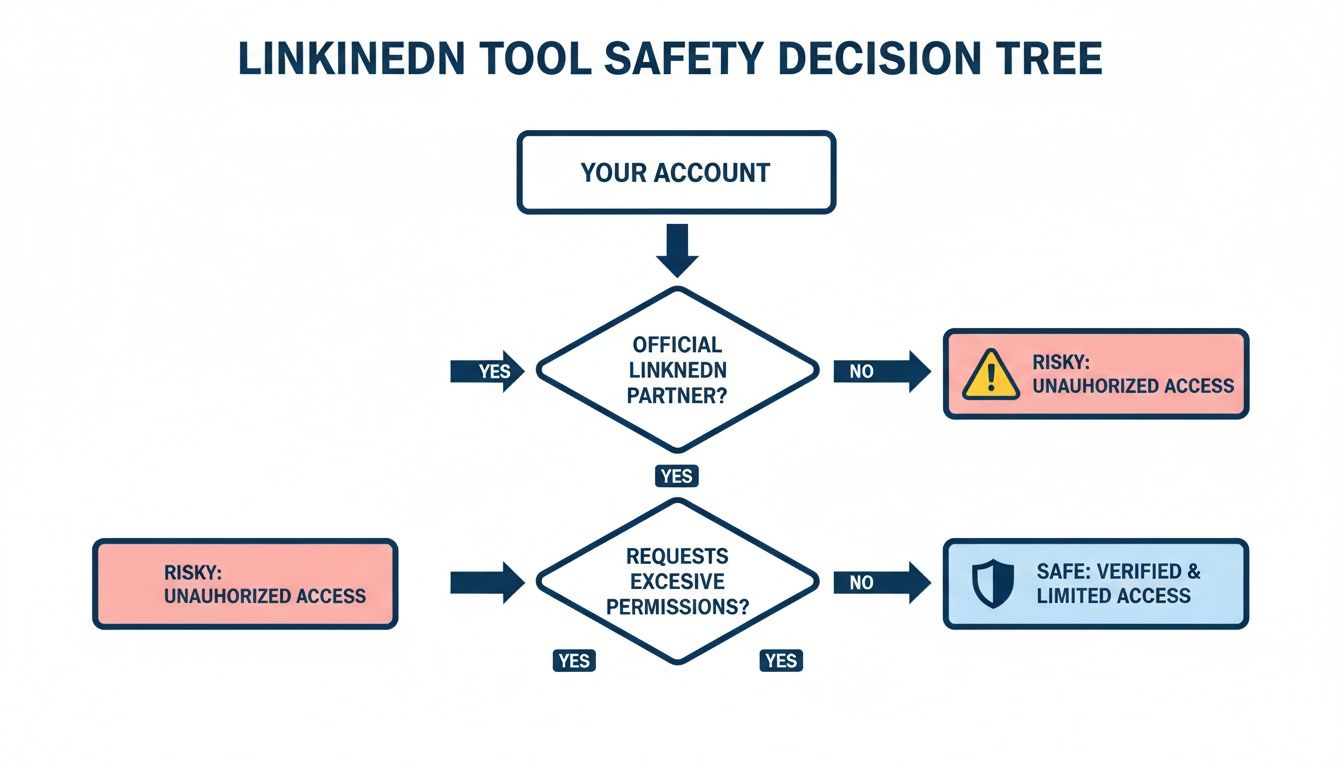
The flowchart drives home a critical point: account safety is non-negotiable. Modern authentication methods are the foundation you build on, long before you start comparing features. By starting with a secure, compliant platform like Postiv AI, you're protecting your long-term growth and professional reputation from unnecessary risks.
Kleo vs Taplio: Which One Should You Choose?
This is one of the most common comparisons people make when exploring Taplio alternatives, so let's address it directly. In 2026, Kleo has evolved from a free-only research tool into a full AI content platform, making the comparison with Taplio much more direct.
Kleo now offers voice-trained AI writing with a knowledge base, scheduling, an image creator, and analytics at $99/month. Its standout feature is the memory layer that improves AI output over time as you post. The free Chrome extension still works for saving posts to a swipe file, but the core product is a premium platform. Kleo supports LinkedIn and X but has no carousel design or team collaboration.
Taplio covers AI content generation, scheduling, a viral post library, and lead generation features on the Pro plan. Its AI output tends toward generic, and the features most users want require the $69/month Growth or $199/month Pro tiers. Taplio's Chrome extension and cookie-based authentication carry some compliance risk.
The verdict: At $99/month, Kleo gives you unlimited AI with deep personalization, a better deal than Taplio's $199/month Pro plan for unlimited AI credits. But neither tool offers carousel design or team workflows. If you want the most complete alternative that combines brand-trained AI writing, carousel design, and team collaboration, Postiv AI covers all the bases in a single platform. For a full breakdown after the Kleo Chrome extension ban, see our dedicated guide to the best Kleo alternatives in 2026.
For more on building a complete LinkedIn approach, see our guide on LinkedIn ghostwriting: DIY vs hiring vs AI.
Taplio vs Supergrow: Which Should You Pick?
This is one of the most common head-to-head searches in the Taplio alternatives space, so let's settle it. Taplio and Supergrow both target LinkedIn creators, but they sit at opposite ends of the price-and-power spectrum.
Supergrow starts at around $19/month with voice-trained AI writing, scheduling, a content calendar, and a first-comment scheduler all included. The $39/month Pro plan layers in a carousel maker, engagement tools, and AI comments. Supergrow publishes exclusively through LinkedIn's official API, so there's no Chrome extension and no cookie-based account risk. The AI is prompt-driven, fast for getting a draft started, less polished than Taplio's LinkedIn-trained model.
Taplio starts at $39/month, but that tier includes zero AI credits. To access the AI writing Taplio is best known for, you need the Growth plan at $69/month with 250 credits, or the Pro plan at $199/month for unlimited AI plus the lead database. Taplio's AI is trained on viral LinkedIn content patterns, so structure feels native. The downside: pricing is steep once you're on Pro, the carousel builder is gated and basic, and Taplio's Chrome extension overlay carries some account-safety overhead.
| Feature | Supergrow | Taplio |
|---|---|---|
| Starting Price | $19/mo | $39/mo (0 AI credits) |
| Real AI Access | Included from Starter | From $69/mo Growth (250 credits) |
| Carousel Maker | Yes ($39/mo Pro) | Yes (gated, basic) |
| Voice / Brand Learning | Yes (voice-trained) | No |
| Lead Generation | No | Yes ($199/mo Pro) |
| Account Safety | API + OAuth only | Chrome extension + cookies |
| Team / Agency | Single user | Limited team plan |
Who Supergrow is for: Solo creators on a tight budget who want AI writing plus a usable carousel builder without account risk. Best if you're starting out, post mostly text and basic carousels, and don't need lead gen.
Who Taplio is for: Established creators who need lead generation alongside content tools and can afford the $69-199/month tiers. Best if your LinkedIn strategy mixes content with outbound ICP targeting.
The one-line decision rule: Supergrow for solo creators on a budget, Taplio for solo creators who need lead gen. If you want brand-trained AI plus a real carousel workflow (not the gated basic version Taplio ships) without paying Taplio Pro pricing, Postiv AI sits between the two on price and beats both on content quality. Postiv also covers the agency multi-client gap that neither tool addresses.
Taplio vs AuthoredUp: Which Should You Pick?
This pairing comes up constantly in search because Taplio and AuthoredUp are often listed as alternatives, but they actually solve different problems. Most creators using one eventually pay for both, which is the trap worth understanding before you commit.
AuthoredUp is a Chrome extension and web app priced at around $10-20/month that does two things exceptionally well: LinkedIn-native formatting (bold, italic, bullets, line breaks that actually render) and per-post analytics with engagement breakdowns and follower attribution. It also ships a 300+ hook template library, a snippet library for reusable blocks, and accurate cross-device preview. AuthoredUp has no AI writing, no carousel builder, no team features, and the Chrome extension carries some residual risk after LinkedIn's crackdown on extensions in early 2026.
Taplio is the all-in-one growth platform, AI writing (from Growth at $69/month), scheduling, lead generation, content inspiration feeds, and audience analytics. Formatting controls are basic compared to AuthoredUp, the carousel builder is gated and weak, and team/agency features are thin. Taplio uses OAuth, so it's the safer of the two from an account-risk perspective.
| Feature | AuthoredUp | Taplio |
|---|---|---|
| Starting Price | ~$10-20/mo | $39/mo (0 AI credits) |
| AI Writing | None | Growth $69/mo+ |
| Formatting | Best-in-class | Basic |
| Per-Post Analytics | Best-in-class | Strong |
| Hook / Template Library | 300+ hooks | Viral post library |
| Carousel Builder | None | Basic, gated |
| Scheduling | Yes | Strong |
| Lead Generation | None | Yes ($199/mo Pro) |
| Account Safety | Chrome extension | OAuth (safer) |
Who AuthoredUp is for: Creators who already write their own content and want it to look polished. Your bottleneck is formatting and analyzing performance, not generating ideas. Budget cap: $20/month.
Who Taplio is for: Creators who need AI to scale content output and want lead generation in the same tool. Budget tolerance: $69-199/month.
The one-line decision rule: AuthoredUp if your bottleneck is formatting; Taplio if your bottleneck is content generation. The catch most people don't price in: these tools complement rather than compete, so you'll likely end up paying for both, roughly $102/month combined for Taplio Growth plus AuthoredUp full, plus another $13/month for Canva once carousels matter. Postiv AI replaces that three-tool stack with brand-trained AI, strong formatting, integrated carousel design, and scheduling in one platform, at less than the combined cost, with agency multi-client workspaces that neither tool offers.
How to Switch from Taplio Without Losing Content
If you've decided to move away from Taplio, here's a step-by-step migration guide to make the transition smooth. Many creators worry about losing their content history or breaking their posting rhythm, but the switch is simpler than you might think.
Step 1: Export Your Content
Before disconnecting anything, save your existing work. Download any scheduled posts, saved drafts, and content ideas from Taplio. Copy your best-performing post templates into a document, you'll want these as reference material for training your new tool's AI.
Step 2: Disconnect Taplio Safely
Go to your LinkedIn account settings, navigate to "Permitted services," and revoke Taplio's access. This ensures the Chrome extension and any cookie-based connections are cleanly removed. Also uninstall the Taplio Chrome extension to prevent any lingering background activity.
Step 3: Set Up Your New Tool
Connect your new platform using OAuth authentication. For tools like Postiv AI, upload your existing content (blog posts, PDFs, past LinkedIn posts) to train the brand AI on your voice. This means your first drafts will already sound like you, rather than starting from scratch.
Step 4: Rebuild Your Schedule
Re-create your posting cadence in the new tool. Most platforms let you set up recurring time slots, so you can batch this in one session. If you were using Taplio's content calendar, recreate a similar structure.
Step 5: Verify Everything Works
Publish a test post to confirm the connection is solid and the formatting looks right. Check that your profile photo, name, and company show up correctly in the post preview. The entire migration process typically takes 30 to 60 minutes.
Frequently Asked Questions About Taplio Alternatives
Is there a free alternative to Taplio?
Yes, though free tools come with significant limitations. Kleo's old free Chrome extension was shut down with the Kleo 3.0 relaunch; it is now a paid platform at $99/month with no free tier. Buffer has a free plan supporting up to three social channels with basic scheduling. MagicPost offers a free trial (no credit card required) and Typefully has a permanent free plan for basic usage. However, free tools typically lack AI writing, carousel design, and team collaboration features. If you need a full content workflow, Postiv AI offers a free trial so you can test brand-trained AI writing and carousel design before committing.
Is Kleo better than Taplio?
In 2026, Kleo and Taplio compete more directly than before. Kleo now offers voice-trained AI writing with a knowledge base, scheduling, and analytics at $99/month, plus a memory layer that improves output over time. Taplio offers a larger viral post library and lead generation features, but its unlimited AI tier costs $199/month. Kleo's advantage is deeper AI personalization; Taplio's advantage is broader feature scope on the Pro plan. Neither tool offers carousel design or team collaboration. For the most complete solution, Postiv AI combines brand-trained AI with integrated carousel design and team workflows.
What is the best Taplio alternative for agencies?
Postiv AI is the top pick for agencies. It supports multiple client workspaces with separate brand libraries, ensuring the AI never mixes up client voices. Team roles with approval workflows create a professional, transparent content process. The built-in carousel designer eliminates the need for separate design subscriptions per client. This makes it possible to scale agency services efficiently while maintaining quality across every account.
How does Taplio compare to AuthoredUp?
Taplio is an AI content generation and scheduling tool, while AuthoredUp is a formatting and hook template tool. AuthoredUp provides rich text editing, 300+ hook templates, and cross-device preview, but it has no AI writing or scheduling. Many users combine AuthoredUp with another tool, which adds cost and complexity. Postiv AI covers both areas, AI writing, formatting, carousel design, and scheduling, in a single platform.
Can I use Taplio alternatives for LinkedIn carousel posts?
Some alternatives include built-in carousel designers. Postiv AI has the most fully integrated carousel workflow, you can generate text with AI, convert it into a designed carousel using your brand templates, and schedule it, all without leaving the platform. For a deeper dive into carousel tools, check out our guide to the best LinkedIn carousel makers. Supergrow also offers a basic carousel builder on its Pro plan. Most other alternatives (AuthoredUp, Kleo, MagicPost, Buffer, Typefully, Hootsuite) have no native carousel designer and require a separate tool like Canva.
Is Taplio worth the price in 2026?
That depends on what you actually need. Taplio's Starter plan at $39/month includes zero AI credits, which means no AI post generation, no AI hook creation, and no carousel building. To use the features Taplio is best known for, you need the Growth plan at $69/month (250 AI credits) or the Pro plan at $199/month (unlimited). For comparison, alternatives like Postiv AI, Supergrow, and Typefully include AI features at their starting price points, making them more transparent about what you're getting.
Can I use multiple LinkedIn tools together?
Yes, and it's often a smart strategy. Many creators pair a free research tool like Kleo with a creation and scheduling platform like Postiv AI. Kleo handles content discovery and creator analysis at no cost, while Postiv AI handles the AI writing, carousel design, and scheduling. You can also use AuthoredUp for formatting alongside a scheduling tool like Buffer, though that means managing multiple subscriptions and potentially higher total costs than a single all-in-one platform.
Is Taplio safe to use after LinkedIn's 2025 crackdown?
In April 2025, LinkedIn blocked several major automation tools and restricted accounts connected to them. Taplio uses a Chrome extension that overlays features on LinkedIn's native interface, cookie-based authentication for some features, and engagement automation, all of which LinkedIn has warned against. While not every Taplio user will face restrictions, the risk is worth weighing carefully. The safest Taplio alternatives use LinkedIn's official API and OAuth authentication exclusively. Postiv AI, Buffer, and MagicPost all connect through compliant API-based methods that keep your account protected. If you want to automate LinkedIn posts safely, prioritizing tools with official API access is the way to go.
What is better than Taplio?
For most LinkedIn creators, Postiv AI offers the best overall value as a Taplio alternative. It combines brand-trained AI writing, an integrated carousel designer, scheduling, and team collaboration in a single platform at a more transparent price point than Taplio. If you prioritize account safety above all else, MagicPost is worth considering as an official LinkedIn API partner. For budget-conscious solo creators, Supergrow provides solid voice-trained AI writing and scheduling starting at $19/month. The best choice depends on whether you need deep AI personalization, visual content tools, team features, or simply a safe and affordable way to post consistently.
Is Taplio banned by LinkedIn?
LinkedIn has not permanently banned Taplio, but the platform has temporarily blocked Taplio's access in the past due to compliance concerns. In April 2025, LinkedIn cracked down on several third-party automation tools, and users connected to flagged tools reported account warnings, temporary restrictions, and in some cases permanent bans. Taplio uses a Chrome extension overlay and cookie-based authentication for some features, which are methods LinkedIn has explicitly warned against. While many Taplio users continue without issues, the risk scales with how aggressively you use the automation features, scheduled posts and AI writing carry lower risk than engagement automation and auto-DMs.
How does Taplio compare to Supergrow?
Both tools offer AI content generation and scheduling for LinkedIn, but they differ in key areas. Supergrow starts at $19/month with voice-trained AI included, while Taplio starts at $39/month with zero AI credits (AI requires the $69/month Growth plan). Supergrow uses API-based publishing that avoids LinkedIn compliance risks, while Taplio relies on a Chrome extension and cookie-based authentication. Taplio's advantage is its larger viral post library (5M+ posts) and the lead database available on the Pro plan. For a more detailed comparison, see our Taplio vs Supergrow breakdown above. If you want brand-trained AI with carousel design, Postiv AI covers what both tools lack.
Taplio vs Supergrow: which one should I pick?
Pick Supergrow if your budget caps at $20-25/month and basic AI writing plus a usable carousel builder is all you need. Pick Taplio if lead generation is part of your LinkedIn strategy and you can afford $69/month for the Growth plan that actually unlocks AI credits. The one-line rule: Supergrow for solo creators on a budget, Taplio for solo creators who need lead gen. If you want brand-trained AI plus a real carousel workflow without paying Taplio Pro pricing, Postiv AI sits between the two on price and beats both on content quality.
Taplio vs AuthoredUp: which one should I pick?
Pick AuthoredUp if your bottleneck is formatting existing posts and analyzing per-post performance, it costs $10-20/month and is best-in-class at LinkedIn formatting. Pick Taplio if you need AI to generate content from scratch and want scheduling plus lead gen in one tool. The catch is that most creators end up paying for both ($89+/month combined) because they solve different problems. Postiv AI replaces the stack with brand-trained AI, formatting, carousels, and scheduling in one platform for less than the combined cost.
How much does running Taplio + AuthoredUp together actually cost?
Roughly $102/month if you go Taplio Growth ($69) plus AuthoredUp full plan (~$20). Add Canva for carousels and you are at about $115/month for three tools, three logins, and three bills. Most creators end up here within 6-12 months of starting with Taplio because formatting and visual content become more important as posting frequency grows. A single platform like Postiv AI typically costs less than the combined stack while removing the tool-switching overhead.
Is Taplio still the best LinkedIn tool for lead generation?
Taplio is the only tool in this guide with a real lead generation workflow, ICP filters, post-engagement targeting, and CRM exports on the $199/month Pro plan. If you need content tools and outbound lead gen in one platform, Taplio is the answer. If you only need content (and handle outreach separately or focus on inbound), Taplio's lead-gen features are paid weight. Most alternatives in this guide skip outbound entirely.
Which Taplio alternative has real agency features?
No major Taplio competitor has agency-grade multi-client workspaces with brand isolation built in. Taplio added basic team seats but does not separate client voices or workflows. Supergrow is single-user. AuthoredUp is single-user. Kleo has no team features. Postiv AI is the only Taplio alternative on this list with dedicated client workspaces, separate brand libraries per client, team roles, and approval workflows, all designed for agencies managing multiple LinkedIn accounts.
How do I migrate from Taplio to another tool?
Start by exporting your scheduled posts and saved drafts from Taplio. Copy your best-performing content into a document for reference. Then disconnect Taplio from your LinkedIn account in LinkedIn's settings under "Permitted services" and uninstall the Chrome extension. Connect your new tool using OAuth authentication, upload any brand assets, and rebuild your posting schedule. Tools like Postiv AI let you train the AI on your existing content library, so your new tool matches your voice from day one. The entire process typically takes 30 to 60 minutes. For a detailed walkthrough, see our step-by-step migration guide above.
What is the best Taplio alternative in 2026?
For 2026, Postiv AI is the strongest all-round Taplio alternative because it bundles brand-trained AI writing, an integrated carousel designer, scheduling, and agency workspaces into one platform with transparent pricing. If budget is your priority, Supergrow includes voice-trained AI from about $20/month with no $69/month AI gate. For account safety, MagicPost posts through LinkedIn's official API. The best 2026 pick depends on whether you optimise for features, price, or safety.
What Taplio alternatives do people recommend on Reddit?
Reddit threads on r/LinkedInTips and r/SaaS frequently point people away from Taplio after LinkedIn's 2025 automation crackdown. The most-recommended replacements are Supergrow and AuthoredUp for solo creators, MagicPost for API-safe posting, and all-in-one platforms like Postiv AI for those who want AI writing plus carousels and team features. The common theme is avoiding cookie-based or extension-driven tools that put accounts at risk.
How does Taplio compare to EasyGen?
Both use AI to draft LinkedIn posts, but they serve different needs. EasyGen focuses on fast, prompt-based hooks and post drafts from around $13/month, with no scheduling or carousel design. Taplio adds scheduling, a viral post library, and lead generation, though AI requires the $69/month Growth plan. Neither offers brand-trained AI with an integrated carousel designer the way Postiv AI does, so heavy creators often outgrow both.
Is there a cheaper alternative to Taplio?
Yes. Several Taplio alternatives undercut its real cost. Taplio's usable AI tier starts at $69/month (Growth), while Supergrow and Socialsonic include AI from around $20/month, Typefully starts at $12.50/month, and EasyGen from about $13/month. Buffer has a free plan for three channels. Postiv AI bundles AI writing, carousel design, and scheduling so you avoid paying for several tools at once, which often makes it cheaper than a Taplio plus Canva stack.