Schedule LinkedIn Posts. Stay Consistent Effortlessly.
Plan a month of LinkedIn content in one sitting. Create and schedule posts, carousels, and content. Auto-publish while you focus on work.
Content Calendar
Your Week at a Glance
See your entire week of LinkedIn content in one visual calendar. Drag, plan, and schedule, all from a single dashboard.
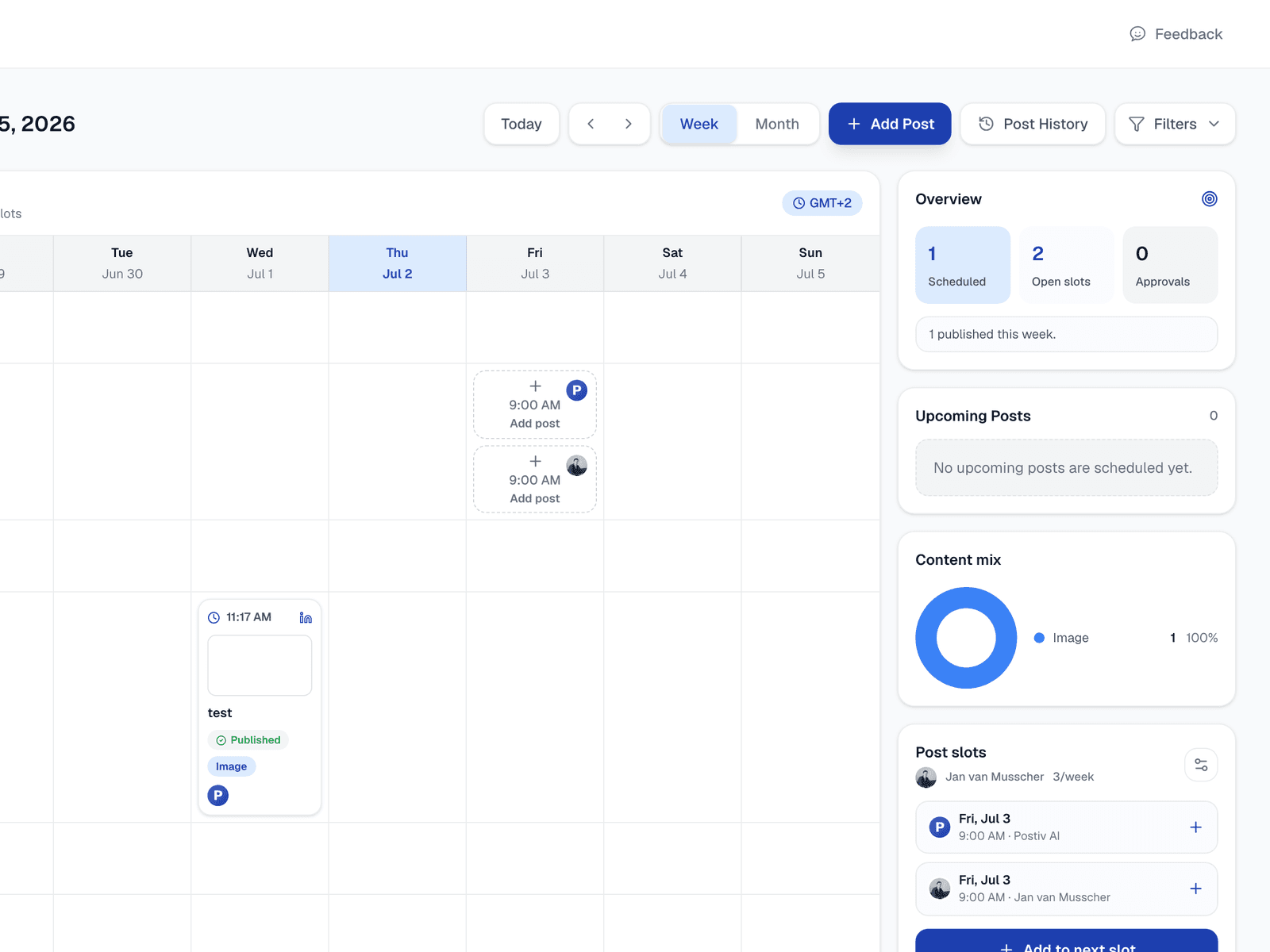
The actual calendar. Not a mockup.
The Problem
Manual Posting Means Missed Days
Posting manually means you need to be at your desk every day at the right time. Miss a day, lose momentum. Miss a week, lose your audience.
Manual Posting
- ✗Need to be at your desk daily
- ✗Forget to post = lost reach
- ✗No strategic content planning
- ✗Cannot batch-create content
Scheduled Posting
- Plan a month in 30 minutes
- Auto-publish at optimal times
- Strategic content calendar
- Batch-create and forget
Schedule a Month of LinkedIn Content in 4 Steps
From blank calendar to a full month of scheduled posts in under 30 minutes.
Create Your Content
Write posts manually or let AI generate them. Create text posts, carousels, or both in minutes.
Pick Your Dates
Drag posts onto your content calendar. Postiv suggests optimal times based on your audience activity.
Auto-Publish
Postiv publishes your posts automatically at the scheduled time. No manual intervention needed.
Track Performance
See which posts perform best and when your audience is most active. Optimize your strategy over time.
Compare
The Only Tool That Creates and Schedules
Most scheduling tools only schedule. Postiv creates your content and schedules it, all in one place.
| Feature | Postiv | Buffer | Hootsuite | Native LinkedIn |
|---|---|---|---|---|
| AI Content Creation | ||||
| Carousel Scheduling | Limited | |||
| Voice Learning | ||||
| Best-time Optimization | ||||
| Price | Free trial | From $6/mo | From $99/mo | Free |
Postiv
- AI Content Creation
- Carousel Scheduling
- Voice Learning
- Best-time Optimization
- Free trialPrice
Buffer
- AI Content Creation
- Carousel Scheduling
- Voice Learning
- Best-time Optimization
- From $6/moPrice
Hootsuite
- AI Content Creation
- LimitedCarousel Scheduling
- Voice Learning
- Best-time Optimization
- From $99/moPrice
Native LinkedIn
- AI Content Creation
- Carousel Scheduling
- Voice Learning
- Best-time Optimization
- FreePrice
Who This Is For
Built for Professionals Who Value Consistency
Whether you manage one profile or ten, Postiv keeps your LinkedIn content on schedule.
Agency Owners
Schedule LinkedIn content for multiple clients from one dashboard. Batch-create a month of posts per client in one session.
Founders Batching Weekly
Dedicate one hour per week to create and schedule all your LinkedIn content. Post daily without daily effort.
Marketing Teams
Coordinate LinkedIn content across team members. Maintain a consistent posting calendar with shared scheduling.
Coaches With Recurring Themes
Plan content around your recurring topics and frameworks. Schedule themed weeks of content in advance.
Create + Schedule
One Tool.
Create and Schedule.
Postiv is the only LinkedIn tool that creates your content and schedules it. No switching between apps. Generate posts with AI, drag them onto your calendar, and auto-publish.
- AI-powered content creation
- Visual content calendar
- Best-time auto-publishing
- Carousel and text post scheduling
Last updated:
FAQ
Frequently Asked Questions
Yes. LinkedIn has never confirmed a ranking penalty for scheduled posts, and it ships a native scheduler inside its own composer. The belief that scheduling costs reach confuses a real effect with the wrong cause: early comment velocity is a genuine ranking factor, and LinkedIn tests a post with a small slice of your audience in roughly the first 60 to 90 minutes. Scheduled posts often underperform because the author is not there to reply during that window, not because the post was queued. Schedule into slots you can show up for and reply to comments after it goes live.
Yes. LinkedIn has a built-in scheduler: click the clock icon in the post composer, pick a date and time, and LinkedIn publishes it for you. Native scheduling covers text and image posts from one hour to three months ahead, but has no calendar view, no recurring slots, no bulk scheduling, and you cannot edit the content after scheduling. A third-party scheduler like Postiv adds all four plus carousel and PDF support.
You can schedule posts from the LinkedIn mobile app using the clock icon in the composer, but you cannot edit or manage the queue there: scheduled posts are not editable in the mobile app. With Postiv the full content calendar works on mobile, so you can edit copy, swap a carousel, or reschedule from your phone.
Yes. While LinkedIn does not offer robust native scheduling, tools like Postiv let you schedule posts days, weeks, or months in advance. Create your content, pick the date and time, and Postiv auto-publishes it to your LinkedIn profile.
The best times to post on LinkedIn are typically Tuesday through Thursday, between 8 to 10 AM and 12 to 1 PM in your audience's time zone. However, optimal timing varies by industry. Postiv AI analyzes your audience engagement patterns and suggests the best posting times for you.
With Postiv, you can schedule posts as far in advance as you want. Many users plan an entire month of content in one sitting, scheduling 20 to 30 posts across 4 weeks. This batching approach saves hours compared to daily manual posting.
Yes. Postiv is one of the few tools that supports scheduling carousel posts alongside text posts. Create your carousel with AI, set the date and time, and it publishes automatically. Most scheduling tools only support text posts.
Scheduling tools let you batch-create content and post consistently without daily effort. Manual posting means you need to be at your desk every day at the right time. Scheduling tools like Postiv also optimize timing for maximum reach and let you plan content strategically.
Start by defining 3 to 4 content themes for the month. Plan 1 post per weekday (20 per month). Mix formats: text posts, carousels, stories. Use a scheduling tool like Postiv to map posts to specific dates and auto-publish. A content calendar eliminates daily decision fatigue.
Yes. Postiv offers a free LinkedIn post scheduler with a 7 day free trial. You can schedule text posts, carousels, and PDFs to your personal profile or Company Page. LinkedIn's native scheduler is also free but only supports basic text and image posts and lacks a content calendar view, recurring schedules, or analytics.
Yes. Postiv supports scheduling posts to both LinkedIn personal profiles and Company Pages from the same dashboard. You connect your Page once, then drag content onto your calendar to auto-publish. This is essential for marketing teams and agencies managing client Pages who need a unified queue across profiles and brands.
On LinkedIn natively, click the clock icon in the post composer and select 'View all scheduled posts' to see your queue. On mobile, scheduled posts are not editable in the LinkedIn app. With Postiv, all scheduled posts appear in your visual content calendar where you can edit, reschedule, or delete them in one click, on desktop or mobile.
On native LinkedIn, you can change the time of a scheduled post but you cannot edit the content once scheduled. You have to delete it and create a new post. With Postiv, you can edit the copy, swap the carousel, or move the post to a different day at any point before it publishes, with no need to start over.
Native LinkedIn scheduled posts can fail when your session token expires, when LinkedIn's mobile app is used to draft them, or during platform outages. Third-party schedulers like Postiv use the official LinkedIn API and re-authenticate automatically, so posts publish reliably. If a post does fail, you receive an alert with a one-click retry option.
The 3/2/1 rule is a content structure: open with 3 sentences that stop the scroll, develop 2 insights that deliver real value, and close with 1 clear call to action. It works well for scheduled posts because it forces a tight format you can repeat. Postiv's AI can generate posts in this structure automatically and slot them straight onto your calendar.
The 5-3-2 rule is a posting mix: out of every 10 scheduled posts, 5 should curate or react to other creators' content, 3 should be your own original ideas, and 2 should be personal stories that show the human behind the brand. It works particularly well in a scheduler because you can theme your calendar around the ratio, batching 5 reactions on Monday, drafting 3 originals midweek, and saving 2 story posts for Friday so the queue stays balanced without you thinking about it.
LinkedIn natively lets you schedule posts from one hour to three months in advance, with the time stored in UTC and converted to your device's time zone. With Postiv there is no three-month cap, so you can plan a full quarter, an evergreen recurring slot, or a launch sequence that goes out months from now. Most creators using the scheduler block a single hour and queue 4 to 6 weeks of posts at a time.
The LinkedIn mobile app does not show a dedicated scheduled-posts view. You can draft a post on mobile, but to see, edit, or reschedule already-queued posts you have to open LinkedIn on desktop and use the clock icon in the post composer. Postiv solves this with a mobile-friendly calendar that lets you tap any scheduled post, edit the copy, swap the carousel, or move it to a different day from your phone.
LinkedIn's native scheduler has no recurring slots — you have to manually schedule each individual post. Postiv supports recurring time slots, so you can lock in (for example) Tuesday 9am, Thursday 12pm, and Friday 8am as your weekly publishing window. Drop content into those slots and it auto-publishes on repeat. This is how most consistent creators run their schedule without thinking about timing every week.
Bulk scheduling means queuing many posts in one session instead of drafting each one in real time. With Postiv you generate or import a batch (CSV, AI-generated drafts, or repurposed content), then drag the entire batch onto the calendar in seconds. A typical workflow: spend 30 minutes generating 20 posts with AI, drop them onto your weekly slots for the next month, and the scheduler handles the rest. LinkedIn natively has no bulk-schedule option — you have to schedule posts one at a time.
Stop Missing Days. Start Scheduling.
Plan your LinkedIn content in advance and never miss a posting day again. 7 day free trial. Cancel anytime.
What Is a LinkedIn Post Scheduler?
A LinkedIn post scheduler is a tool that lets you write, queue, and auto-publish posts to your LinkedIn profile or Company Page at a future date and time. Instead of logging in every morning to post manually, you batch your content in one session and the scheduler delivers each post at the scheduled time, even if you are asleep, in a meeting, or on a flight.
Modern schedulers go beyond simple queuing. The best ones include a visual content calendar, best-time recommendations based on your audience, support for carousels and PDFs, multi-account management for agencies, and analytics that show which scheduled posts performed. LinkedIn has a native scheduler built into the post composer, but it lacks a calendar view, recurring time slots, edit-after-schedule, and any form of AI assistance.
How to Schedule LinkedIn Posts in 2026
There are two ways to schedule a LinkedIn post in 2026: natively inside LinkedIn or with a third-party scheduler like Postiv. Both work, but the workflow and what you can schedule are very different.
Schedule natively on LinkedIn: Open the post composer, write your post, click the clock icon in the lower-right corner, pick a date and time, and confirm. To find scheduled posts, click the clock icon again and select "View all scheduled posts." You can change the time of a scheduled post, but you cannot edit the content. Native scheduling does not support carousels, PDFs uploaded as documents, or recurring slots.
Schedule with Postiv: Connect your LinkedIn profile or Company Page once, draft a post (or generate one with AI in your voice), drag it onto the visual calendar, and Postiv auto-publishes at the chosen time. You can edit copy, swap the carousel, or move the post between days at any point before it goes live. For teams, the same calendar handles multiple accounts and Pages from one queue.
Free vs Paid LinkedIn Schedulers: What You Actually Get
A free LinkedIn post scheduler usually covers the basics: queue a few text posts, see them on a list, and auto-publish. That is enough if you post once or twice a week to a single profile and never need to plan further than next Tuesday.
Paid (or freemium) schedulers add the things you actually need at scale: a real calendar view, AI content generation, carousel and PDF scheduling, recurring time slots, multi-account and Company Page support, team approvals, and post-publish analytics. Postiv starts with a 7-day free trial, and paid plans unlock unlimited scheduling, AI drafting, and carousel support, giving you the full workflow in one tool instead of stitching together a scheduler, an AI writer, and a carousel maker.
LinkedIn Post Scheduler vs Native LinkedIn Scheduling
LinkedIn's native scheduler is fine for a single creator who only posts text and never wants to plan past the current week. It is free, lives inside the platform, and requires no extra connection. The trade-off: no calendar view, no AI, no carousels or documents, no recurring slots, no editing scheduled content, and no way to manage multiple accounts.
A dedicated LinkedIn post scheduler like Postiv is built for people who treat LinkedIn as a real channel. Drag-and-drop calendar, AI that writes in your voice, carousel + PDF + image + video scheduling, multi-account queues for agencies, Company Page posting, recurring time slots, and analytics that show which scheduled posts won. If you are batching a month of content in one sitting, a third-party scheduler is the only option that scales.
Best Times to Schedule LinkedIn Posts in 2026
The biggest reason people use a scheduler instead of posting manually is timing. LinkedIn engagement is concentrated in narrow windows, and missing those windows by even an hour can cut reach in half. Across our user base, the strongest engagement windows for B2B audiences cluster around Tuesday, Wednesday, and Thursday between 8:00 and 10:00 AM in the reader's local time, with a secondary spike from 12:00 to 1:00 PM during lunch.
Monday mornings tend to underperform because most professionals are clearing inbox, and Friday afternoons drop off as the weekend approaches. Saturday and Sunday are quiet for B2B but can work for creators targeting founders, freelancers, and operators who scroll on weekends.
Your own audience is the real signal. If you sell to European agencies, scheduling for 9 AM Central European Time outperforms US timing. If your audience is US-distributed sales leaders, 11 AM Eastern hits both coasts. Postiv's scheduler analyzes when your past posts got the most engagement and suggests slots automatically, so you do not have to guess. For a deeper breakdown, see our guide on the best time to post on LinkedIn.
Do Scheduled Posts Do Well on LinkedIn?
Yes. LinkedIn has never confirmed a ranking penalty for scheduled posts, and it ships a native scheduler inside its own composer, which would be a strange thing to penalize. The widespread belief that scheduling costs you reach confuses a real effect with the wrong cause.
What actually drives the difference: early comment velocity is a genuine ranking factor, and LinkedIn tests a post with a small slice of your audience in roughly the first 60 to 90 minutes. Scheduled posts often underperform because the author is not there to reply during that window, not because the post was queued. A post you publish manually and then abandon behaves the same way.
What this means in practice: schedule the writing, but not your attention. Queue posts into slots you can actually show up for, and spend ten minutes replying to comments after each one goes live. Scheduling into a slot where you are asleep or in back-to-back meetings is the version of scheduling that genuinely underperforms.
How to Batch a Month of LinkedIn Posts in 30 Minutes
Batching is the workflow that separates creators who post consistently from creators who post once and disappear. Instead of writing one post per day in the moment, batching means producing 4 to 6 weeks of content in a single focused session and scheduling it all at once. This is where a real LinkedIn post scheduler earns its keep.
The repeatable batching workflow looks like this:
- Define 3 to 4 content pillars — the recurring topics you want to be known for. For an agency: client results, frameworks, behind-the-scenes, and industry takes.
- Generate 20 to 30 drafts using AI or a swipe file. Pick the strongest 20 and discard the rest.
- Mix formats: roughly 60% text posts, 25% carousels, 15% documents or images. Variety keeps the calendar from looking monotone.
- Drop posts onto fixed weekly slots (e.g. Mon/Wed/Fri 9 AM). Recurring slots remove the decision of “when should this go up?” every time.
- Review and ship. Scan the month for repeat hooks, balance the pillars, and confirm. The scheduler handles the rest.
Most users report this takes 30 to 60 minutes once a month, replacing 20+ hours of daily posting effort. The second time you run the workflow it is faster, because you already have voice, pillars, and slot structure locked in.
Scheduling LinkedIn Profile vs Company Page Posts
Personal profiles and Company Pages behave differently on LinkedIn, and a good scheduler should handle both from one queue. Profiles drive personal-brand reach and are weighted by LinkedIn's algorithm to favor comments and dwell time. Company Pages typically get less organic reach but are essential for sales enablement, recruiting, and product launches.
To schedule a Company Page post natively, you need admin access to the Page, open it from the “Me > Manage” menu, click “Start a post,” and use the clock icon to pick a date and time. The native flow does not let you schedule the same content to a profile and a Page in one click. With Postiv, connect both surfaces once and you can post or schedule to either (or both) from the same composer, which is the standard workflow for marketing teams running founder + brand accounts in parallel.
Agencies managing client Pages get the most benefit: every client Page lives in one calendar, every client has their own approval flow, and a single weekly planning session covers the entire roster. No swapping accounts, no logging in and out of LinkedIn for each Page.
Time Zones, Mobile Limits, and Other Scheduling Gotchas
A few things trip up new schedulers, and they are worth knowing before you queue your first batch.
Time zones: LinkedIn stores scheduled times in UTC. If you travel, the post still fires at the originally scheduled UTC moment, which may be the wrong local time for your audience. Postiv lets you pin the schedule to a specific audience time zone instead, so a 9 AM Eastern post stays at 9 AM Eastern even if you draft it from a different country.
Mobile limitations: The LinkedIn mobile app cannot show or edit your scheduled queue. You can draft and queue, but to manage the list you have to be on desktop. Third-party schedulers like Postiv expose the full queue on mobile web, so you can reschedule from a phone.
Editing scheduled content: Natively, you can change the time of a scheduled post but not the content itself — you have to delete and re-create. Postiv lets you edit the copy, swap an image, or rebuild the carousel up until the second the post goes live.
Failed publishes: Native scheduled posts can fail silently if your session expires or LinkedIn has a brief outage. Postiv uses the official LinkedIn API and re-authenticates automatically, and any post that does fail surfaces immediately with a one-click retry instead of vanishing from the queue.
LinkedIn Post Scheduler: Plan, Schedule, Auto-Publish
Prefer to plan posts in your AI assistant? Use Postiv’s LinkedIn MCP server to create drafts and schedule content for your connected LinkedIn profiles, with configured approval rules still in place.
A LinkedIn post scheduler eliminates the biggest barrier to consistent posting: being available every day at the right time. With a scheduling tool, you can batch-create content and set it to auto-publish across the week. This means you can dedicate one focused session to content creation and let the tool handle the rest. Pair scheduling with an AI LinkedIn post generator and you can go from zero to a full month of content in under 30 minutes.
A strong content calendar is the foundation of any LinkedIn strategy. Plan your content themes, mix text posts with LinkedIn carousels, and map every post to a specific date and time. Scheduling tools turn your content calendar from a spreadsheet into a visual, drag-and-drop system that makes planning intuitive and fast.
While tools like Buffer and Hootsuite focus on multi-platform scheduling, Postiv is built specifically for LinkedIn. It combines AI content creation with scheduling, so you create and schedule in one tool instead of switching between apps. For professionals and agencies who take LinkedIn seriously, this integrated approach saves hours every week.