

Scheduling
One Calendar for Every Profile, Page and Channel.
Plan the week for you, your team and your company page in one view. Fill your posting slots, keep the mix balanced across your pillars, and let Postiv publish and post the first comment for you.
Calendar and scheduling on every plan
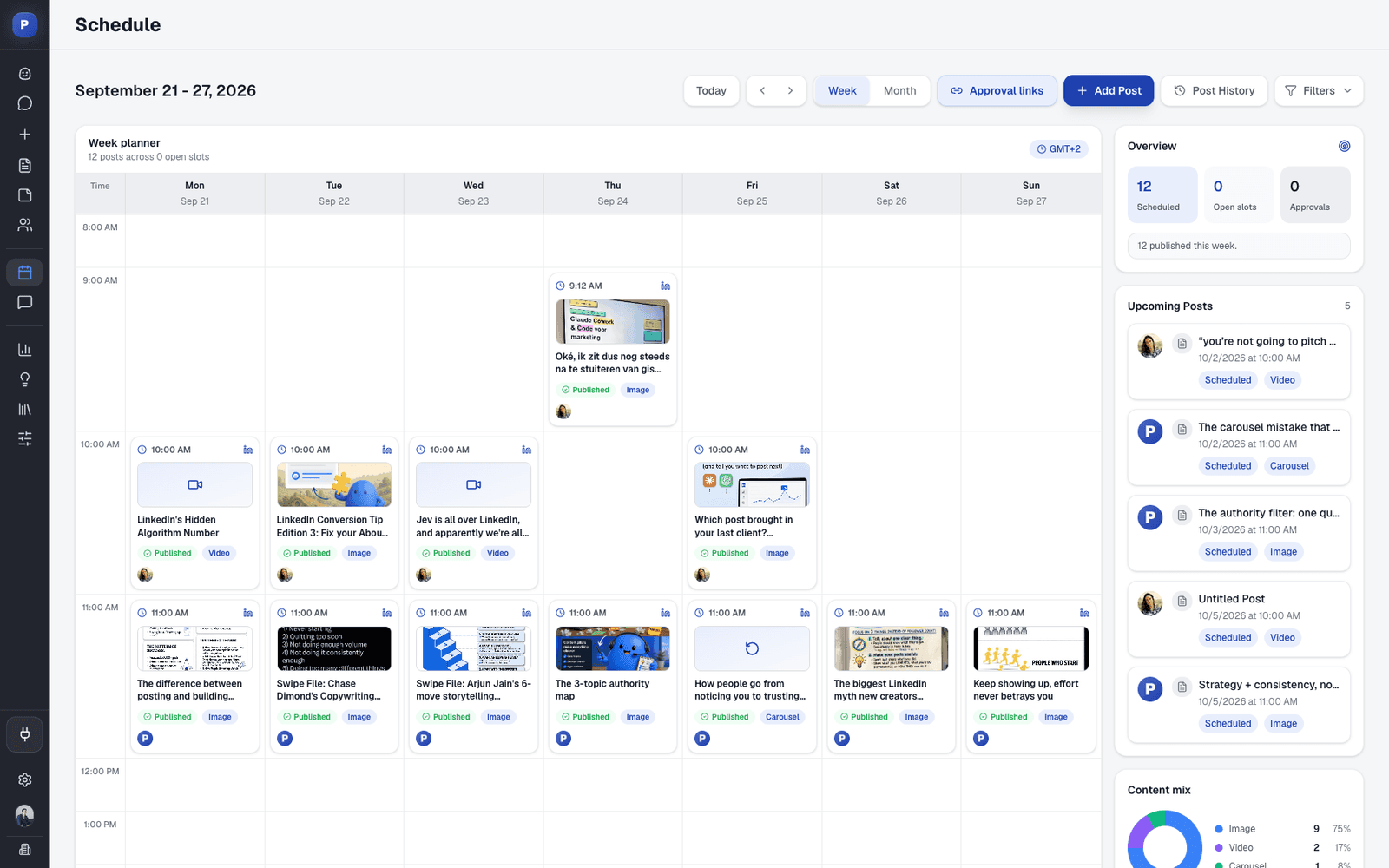
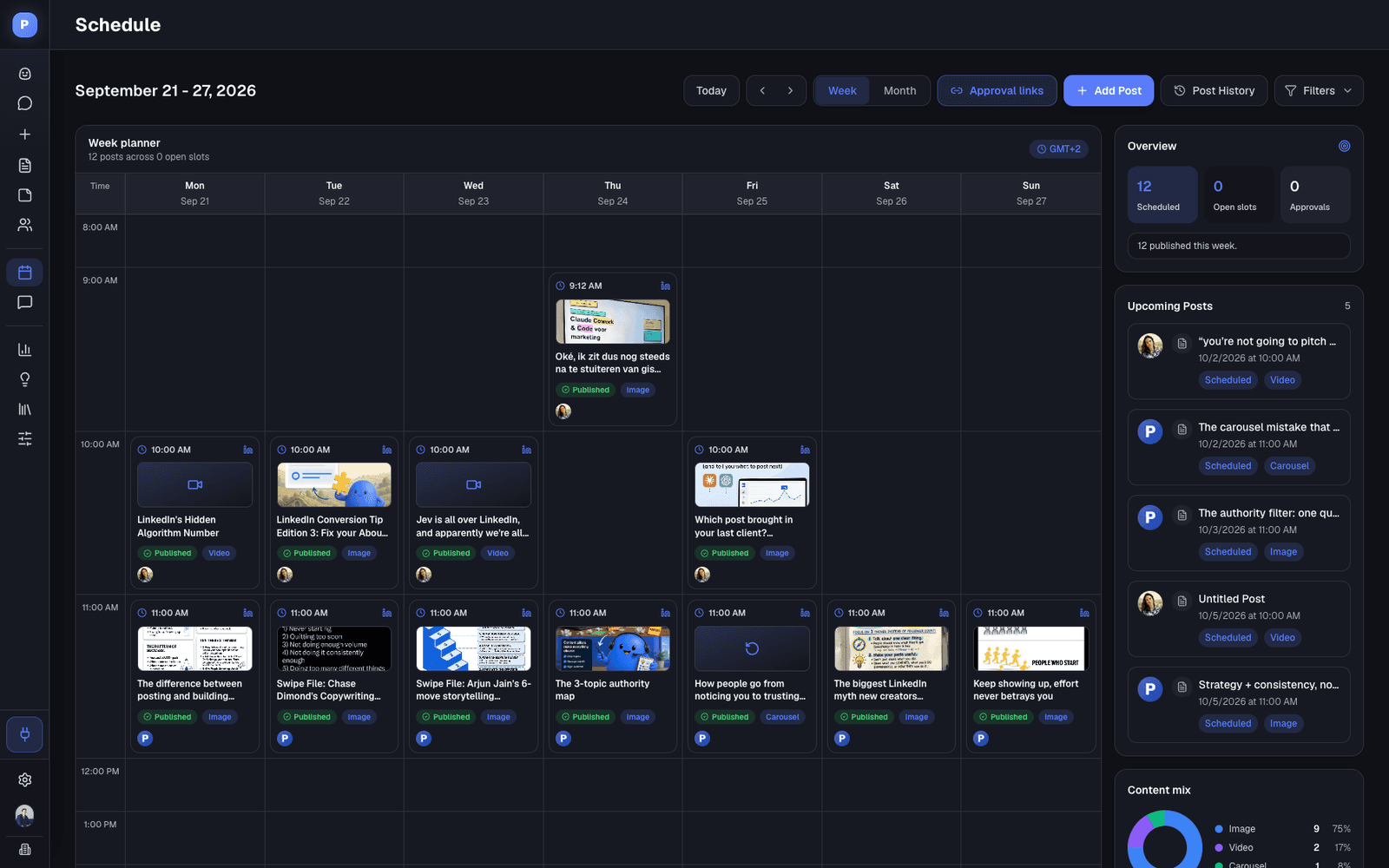
Week and month views
Profiles and company pages together
Posting slots per profile
Automatic first comment
The Calendar
Everything You Need to Keep a Posting Rhythm
The calendar is not a separate planning doc. Every post on it is scheduled and publishes at its time.
Week and month views
Week view shows each day by the hour with your posting slots. Month view shows the whole month at a glance.
Drag to reschedule
Move queued, scheduled and waiting-for-approval posts to a new day or time by dragging them in week view.
Posting slots
Set the days and times each profile posts. Empty slots appear as Add post, and Add to next slot fills the first free one.
Company pages next to your people
Switch on the pages you admin and schedule as the company, right beside the founder and team profiles that post for it.
Comment Plug
Your first comment goes out automatically, 2 minutes or more after publishing. Up to five comments per post, with images, as the profile or the page.
Weekly overview and content mix
See how many posts are scheduled, how many slots are still open, how many wait for approval, and the mix of text, image and carousel posts.
Content Pillars
Pillars Decide What Goes in the Slots
A calendar tells you when to post. Pillars tell you what. In Postiv they live next to each other, and Bob uses both to plan your week.
- 1
Pick three to five themes
Bob reviews your analytics and knowledge base and proposes pillars. Nothing is saved until you confirm.
- 2
Fill the week
Bob's weekly plan puts one pillar in each posting slot, and a pillar with a preferred day goes to the closest slot.
- 3
Approve
Posts for profiles with approvers wait for every approver. Nothing goes live without your OK.
- 4
Publish
Postiv publishes at the slot time through the official API, then posts your first comment.
Straight Answer
Scheduling, Plainly
What you get on day one, and the details worth knowing before you plan a quarter.
What it does
- Schedule text, image, carousel, document and video posts on LinkedIn
- Schedule single posts, threads, images and X Articles on X
- Plan personal profiles and company pages side by side
- Approve, deny or request changes on posts from the calendar
- Retry the first comment automatically if it fails
What to know first
- Company pages need an admin. Postiv lists the pages where your LinkedIn account is an administrator.
- Five pillars at most. Each profile can have up to five active pillars. Archive one to make room for a new theme.
- Comment Plug only follows Postiv posts. It comments on posts Postiv published, with a minimum delay of 2 minutes.
FAQ
Frequently Asked Questions
What is a LinkedIn content calendar?
A LinkedIn content calendar shows which posts go out on which day, for which profile. In Postiv it is also where you publish from: every post on the calendar is scheduled and goes live at its time, so the plan and the posting are the same thing.
What are post slots?
Post slots are your regular posting times: the days you post and the time of day for each, per profile. Empty slots show up on the calendar as Add post, and Add to next slot drops a post into the first free one.
Can I drag and drop posts to reschedule them?
Yes. In week view, drag a queued or scheduled post to a new day or time. Posts waiting for approval can be moved the same way. You can also switch to month view for the bigger picture.
Can I schedule posts to a LinkedIn company page?
Yes. Connect your LinkedIn account, switch on the company pages you manage, and they appear as publishing targets next to your personal profile. Schedule a post for a page and it publishes as the company at the time you set.
Which post types can I schedule?
Text posts, image posts, carousels as PDF documents and native video on LinkedIn profiles and company pages. On X, single posts, threads, images and X Articles.
What is an auto first comment?
A comment Postiv posts on your own post a set number of minutes after it goes live, for the link, resource or follow-up you kept out of the post. In Postiv it is called Comment Plug. You choose the delay from 2 minutes up, and you can add up to five comments per post.
Can I see my whole team on one calendar?
Yes. Posts from every connected profile and company page in the workspace appear on the same calendar, each marked with the profile's picture, and the open slots of every profile are listed together.
Can someone review posts before they go live?
Yes, on the Team plan. Add approvers to a profile or page, and every post scheduled for it waits until each approver has approved it. Posts that are not approved in time do not publish.
Fill Next Week in One Sitting
Set your posting slots, agree on your pillars, and let the calendar publish for you. Try Postiv free for 7 days, cancel anytime.
How to Build a LinkedIn Posting Schedule That Lasts
Start with frequency, not with ideas. Two or three posts a week that actually go out beat a daily plan that stalls in week two. Our research on how often to post on LinkedIn and the best time to post on LinkedIn will help you pick your slots.
Then give every slot a pillar, and fill the week in one sitting with the ideation agent. If you are comparing tools, the LinkedIn post scheduler guide covers what to look for, and the LinkedIn and X channel pages list what you can publish where.
Last updated
More Postiv Features
All features- Ideation agentBob plans your posting week: one idea per slot, tied to your content pillars, your sources and last week's results.
- Content creationPosts, carousels, images and infographics on your brand. Draft with AI, finish in your own words.
- Team managementEvery profile and company page in one workspace, with roles, approvers per profile and a Team Hub.
- EngagementEvery comment on every profile in one inbox, plus a feed of the people you want to engage with.
- AnalyticsReach, engagement and followers per post and per profile, so next week starts from what worked.
- Inspiration librarySee which LinkedIn posts are taking off in your niche, spot the outliers, and turn the idea and format into your own post.
- Knowledge baseYour website, documents, YouTube, Notion and newsletters in one library, so every idea and draft starts from your own material.

