

Team Management
Your Whole Team on LinkedIn. One Workspace.
Every profile and company page in one place, the right approver on every post, and a Team Hub that keeps people posting and backing each other's work.
Approvals and Team Hub on the Team plan
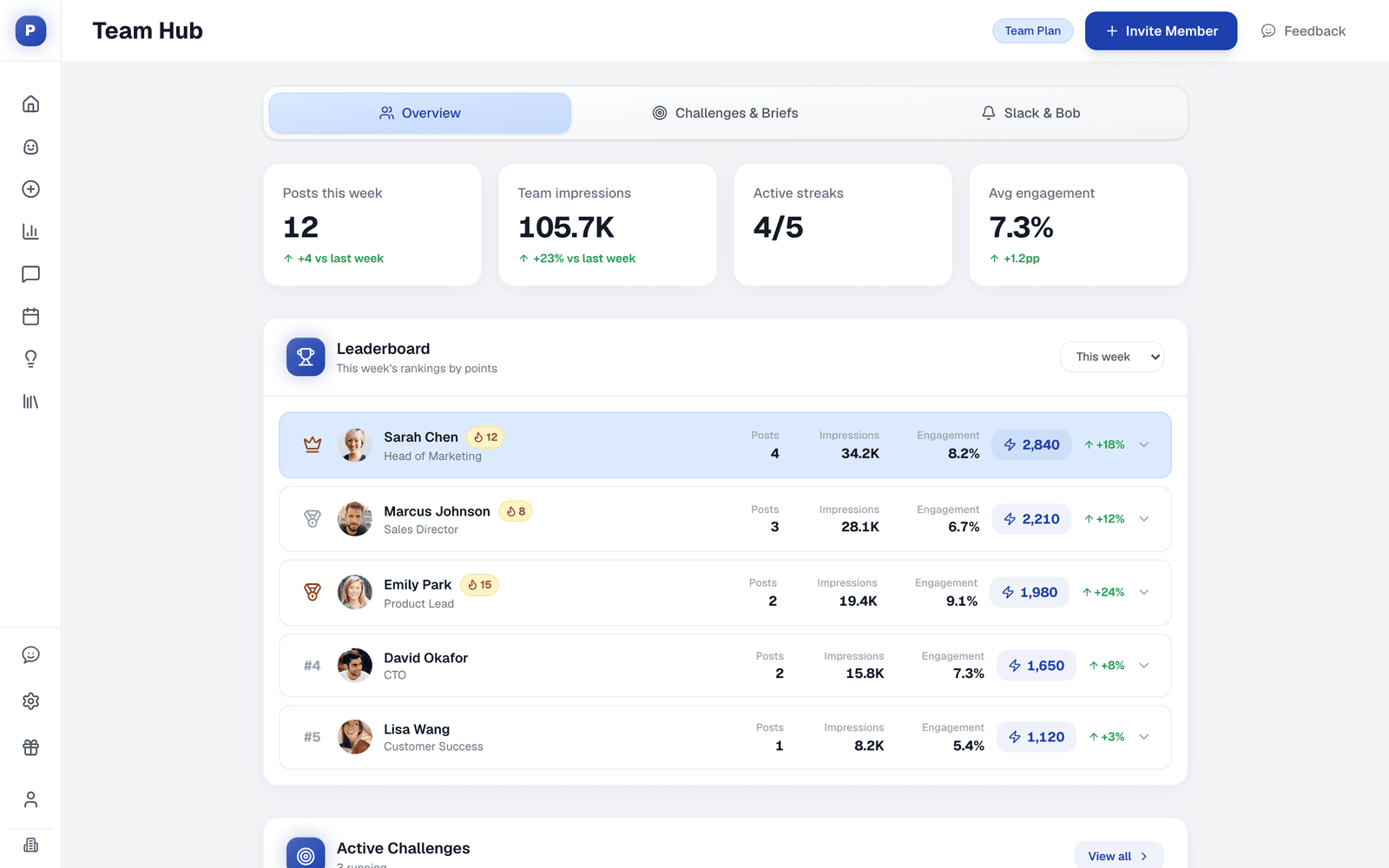
Unlimited members and profiles on Team
Approvers per profile or page
Briefs, challenges and a leaderboard
Team likes and Slack alerts
The Workspace
Everything a Team Needs to Post Together
Everyone keeps their own voice and profile. The workspace keeps the brand, the approvals and the rhythm in one place.
Members and roles
Invite teammates as members or admins. Admins manage people, approvers and team settings.
Profiles and company pages
Every teammate's profile and every company page you admin, side by side on one calendar.
Approvers per profile
Posts wait for every approver. One deny stops a post, and request changes sends it back with feedback.
Client approval links
On agency workspaces, clients approve or comment from a link, without a Postiv account.
Team briefs and challenges
Give everyone a clear angle, a deadline and points, and run challenges on posts, reach or engagement.
Slack reminders
Posting reminders and a ping to the team channel the moment a teammate's post goes live.
How It Works
From One Person Posting to a Whole Team
Set it up once. Then the workspace keeps everyone moving.
- 1
Invite the team
Add teammates and connect their profiles and your company page.
- 2
Set approvers
Choose who signs off on each profile or page before anything goes live.
- 3
Brief the week
Share briefs with an angle and a deadline, and let Bob plan each person's week.
- 4
Post and back it
Posts publish after approval, and Slack pings the team when each one is live.
Straight Answer
Team Management, Plainly
What the Team plan covers, and the details worth knowing before you roll it out.
What it does
- Unlimited members and LinkedIn profiles on the Team plan
- Approvers per profile or company page, with approve, deny and request changes
- Team Hub with briefs, challenges, a leaderboard and Slack
- Team likes chosen by admins, within minutes of publishing
- Separate client workspaces for agencies
What to know first
- Approval is not a permission level. It is a check before a post goes live. Teammates can still draft and schedule freely.
- Approval links are for agencies. Client approval links without a Postiv account are available on agency workspaces.
- Team likes only. Automatic team engagement is likes, set by admins. Comments are always written by people.
FAQ
Frequently Asked Questions
Who can I add to a Postiv workspace?
Invite teammates as members or admins. Admins manage members, approvers and team settings; members draft, schedule and post from their own connected profiles. On the Team plan, members and LinkedIn profiles are unlimited.
How does the LinkedIn approval workflow work in Postiv?
You choose approvers for a LinkedIn profile or company page. From then on, every post scheduled for that profile waits in the approval queue. Each approver can approve it, deny it or request changes. The post publishes at its scheduled time only once every approver has approved it.
Can one approver block a post?
Yes. Every approver has to approve, and a single deny stops the post. Request changes sends the post back to its author with feedback instead.
Do I have to approve my own posts?
If you schedule a post and you are the only approver on that profile, it goes straight through. Anyone else's posts for that profile still wait for you.
Can a client approve posts without a Postiv account?
On agency workspaces, yes. Send an approval link: the reviewer enters their name, reads the post, and can comment or approve without signing up. Links can expire or stay reusable. When the last approval comes in, the post is released to publish.
What is the Team Hub?
The Team Hub is where a team stays on track: shared briefs with deadlines, challenges with points, a leaderboard for posts, reach and streaks, team likes, and Slack reminders. It is part of the Team plan.
How do teammates back each other's posts?
When a post goes live, Postiv can ping your team's Slack channel with a link to it. Admins can also choose which profiles like which teammates' posts, within a few minutes of publishing. A profile never likes its own posts.
Get Your Whole Team Posting Together
Invite your team, set your approvers and plan the first week together. Try Postiv free for 7 days, cancel anytime.
How to Get a Team Posting on LinkedIn
Start small: three to five people who already have something to say, each with a clear lane. Give them briefs instead of blank pages, set one approver per profile, and review the results together once a month.
Our employee advocacy guide covers the rollout step by step, and the LinkedIn team strategy hub has breakdowns of teams that do it well. Agencies running client accounts can start with Postiv for agencies.
Last updated
More Postiv Features
All features- Ideation agentBob plans your posting week: one idea per slot, tied to your content pillars, your sources and last week's results.
- Content creationPosts, carousels, images and infographics on your brand. Draft with AI, finish in your own words.
- SchedulingOne calendar for every profile, company page and channel, with posting slots and an automatic first comment.
- EngagementEvery comment on every profile in one inbox, plus a feed of the people you want to engage with.
- AnalyticsReach, engagement and followers per post and per profile, so next week starts from what worked.
- Inspiration librarySee which LinkedIn posts are taking off in your niche, spot the outliers, and turn the idea and format into your own post.
- Knowledge baseYour website, documents, YouTube, Notion and newsletters in one library, so every idea and draft starts from your own material.

