AuthoredUp is one of the most popular LinkedIn formatting tools, and for good reason. Its rich text editor, hook templates, and cross-device post preview fill a genuine gap that LinkedIn's native composer leaves wide open. But as LinkedIn content strategies have grown more sophisticated, many professionals are discovering that formatting is only one piece of the puzzle.
After testing 10 AuthoredUp alternatives side by side, the pattern became clear: most people searching for a replacement aren't unhappy with AuthoredUp's formatting. They're frustrated by everything it doesn't do. There's no AI writing, no carousel creation, and no brand-trained content generation. Basic scheduling exists but without the queue management, best-time suggestions, or analytics depth that dedicated tools provide. That means you're still paying for multiple additional tools to get a complete LinkedIn workflow. Platforms like Postiv AI solve this by combining brand-trained AI content generation, an integrated carousel designer, scheduling, and team management into one workspace.
Why Look for AuthoredUp Alternatives

AuthoredUp does one job exceptionally well: it makes LinkedIn posts look better. The bold, italic, and bullet formatting options, combined with 300+ hook templates and an accurate mobile/desktop preview, give your content a polished edge. Thousands of LinkedIn creators rely on it daily.
But here's the reality that most AuthoredUp users eventually confront: formatting doesn't create content. You still face a blank screen every time you sit down to write. And once you've written and formatted your post, you still need a separate tool to schedule it, another to create carousels, and possibly another for analytics. The monthly costs add up fast, and the workflow stays fragmented.
The Tool Stack Problem
The most common frustration isn't with AuthoredUp itself. It's with the stack of tools you end up needing around it. A typical AuthoredUp user's workflow looks something like this:
- Write the post from scratch (no AI assistance)
- Format it in AuthoredUp (this part works great)
- Copy it to a scheduling tool like Buffer or Hootsuite
- Open Canva to design a carousel if needed
- Check analytics in yet another dashboard
That's four or five tools, multiple subscriptions, and constant context-switching. For solo creators posting twice a week, this might be manageable. For agencies, marketers, or founders posting daily across multiple profiles, it becomes a serious bottleneck.
What AuthoredUp Does Well
To be fair, AuthoredUp remains the gold standard for LinkedIn text formatting. Credit where it's due:
- Rich text editing: Bold, italic, strikethrough, bullet lists, and custom spacing that LinkedIn's native editor doesn't support
- 300+ hook templates: A solid library of proven opening lines to beat the blank page
- Cross-device preview: See exactly how your post renders on mobile, tablet, and desktop before publishing
- Cookie-free authentication: Minimal account risk since it doesn't store LinkedIn credentials
- Clean interface: Simple, focused UX that doesn't try to do too much
If all you need is a formatting upgrade for posts you already know how to write, AuthoredUp at ~$19.95/month is a fair deal. But if you need more, you're paying $20/month for formatting while still missing the rest of your workflow.
Key Limitations at a Glance
| Limitation Area | AuthoredUp Gap | What Alternatives Offer |
|---|---|---|
| Content Creation | No AI writing. Every word is on you | Brand-trained AI that drafts posts in your voice |
| Scheduling | Basic scheduling present; no optimal-timing or queue depth | Built-in scheduling with optimal timing and queue management |
| Visual Content | No carousel or image design tools | Integrated carousel designers with templates |
| Team Collaboration | Single-profile, no approval workflows | Multi-user workspaces with roles and approvals |
| Analytics | Basic post performance stats | Detailed engagement, follower, and content analytics |
| Platform Access | Chrome extension required | Web apps accessible from any browser or device |
What AuthoredUp Costs in 2026
AuthoredUp offers three tiers:
| Plan | Monthly Price | Annual Price | What's Included |
|---|---|---|---|
| Individual | $19.95/mo | $16.63/mo (billed $199.50/yr) | 1 profile: formatting, hooks, preview, analytics |
| Business | $14.95/profile/mo (min 3 profiles) | $12.46/profile/mo (billed $149.50/yr/profile) | Multiple profiles, team analytics, org management |
| Custom | Contact sales (min 10 profiles) | Contact sales | Growth plan for larger teams |
There is no permanent free tier. A 14-day free trial is available. Even on the Business plan, you cannot add AI writing, carousel design, or advanced scheduling. Those require separate tools entirely.
How We Evaluated the Top AuthoredUp Alternatives
Replacing AuthoredUp means finding a tool that covers formatting and everything else. We evaluated each platform against five core pillars that reflect what a complete LinkedIn workflow actually requires.
The Five Pillars of Our Evaluation
- AI Content Quality & Personalization: Can the AI generate posts that sound like you, not like a robot? Does it learn from your existing content, or is it just generic prompt-based output?
- Content Format Versatility: Can you create carousels, long-form posts, and visual content without leaving the platform? Or are you still bouncing to Canva for every visual?
- Scheduling & Analytics: How smart is the scheduler? Does it suggest optimal posting times, and do the analytics go beyond basic impressions?
- Team Collaboration & Workflow: Are there approval workflows, user roles, shared brand assets, and multi-profile management for teams and agencies?
- Account Safety & Compliance: Does the tool connect via LinkedIn's official OAuth API, or does it use riskier methods like cookie-based authentication or browser extension overlays?
This framework makes it possible to compare tools that serve very different niches (from AI writing platforms to enterprise scheduling suites) on the same terms.
The 10 Best AuthoredUp Alternatives in 2026
1. Postiv AI: Best All-in-One LinkedIn Platform
Postiv AI is built for professionals who want to go from idea to published content (text posts, carousels, and everything in between) without leaving a single platform. Where AuthoredUp stops at formatting, Postiv AI covers the entire workflow: AI content creation, visual design, scheduling, and team collaboration.
The standout feature is the brand-trained AI writer. Instead of generic prompts, you feed it your own materials (PDFs, blog posts, video transcripts, even YouTube content) and it learns your specific voice, phrasing, and expertise. First drafts come out sounding like you wrote them, which cuts editing time dramatically.
The integrated carousel designer is the other major differentiator. You can generate a text post with AI, convert it into a fully designed carousel with your brand colors and logo, and schedule it, all in one window. For agencies, separate brand libraries per client prevent voice mix-ups across accounts.
Best for: Founders, agencies, and marketers who want AI writing + carousel design + scheduling in one workspace.
Key strengths:
- Brand-trained AI that learns your unique voice from your content
- Integrated carousel designer with brand templates and one-click export
- Team collaboration with approval workflows and role-based permissions
- OAuth 2.0 authentication for full LinkedIn compliance
- Smart scheduling with performance analytics
Limitations: Newer platform, so the community and integrations ecosystem is still growing.
2. Taplio: Best for AI Content Ideas and Scheduling
Taplio is one of the most recognized names in LinkedIn tools. It combines AI content generation with scheduling, content discovery, and basic analytics. If your main frustration with AuthoredUp is the lack of AI writing, Taplio fills that gap.
However, Taplio's pricing has a catch that trips up a lot of users. The $39/month Starter plan includes zero AI credits. To actually use AI features, you need the Growth plan at $69/month, which caps you at 250 credits. Unlimited AI requires the $199/month Pro plan.
For a deeper dive, see our full Taplio alternatives comparison.
Best for: Creators who want AI writing and scheduling and don't mind the pricing tiers.
Key strengths:
- AI content generation with content discovery features
- Post scheduling with queue management
- Viral post library for inspiration
- Engagement features and auto-DMs on higher plans
Limitations: AI starts at $69/month Growth plan (not $39). No brand training; output can feel generic. Carousel builder only available on Growth and above. LinkedIn's 2025 crackdown raised safety questions about tools using Chrome extension overlays.
Pricing: $39/mo (Starter, 0 AI) | $69/mo (Growth, 250 AI credits) | $199/mo (Pro, unlimited AI)
3. Kleo: Best for LinkedIn Content Research
Kleo is a LinkedIn content research tool that lets you discover viral posts, analyze top creators in your niche, and understand engagement patterns.
The original free Chrome extension was shut down by LinkedIn in early 2026. Kleo relaunched as a paid web app (Kleo 3.0) at a flat $99/month with no free tier. It is strictly a research tool. It doesn't write content, schedule posts, create carousels, or support teams. Think of it as a content discovery companion that pairs well with a creation tool, not a standalone AuthoredUp replacement. Many creators use Kleo for research and Postiv AI for the actual creation and scheduling. For a full breakdown of tools replacing Kleo, see our Kleo alternatives guide.
Best for: Data-driven creators who want to research viral content patterns before writing.
Key strengths:
- Viral content discovery filtered by date, engagement, and niche
- Creator performance analysis and benchmarking
- Posting pattern insights for top performers
Limitations: No content creation, no scheduling, no carousel design, no team features. At $99/month you are paying purely for research data. You still need separate tools for everything else.
Pricing: $99/month (flat). No free tier.
4. Supergrow: Best for Trending Topic Analysis
Supergrow positions itself as an AI-powered personal branding platform for LinkedIn. It combines trending topic analysis with prompt-based AI writing and a basic carousel builder, making it one of the more complete AuthoredUp alternatives at an accessible price.
The Content DNA feature, which creates a profile of your writing style, is a nice touch. It is prompt-based rather than truly trained on your content like Postiv AI's approach. The carousel builder is on the Pro $39 plan and works for simple designs, but lacks the template depth of dedicated design tools.
Best for: Solo creators who want AI writing, scheduling, and basic carousel design in one tool.
Key strengths:
- Trending topic analysis for content ideas
- AI post generation with Content DNA personalization
- Basic carousel builder included
- Team features and approval workflows on higher plans
- Content scheduling with queue management
Limitations: AI personalization is prompt-based, not brand-trained. Carousel builder is more basic than dedicated design tools. Analytics are functional but not deep.
Pricing: Starter $19/month (no carousel) | Pro $39/month (carousel included). For more options in this space, see our upcoming Supergrow alternatives guide.
5. Buffer: Best Multi-Platform Scheduler
Buffer is a veteran social media management platform that supports LinkedIn alongside Instagram, X, Facebook, TikTok, and more. If you manage multiple social channels and need a single scheduling dashboard, Buffer delivers reliability at a competitive price.
Its free plan (supporting up to three channels) makes it the easiest entry point for solopreneurs. Buffer also recently added a basic AI writing assistant, though it's general-purpose and not LinkedIn-specialized.
Best for: Users who manage multiple social platforms and want affordable, centralized scheduling.
Key strengths:
- Free plan for up to 3 social channels
- Multi-platform scheduling from a single dashboard
- Basic AI writing assistant included
- Team collaboration on paid plans
- OAuth-based authentication for account safety
Limitations: Not LinkedIn-focused. No carousel design, no brand-trained AI, no LinkedIn-specific analytics. The jack-of-all-trades approach means it doesn't go deep on any single platform.
Pricing: Free (3 channels) | Paid plans from $5/month per channel.
6. Typefully: Best for Cross-Platform Writers
Typefully started as a Twitter/X writing tool and has expanded to support LinkedIn, Bluesky, Threads, and Mastodon. Its distraction-free writing environment and cross-platform scheduling make it appealing for creators who post across multiple text-based platforms.
The AI assist feature helps expand ideas and refine drafts, though it's a general-purpose AI rather than one trained on your specific voice. Typefully's free plan is generous, making it easy to test before committing.
Best for: Creators active on LinkedIn, X, and other text-based platforms who want one writing tool for all of them.
Key strengths:
- Multi-platform support (LinkedIn, X, Bluesky, Threads, Mastodon)
- Clean, distraction-free writing interface
- AI writing assist for expanding and refining ideas
- Generous free plan
- Collaborative features for teams
Limitations: No carousel designer, no brand-trained AI, no LinkedIn-specific analytics. Better for text posts than visual content. Not LinkedIn-specialized.
Pricing: Free plan available | Paid plans from $12.50/month.
7. MagicPost: Best for API-Safe Posting
MagicPost has gained significant traction as one of the few LinkedIn tools operating as an official LinkedIn API partner. After LinkedIn's 2025 crackdown on unauthorized automation tools, this API partner status provides genuine peace of mind.
MagicPost focuses on speed. You can generate and publish posts quickly using templates and AI assistance. It supports scheduling but does not include a native carousel builder. The AI writing is template-driven rather than personalized to your voice, but the safety-first approach makes it a compelling option for risk-averse professionals.
Best for: Creators who prioritize account safety and want a fast, no-frills posting workflow.
Key strengths:
- Official LinkedIn API partner status
- Fast post creation with AI templates
- Clean, simple interface
- Scheduling with basic analytics
Limitations: No native carousel designer. AI writing is template-based, not trained on your brand. Limited analytics compared to dedicated analytics tools. No knowledge base or voice learning features.
Pricing: Starts at ~$21/month.
8. Hootsuite: Best Enterprise Social Suite
Hootsuite is the heavyweight of social media management, built for large teams and enterprises managing multiple platforms at scale. It supports LinkedIn alongside virtually every other social network, with advanced analytics, team management, and approval workflows.
For enterprise teams with complex compliance requirements and dozens of social profiles, Hootsuite's depth is hard to beat. But for solo creators or small teams focused on LinkedIn, it's expensive overkill.
Best for: Enterprise teams managing social media at scale across multiple platforms.
Key strengths:
- Advanced analytics and custom reporting
- Robust team management with approval workflows
- Multi-platform support covering virtually every network
- Social listening and monitoring
- Established track record and extensive integrations
Limitations: Expensive starting point at $99/month. No LinkedIn-specific features like carousel design or brand-trained AI. Complex interface with a steep learning curve. Overkill for individual creators.
Pricing: Professional plan starts at $99/month.
9. ContentStudio: Best for Content Curation and Scheduling
ContentStudio combines content curation, AI writing, and multi-platform scheduling into a single dashboard. Its discovery engine surfaces trending content across industries, making it useful for marketers who need a steady stream of shareable content alongside original posts.
The AI writing features are serviceable for generating post drafts, and the scheduling system is solid across multiple platforms. It's a good middle ground between Buffer's simplicity and Hootsuite's complexity.
Best for: Marketers who want content curation and scheduling across multiple social channels.
Key strengths:
- Content discovery and curation engine
- AI writing assistant for post generation
- Multi-platform scheduling (LinkedIn, X, Facebook, Instagram, and more)
- Automation recipes for content workflows
- Team collaboration features
Limitations: Not LinkedIn-specialized. No carousel designer, no brand training. AI output is generic. Analytics are adequate but not LinkedIn-deep.
Pricing: Starts at ~$25/month.
10. Shield (Note: Winding Down)
Shield took a completely different approach from AuthoredUp. Where AuthoredUp helped you format content before publishing, Shield helped you understand how it performed after publishing. It was a dedicated LinkedIn analytics platform with deep performance metrics, follower growth tracking, audience demographics, and a full post archive.
As of mid-2026, Shield announced it is winding down after LinkedIn revoked its data access. The platform is no longer accepting new customers. If you are a current Shield user, the company has advised migrating your data. For a full list of options, see our Shield alternatives guide.
Shield Agent, their AI feature, let you ask questions about your LinkedIn data in natural language. Many professionals used Shield alongside a content creation tool rather than as a standalone replacement.
Status: Winding down (non-official data access revoked by LinkedIn).
Key strengths (historical):
- Deep LinkedIn analytics: impressions, engagement rate, reach, all filterable
- Follower growth tracking with visualizations
- Audience demographics (job titles, industries, locations)
- Shield Agent for natural language data queries
- Full historical post archive
- Multi-profile support for agencies
Limitations: No content creation features. Purely an analytics tool. Now winding down.
Feature Comparison: AuthoredUp vs Top Alternatives
| Feature | AuthoredUp | Postiv AI | Taplio | Kleo | Supergrow | Buffer | MagicPost | Typefully | Hootsuite | ContentStudio | Shield |
|---|---|---|---|---|---|---|---|---|---|---|---|
| AI Content Generation | No | Yes (brand-trained) | Yes (from $69/mo Growth) | No | Yes (prompt-based) | Yes (basic) | Yes (template) | Yes (AI assist) | Yes (basic) | Yes (basic) | No |
| Rich Text Formatting | Yes (best-in-class) | Yes | Basic | No | Basic | No | Basic | Basic | No | No | No |
| Carousel Designer | No | Yes (integrated) | Yes (from $69/mo Growth) | No | Yes (Pro $39 only) | No | No | No | No | No | No |
| Post Scheduling | Yes (basic) | Yes | Yes | No | Yes | Yes | Yes | Yes | Yes | Yes | No (winding down) |
| Analytics | Basic | Yes | Basic | Creator analysis | Yes | Yes | Basic | Basic | Advanced | Basic | Was deep (winding down) |
| Team Workflows | No | Yes (roles + approvals) | Basic | No | Basic | Yes | Basic | Yes | Advanced | Yes | Multi-profile |
| Multi-Platform | LinkedIn only | LinkedIn + X | 8+ platforms | 5 platforms | 10+ platforms | 8+ platforms | LinkedIn only | ||||
| Authentication | Cookie-free extension | OAuth 2.0 | Cookie + OAuth | Web app | OAuth | OAuth 2.0 | Official API | Official API | OAuth | OAuth | OAuth |
Pricing Comparison Table
| Tool | Free Plan | Starting Price | AI Included? | Best For |
|---|---|---|---|---|
| Postiv AI | 7-day free trial | 7-day free trial | Yes (brand-trained) | Agencies, founders, content teams |
| Taplio | No | $39/mo (0 AI credits) | Only from $69/mo (Growth) | AI content + scheduling |
| Kleo | No | $99/mo | No | Content research and discovery |
| Supergrow | No | $19/mo | Yes (prompt-based, Pro $39 for carousel) | Solo creators wanting AI + trends |
| Buffer | Yes (3 channels) | $5/mo per channel | Yes (basic) | Multi-platform scheduling |
| Typefully | Yes (free plan) | $12.50/mo | Yes (AI assist) | Cross-platform text creators |
| MagicPost | Free trial | ~$21/mo | Yes (template-based) | Safety-first LinkedIn creators |
| Hootsuite | No | $99/mo | Yes (basic) | Enterprise social teams |
| ContentStudio | No | ~$25/mo | Yes (basic) | Content curation + scheduling |
| Shield | N/A (winding down) | N/A (winding down) | No (analytics only) | LinkedIn analytics (winding down) |
| AuthoredUp | 14-day trial | $19.95/mo | No | Text formatting and hooks |
A Deeper Look at Postiv AI

When the search for AuthoredUp alternatives evolves from "I need better formatting" to "I need a complete LinkedIn content system," Postiv AI enters the picture. It's designed for creators, founders, and agencies who've outgrown the piecemeal approach of stacking multiple tools and want one platform that handles everything.
Brand-Trained AI That Actually Sounds Like You
The core differentiator is Postiv AI's brand-trained AI writer. This isn't the generic, one-size-fits-all AI you find in most tools. You build a knowledge library from your own materials:
- PDFs: white papers, case studies, strategy documents
- Video transcripts: webinars, interviews, product demos
- Blog posts and articles: content that already captures your voice
- YouTube videos: the AI extracts and learns from your video content
Once trained, the AI understands your specific phrasing, point of view, and core topics. First drafts come out sounding authentically like you, which cuts editing time from hours to minutes. This is a fundamentally different experience from prompt-based AI that produces generic LinkedIn-speak.
Integrated Carousel Design
One of the biggest gaps AuthoredUp leaves is visual content creation. Carousels are among the highest-performing content formats on LinkedIn, but AuthoredUp can't create them. Most users end up in Canva, which breaks the workflow and makes brand consistency harder to maintain.
Postiv AI solves this with a built-in carousel designer. You can generate a text post with AI, convert it into a fully designed carousel using your brand templates (colors, fonts, logos), and schedule it, all without leaving the platform. For agencies, this means every client's carousels stay perfectly on-brand without manual design work. If you're looking for carousel inspiration, our collection of LinkedIn carousel examples showcases 50 high-performing formats.
The Complete Workflow in One Place
Here's what a typical Postiv AI workflow looks like, compared to the multi-tool juggling act that AuthoredUp requires:
| Stage | AuthoredUp Workflow | Postiv AI Workflow |
|---|---|---|
| Ideation | Stare at blank screen, browse hooks | Feed a source to brand-trained AI, get multiple angles |
| Writing | Write everything yourself | AI generates first draft in your voice; refine with editor |
| Formatting | Format in AuthoredUp (great) | Format within the same platform |
| Design | Switch to Canva for carousels | Convert to carousel with brand templates in one click |
| Scheduling | Copy to Buffer or Hootsuite | Schedule directly with optimal timing suggestions |
| Analytics | Check LinkedIn native stats | Track performance in the same dashboard |
The difference isn't just convenience. It's compounding. Every tool switch introduces friction, delays, and opportunities for brand inconsistency. A unified platform eliminates all of that.
Account Safety Built In
Postiv AI connects to LinkedIn through OAuth 2.0, the official LinkedIn-approved authentication method. You never hand over your password. You can revoke access at any time. All scheduling and posting is done through LinkedIn's compliant API, keeping your account protected.
This matters more than ever after LinkedIn's 2025 crackdown. Tools that relied on cookie-based authentication or browser extension overlays put accounts at real risk. Postiv AI was designed from the ground up to play by LinkedIn's rules.
How to Choose the Right AuthoredUp Alternative
The right replacement depends entirely on what's missing from your current workflow. AuthoredUp users fall into a few common camps, and each has a clear best-fit tool.
If You Need AI Writing + Design + Scheduling
You want a single platform that replaces AuthoredUp and the two or three other tools you're currently using alongside it. You're tired of context-switching and want everything in one place.
Best choice: Postiv AI. Brand-trained AI writing, integrated carousel design, scheduling, and team workflows. One subscription replaces your entire stack.
If You Want the Cheapest Possible Setup
Budget is your primary concern. You'll accept more manual work and a fragmented workflow in exchange for lower costs.
Best choice: Buffer (free). Buffer handles scheduling across up to 3 channels at no cost. You still write and design everything yourself. Note that Kleo, previously a free Chrome extension, relaunched as a paid $99/month web app in 2026, so it no longer fits a zero-budget stack. For carousel creation on a budget, see our guide to LinkedIn infographic makers.
If You Manage Multiple Social Platforms
LinkedIn is just one of several channels you post to. You need a single dashboard for LinkedIn, Instagram, X, TikTok, and more.
Best choice: Buffer (for simplicity and value) or Hootsuite (for enterprise scale). Neither specializes in LinkedIn, but both cover the most platforms.
If You're an Agency Managing Client Accounts
You need separate brand voices, approval workflows, and the ability to scale content production across multiple client profiles without mixing anything up.
Best choice: Postiv AI. Separate client workspaces, brand-trained AI per client, approval workflows, and team roles. Our guide to social media tools for agencies covers additional options for multi-platform agency needs.
If Analytics Are Your Priority
You want deep, detailed LinkedIn performance data: not just basic post stats, but audience demographics, growth trends, and content archive analysis.
Best choice: Shield was the most specialized LinkedIn analytics tool available, but it is now winding down after LinkedIn revoked data access. See our Shield alternatives guide for current options. Pair any analytics tool with a content creation platform like Postiv AI for a complete setup.
Safety First: Check Authentication Before Features
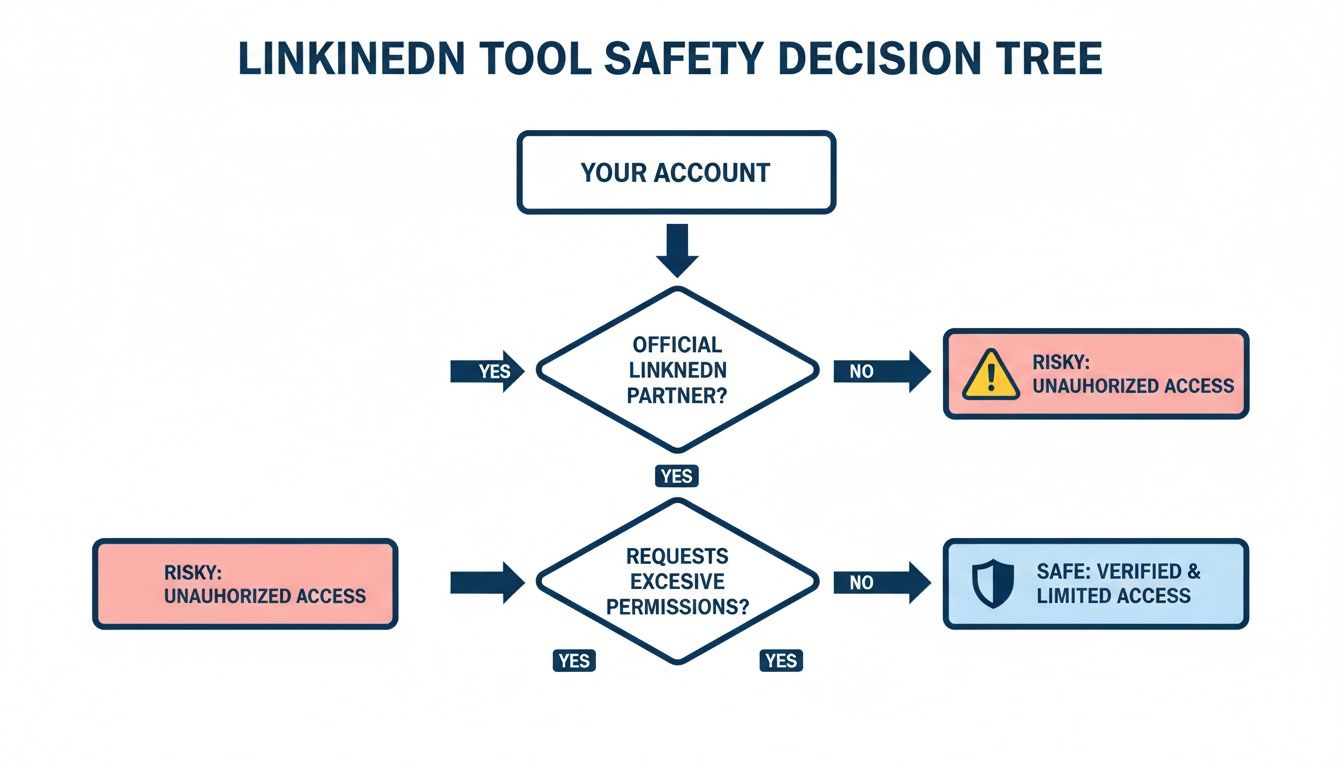
Before comparing features, always check how a tool connects to your LinkedIn account. After LinkedIn's 2025 crackdown, this is non-negotiable. Tools using OAuth 2.0 or official API partnerships (Postiv AI, Buffer, MagicPost) are the safest. Cookie-based authentication and engagement automation carry real risk. Your LinkedIn network is too valuable to gamble with.
For more strategies on building a LinkedIn presence with the right tools, check out our guide to the best LinkedIn post creators. If you are specifically weighing AuthoredUp against Taplio as your primary content tool, our head-to-head of the top Taplio alternatives in 2026 walks through pricing traps, AI credits, and account-safety differences most review sites gloss over.
Frequently Asked Questions About AuthoredUp Alternatives
Is there a free AuthoredUp alternative?
Buffer has a free plan supporting up to three social channels. Typefully also has a free tier for text-based posting. Note that Kleo, previously a free Chrome extension, relaunched in 2026 as a paid $99/month web app and no longer qualifies as a free option. Free tools generally lack AI writing, carousel design, and team features. Postiv AI offers a 7-day free trial that includes brand-trained AI writing and carousel design so you can test a full workflow before committing.
Does AuthoredUp have AI writing?
No. AuthoredUp is a formatting and text editing tool. It provides rich text formatting, hook templates, and post preview, but it does not generate content with AI. If you need AI writing alongside formatting, alternatives like Postiv AI, Taplio, and Supergrow include AI content generation.
Can I schedule LinkedIn posts with AuthoredUp?
AuthoredUp does include basic scheduling as part of its profile connection. However, it does not offer queue management, best-time suggestions, or deep scheduling analytics. If you need a smarter scheduler with AI writing and carousel design in one platform, alternatives like Postiv AI provide a more complete solution.
What is the best AuthoredUp alternative for agencies?
Postiv AI is the strongest option for agencies. It offers separate client workspaces with individual brand libraries, team roles with approval workflows, and a built-in carousel designer. Agencies can manage multiple LinkedIn accounts without mixing up brand voices or paying for multiple tool subscriptions.
Is AuthoredUp safe to use with LinkedIn?
AuthoredUp uses a cookie-free authentication model and operates as a Chrome extension overlay. It does not use automation or engagement bots, so it carries minimal account risk. However, since it requires Chrome, you are limited to desktop browser use. Alternatives that use LinkedIn's official OAuth API, like Postiv AI, Buffer, and MagicPost, offer similar safety with more flexibility.
Can I create LinkedIn carousels with AuthoredUp?
No. AuthoredUp is focused entirely on text post formatting. To create carousels, you need a separate design tool like Canva or a platform with a built-in carousel designer. Postiv AI and Supergrow both include carousel builders. MagicPost does not have a native carousel designer.
How does AuthoredUp compare to Taplio?
AuthoredUp and Taplio serve different purposes. AuthoredUp excels at rich text formatting, hook templates, and post preview. Taplio provides AI content generation, scheduling, and analytics. Neither offers an integrated carousel designer at the base plan. Postiv AI combines AI writing, formatting, carousel design, and scheduling in a single platform. For a full breakdown, see our guide to the best Taplio alternatives.
What is the cheapest AuthoredUp alternative with AI?
Buffer offers a free plan with basic AI writing for up to three channels. Typefully has a free tier with AI assist features. For a more complete AI experience with brand training and carousel design, Postiv AI starts with a 7-day free trial. Supergrow starts at $19/month with prompt-based AI included (carousel design requires the $39 Pro plan).