LinkedIn MCP Servers Compared (2026): Official API vs Scrapers vs Scheduler MCPs
Which LinkedIn MCP server should you use? It depends on what you want the AI to do. To publish and manage your own content, pick a hosted server that uses LinkedIn's official API. To research other people's profiles and jobs, an open-source scraper or a data service is the only option, and it carries account risk. If LinkedIn is one of many networks you post to, use the MCP of your scheduler.
We build Postiv's hosted LinkedIn MCP, so we are one of the options in this comparison. We say where we fit and where we do not. Every third-party claim below comes from the vendor's own pages, checked in October 2026. We name no prices, and where a vendor's pages disagree or say nothing, we say "check their docs".
If you only want the Claude setup, go straight to how to connect Claude to LinkedIn.
What is a LinkedIn MCP server?
A LinkedIn MCP server is a service that exposes LinkedIn-related actions as tools an AI app such as Claude or ChatGPT can call through the Model Context Protocol. Depending on the server, those tools read public data, post to your profile, manage drafts and schedules, or pull your analytics.
The AI app is the client. It lists the server's tools, decides which to call, and (in well-built servers) asks for your approval before anything is published. What differs between servers is how the server reaches LinkedIn, and that decides what it can do and how much risk you carry.
Is there an official LinkedIn MCP server?
As of October 2026 we could not find one. LinkedIn has not published an MCP server or Claude connector that we could locate, so every LinkedIn MCP server is third-party. That is absence of evidence rather than proof, so check LinkedIn's developer pages if this matters for your decision.
LinkedIn does publish two official apps in ChatGPT's directory:
- LinkedIn: looks up a professional and shows title, company, location and follower count, then links out to the full profile.
- LinkedIn Ads: in beta, shows read-only ad set performance for accounts you can access.
Neither posts, schedules or manages your content. If you want an AI to write and publish on LinkedIn, you need one of the third-party servers below.
The four types of LinkedIn MCP servers
LinkedIn MCP servers reach LinkedIn in four different ways, plus a fifth family of scheduler tools that we cover further down.
- Scraper and browser-session servers. Open-source projects on GitHub that drive a logged-in browser as you. They read profiles, jobs and messages. They cannot use LinkedIn's official API, so they work by imitating you, which is where the account risk comes from.
- Data-extraction services. Apify and Bright Data run scrapers in their own cloud and expose them through an MCP server. They return public LinkedIn data (profiles, companies, jobs, posts). They are read-only and built for research, not publishing.
- Generic connector platforms. Zapier, Composio and Merge offer a LinkedIn integration inside a broad catalog of apps. They connect through LinkedIn's official API with OAuth, but the LinkedIn coverage is a few actions inside a much bigger product.
- Official-API content platforms. Postiv, ContentIn and Taplio are built around LinkedIn content. They connect your account through LinkedIn's official API and give the AI a workspace: drafts, scheduling, analytics and more.
- Social scheduler MCPs. Buffer, Pallyy, Planoly, Hootsuite and Metricool added MCP servers to multi-network schedulers. LinkedIn is one network among several.
LinkedIn MCP servers compared
Checked October 2026 from each vendor's own pages. "Not listed" means we found no such tool in their documentation, not that it is impossible.
| Server | Type and how it reaches LinkedIn | Auth for your AI app | Publish posts | Carousels / documents | Analytics | Comments | DMs / connection requests | Account risk |
|---|---|---|---|---|---|---|---|---|
| Postiv | Content platform, LinkedIn official API (OAuth) | Postiv sign-in (Claude, ChatGPT) or org API key | Yes, with approval rules | Yes, carousels (published as PDF documents) | Yes (cached imports) | Yes | No | Low |
| ContentIn | Content platform, verified LinkedIn app (official API) | MCP key, one per profile | Yes, asks to confirm | Not listed (images only, no PDFs) | Yes, per post | Reads your comments | No | Low |
| Taplio | Content platform, own LinkedIn integration (no scraping, per vendor) | Taplio sign-in | Yes, after confirmation | Not listed | Yes | Yes | No | Low |
| stickerdaniel/linkedin-mcp-server | Open-source scraper, your own browser session | Local login, no vendor account | No | No | No | Not listed | Yes (messages, connect) | High (own README warns) |
| Apify | Data service, third-party Store Actors | OAuth or token | No | No | No | No | No | Depends on the Actor |
| Bright Data | Data service, pre-built scraper APIs | API token | No | No | No | No | No | Third-party data, read-only |
| Zapier | Connector platform, official API | Zapier OAuth | Yes (share updates) | Not listed | No | No | No | Low |
| Composio | Connector platform, official API | Composio-managed OAuth | Yes (text, image, video) | Not listed | Share and page stats | Yes | No | Low |
| Merge Agent Handler | Connector platform, official API | OAuth | Yes (text, article, image) | Not listed | Yes, post analytics | Not listed | No | Low |
A few notes on the table:
- ContentIn is available on its Pro plan only and checks your plan on every call. Its image attach tool takes up to five JPG, PNG or WEBP files and says no GIFs, video or PDFs.
- Taplio needs a plan that includes API access. Its June blog post describes the MCP as text-only, but its later product and Claude directory pages list image and video attachments, so we treat the blog as out of date.
- Zapier exposes Create Share Update, Create Company Update and a beta raw API request. Each successful tool call uses two tasks from your Zapier plan.
- Composio lists 25 LinkedIn tools. Merge posts to a profile or a company page.
- Apify and Bright Data do not post. Both return data other people published.
For the open-source side, the most used repo on GitHub is stickerdaniel/linkedin-mcp-server (Apache-2.0, installed with uvx or Docker, thousands of GitHub stars). It has roughly twenty tools for profiles, companies, job search, people search, your inbox and sending messages. It has no tool to create a post. Smaller repos exist, such as eliasbiondo/linkedin-mcp-server, which is also browser-based. Another repo says it uses LinkedIn's API with a token, but it has not been updated since early 2025, so treat what its listing claims with caution before you rely on it. GitHub activity changes fast, so check the repo's last commit before you commit to one.
Social media scheduler MCPs: Buffer, Pallyy, Planoly, Hootsuite, Metricool
If you already run a social media scheduler, its MCP server is a natural way to let an AI draft and queue posts across networks. All five below are hosted, so you add a URL and sign in instead of installing anything.
| Scheduler | Networks | What it does on LinkedIn, per its docs | Auth | Plan inclusion |
|---|---|---|---|---|
| Buffer | Many | Create, edit, delete and schedule posts; image, video and a document asset; link preview card; aggregated post metrics, refreshed once a day | API key as bearer header per the dev docs; Buffer's marketing page also mentions OAuth sign-in | Included on every plan, including Free |
| Pallyy | 10 networks | One post can target several networks; drafts by default, publishing needs a separate permission. No analytics, no comment replies | Pallyy sign-in (Claude, ChatGPT, Cursor) or API key | Check their docs |
| Planoly | Instagram-first | LinkedIn is a publish target: create and cross-post carousels, schedule, drafts. Analytics are Instagram only | OAuth sign-in | Their help pages conflict, check their docs |
| Hootsuite | Many | Publish or schedule to a connected LinkedIn page, save drafts, view your LinkedIn schedule, summarize performance, recommended times | Hootsuite workspace sign-in | Check their docs |
| Metricool | Many | Schedule posts, update them, read your LinkedIn posts with metrics, best times to post, analytics | OAuth in the browser, or a user token | The LinkedIn connection starts at its Starter plan |
These are strong if LinkedIn is one of five or ten networks you post to and you want one queue. The trade-off is depth. Carousels are not named in most of these docs (Planoly names them), comment management is thin, and a social media MCP server built around "post to everything" will not know your voice, your content pillars or your team's approval rules.
Postiv is LinkedIn-first (it also supports X). It exposes carousels, approvals, comment replies and analytics as tools the AI can call, because the product was built for LinkedIn content. If your reach lives on LinkedIn, depth beats breadth. If you post to eight networks equally, the scheduler is the better fit.
Does Buffer have an MCP?
Yes. Buffer runs a hosted MCP server at mcp.buffer.com, so there is nothing to install. Per Buffer's own pages it is included on every Buffer plan, including Free, and it can create, edit, delete and schedule posts on connected channels, including LinkedIn. Write tools usually need your client's approval, and Buffer applies rolling 15-minute, 24-hour and 30-day quotas by plan (you get a 429 error when you go over).
Can Claude connect to Buffer?
Yes. Buffer lists Claude among the clients its MCP server supports, along with ChatGPT, Cursor, Raycast, Perplexity, Notion, Zapier and n8n. You add Buffer's server URL as a custom connector and authenticate with your Buffer account credentials. Check Buffer's docs for the current sign-in method, because its developer docs and its marketing page describe it differently.
How is MCP better than API?
MCP is not a replacement for an API, it is a standard layer on top of one. A good MCP server wraps an API so an AI app can discover the available tools, call them with the right parameters and ask for your approval before writes. You skip the glue code, but the vendor API still does the work. If you are building your own integration, read how the LinkedIn posting API works for AI agents.
Which LinkedIn MCP server can publish posts?
Servers built on LinkedIn's official API can publish: Postiv, ContentIn, Taplio, Zapier, Composio and Merge all list post-creation tools. The popular open-source scraper servers and the data-extraction services are read-only. Scheduler MCPs such as Buffer, Pallyy, Planoly, Hootsuite and Metricool can also publish or schedule to LinkedIn.
The details differ:
- Confirmation before posting. ContentIn and Taplio wait for your confirmation before publishing. Postiv schedules at least two minutes ahead and, if the profile has approvers, the post waits for them.
- Media. Image attachments are common. Carousels are rare outside Postiv and Planoly in the docs we checked.
- Where it posts. Postiv connects profiles and Company Pages. Merge posts to a profile or a company page. Hootsuite's examples target a connected LinkedIn page, and we could not verify personal profile support.
For a full ranking of agents that write and post, see our best LinkedIn AI agents guide.
Will a LinkedIn MCP server get my account restricted?
Servers that automate a logged-in browser session carry real risk, because LinkedIn's User Agreement prohibits bots and unauthorized automated access. Servers that use LinkedIn's official API through OAuth are the sanctioned route. The safest choice is one that never touches your password or session cookie.
Section 8.2 of LinkedIn's User Agreement lists as a "Don't" to "use bots or other unauthorized automated methods to access the Services". It also bars scripts, crawlers and browser add-ons used to scrape or copy the Services. A scraper MCP that logs in as you and clicks through LinkedIn is the pattern that rule describes. The most used GitHub scraper says so itself: its README warns that accounts using automated tools can be restricted or banned. Another repo's disclaimer says scraping may violate LinkedIn's terms.
The official API route is different in kind. You authorize an app once through LinkedIn's OAuth screen, the app gets scoped permission to post for you, and you can revoke it. The trade-offs are real too. Access tokens last 60 days, so connections occasionally need re-authorizing, and LinkedIn's organic posting API does not support every format. The full picture is on our LinkedIn safety page. If you want to compare tools by risk, our LinkedIn automation tools guide uses the same lens.
How to choose: a decision guide
| Your goal | Pick | Why |
|---|---|---|
| Research other people's profiles, jobs or companies | An open-source scraper (GitHub), Apify or Bright Data | They are the only ones that read other people's data, and that is the access LinkedIn's User Agreement restricts. Weigh the account and data risk before you use one. |
| Publish and manage your own LinkedIn content | An official-API content platform: Postiv, ContentIn or Taplio | Sanctioned access, confirmation before posting, drafts and schedules in one place. |
| Run a team or agency with approvals | Postiv | Workspaces, approvers on scheduled posts and Company Pages. See the agency setup. |
| Schedule across many networks | Your scheduler's MCP: Buffer, Metricool, Hootsuite, Pallyy or Planoly | One queue for every network you post to. |
| Build your own integration | The LinkedIn API directly, or Zapier or Composio as a shortcut | Full control, but you manage tokens, versions and approvals. |
| Occasional single posts from a no-code flow | Zapier | Two write actions, simple to wire up. |
If you are unsure, ask one question: does the AI need to read other people's LinkedIn data, or write and manage yours? Only a scraper does the first, and only an official-API platform does the second without the risk.
How to install a LinkedIn MCP server in Claude, ChatGPT or Claude Code
The install steps depend on the type.
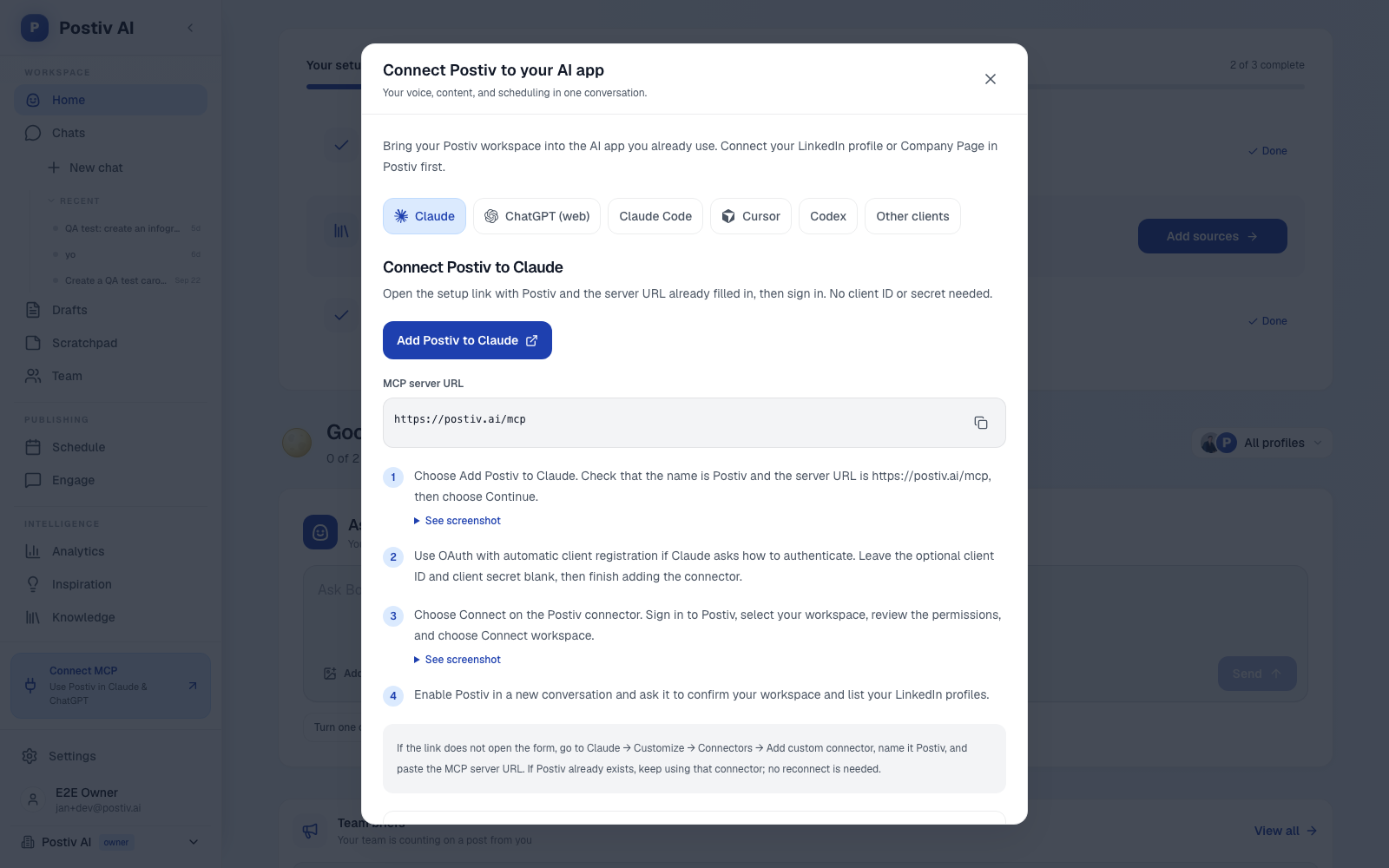
Hosted servers (Postiv, ContentIn, Taplio, Buffer and the other schedulers) run on the vendor's side. You paste a URL and sign in. For Postiv:
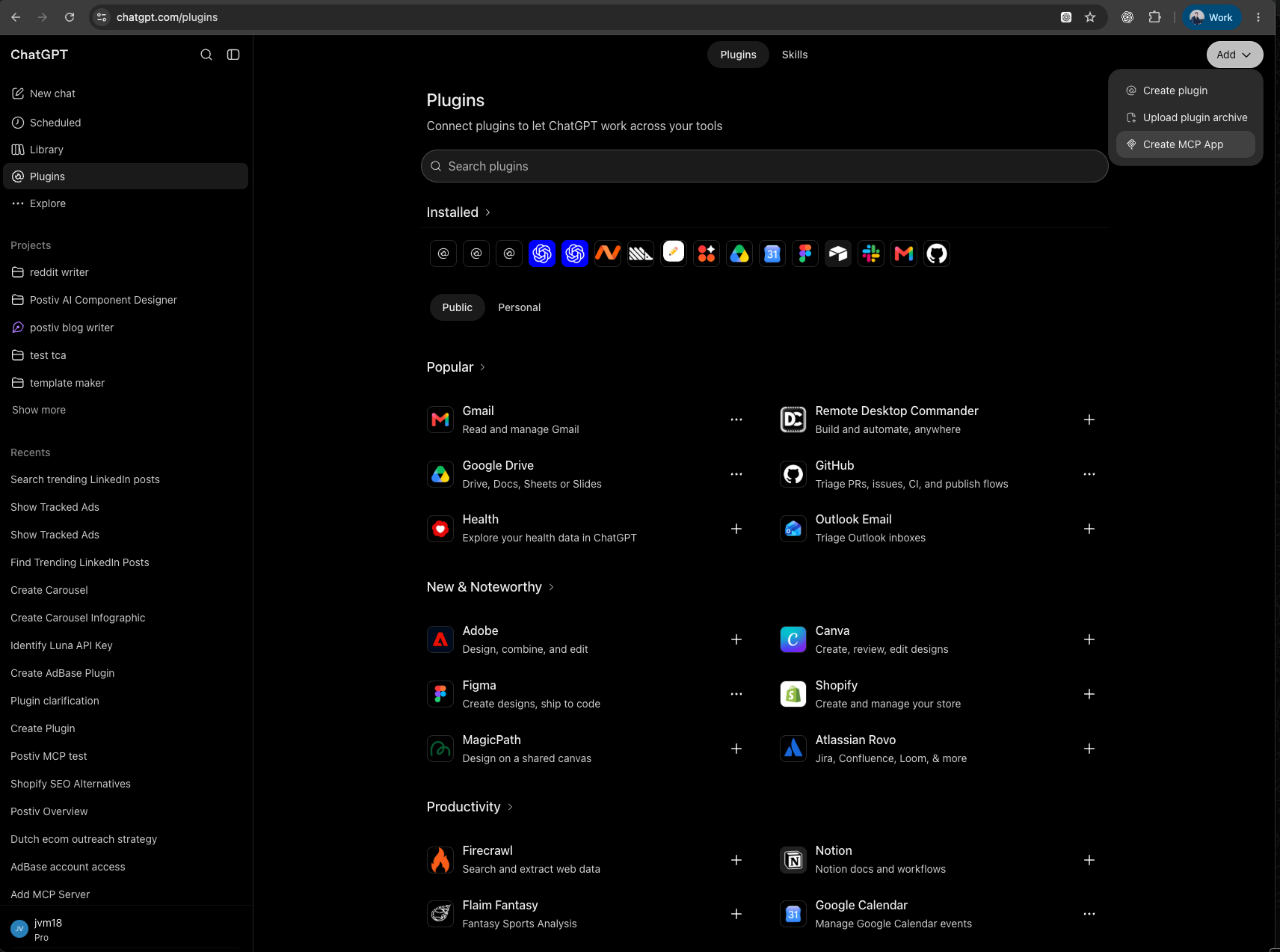
- Claude: Customize, Connectors, Add custom connector. Name it Postiv, URL
https://postiv.ai/mcp, choose Connect, sign in, pick your workspace and click Connect workspace. - ChatGPT: Plugins, Add, Create MCP App. Server URL
https://postiv.ai/mcp, keep OAuth, then Sign in with Postiv. You may need Developer mode on, and availability depends on your plan. - Claude Code:
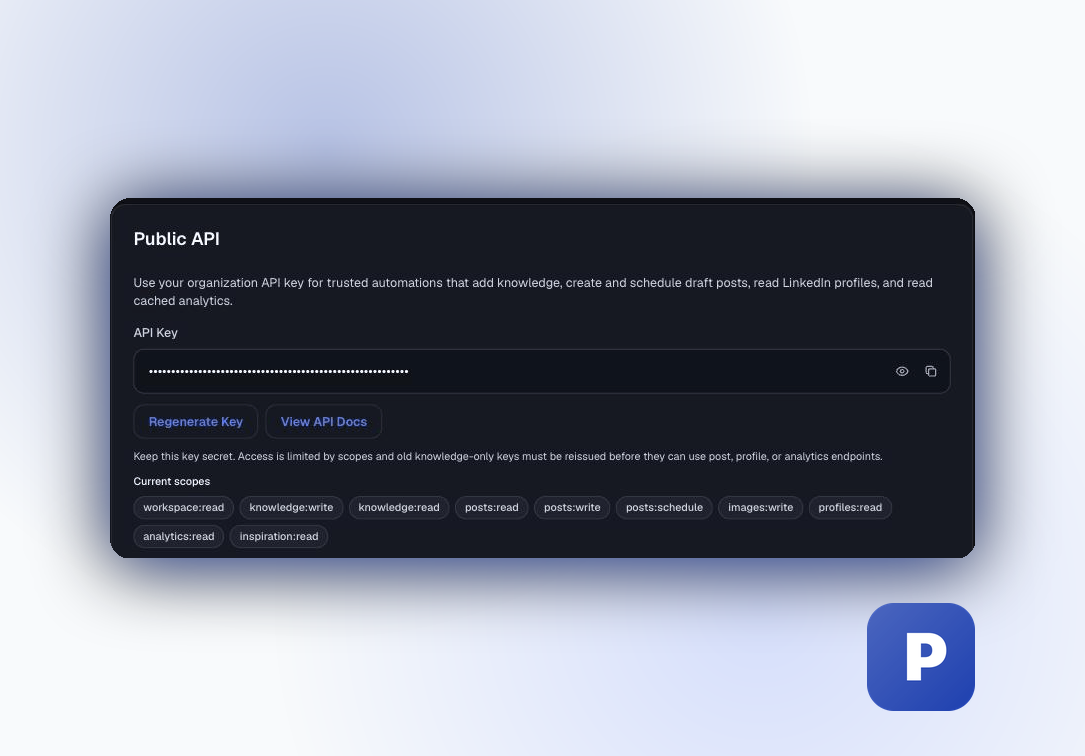
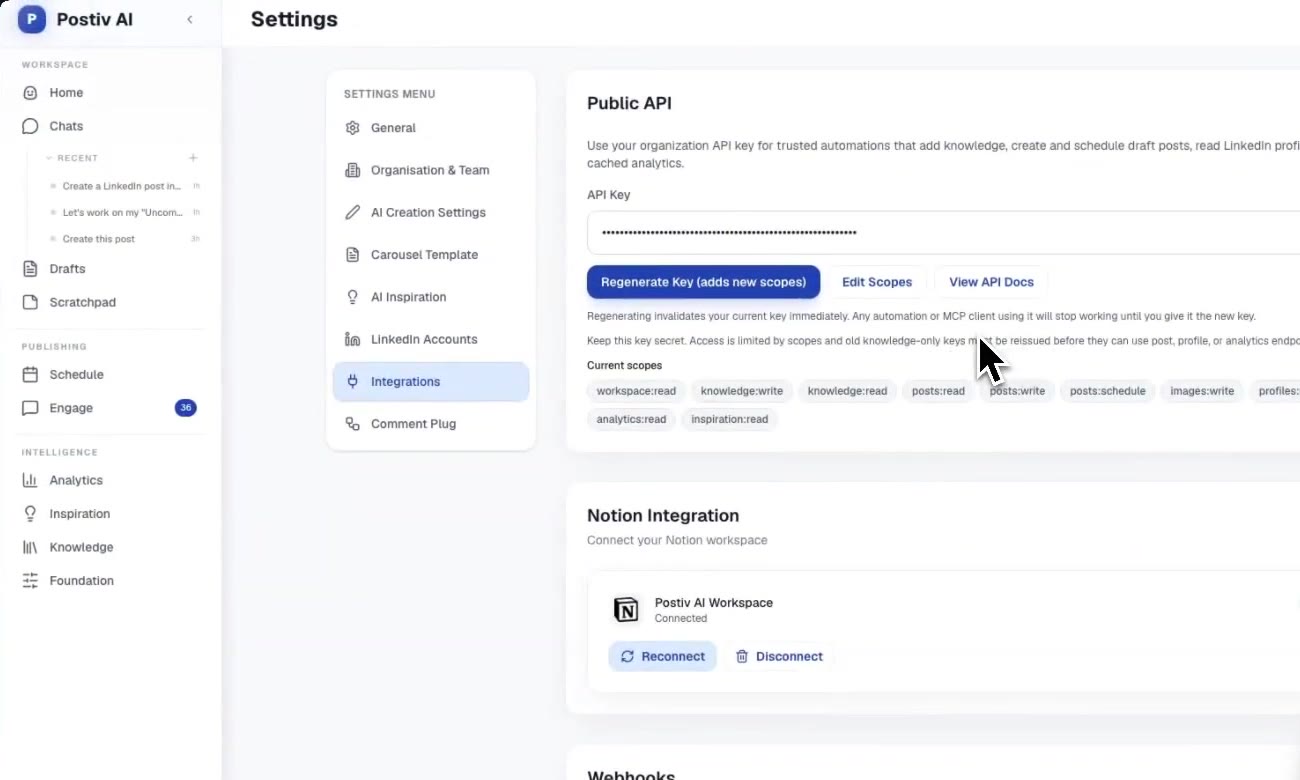
claude mcp add --transport http postiv https://postiv.ai/mcp --header "Authorization: Bearer pk_postiv_YOUR_KEY", using an organization API key from your Postiv settings.
Full walkthroughs: Claude, ChatGPT and Claude Code. The reference is in the hosted MCP docs.
Self-hosted GitHub servers run on your own machine. In general terms: install Python tooling (uvx) or Docker, add the server to your client's MCP config as a local command, then run its login step once. That opens a browser where you sign in to LinkedIn, and the server keeps that session. When LinkedIn expires the session, which happens, you log in again. Because they run locally, they suit desktop and command-line clients better than a web chat. Follow the repo's README for exact commands, as they change often.
What Postiv's hosted MCP does, and what it does not
Postiv's MCP is built and run by Postiv, not LinkedIn. It connects LinkedIn profiles and Company Pages through LinkedIn's official API, with no password, no session cookie and no scraping.
What the AI can do with it (more than 80 tools in total):
- Write:
create_post,update_post,get_writing_style,add_post_version. - Visuals:
create_carousel,edit_carousel_slide,render_carousel,create_infographic,generate_post_image. - Schedule:
schedule_post,reschedule_post,unschedule_post, plusset_comment_plug_configfor an automatic first comment. - Approve:
list_pending_approvals,approve_scheduled_post,request_approval_changes,deny_scheduled_post. - Analyze:
get_analytics_summary,get_performance_overview,list_analytics_accounts. - Engage:
get_post_comments,suggest_reply,reply_to_comment,comment_on_post,react_to_post. - Plan and research:
list_pillars,list_content_plans,search_inspiration,search_knowledge,track_creator.
What it does not do, by design: no direct messages, no connection requests, no job search, and no look-ups of arbitrary LinkedIn members. It is a content tool, not an outreach tool. Analytics are cached imports from LinkedIn, not live scrapes, so numbers reflect the last import. You can choose Read only access when you connect, for research and reporting without any write ability. The assistant also cannot bypass approvers on a profile.
Postiv is a paid product with a 7-day free trial, which is a trade-off if you wanted a free repo.
More quick answers
What is the best LinkedIn MCP server?
It depends on the goal. For publishing your own content, pick a hosted server that uses LinkedIn's official API. For research on other people's data, an open-source scraper or a data service fits, with account risk. For multi-network scheduling, use the MCP of the scheduler you already pay for. The decision guide above maps each goal to a pick.
Is there a LinkedIn MCP server on GitHub?
Yes, several. The most used is stickerdaniel/linkedin-mcp-server, which drives your own logged-in browser session and focuses on reading profiles, jobs and messages. GitHub servers are self-hosted, so you install and update them yourself, and the browser-session ones carry account risk. For hosted, no-install options, see the comparison table above.
The bottom line
Pick by goal, not by star count. Read other people's data and you accept the scraper trade-off. Publish your own content and the official-API route is the one LinkedIn sanctions. Post to many networks and your scheduler's MCP is already there.
If your reach lives on LinkedIn and you want an AI that writes in your voice, builds carousels, queues posts through approvals and reads your analytics, Postiv is built for that, for B2B teams up to about 200 people and agencies. Start your 7-day free trial, connect your profile, and ask Claude to list your LinkedIn profiles.