Later is a good scheduler for what it was built to do. It is a visual planner for Instagram, TikTok and Facebook with best-time-to-post suggestions for those networks and a link-in-bio tool, and the entry price is $25 a month. If your brand lives on Instagram and TikTok, you probably do not need Later alternatives.
This guide is for teams whose priority channel is LinkedIn, meaning the personal profiles of your founders and executives plus the company page. On Later, LinkedIn is one profile slot in a set of eight networks, which makes an Instagram-led planner a poor fit for that work. If you are weighing larger suites instead, our guide to Sprout Social alternatives covers that end of the market. Every competitor price and feature below was checked in October 2026.
Quick picks by need:
- B2B team where LinkedIn is the main channel: Postiv, a LinkedIn post scheduler that also writes posts and measures them
- Simple scheduling with a free plan: Buffer
- Inbox and LinkedIn reporting: Agorapulse
- Many reviewers per brand: Planable
- Analytics across many brands: Metricool
- Large brand and customer-care teams: Sprout Social
- Broad suite with listening and benchmarking: Hootsuite
- Instagram and TikTok first: stay on Later
Later pricing in 2026
Later prices by plan, with a fixed number of "social sets" and users. One social set holds one profile for each of eight networks: Instagram, Facebook, Threads, Pinterest, TikTok, LinkedIn, YouTube and Snapchat.
| Plan | Monthly billing | Yearly billing (per month) | Social sets | Users | What changes |
|---|---|---|---|---|---|
| Starter | $25 | $18.75 | 1 (8 profiles) | 1 | 30 scheduled posts per profile a month, 5 AI credits, 3 months of analytics |
| Growth | $50 | $37.50 | 2 (16 profiles) | 2 | 180 posts per profile, 50 AI credits, 1 year of analytics, approval workflows, unlimited Access Groups |
| Scale | $110 | $82.50 | 6 (48 profiles) | 4 | Unlimited posts, 100 AI credits, 2 years of analytics, custom analytics, competitor benchmarking |
What else to know before you budget:
- LinkedIn counts by set. Starter includes one LinkedIn profile, Growth two and Scale six. The pricing page lists "LinkedIn" without saying whether that means personal profiles, company pages or both.
- Post caps are per profile. Starter allows 30 scheduled posts per profile per month, Growth 180 and Scale unlimited. Posts count when you schedule them, not when they publish.
- Add-ons are for Growth and Scale only. An extra social set is $11.25 a month, an extra user $3.75 and 100 extra AI credits $3.75 (yearly-billing figures). The extra-user price shows as $3.75 on the plan card and $5 in the FAQ. Starter cannot add sets, users or credits.
- Trial: 14 days. The pricing page does not say whether a card is required. Taxes are extra.
Is Later free?
No free plan appears on the pricing page. The only free route it lists is the 14-day trial.
What Later does well
Before the alternatives, here is what Later gets right.
- A polished visual planner with multi-profile scheduling and drafts.
- Best-time-to-post for Instagram, Facebook and TikTok, plus link-in-bio analytics.
- A low entry price. Starter is $18.75 a month billed yearly.
- Approvals from Growth. A content approval workflow for submitting and approving posts, plus an external comment workflow that gathers feedback from stakeholders through a shared link, with no Later account needed.
- Unlimited Access Groups on Growth and Scale. Each group shares and limits access to chosen profiles and has its own media library and calendar. Social sets can be organized by brand or client.
- Eight networks in one tool. Auto publish covers LinkedIn alongside Instagram, Facebook, Threads, Pinterest, TikTok, YouTube and Snapchat.
- Deeper reporting on Scale. Custom analytics, benchmarking against 20 competitors, brand health and mentions.
If most of that describes your week, Later is probably enough.
Why teams look for Later alternatives
- LinkedIn is one slot in an eight-network set. The pricing page says "auto publish" for LinkedIn and nothing about personal profiles versus company pages.
- No LinkedIn analytics in the plan comparison. Analytics are listed for Instagram, TikTok, Facebook, Threads, Pinterest and Link in Bio, with history of 3 months, 1 year or 2 years by plan.
- No LinkedIn best-time-to-post. Those suggestions are listed for Instagram, Facebook and TikTok only.
- No slide designer. Carousels arrive as media. Later offers Canva export into its media library and basic editing such as crop, filters, text on images and video trim.
- AI aimed at Instagram captions. Caption Writer and Ideas run on credits: 5, 50 or 100 a month by plan, where one credit is one caption or three ideas.
- No MCP or API shown, and X is not one of the eight networks.
- A shifting focus. Later's homepage now leads with influencer marketing, with social management as one of three offers.
Brands on Instagram, TikTok and Facebook will rarely hit any of these. They show up when the work is LinkedIn content for a B2B team.
Later alternatives at a glance
Prices are USD, checked in October 2026. "Not shown" means the vendor does not list it on the pages we checked. For a wider look at schedulers built for LinkedIn, see our roundup of the best LinkedIn scheduling tools.
| Tool | Pricing unit and free option | LinkedIn profiles and pages | LinkedIn analytics | Slide designer | MCP | Best for |
|---|---|---|---|---|---|---|
| Later (baseline) | By social set, $25 / $50 / $110 monthly ($18.75 / $37.50 / $82.50 yearly). No free plan, 14-day trial | Auto publish. Profile versus page not specified | Not shown in plan comparison | No, Canva export | Not shown | Instagram and TikTok-first brands |
| Postiv | 7-day free trial, plans on the pricing page | Personal profiles and company pages | Personal profiles and company pages | Built-in editor and AI carousels | Research, knowledge base, carousels, scheduling, analytics, engage inbox and feed | B2B teams, founders and agencies on LinkedIn |
| Buffer | Per channel, $5 / $10 yearly ($6 / $12 monthly). Free plan with 3 channels | Both | Pages: basic and advanced. Profiles: basic | No | Every plan. Queue and drafts from Claude, ChatGPT, Cursor, Perplexity | Simple, low-cost scheduling |
| Agorapulse | Per user, $79 / $119 / $149 yearly ($99 / $149 / $199 monthly). 30-day trial | Both | Organic and paid in one report | No, documents scheduled as carousels | Official connector (beta). Inbox, replies, drafts, analytics | Inbox and reporting teams |
| Planable | Per workspace, $33 / $49 yearly ($39 / $59 monthly). First 50 posts free | Both | Paid add-on | No, PDF from images | Every plan. Drafts, approve and reject | Many reviewers per brand |
| Metricool | By brands, Starter from $20 yearly ($25 monthly). Free plan excludes LinkedIn | Personal and business accounts, Starter and up | Listed, metrics not named | No, PDF scheduling | Every plan, 20+ tools | Analytics-first, many brands |
| Sprout Social | Per seat, $79 / $199 / $299 / $399 yearly ($99 / $249 / $399 / $499 monthly). 30-day trial | Both | LinkedIn metrics not named | No, Canva link-out | Not shown | Brand and customer-care teams |
| Hootsuite | Per user, $99 / $199 / $399 billed annually. 14-day trial | Both | Benchmarking includes LinkedIn metrics | No, Canva and Adobe Express link-out | Not shown | Mid-market and enterprise suites |
The 7 best Later alternatives
1. Postiv
Postiv is built LinkedIn-first. It is a content workspace that publishes to LinkedIn personal profiles, company pages and X, so it is the pick when LinkedIn is the channel that matters.
Best for: B2B marketing teams, founders and agencies that run LinkedIn for people and companies, from a handful of clients up to hundreds.
What it does well:
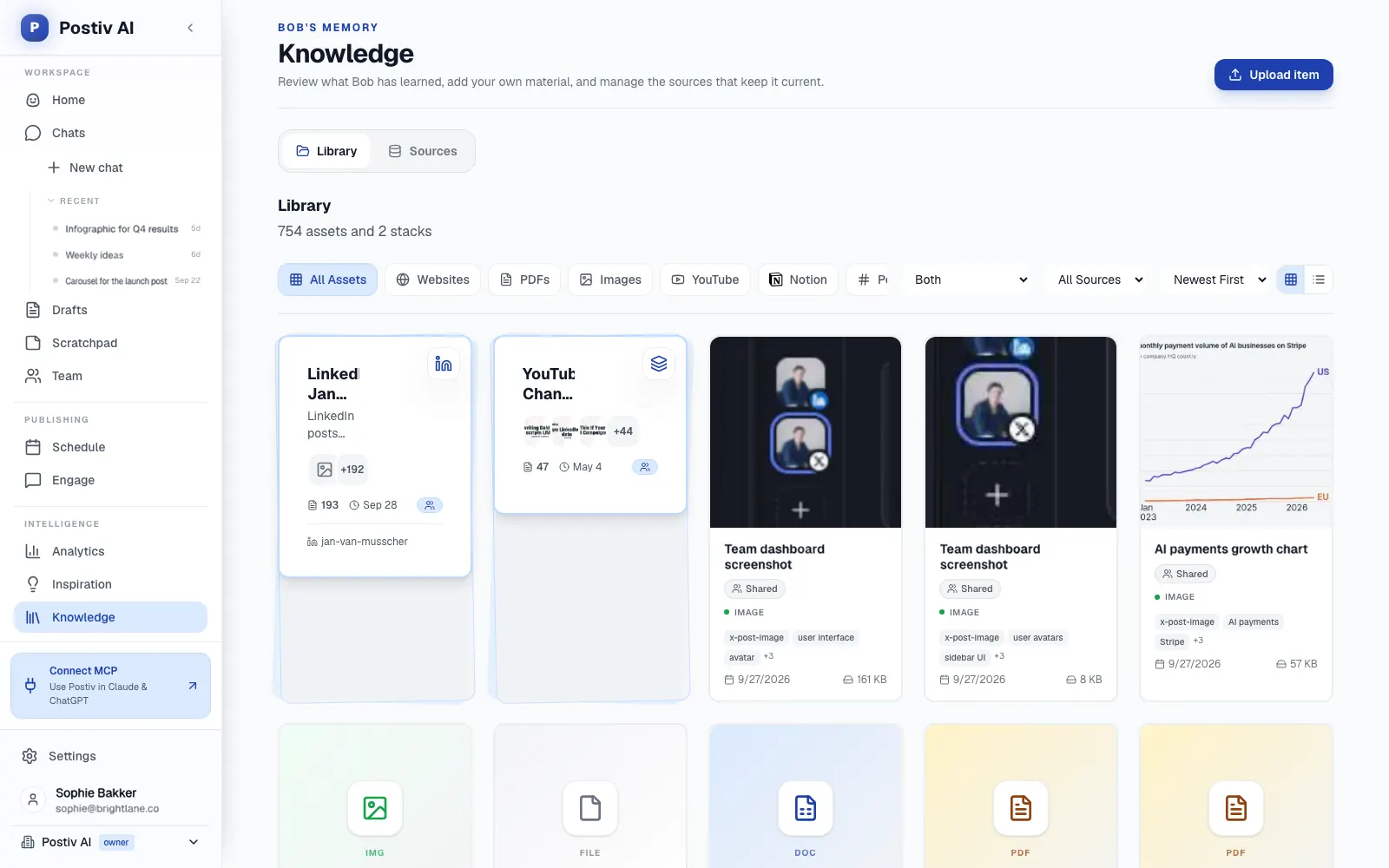
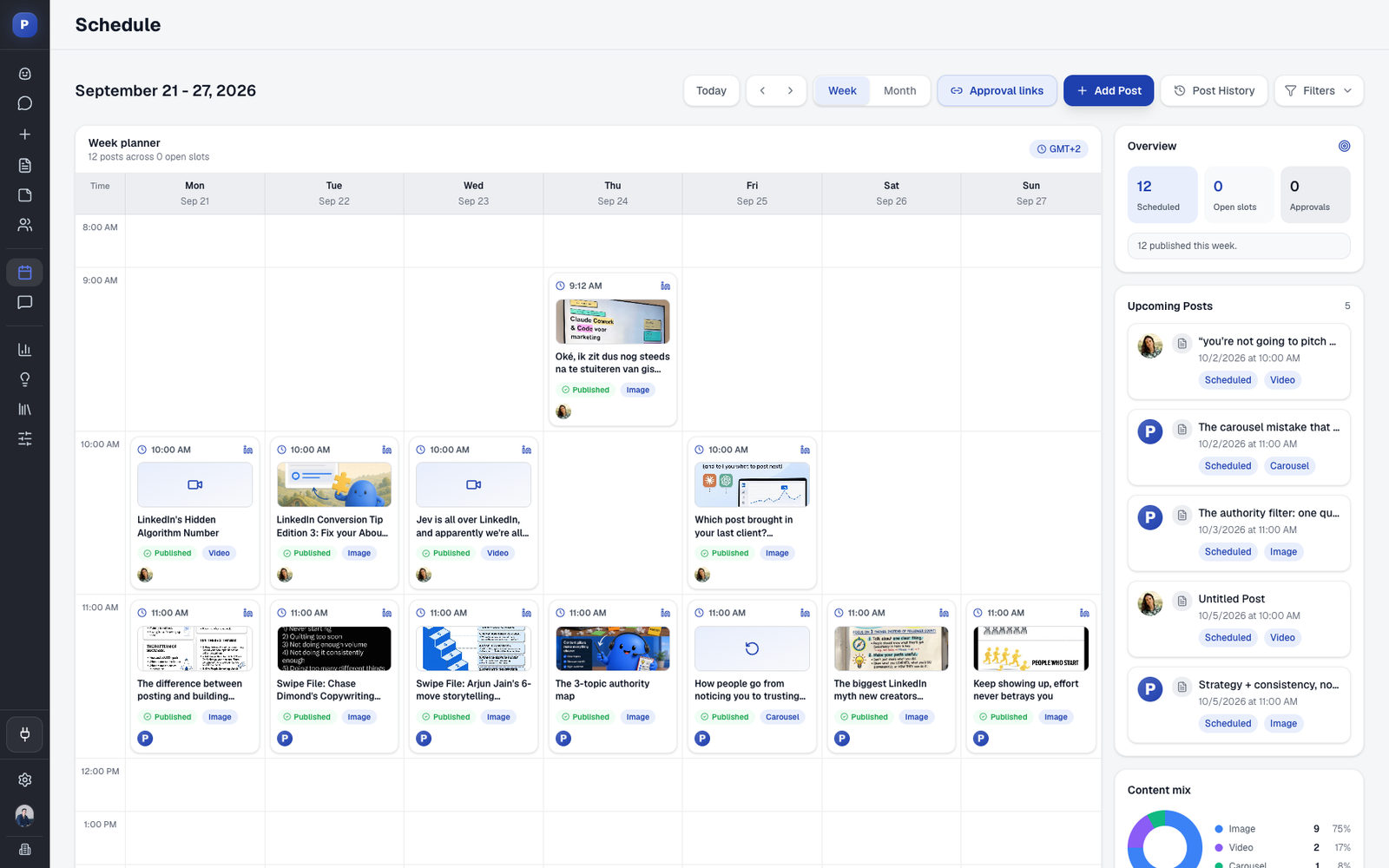
- One workspace for the whole job. Bob, Postiv's AI content partner, plans a posting week per profile from its slots, content pillars and sources, and drafts the posts. One calendar shows every profile and company page.
- Content in each person's own voice. Every LinkedIn profile has its own writing style, knowledge and content pillars. Drop in a blog URL, a PDF or a video link and Bob drafts posts from the key ideas.
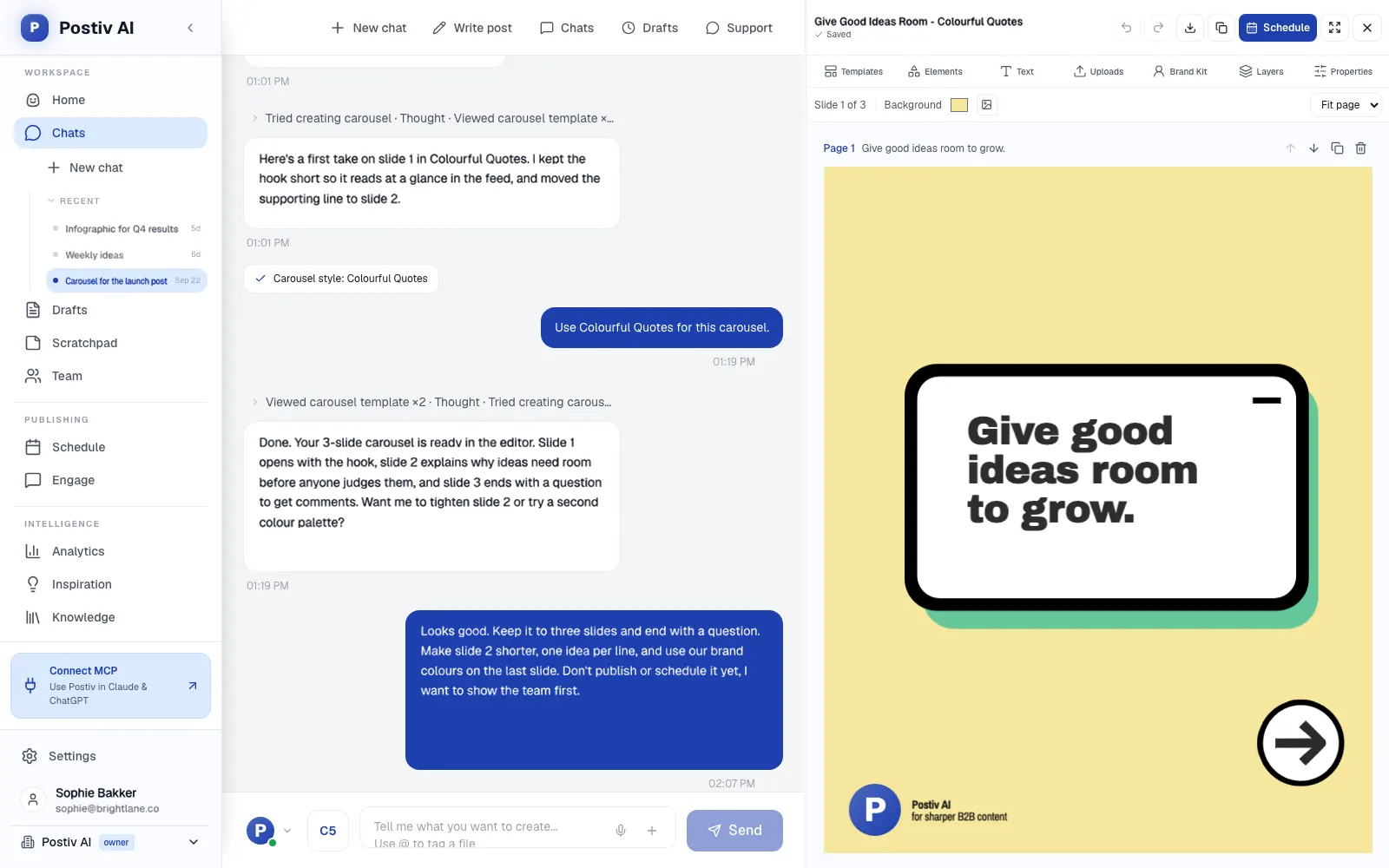
- Carousels and infographics built in. A carousel editor with templates, a brand kit and up to 30 slides, plus AI carousels and infographics, exports a PDF that publishes as a LinkedIn document post. See the LinkedIn carousel generator.
- Approvals. Set approvers per profile or company page. Every approver must approve, one deny stops the post, and "request changes" sends it back with feedback. Agencies get a separate workspace per client, with an approval link that works without an account. More in client workspaces for agencies.
- Analytics for profiles and company pages. Posts, impressions, followers, profile visits and engagement rate against the previous period, with up to 12 months of history imported through LinkedIn's official analytics access. See LinkedIn analytics.
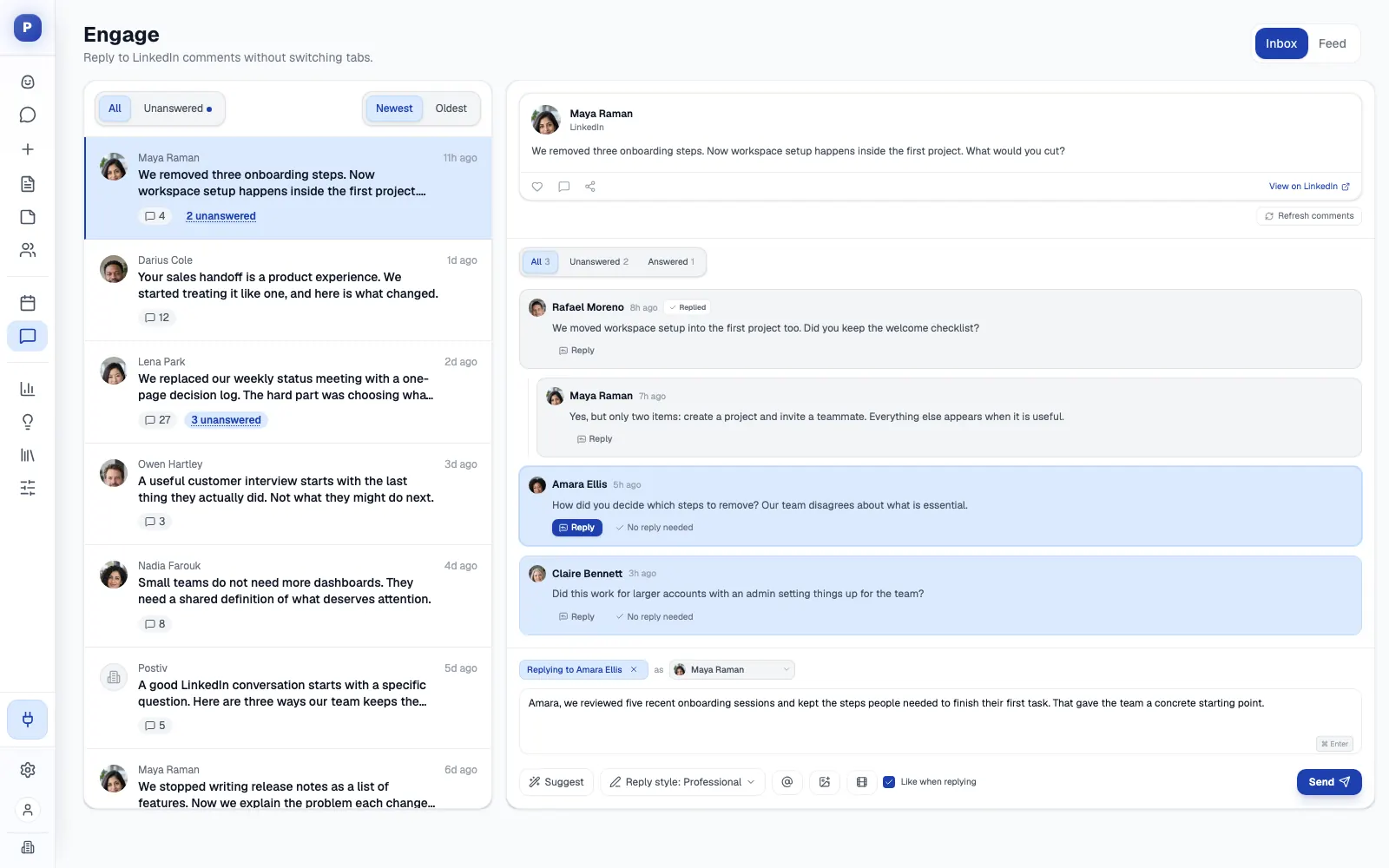
- Engagement. The engage inbox collects comments from every connected profile and page, and the engage feed drafts comments you approve before they go out. See the engagement features. On the Team plan, Team Hub adds shared briefs and team likes.
- An MCP and API. The LinkedIn MCP works with Claude, ChatGPT, Cursor, Claude Code and Codex, and a public REST API is available.
- Official API publishing. No browser extension and no automated connection requests.
Where it is not the fit: if most of your posting is Instagram and TikTok planned on a visual feed, a visual-first planner such as Later is the better tool.
2. Buffer
Buffer is the simple option. It gives you a queue, a calendar and a permanent free plan across 12 channels, including LinkedIn profiles and pages.
Best for: solo operators and small teams that want straightforward scheduling and light analytics.
Strengths: The Free plan covers 3 channels with 10 scheduled posts per channel. Paid plans are priced per channel, with Essentials at $5 a month billed yearly ($6 monthly) and Team at $10 ($12 monthly). For LinkedIn, Buffer lists automatic publishing, community engagement and basic analytics on personal profiles, with advanced analytics added for company pages. First-comment scheduling is on paid plans. The AI Assistant, a comment inbox and integrations to manage the queue and draft posts from Claude, ChatGPT, Cursor and Perplexity are on every plan. Team adds unlimited team members and approval workflows.
Weaknesses: no carousel or slide designer (Canva and Unsplash imports only), a general-purpose AI and no knowledge base for your own documents. Free and Essentials include one user, Buffer shows no client-isolated workspaces, and personal profiles get basic analytics only. Buffer states its prices were last updated in November 2025.
Later vs Buffer: both are cheap and easy to start. Later is stronger on visual planning for Instagram and TikTok, while Buffer shows more LinkedIn detail and keeps a free plan. Our Buffer alternatives guide covers the trade-offs.
3. Agorapulse
Agorapulse is the inbox-and-reporting pick, and it shows more LinkedIn depth than Later's plan page does. Pricing is per user, with Standard at $79 a month billed yearly ($99 monthly), Professional at $119 ($149) and Advanced at $149 ($199), each with 10 profiles.
Best for: teams that live in the inbox and in client reports, with roughly 10 to 40 profiles.
Strengths: it connects LinkedIn company pages and personal profiles, schedules LinkedIn documents as carousel posts, and supports first comments from Professional. LinkedIn comments are answered in the unified inbox on every plan. LinkedIn organic and paid analytics sit in one report, and white-label reporting is on every plan. Advanced adds Shared Calendars, which let clients sign off without an account (up to 5). An official MCP connector (beta) reads the inbox, replies, creates drafts and reads analytics. The trial runs 30 days with no card.
Weaknesses: per-user pricing grows with every teammate. Standard has no approvals, one-step approvals start at Professional and multi-step approvals are Custom only. There is no slide designer or LinkedIn-native writing engine, and the MCP creates drafts rather than published posts. Our Agorapulse alternatives guide goes further.
4. Planable
Planable is built around collaboration and approval. Each client or brand is a workspace with its own pages, calendar and approval flow, and every plan has unlimited users.
Best for: agencies and multi-brand teams with many reviewers per brand.
Strengths: feed-style previews, suggested edits and separate internal and external comments. Basic is $33 per workspace a month billed yearly ($39 monthly) and Pro is $49 ($59). It schedules to LinkedIn company pages and personal profiles, including document and PDF posts and first comments. The MCP connector is on every plan and can approve or reject posts as well as create drafts. The first 50 posts are free with no time limit.
Weaknesses: every extra workspace is another bill, and LinkedIn analytics is a paid add-on ($12 a month billed yearly, $14 monthly). Required approval needs Pro and multi-level approval is Enterprise only. Client links are view and comment only, so a client needs a free Planable account to approve. There is no slide designer, and the PDF option builds from images. See our comparison of Planable, Loomly and Kontentino alternatives.
5. Metricool
Metricool is an analytics-and-planning suite priced by number of brands instead of seats. The Free plan has 1 brand and does not connect LinkedIn. Starter starts at $20 a month billed yearly ($25 monthly) for 5 brands, and Advanced starts at $53 ($67) for 15 brands.
Best for: social managers and agencies running many small brands who care about reporting and competitor tracking.
Strengths: LinkedIn personal and business accounts from Starter, with PDF documents and polls, unlimited analytics history on paid plans, competitor analysis and an official MCP with 20+ tools on every plan. Advanced adds the approval system, unlimited team members and API access.
Weaknesses: LinkedIn is a paid-only network here and one of a dozen. There is no slide designer (PDF scheduling only) and no LinkedIn-specific creation workflow. Approvals, team seats and API all need Advanced, and whether a client can approve without a Metricool account is not shown. Read our Metricool review for more.
6. Sprout Social
Sprout Social is a premium suite for brand, communications and customer-care teams. Pricing is per seat, billed annually: Essentials $79 ($99 monthly), Standard $199 ($249), Professional $299 ($399) and Advanced $399 ($499).
Best for: large social operations that need a unified inbox, listening and approvals.
Strengths: inbox, reviews, listening and employee advocacy, a Trellis AI agent on every plan, and group, profile and post reporting. LinkedIn company pages and personal profiles are both supported. Approval workflows start at Professional, and external stakeholders can approve without logging in from Advanced. The trial is 30 days with no card.
Weaknesses: the price per seat adds up when every team member publishes on LinkedIn. Essentials and Standard cap at 5 profiles, there is no carousel designer (Canva import only), the AI is generic, and competitor reports cover Facebook, X and Instagram but not LinkedIn. LinkedIn-specific metrics are not named, and an MCP is not shown.
7. Hootsuite
Hootsuite is a broad multi-network suite for mid-market and enterprise teams. Plans are per user and billed annually: Standard $99, Professional $199 and Advanced $399, with Enterprise on custom pricing.
Best for: teams managing five or more channels that need a shared inbox, listening and cross-network reporting. See our Hootsuite alternatives guide.
Strengths: a shared inbox on every plan, best-time-to-post for LinkedIn, LinkedIn post boosting and ad publishing, benchmarking that includes LinkedIn metrics, and an AI assistant on every plan. The trial is 14 days with no card.
Weaknesses: no free plan, and Standard is capped at 10 social accounts. Approvals are listed first on Advanced at $399 per user. There is no carousel designer (Canva and Adobe Express link-out), the AI is a general assistant, and an MCP is not shown.
Later vs Hootsuite: Hootsuite is the heavier suite, built around the inbox, listening and reporting, while Later is a visual planner with a low entry price. Neither is built around LinkedIn.
Later vs Postiv for LinkedIn teams
The table compares them need by need.
| If you need | Later | Postiv |
|---|---|---|
| LinkedIn as the main channel | One LinkedIn slot in an eight-network set. Auto publish. Profile versus page not specified | Built around LinkedIn personal profiles and company pages, and X |
| Instagram, TikTok, Facebook and link in bio | Built for it, with best-time-to-post for those networks | Built for B2B LinkedIn work instead |
| LinkedIn posts in a person's voice | Caption Writer aimed at Instagram captions, 5 to 100 credits a month | Bob drafts from each profile's writing style, knowledge and pillars |
| Carousels | No slide designer shown, Canva export into the media library | Built-in editor with brand kit and up to 30 slides, PDF export as a LinkedIn document post, plus AI carousels |
| Approvals | Growth and up: approval workflow, plus a shared feedback link with no Later account | Approvers per profile or page. On agency workspaces, a client approval link with no account |
| Client separation | Social sets and Access Groups, organized by brand or client. No client portal shown | A workspace per client with its own profiles, pages, knowledge, brand kit and writing styles |
| LinkedIn analytics | Not shown in the plan comparison | Personal profiles and company pages, up to 12 months of history |
| MCP and API | Not shown | MCP for Claude, ChatGPT, Cursor, Claude Code and Codex, plus a public REST API |
| Free option | No free plan, 14-day trial | 7-day free trial |
Switching from Later for LinkedIn: a short checklist
You can keep Later for Instagram and TikTok and move only LinkedIn to a tool built for it.
- Decide what moves. List the LinkedIn profiles and company pages you post to from Later.
- Connect them in Postiv. Each profile and company page connects through LinkedIn's official API.
- Set each person's voice. Give every profile its own writing style, knowledge and content pillars, and add sources such as blog URLs, YouTube videos, Notion pages, PDFs or slide decks.
- Rebuild the rhythm. Set posting slots per profile. Bob plans each week from those slots and the content pillars.
- Move the posts worth keeping. Copy the text of queued and evergreen posts from Later into Postiv drafts. Remove the Later version from its queue once the Postiv one is scheduled, so nothing goes out twice.
- Rebuild the carousels you reuse. Recreate them in the carousel editor with your brand kit. Magic Apply moves a carousel into another template and keeps the text.
- Set approvals. Add approvers per profile or company page. For clients, create an approval link on the agency workspace.
- Connect analytics. Postiv imports up to 12 months of history through LinkedIn's official analytics access, a LinkedIn baseline that Later's plan comparison does not show.
Which Later alternative should you pick?
- Stay on Later if your brand runs on Instagram, TikTok and Facebook, you want a visual calendar and link in bio, and LinkedIn is a side channel. For other Instagram-led schedulers, see our Pallyy alternatives guide.
- Choose Buffer for simple scheduling with a free plan.
- If the inbox and reporting are the core of your work, choose Agorapulse.
- Choose Planable if every brand brings several reviewers.
- Metricool is the one for analytics across many brands, with LinkedIn on a paid plan.
- Choose Sprout Social or Hootsuite if you run a large multi-network program and budget per seat.
- Choose Postiv if LinkedIn is where your pipeline comes from and you want your founders, executives and company page in one workspace, from the first draft and carousel design through approvals and scheduling to engagement and analytics.
Frequently Asked Questions
How much does Later cost?
Later prices by plan and by "social sets", where one set holds one profile on each of eight networks. Starter is $18.75 a month billed yearly or $25 billed monthly (1 set, 1 user, 30 scheduled posts per profile per month). Growth is $37.50 yearly or $50 monthly (2 sets, 2 users, 180 posts per profile). Scale is $82.50 yearly or $110 monthly (6 sets, 4 users, unlimited posts). Taxes are extra. Prices checked in October 2026.
Is Later no longer free?
The Later pricing page we checked lists no free plan. It offers a 14-day free trial instead, and the cheapest plan is Starter at $18.75 a month billed yearly ($25 monthly). The page does not say whether the trial asks for a card, so read the signup screen before you start. If you want a permanent free option for LinkedIn, Buffer's free plan covers 3 channels with 10 scheduled posts per channel.
Which is better, Later or Buffer?
It depends on the channel. Later is a visual planner with best-time-to-post suggestions for Instagram, Facebook and TikTok, a link-in-bio tool and plans by social set from $18.75 a month billed yearly. Buffer prices per channel and has a permanent free plan. It also shows more LinkedIn detail, with automatic publishing, basic and advanced analytics for company pages, basic analytics for personal profiles and first-comment scheduling on paid plans. If your brand is Instagram and TikTok first, Later is the better pick. Of the two, Buffer is the closer fit for LinkedIn, and Postiv is built around LinkedIn from the start.
Is Later better than Hootsuite?
They serve different teams. Later is a visual planner for brand and e-commerce social managers, with plans from $18.75 a month billed yearly. Hootsuite is a broad suite for mid-market and enterprise teams. It has per-user plans from $99 a month billed annually, a shared inbox on every plan, listening, benchmarking that includes LinkedIn metrics, and approvals from the Advanced plan at $399. Later suits visual Instagram and TikTok planning, while Hootsuite suits a cross-network inbox and reporting. Neither has a slide designer for LinkedIn carousels.
Is later.com legitimate?
Yes. later.com is the website of the Later social media scheduler. It has a public pricing page with named plans and a 14-day trial, and its scheduler publishes to eight networks including LinkedIn. Its homepage now leads with influencer marketing and creator affiliate earnings, with social management as one of three offers, so the site reads as more than a scheduler. As with any tool, check the address before you enter payment details.
What is the best Later alternative for LinkedIn?
For B2B teams where LinkedIn is the main channel, Postiv fits best. It publishes to LinkedIn profiles and company pages and has analytics for both. Bob drafts posts and carousels in each person's own voice, and approvers sign off per profile. Buffer is the easy pick for simple scheduling with a free plan, Agorapulse is stronger on the inbox and reporting, and Planable is for brands with many reviewers. If most of your work is Instagram and TikTok, stay on Later.
Does Later have an MCP or API?
The Later pricing page shows no MCP and no API. Buffer, Planable, Metricool and Agorapulse (in beta) list MCP connectors, each with a different scope. Postiv has a full MCP server for Claude, ChatGPT, Cursor, Claude Code and Codex, plus a public REST API. An assistant connected to it can research inspiration, draft posts and build carousels. It can also schedule with approvals still applied, read analytics and work the engage inbox.
Is there a free Later alternative?
Buffer has a permanent free plan with up to 3 channels and 10 scheduled posts per channel, and Planable gives you your first 50 posts free with no time limit. Metricool also has a free plan, but it does not connect LinkedIn. Postiv offers a 7-day free trial.