Agorapulse is a good tool for the job it was built for. In this comparison it has the strongest unified inbox and reporting, white-label exports included, and it ships an official MCP connector. Clients can also sign off through a link without an Agorapulse account. If your service is community management across many networks and your team lives in the inbox, you should probably stay.
This guide to Agorapulse alternatives is for the other case. You run LinkedIn for clients and executives, and you are weighing per-user pricing against plan tiers that gate approvals, in a product built around the inbox. If you are comparing approval-first tools more widely, our guide to Planable, Loomly and Kontentino alternatives covers that field. Every competitor price and feature below was checked in October 2026.
Quick picks by need:
- B2B agency running LinkedIn for several clients: Postiv, with a separate workspace per client
- Many reviewers per brand, visual feed-style review: Planable
- Flat plan price, no-login client approvals, white-label reports: SocialPilot
- Workspace bundles with unlimited users: Sendible
- One broad dashboard with inbox, listening and reviews: Vista Social
- Enterprise inbox, listening and compliance: Sprout Social
- Mid-market suite with an inbox on every plan: Hootsuite
- Inbox and reporting first, across many networks: stay on Agorapulse
Agorapulse pricing in 2026
Agorapulse prices per user, not per client, where a user is a team member and a profile is a connected social account. Each self-serve plan includes 10 profiles per account.
| Plan | Monthly billing (per user) | Yearly billing (per user, per month) | Profiles | What changes |
|---|---|---|---|---|
| Standard | $99 | $79 | 10 | Publishing, inbox, reporting. No approval workflows, no internal comments |
| Professional | $149 | $119 | 10 | One-step approvals, internal comments, LinkedIn first comment, team performance reports |
| Advanced | $199 | $149 | 10 | Bulk approve, no-account Shared Calendars (max 5), Profile Connector, CSV bulk scheduling up to 200 posts, advanced reports, competitor benchmarking |
| Custom | Quoted by sales | Quoted by sales | Unlimited | Multi-step approvals, custom roles, SSO, unlimited Shared Calendars, AI reply suggestions, historical data import |
A few other things affect the budget.
- Every teammate is a billed user. Pricing is per user on every plan, and the 10 profiles are shared across the account.
- Personal profiles and company pages both count toward the 10 profiles. Extra profiles cost $10 a month each on annual billing, or $15 monthly.
- Trial: 30 days, no credit card.
- Annual billing saves up to 20%.
Is Agorapulse free?
Its pricing page is unclear. A heading advertises a free 30-day period and no free plan card is listed, but one FAQ mentions a free plan. Plan on the 30-day trial and confirm at signup what stays free afterwards.
Agorapulse review: what it does well
- The inbox. Unified, with moderation rules, sentiment and labels, and LinkedIn comments can be replied to and moderated there on every plan.
- Reporting. Profile, post and community-management reports plus basic ROI on every plan, white-label reporting and branded exports included. LinkedIn organic and paid analytics sit in one report.
- Client sign-off without a seat. On Advanced, external reviewers get a Shared Calendar link, approve or reject, comment and send posts back for changes without an Agorapulse account.
- An official MCP connector (beta). It reads inbox items, replies (following inbox approval rules), reads Listening results and analytics, and creates draft posts.
- Solid LinkedIn basics. Company pages and personal profiles are both supported, and LinkedIn documents can be scheduled as carousel posts. First comment is available from Professional.
- Client access controls. Workspaces with profile-level access restrictions on every plan, and a Profile Connector on Advanced for clients to connect their own profiles.
- Ten networks in one place, plus an AI writing assistant and a brand-tone setting on every plan.
If that is most of your week, staying on Agorapulse is a reasonable call.
Why teams look for Agorapulse alternatives
- Per-user pricing. Every teammate who touches the account is a billed user, so the bill follows headcount.
- Approvals depend on the tier. Standard has none, Professional and Advanced have a single step, and multi-step chains are Custom only. Client sign-off without an account starts at Advanced.
- Advanced caps Shared Calendars at 5. Only an Owner, Co-owner or Manager can create one, and the people using it cannot see drafts or queued posts.
- LinkedIn is one of ten networks. Agorapulse schedules finished LinkedIn documents as carousel posts, but no in-app slide designer is shown. Brand tone is set once at organization level, and every personal profile and company page counts toward the 10-profile cap.
- The MCP only creates drafts. It is still in beta and needs the Owner or Admin role to connect.
For an inbox-led community management team these are not flaws, though they do get in the way of LinkedIn content work.
Agorapulse alternatives at a glance
Prices are USD, checked in October 2026, on monthly billing unless stated. "Not shown" only means the vendor's pricing page does not list it.
| Tool | Pricing unit | Approvals | Inbox | MCP | Best for |
|---|---|---|---|---|---|
| Agorapulse (baseline) | Per user, $99 / $149 / $199 monthly | One step from Professional. No-account client sign-off from Advanced | Unified inbox on every plan | Official connector (beta). Inbox, replies, analytics. Drafts only | Inbox and reporting teams |
| Postiv | 7-day free trial, plans on the pricing page | Approvers per profile or page. Reusable client approval link, no account | Engage inbox across connected profiles and company pages | Full MCP plus public REST API | B2B agencies on LinkedIn |
| Planable | Per workspace, $39 / $59 monthly, unlimited users | Optional from Basic, required from Pro. Client needs an approver account | Social Inbox add-on, $9 monthly | Every plan. Drafts, approve and reject | Many reviewers per brand |
| SocialPilot | Flat per plan, $20 / $40 / $100 / $200 monthly | From Standard. No-login client approval from Premium | Not shown | Every plan. Create, schedule, drafts. No analytics | Flat-rate multi-network agencies |
| Sendible | Per workspace bundle, from $35 monthly, unlimited users | From Plus ($99). Clients approve inside a Sendible login | Reply to Page comments | None listed | Fixed workspace bundles |
| Vista Social | Flat per plan, $99 / $199 / $449 monthly | Single stage on every plan, multi-stage from Advanced | Inbox included, plus listening and reviews | Every plan, tool list not shown | 13+ networks, one dashboard |
| Sprout Social | Per seat, $99 to $499 monthly | From Professional. External approval without login from Advanced | Unified inbox from Standard | Not shown. API on Advanced | Enterprise social teams |
| Hootsuite | Per user, $99 / $199 / $399 billed annually | From Advanced | Centralized inbox on every plan | Not shown | Mid-market multi-network teams |
If you only need plain multi-network scheduling, our guides to Later alternatives and Pallyy alternatives cover more options than this shortlist. For agency tooling that goes past LinkedIn, our roundup of social media tools for agencies is the wider view.
The 7 best Agorapulse alternatives
1. Postiv
Postiv is the pick when your clients are B2B and LinkedIn is the channel that matters. It is a LinkedIn-first content workspace that handles writing, design, scheduling, engagement and analytics.
Best for: agencies, freelancers and in-house teams that run LinkedIn for people and companies, from a handful of clients up to hundreds.
What it does well:
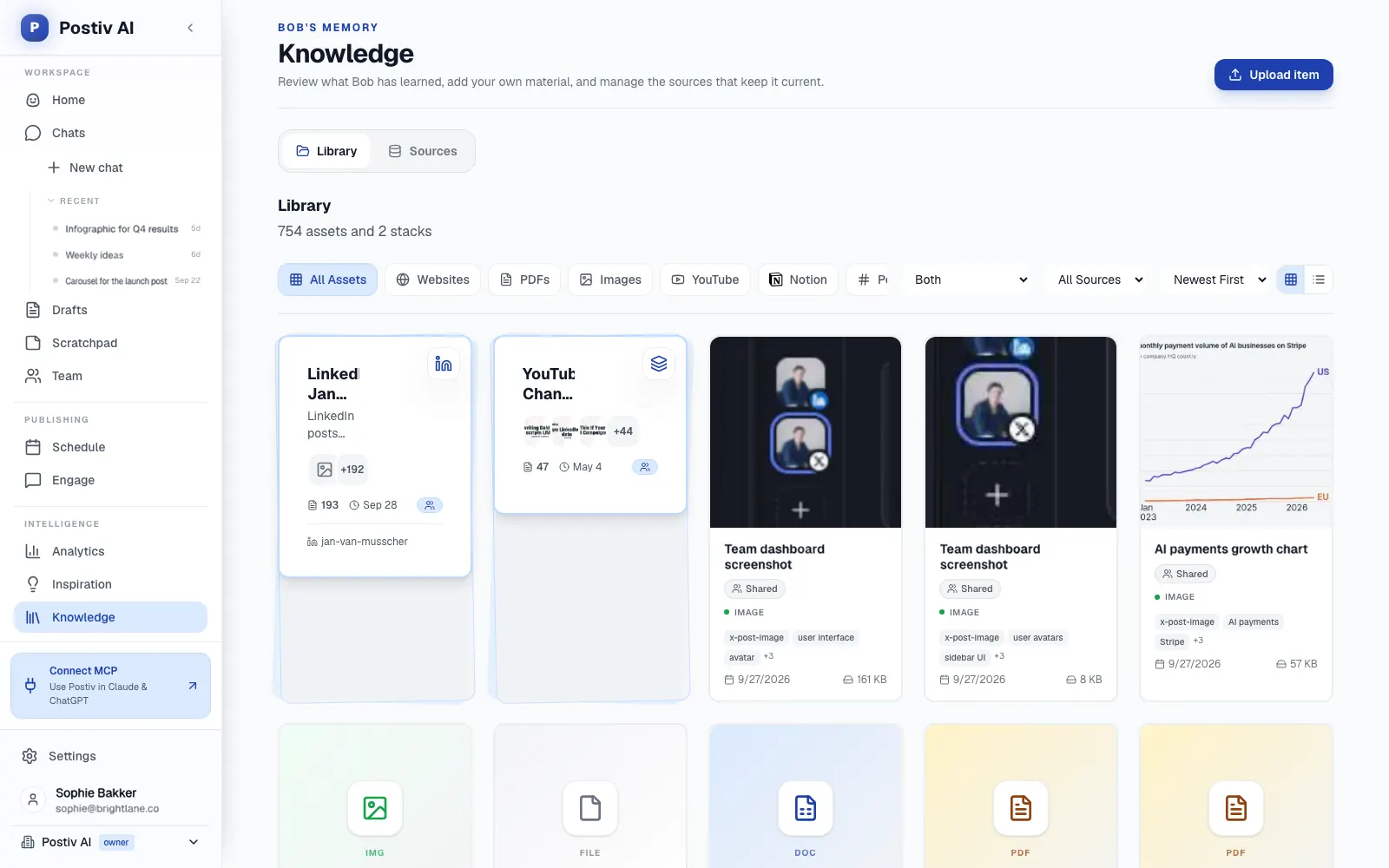
- A separate workspace per client. Each holds that client's profiles, company pages, knowledge, brand kit and writing styles behind one switcher. Agency teammates reach every client workspace from the agency account, with no separate seat per workspace, and admins can show every client's scheduled posts on one calendar.
- Approvals at two levels. Set approvers per profile or company page: every approver must approve, one deny stops the post, and "request changes" sends it back with feedback. For clients, a reusable approval link shows each post as it will look on LinkedIn, and the reviewer comments or approves without a Postiv account. An edit after approval sends the post back for review.
- Content in each person's own voice. Every LinkedIn profile has its own writing style, knowledge and content pillars. Bob, Postiv's AI content partner, plans a posting week per profile and drafts posts and carousels in that voice, quoting the knowledge base.
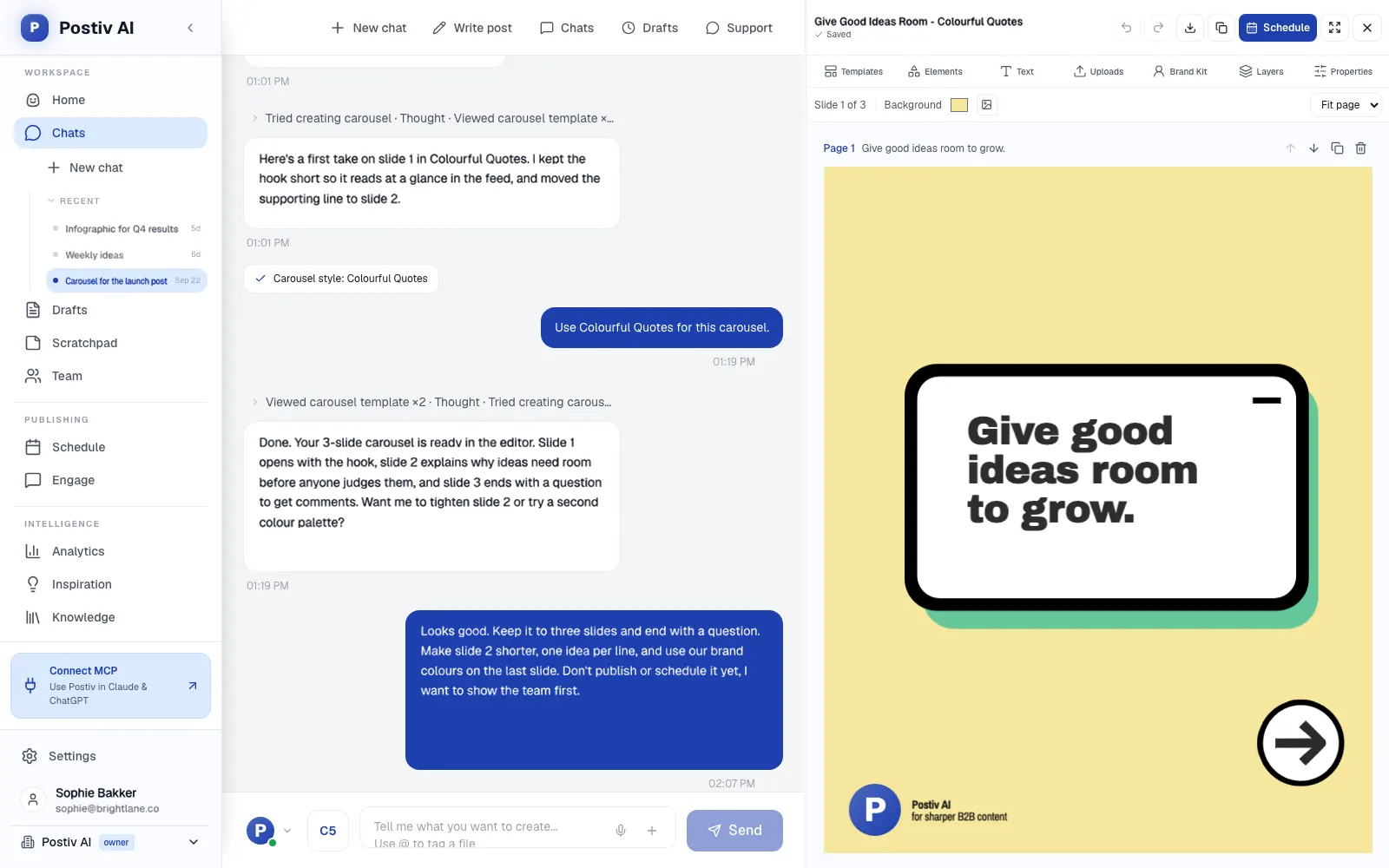
- Visual content built in. There is a carousel editor (up to 30 slides, PDF export that publishes as a LinkedIn document post), plus AI carousels and infographics, and AI post images with your brand kit applied.
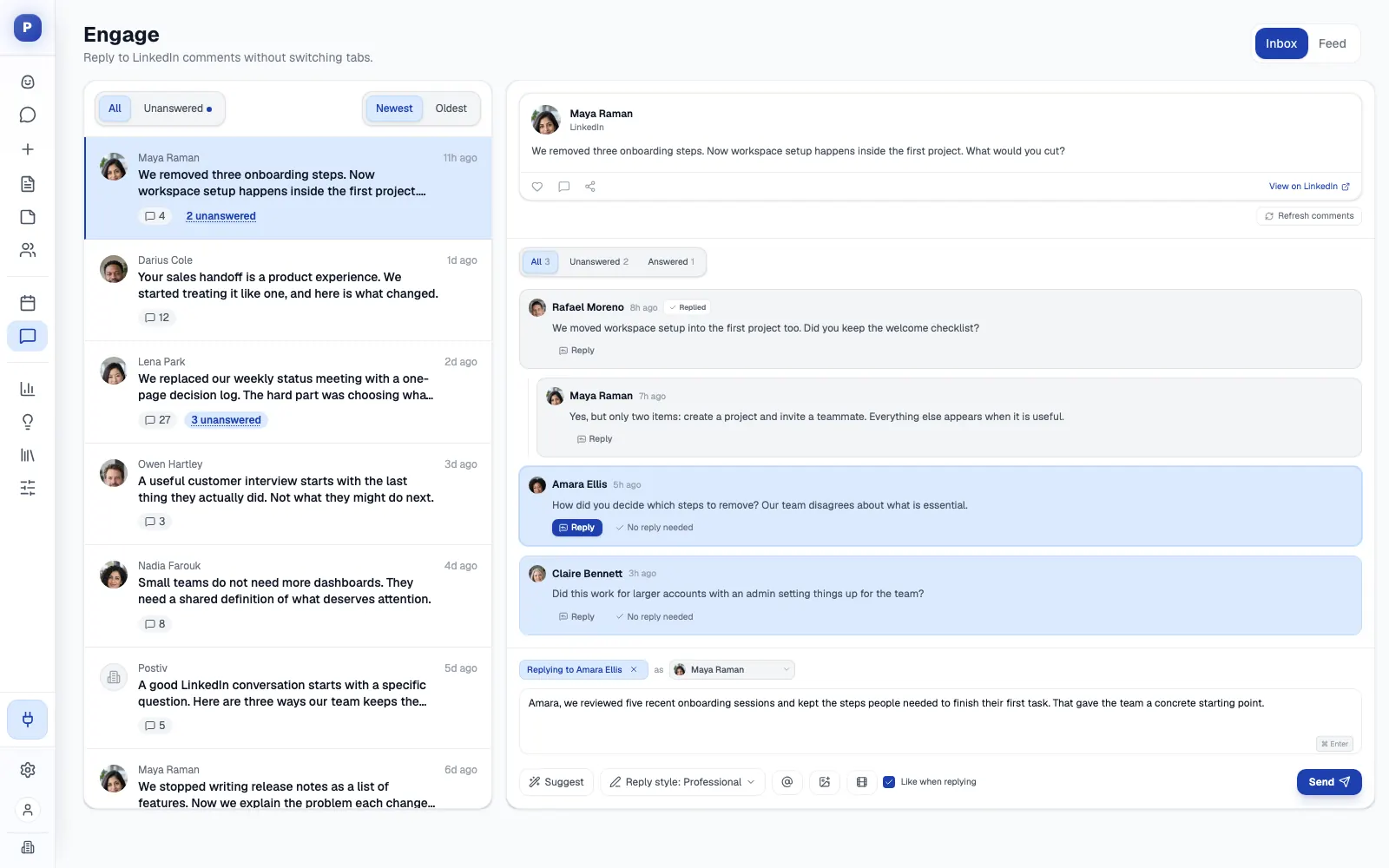
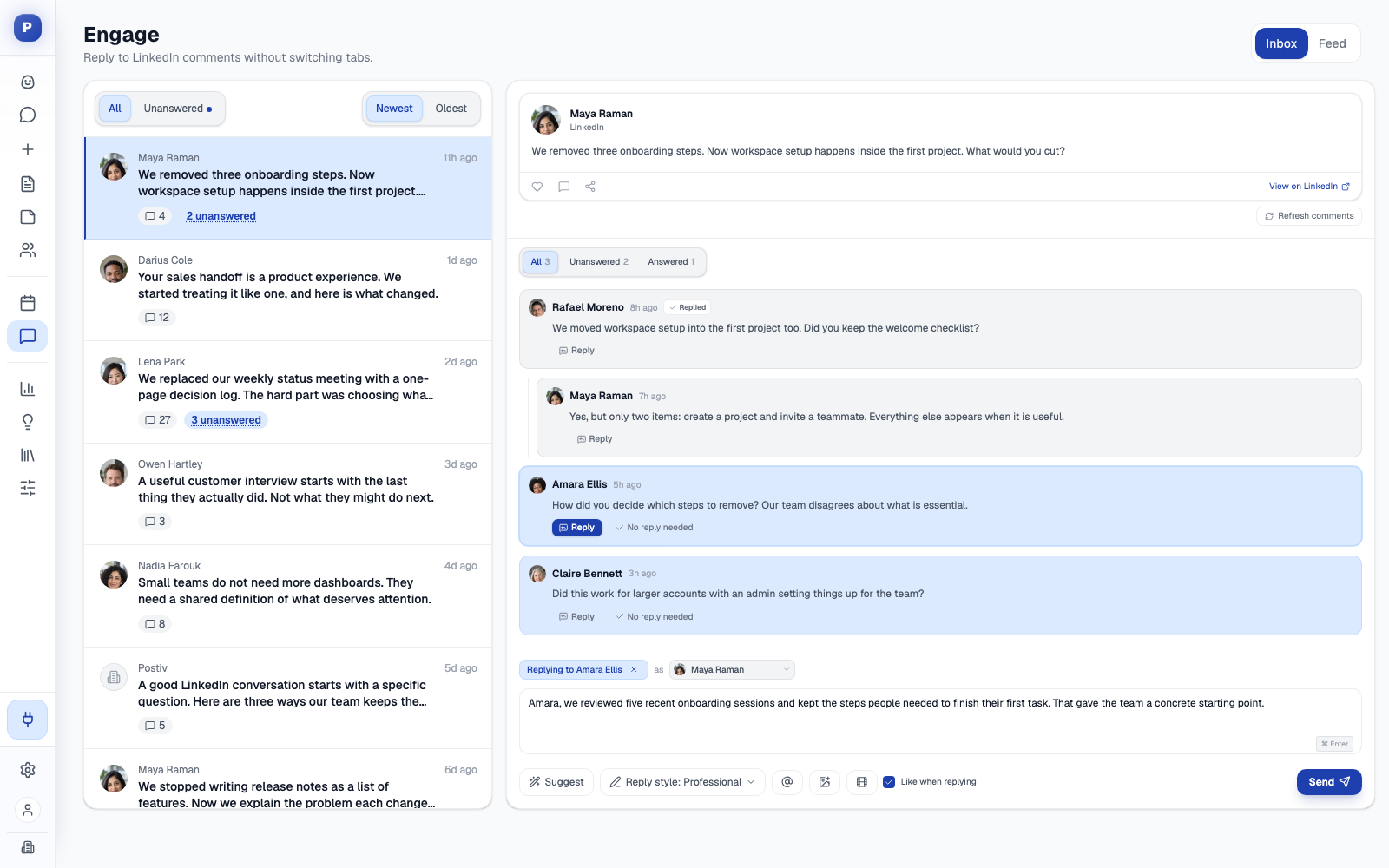
- An engage inbox and feed. Comments on every connected profile and company page in one place, filtered to unanswered, with reply suggestions in a chosen tone. Nothing is sent until you send it. The feed lets you comment and react as any connected profile, with Bob's drafts waiting for your approval. See engagement features.
- Team engagement. Team Hub on the Team plan adds shared briefs with deadlines, a leaderboard and team likes, where admins choose which profiles like which teammates' posts after publishing. See team management.
- Analytics for profiles and company pages: impressions, followers, engagement rate and profile visits against the previous period, with up to 12 months of history from LinkedIn's official analytics access. See LinkedIn analytics.
- An MCP and API. The LinkedIn MCP works with Claude and ChatGPT by sign-in, and with Cursor, Claude Code and Codex through a workspace API key. An assistant can research inspiration, search the knowledge base, create and edit posts, generate images and carousels, schedule content (approvals still apply), read analytics and work the engage inbox and feed. A public REST API is available too.
- Official API publishing to LinkedIn profiles and company pages, with no browser extension and no automated connection requests. Postiv publishes to X as well.
Where it is not the fit: if your service is community management across many networks, with social listening on top, an inbox-first suite such as Agorapulse is the better tool.
2. Planable
Planable is built around collaboration and approval. Each client or brand is a workspace with its own pages, calendar, team and approval flow, and every plan has unlimited users.
Best for: agencies and multi-brand teams with many reviewers per brand and visual, feed-style review.
Strengths: native-looking previews, annotations, suggested edits, and internal versus external comments. Basic is $39 a month per workspace ($33 billed yearly) and Pro is $59 ($49 yearly). It schedules to LinkedIn company pages and personal profiles, and its MCP connector is on every plan.
Weaknesses: every extra client workspace is another bill. Analytics ($14 monthly) and Social Inbox ($9 monthly) are paid add-ons per workspace. Required approval needs Pro and multi-level approval is Enterprise only. Client links are view and comment only, so a client needs a free Planable account to approve. There is no slide designer, and LinkedIn is one of nine networks.
3. SocialPilot
SocialPilot is a flat-rate scheduler for freelancers and agencies. Essentials is $20 a month ($17 yearly) for 5 accounts and 1 user. Premium is $100 monthly ($85 yearly) for 20 accounts, 6 users and unlimited client seats.
Best for: cost-conscious agencies managing 10 to 40 accounts across many networks that want client approvals and white-label reports.
Strengths: approval workflows from Standard and no-login client approval from Premium. LinkedIn document and carousel publishing is on every plan (up to 30 images per carousel), as is an MCP. CSV bulk scheduling goes up to 500 posts, and white-label reports are on Premium.
Weaknesses: the MCP creates, schedules and checks status, with no analytics or inbox, and the public API is Enterprise only. There is no LinkedIn-native writing engine, voice-trained AI or slide designer, and no free plan, only a 14-day trial.
4. Sendible
Sendible prices by workspace bundle. Core is $35 a month for 1 workspace and 6 profiles, Plus is $99 for 3 workspaces and 18 profiles, and Premium is $199 for 7 workspaces and 42 profiles. Every plan has unlimited users and unlimited AI credits.
Best for: agencies that want predictable bundles and many reviewers without per-seat billing.
Strengths: a dedicated workspace per client, a Client Connect widget so clients link their own accounts without sharing logins, client dashboards limited to their own content, and a white-label option on the top tiers.
Weaknesses: approvals start at Plus ($99), custom approval workflows at Premium ($199), and white label is a paid add-on on Elite and Enterprise. Clients approve inside a Sendible login rather than through a no-account link. LinkedIn depth is thin (posts, Page comments, PDF carousels and report-level analytics), and no MCP is listed.
5. Vista Social
Vista Social covers 13+ networks with publishing, inbox, analytics, listening and review management. Professional is $99 a month, or about $79 a month billed yearly, with 15 profiles and 2 users. Advanced is $199 and Scale is $449. There is no free plan, only a 14-day trial. More in our Vista Social alternatives guide.
Best for: agencies and multi-location brands that want one broad dashboard.
Strengths: single-stage approvals on every plan and multi-stage from Advanced, LinkedIn pages and personal profiles, an inbox with listening and reviews, and an MCP ("Ask Vista + MCP") on every plan.
Weaknesses: user caps are tight (2 on Professional, 3 on Advanced, 4 on Scale, extras only on Scale and Enterprise), AI is credit-metered and general-purpose, and there is no carousel designer (Canva integration only). A no-account client approval link is not shown.
6. Sprout Social
Sprout Social is the deepest suite in this list: inbox, reviews, listening, advocacy and enterprise reporting. It prices per seat: Essentials $99 monthly ($79 annual), Standard $249 ($199), Professional $399 ($299), Advanced $499 ($399). Our Sprout Social alternatives guide goes deeper.
Best for: brand, communications and customer-care teams that need cross-network engagement, reporting and compliance.
Strengths: the inbox starts at Standard, message approval at Professional, and external approval without a Sprout login at Advanced. The 30-day trial needs no card.
Weaknesses: per-seat pricing climbs fast, with message approval and unlimited profiles starting at Professional ($399 monthly per seat). Listening and Premium Analytics are sold separately, and the API is Advanced and Enterprise only. LinkedIn profiles and pages count against the 5-profile limit on Essentials and Standard, there is no carousel designer (Canva link-out), and no MCP is shown.
7. Hootsuite
Hootsuite is a broad suite for mid-market and enterprise teams. Standard is $99 per user a month, Professional $199 and Advanced $399, all billed annually, with no monthly rate shown. Our Hootsuite alternatives guide covers the trade-offs.
Best for: teams managing five or more channels that need an inbox, listening and cross-network reporting.
Strengths: a centralized inbox on every plan, social listening and competitor benchmarking, unlimited accounts from Professional, and a 14-day trial with no card.
Weaknesses: approvals start at Advanced ($399 per user), there are no client-isolated workspaces, and LinkedIn is one channel among many with no native carousel builder. Its AI is a general assistant, and no MCP is shown.
Agorapulse vs Postiv for LinkedIn agencies
Agorapulse has the stronger inbox and reporting across many networks, and for some agencies that settles it. The table goes through the two need by need.
| If you need | Agorapulse | Postiv |
|---|---|---|
| A unified inbox across many networks | Unified inbox on every plan, with moderation rules, sentiment and labels | Engage inbox for LinkedIn comments across profiles and company pages, with reply suggestions |
| Social listening | Listening results, readable through its MCP | Engage inbox for your own accounts, plus an engage feed of up to five lists of 30 profiles you choose |
| Approvals and client sign-off | One step on Professional and Advanced, multi-step on Custom only. No-account client sign-off through Shared Calendars from Advanced (max 5) | Approvers per profile or page, all must approve. Reusable client link, no account, post shown as it will look on LinkedIn |
| Posts in each person's voice | AI writing assistant and an organization-level brand tone | Bob drafts from each profile's writing style, knowledge and pillars |
| Carousels | Schedules finished LinkedIn documents, no slide designer shown | Built-in editor, AI carousels and infographics, PDF export as a document post |
| Client separation | Workspaces with profile-level access restrictions, Profile Connector from Advanced | A workspace per client with profiles, pages, knowledge, brand kit and styles |
| Reporting | Organic and paid in one report, ROI reports, white-label exports | Profile and company page analytics, 12 months of history, pillar performance feeding the weekly plan |
| MCP | Official connector (beta), reads inbox and analytics, creates drafts, cannot publish | Research, knowledge base, posts, carousels, scheduling with approvals applied, analytics, engage inbox and feed |
| Pricing model | Per user | 7-day free trial |
Both ship an MCP, so the useful question is what the assistant can do with it. Agorapulse's is strongest for reading the inbox and replying, and Postiv's covers writing, carousels, scheduling and analytics.
Switching from Agorapulse: a short checklist
- List clients, profiles and approvers, including which clients sign off through a Shared Calendar.
- Save the reports you still need. Branded exports are on every Agorapulse plan. For LinkedIn, Postiv imports up to 12 months of analytics history itself when you connect a profile.
- Create a workspace per client in Postiv and connect each client's LinkedIn profiles and company pages.
- Set each person's writing style and add knowledge from a website, YouTube, Notion, newsletters, PDF and PowerPoint files.
- Add approvers per profile or page, and create a client approval link for the profiles each client reviews.
- Rebuild the queue. Nothing transfers across, so reschedule the next two weeks in Postiv's calendar, or let Bob redraft from the knowledge base.
- Overlap briefly. Keep Agorapulse until its last scheduled post has published, then cancel.
Which Agorapulse alternative should you pick?
- Stay on Agorapulse if community management is your service and the inbox is where your team lives, especially when white-label reporting is part of what you sell.
- Planable fits when clients bring several reviewers and you can accept a bill per workspace.
- Choose SocialPilot or Sendible for predictable pricing across many networks. SocialPilot Premium adds white-label reports, and Sendible gives you unlimited users.
- Vista Social gives you one broad dashboard with listening and reviews, if user caps are not a problem.
- Choose Sprout Social or Hootsuite for an enterprise-grade inbox and listening across a large team.
- Postiv is the one to try if your clients are B2B companies and LinkedIn is where their pipeline comes from.
More Questions
Is Agorapulse legit?
Yes. Agorapulse is a real, working social media management product with a public pricing page, a help center, a 30-day trial that needs no credit card, and an official MCP connector (beta) for Claude, ChatGPT and Microsoft Copilot Studio. It covers 10 networks, including LinkedIn company pages and personal profiles. We have not looked at company history or customer ratings for this guide, so an independent review site is worth a read before you commit.
How much does Agorapulse cost?
Agorapulse charges per user per month, with 10 social profiles per account on every self-serve plan. Standard is $99 monthly or $79 billed annually, Professional is $149 or $119, and Advanced is $199 or $149, while Custom is quoted by sales. Extra profiles cost $10 a month on annual billing or $15 monthly. The 30-day trial needs no credit card. Prices checked in October 2026.
What is the best social media monitoring tool?
It depends on what you mean by monitoring. For social listening and brand monitoring, use a suite built for it. Agorapulse has Listening results (its MCP can read them), Sprout Social sells Listening as a separate add-on, and Hootsuite and Vista Social both list listening. For your own LinkedIn accounts, Postiv's engage inbox collects comments on every connected profile and company page, and its analytics track how each post performs.
What are the top 5 social media schedulers?
Which five depends on the job. Postiv suits LinkedIn work for B2B clients, Planable suits visual review with many reviewers per brand, and SocialPilot is a flat-rate scheduler across many networks with no-login client approvals. Sendible sells workspace bundles with unlimited users, and Agorapulse is the one for inbox and reporting. Hootsuite, Sprout Social and Vista Social fit larger multi-network teams.
What is the best Agorapulse alternative for agencies on LinkedIn?
For B2B clients where LinkedIn is the main channel, Postiv fits best. It gives each client a separate workspace, writes posts and carousels in each person's own voice, sends clients a no-account approval link and reports analytics for profiles and company pages. Planable is the pick for visual review and SocialPilot for flat plan pricing across many networks, and if the inbox is the service you sell, stay on Agorapulse.
Does Agorapulse have an MCP?
Yes. Agorapulse has an official MCP connector, currently in beta, for Claude, ChatGPT and Microsoft Copilot Studio. It reads inbox items and replies, reads Listening results and analytics, searches and creates calendar notes, and creates draft posts, but it cannot publish. Connecting needs the Owner or Admin role and an AI-service subscription. Postiv's MCP also schedules posts, with approvals still applying.
Can clients approve Agorapulse posts without an account?
Yes, on Advanced and Custom. A manager creates a Shared Calendar and invites the client by link. The client views scheduled posts, approves or rejects, comments and sends posts back for changes with no Agorapulse account. Advanced allows 5 Shared Calendars, and clients cannot see drafts or queued posts. Postiv offers a reusable approval link on agency workspaces, also without an account.