Buffer vs Hootsuite is really a choice between a light scheduler priced per channel and a broad suite priced per user. If you searched Hootsuite vs Buffer because you run LinkedIn for a team or for clients, the feature lists matter less than how each tool counts your accounts and your people, because that is what sets the bill.
We checked each tool's pricing page and help docs in October 2026. If neither fits, our guides to Buffer alternatives and Hootsuite alternatives cover the wider field.
Below we work through the cost for real team sizes, then LinkedIn depth, approvals and client work, and finish with a third option for LinkedIn-first B2B teams.
TL;DR: Buffer vs Hootsuite at a Glance
| Buffer | Hootsuite | Postiv | |
|---|---|---|---|
| Built for | Light scheduler, priced per channel | Broad suite, priced per user | LinkedIn-first B2B teams, founders, agencies |
| Approvals | Team plan | Advanced plan only | Approvers per profile, client approval links |
| Inbox | Comments | Messages, DM workflows from Professional | Every comment on every profile, plus a feed of people to engage |
| LinkedIn profiles and pages | ✅ Both (two channels) | ✅ Both | ✅ Both |
| PDF carousel posts | ✅ One PDF per post | ✅ One PDF per post | ✅ Designed, then published as a document post |
| Built-in carousel designer | ❌ Canva import | ❌ Canva, Adobe Express | ✅ On your brand kit |
| Writing style per profile | Not listed | Not described | ✅ Per profile |
| Client workspaces, own brand kit | Not described | Not described | ✅ One per client |
Quick verdict: Pick Buffer for a clean, low-cost scheduler with a real free plan. Pick Hootsuite if you need a message inbox, listening, competitor benchmarking and governance, and can pay per user. Pick Postiv if LinkedIn is where your team posts and you need client workspaces, a writing style per person and a built-in carousel designer.
Buffer and Hootsuite in Short
Buffer is priced per channel and built around a simple loop: write, queue, publish. It lists 12 networks, has a real free plan that includes a comment inbox, and offers AI Assistant and a public API on every plan. Its trade-offs: approvals only on Team, a bill that grows per channel, and no listening.
Hootsuite is priced per user and sold as a suite it markets as Hootsuite Social OS: publishing, an inbox and customer care, insights and listening, AI, and employee advocacy.
The Downsides of Using Hootsuite
Hootsuite can do a lot. Where it hurts is the bill, and a few questions its plans page leaves open.
- Cost scales with people. Every teammate is another seat at $99, $199 or $399 per user per month, billed annually.
- Approvals only start on Advanced. Standard and Professional have none.
- No permanent free plan. The 14-day trial caps posting at 10 to 20 posts a day per organization and has no bulk scheduling.
- Seats and billing add up. Hootsuite says some Professional features need multiple user seats, and monthly billing costs more per user, though the plans page does not show the price.
- Open LinkedIn and agency questions. The plans page does not say how profiles and Pages count toward the 10-account cap on Standard, or describe separate client workspaces.
Pricing: Per Channel vs Per User
Buffer charges for each connected channel. Hootsuite charges for each person who logs in. That one difference decides most of the Buffer vs Hootsuite price gap.
Buffer, per channel per month:
- Free: $0, up to 3 channels, 1 user, 10 scheduled posts per channel at a time
- Essentials: $6 billed monthly or $5 billed yearly ($60 per channel per year), 1 user, no approvals
- Team: $12 billed monthly or $10 billed yearly ($120 per channel per year), unlimited users, approvals
- Above 10 channels a volume discount applies (rate not stated)
Hootsuite, per user per month (billed annually, excluding tax):
- Standard: $99 ($1,188 a year), up to 10 social accounts
- Professional: $199 ($2,388 a year), unlimited social accounts
- Advanced: $399 ($4,788 a year), adds approvals
- Enterprise: custom quote after a demo
Full detail is in our Buffer pricing guide and Hootsuite pricing guide.
Worked Example: Three People, Six Channels, Approvals
Three teammates manage six LinkedIn channels (profiles and pages) and need a formal approval step.
- Hootsuite Advanced: 3 users x $399 = $1,197 a month, $14,364 a year.
- Buffer Team, billed yearly: six channels = $60 a month, $720 a year.
Add two teammates and Hootsuite becomes 5 x $399 = $1,995 a month. The Buffer bill stays put, because Team includes unlimited users. Without approvals, three users on Hootsuite Standard cost $297 a month.
Worked Example: One Person, Many Channels
Per-channel pricing can flip the other way. One person publishing to 20 channels on Buffer Team, billed monthly, pays $240 a month at list price, before the volume discount. One Hootsuite Professional seat is $199 a month billed annually, with unlimited social accounts.
Annual billing and the volume discount both lower Buffer's figure, and Professional has no approvals, so run your own numbers.
Hootsuite vs Buffer Free Plan: What You Get Without Paying
Buffer's Free plan is a real plan, not a trial: up to 3 channels, 1 user and 10 scheduled posts per channel at a time, with a visual calendar, queue, AI Assistant, a comment inbox and insights with 30-day history.
Hootsuite has no permanent free plan, only a 14-day trial with no credit card and no automatic charge. Buffer also runs a 14-day trial of Essentials and Team.
Publishing and Scheduling
- Buffer: a visual calendar, a queue and a browser extension. Paid plans have unlimited scheduled posts, and Essentials adds channel groups and a hashtag manager.
- Hootsuite: unlimited scheduled posts from Standard. Professional adds link shortening and tracking and automatic boosting of top posts.
- Networks: Buffer lists 12, including Bluesky, Mastodon, Substack and Threads. Hootsuite lists Facebook, Instagram, LinkedIn, X, TikTok, Pinterest and YouTube, plus social ads publishing.
Approvals and Collaboration
Both tools put approvals on a higher plan.
- Buffer: approval workflows (who can draft, who can approve) and custom permissions per channel start on Team, which includes unlimited users. Essentials has 1 user and no approvals.
- Hootsuite: approval workflows, internal comments and collaborating on content start on Advanced. It also adds message assignment and skill-based routing for support teams.
One question stays open on both pages: whether a client outside your company can review a post. Hootsuite's plans page does not say whether an outside client needs a paid seat to approve. Buffer's does not say whether a client can review without a login. Ask both before you promise clients a sign-off step.
Analytics and Reporting
- Buffer: insights with 30-day history on Free, custom analytics and report exports on Essentials, branded reports with your logo on Team. LinkedIn insights cover pages and profiles: post performance, a metrics chart and follower growth.
- Hootsuite: analytics and reporting from Standard, custom reports on Professional, report exports with your logo on Advanced, attribution and ROI reporting on Enterprise.
Buffer has no social listening and no competitor benchmarking: its analytics cover your own channels only. Hootsuite has both, with benchmarking against up to 5 competitors on Standard and up to 20 on Professional, a 30-day Quick Search in listening on Professional, and advanced listening with 13 months of history on Enterprise. The plans page does not say which networks benchmarking covers, so check that LinkedIn is included.
AI Features
- Buffer: AI Assistant on every plan with unlimited credits, described as refining and repurposing content. AI replies in the community inbox "learn your voice". Claude, ChatGPT, Cursor and Perplexity integrations manage the queue and draft posts.
- Hootsuite: Wisdom on every plan, described as an in-app assistant plus MCP connectors. Standard generates posts and images, and Professional adds AI trend forecasts up to 90 days ahead.
Neither page describes a knowledge base or a writing style per person.
Team and Agency Setup
Buffer says agencies pay per channel, not per brand or client, from one dashboard, with channel groups and per-channel access. Hootsuite has departmental organization on every plan.
What neither page describes is a separate client workspace with its own brand settings. Before you sign, ask each vendor:
- Does each client get a separate space with its own brand settings?
- How do LinkedIn profiles and pages count toward the account cap?
- Can I see every client's posts in one calendar?
For the wider setup question, read our guide to managing multiple LinkedIn accounts.
LinkedIn Depth: Profiles, Pages, Carousels and Voice
In a Buffer vs Hootsuite comparison, LinkedIn is one network among many. For a B2B team it is usually the one that matters, so here is what each does on it.
Personal Profiles vs Company Pages
Both publish to personal profiles and company pages. The difference is how they count.
- Buffer: a channel is one connected account, so a personal profile and a LinkedIn page are two channels, and both are billed. Connecting a LinkedIn Page needs Super Admin on that Page.
- Hootsuite: publishes to profiles and Pages, and Page posts can be boosted and targeted to an audience. The plans page does not say how profiles and Pages count toward the 10-account cap on Standard.
A B2B team usually has a company page plus founders or employees posting from their own profiles.
PDF Document Posts and Carousels
Both can publish a LinkedIn PDF document post, which is how a carousel reaches the feed.
- Buffer: one PDF per post on the web app, up to 100MB and 300 pages, with a required document title.
- Hootsuite: one PDF per post, up to 300 pages and 100MB. It cannot be combined with images or video, or added if other networks are selected in the same post.
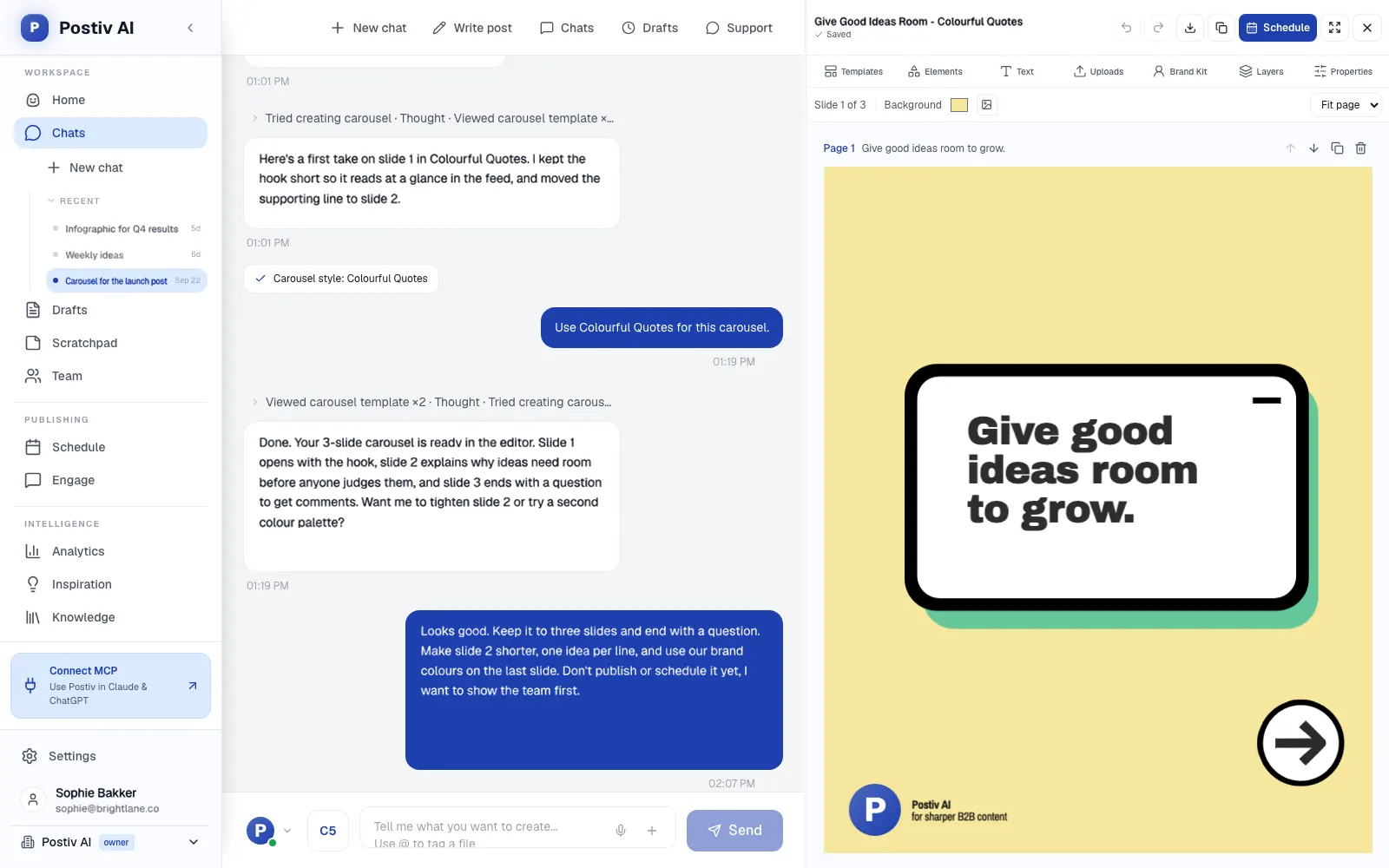
Neither has a built-in carousel designer. Buffer imports designs from Canva, and Hootsuite connects to Canva and Adobe Express, so you design somewhere else, export a PDF and upload it. If you would rather design where you schedule, the LinkedIn carousel generator builds the carousel on your brand kit.
First Comment
Both support it. Buffer schedules it on paid plans and publishes it with the post, from the same channel. On Hootsuite you add it when you create the post.
Writing in Each Person's Own Voice
Here both pages go quiet. Neither describes a writing style per person. Buffer's inbox replies "learn your voice", but that applies to comment replies, not posts. When a CEO, a head of sales and an engineer all post under their own names, each one needs a style built from their own material, or the AI drafts start to sound like the same person.
Founders and Employees Posting
On Buffer, each person's profile is one more channel on the bill, so every founder or employee you add raises the cost. On Hootsuite, employee advocacy through Parliament is an Enterprise feature, which means a custom quote after a demo.
Is Buffer as Good as Hootsuite?
At the job Buffer does (a queue, a comment inbox, AI Assistant, integrations and a clean workflow), Buffer is as good as Hootsuite, and for most small teams the bill is lower. It is not as broad, though. For a message inbox with DM workflows, listening, competitor benchmarking or single sign-on, Hootsuite does more.
Three questions settle the Buffer vs Hootsuite decision:
- Do you need listening, benchmarking or a DM inbox? Then Hootsuite.
- Is your bill driven by people or by channels? Many people on few channels favors Buffer. Few people on many channels favors Hootsuite.
- Is the free plan enough? Only Buffer has one.
On LinkedIn the two are close. Both handle profiles and pages, one PDF per post and a first comment, and they share the same gaps: neither describes a writing style per person or client workspaces with their own brand kit, and neither has a built-in carousel designer.
If Your Shortlist Is Bigger
If you are weighing Buffer vs Hootsuite vs Sprout Social, the third name is also priced per seat, has no free plan and offers a 30-day free trial. We compare the two suites in Hootsuite vs Sprout Social.
If Taplio is on your shortlist instead of Hootsuite, our Buffer vs Taplio comparison covers that pair.
Choose Buffer If
- You want a real free plan to start on.
- You post to several networks, including ones like Bluesky, Mastodon or Substack.
- Your team is several people on a handful of channels, so a bill by channel stays small.
- A comment inbox, AI Assistant and Claude or ChatGPT integrations are enough, and you skip listening and benchmarking.
- You are happy designing carousels in Canva and uploading the PDF.
Choose Hootsuite If
- You need a message inbox with DM workflows, or customer care features such as message assignment.
- Listening and competitor benchmarking are part of the job.
- One or two people manage many accounts, so a flat per-user price with unlimited social accounts works out.
- You need governance: approvals on Advanced, single sign-on on Enterprise.
- You want social ads publishing and automatic boosting of top posts.
A Third Option for LinkedIn-First B2B Teams
Buffer and Hootsuite are both generalist tools. If LinkedIn is where your B2B team publishes, Postiv is built for exactly that, for LinkedIn-first teams, founders and agencies. (If your main job is customer care, social listening, a DM inbox or publishing to many networks, a suite like Hootsuite fits better.)
What Postiv adds on LinkedIn:
- Client workspaces. Each client gets a separate client workspace with its own profiles, company pages, knowledge, brand kit and writing styles. Agency teammates reach every one from the agency account without a separate seat per workspace, and the agency calendar can show all client posts together.
- Client approval links. A reusable link for chosen client profiles. The client sees each post as it will look on LinkedIn, and approves or comments without a Postiv account. An approved post publishes at its scheduled time, and if you change it, the client reviews the new version. The review page can run on your own subdomain with no Postiv logo.
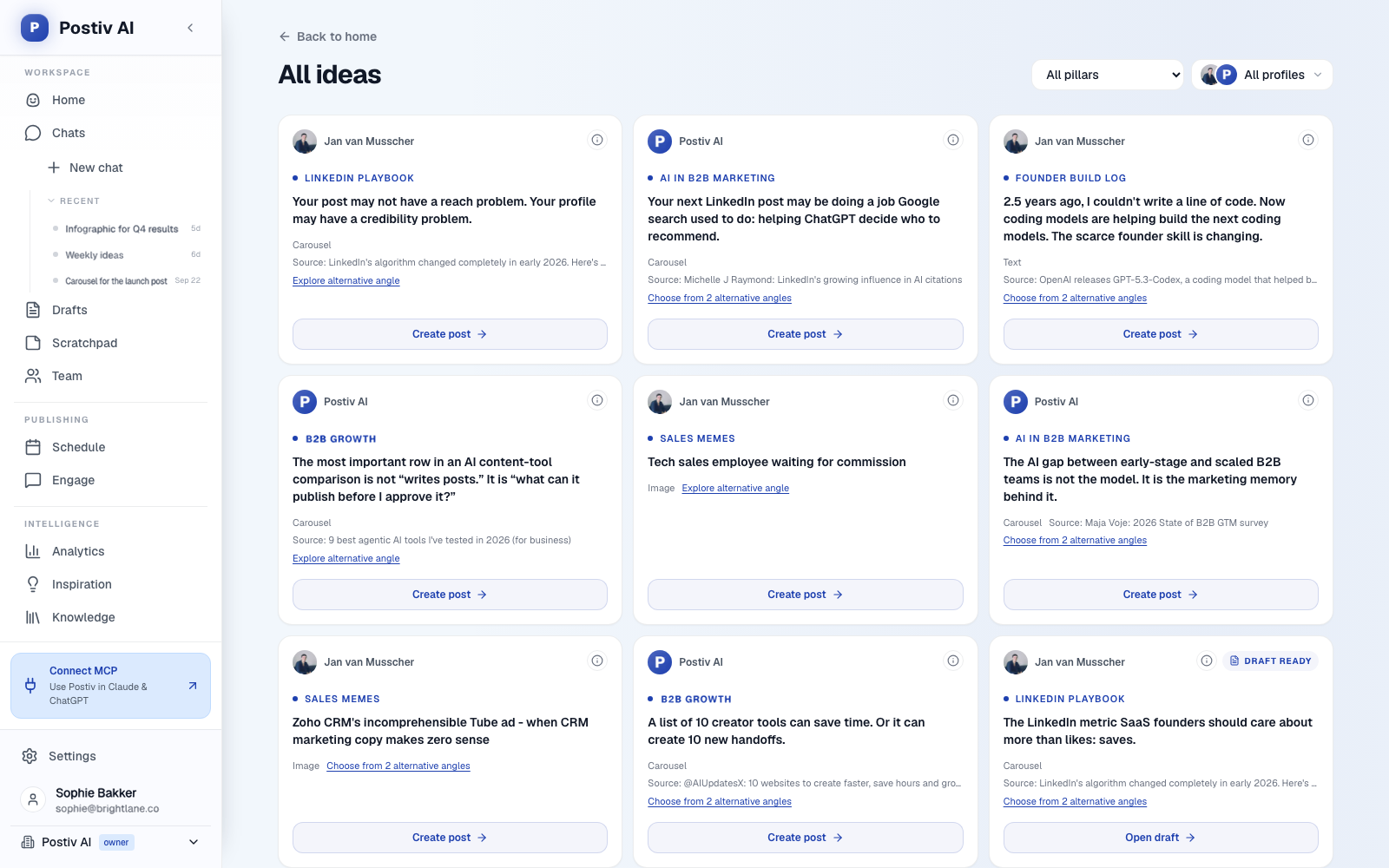
- A voice per profile. Bob, Postiv's AI content partner, plans the posting week: one idea per slot, tied to your content pillars, your sources and last week's results. Drafts follow each profile's own writing style, using that profile's knowledge base, which pulls in your website, documents, YouTube, Notion and newsletters.
- Creation built in. Posts, carousels, images and infographics are made on your brand kit in an editor, and you can change a design by asking. Carousels go out as LinkedIn document posts, and infographics only show real data you provide.
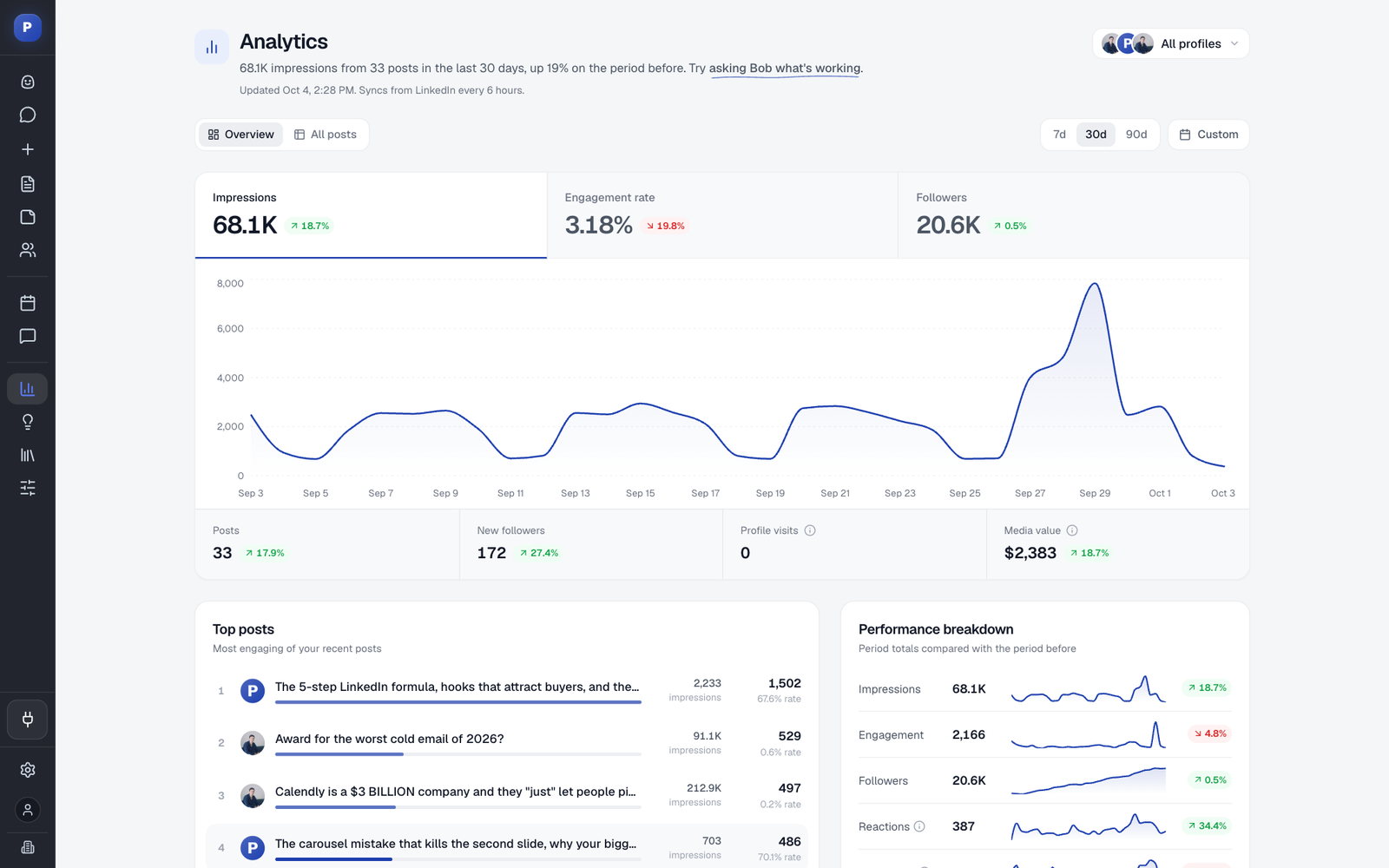
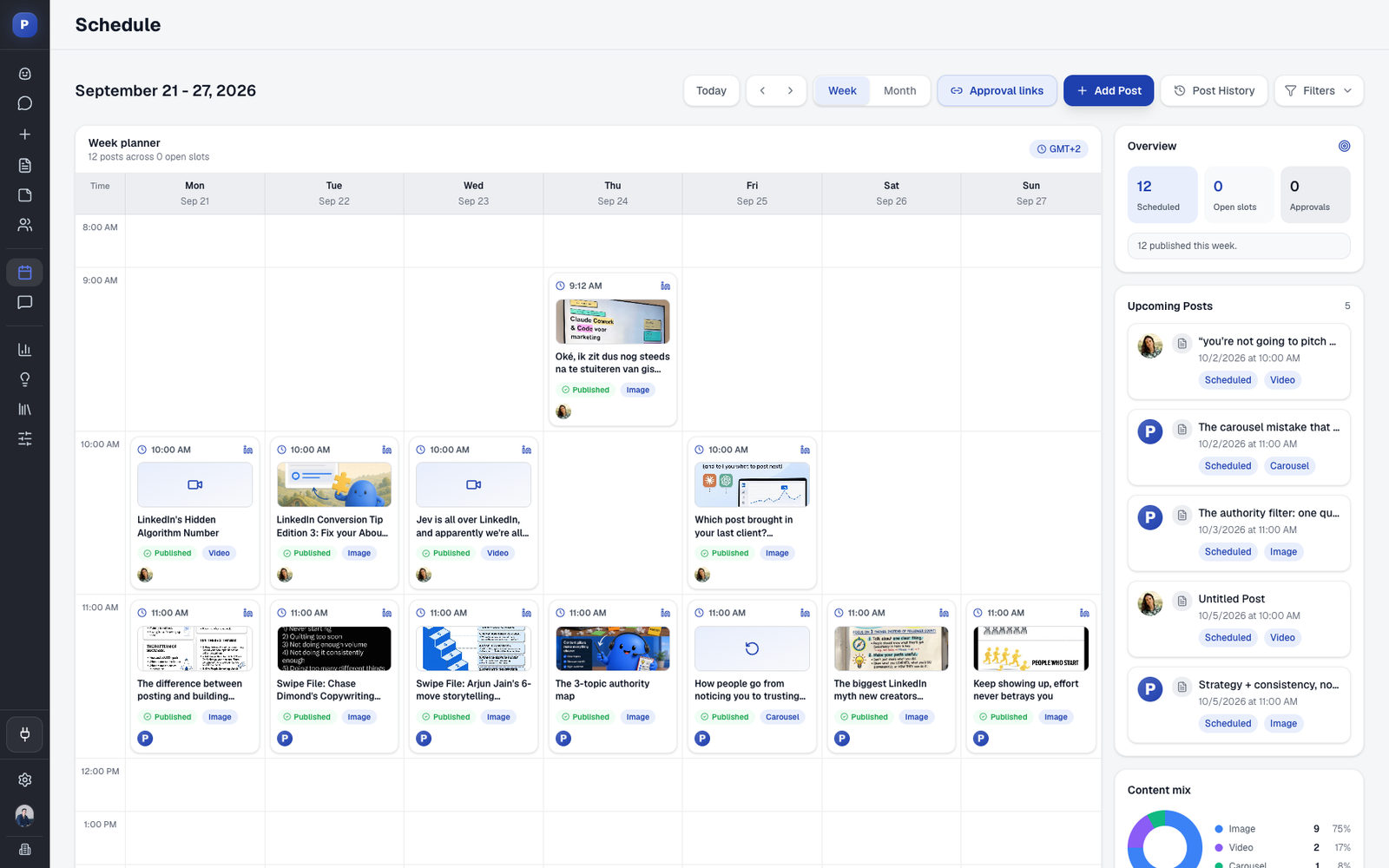
- More than a scheduler. One calendar for every profile, company page and channel, with posting slots, drag-and-drop rescheduling and an automatic first comment (LinkedIn scheduling). A comment inbox across every profile, answered with suggestions in your tone or your own words, plus a feed of people you want to reach (engagement tools). Analytics per post and per profile, plus results per content pillar.
- Team management. Every profile and company page in one workspace, with roles, approvers per profile and a Team Hub. Admins can set automatic team engagement as likes; comments are always written by people.
- MCP and API. Buffer and Hootsuite both have AI connectors as well. Postiv's hosted LinkedIn MCP server goes further into the content work: from Claude, ChatGPT, Cursor or Claude Code it can research inspiration, use workspace knowledge, create and edit posts, generate images and carousels, schedule into queues and read analytics, with approvals still applying. There is a public REST API too.
Postiv connects through the official LinkedIn API for personal profiles and company pages, with no Chrome extension and no browser automation. It never comments on its own.
Related Reading
- Buffer pricing, plan by plan: every Buffer plan and limit.
- Hootsuite pricing explained: what each Hootsuite tier includes.
- Compare Hootsuite with Sprout Social: the other per-seat suite.
- Buffer vs Taplio for LinkedIn: if Taplio is on your shortlist.
- Run several LinkedIn accounts as a team: the multi-profile setup question.
- Running LinkedIn for agency clients: client workspaces and approval links.
More Questions
What are the downsides of using Hootsuite?
The downsides are cost and clarity. Hootsuite is priced per user at $99, $199 or $399 a month on annual billing, so every teammate adds a seat. Approvals only start on Advanced. There is no permanent free plan, only a 14-day trial with daily posting limits. The plans page does not describe client workspaces, does not say how LinkedIn profiles and Pages count toward the 10-account cap on Standard, and there is no built-in carousel designer.
What's better than Buffer?
It depends on the job. If you want another per-channel scheduler, our guide to the best Buffer alternatives compares them. If LinkedIn is where your B2B team publishes, Postiv is built for that: client workspaces with their own brand kit, a writing style per profile, a built-in carousel designer and a comment inbox across every profile. Hootsuite fits better when you need listening or a DM inbox.
Does anyone use Hootsuite anymore?
Yes, Hootsuite is still sold. In October 2026 its plans page listed Standard, Professional and Advanced at $99, $199 and $399 per user per month on annual billing, plus a custom Enterprise tier, and Hootsuite markets its suite as Hootsuite Social OS. It suits teams that want an inbox, listening and benchmarking in one place. To compare it with other tools, read our guide to Hootsuite alternatives.
Does Buffer or Hootsuite have a free plan?
Buffer has a free plan: up to 3 channels, 1 user and 10 scheduled posts per channel at a time, with a visual calendar, queue, AI Assistant and a comment inbox. Hootsuite has no permanent free plan. It offers a 14-day free trial with no credit card and no automatic charge, but trial accounts are limited to 10 to 20 posts per day per organization and cannot bulk schedule. Buffer also gives a 14-day trial of Essentials and Team.
How does Buffer pricing compare with Hootsuite pricing for a team?
Buffer charges per channel and Hootsuite charges per user. Three people managing six LinkedIn channels with approvals pay $1,197 a month on Hootsuite Advanced (3 x $399) or $60 a month on Buffer Team billed yearly. Add two people and Hootsuite reaches $1,995 a month while Buffer stays at $60, because Team includes unlimited users. One person running 20 channels flips it: Buffer Team is $240 a month at monthly list price, against $199 for one Hootsuite Professional seat billed annually.
Can Buffer and Hootsuite post LinkedIn carousels?
Yes, as PDF document posts. Both let you attach one PDF per LinkedIn post, up to 300 pages and 100MB. Buffer requires a document title. On Hootsuite a PDF cannot be combined with images or video, or added when other networks are selected in the same post. Neither has a built-in carousel designer: Buffer imports designs from Canva, and Hootsuite connects to Canva and Adobe Express. Postiv designs the carousel on your brand kit and publishes it as a LinkedIn document post from the same place.
Do Buffer and Hootsuite have approval workflows?
Yes, on higher plans. On Buffer, approval workflows (who can draft, who can approve) start on the Team plan. On Hootsuite they start on Advanced at $399 per user per month, together with internal comments. Neither pricing page says whether a client outside your company can review a post without a paid seat or a login, so ask before you promise clients a sign-off step. Postiv's client approval links let a client approve without a Postiv account.
Which is better for an agency managing LinkedIn clients?
Neither page describes a separate workspace per client with its own brand kit, so ask both vendors. Buffer says agencies pay per channel, not per brand or client, with channel groups and per-channel access. Hootsuite has departmental organization on every plan. If each client needs its own profiles, brand kit and writing styles, plus approval without a login, Postiv's client workspaces are built for that.
What fits LinkedIn-first B2B teams better than Buffer or Hootsuite?
Postiv is built for LinkedIn-first B2B teams, founders and agencies. Bob plans the posting week, drafts follow each profile's own writing style from its knowledge base, and posts, carousels, images and infographics are created on your brand kit. One calendar covers every profile and company page, a comment inbox covers every profile, and a hosted LinkedIn MCP server works with Claude, ChatGPT, Cursor and Claude Code. It comes with a 7-day free trial.