10 Best LinkedIn Analytics Tools in 2026 (Compared)
The best LinkedIn analytics tool depends on who is using it. For founders, teams and agencies that want performance data right next to writing and scheduling, Postiv is our pick. For a free baseline, LinkedIn's own analytics is the right start. For reporting across many networks, a suite like Hootsuite, Sprout Social or Buffer fits better. Below we compare ten LinkedIn analytics tools on what matters most in 2026: where the data comes from, what the tool can see on personal profiles versus company pages, and how it handles several profiles at once.
If you want the short version of what we built, our LinkedIn analytics tool for profiles and company pages shows which posts brought reach, engagement and followers, measured against your own average. The rest of this guide stays honest about where other tools beat us.
Quick picks by use case
- Creators and personal brands: LinkedIn native analytics for the free baseline, Postiv if you want outliers against your own average and a weekly writing loop, AuthoredUp if you live in the LinkedIn feed and like a browser extension.
- Company pages: LinkedIn native analytics, Sprout Social or Socialinsider for page-level reporting and benchmarking, Postiv if you want the page read next to the founder and team profiles that post for it.
- Agencies managing many clients: Postiv for LinkedIn-first client workspaces, Hootsuite or Sprout Social if you report across several networks, Metricool or Planable for lighter multi-brand reporting.
- Teams and employee advocacy: Postiv for a team view across connected profiles, Hootsuite for a multi-network suite your social team may already use.
- Enterprise reporting: Sprout Social or Hootsuite for suite-level reporting and governance, with LinkedIn as one channel among many.
Comparison table
The table summarizes what each tool is built for. Data source is the column most listicles skip, and the one that decides whether a tool still works next year. Entries marked "check in trial" are cells where we could not confirm a fact from public comparisons, so verify them before you buy.
| Tool | Best for | Personal profiles | Company pages | Data source | Multi-profile reporting | AI insights |
|---|---|---|---|---|---|---|
| Postiv | Founders, teams and agencies who write, schedule and measure in one place | Yes | Yes | Official LinkedIn analytics API | Yes, all profiles in one workspace | Ask Bob, outliers vs your own baseline, MCP for Claude and ChatGPT |
| LinkedIn native analytics | Free baseline for any account | Yes | Yes | First-party LinkedIn | No, one profile or page at a time | No |
| Hootsuite | Multi-network social teams | Yes, since July 2025 | Yes | Official API | Yes | Check in trial |
| Buffer | Light scheduling plus basic stats | Yes | Yes | Official API | Basic | Check in trial |
| Sprout Social | Enterprise and page reporting | Not its focus | Yes | Official API | Yes | Check in trial |
| Taplio | Creators who want benchmarks | Yes | Not its focus | Reported unofficial access | Not its focus | Benchmarks against a large post pool |
| AuthoredUp | LinkedIn-native creators | Yes | Yes | Chrome extension, plus GDPR archive import | Cross-profile views | Post comparisons |
| Metricool | Lightweight multi-brand reporting | Yes, official API partner | Yes | Official API | Yes, several brands | Check in trial |
| Socialinsider | Competitor benchmarking | Not its focus | Yes | Official API | Yes | Check in trial |
| Planable | Social teams with approval workflows | Not its focus | Yes | Not clearly stated | Yes | Check in trial |
Prices are deliberately not in this table. They change often and differ by seat, profile and plan, so check each vendor's pricing page for the current numbers.
How we compared these tools
We compared the tools on five questions: where the data comes from, which account types it covers, what it shows beyond a dashboard, how it works for several profiles, and what you give up by choosing it. Facts about other vendors come from their own positioning and from how third-party comparisons describe them, and access claims are vendor claims. Our own product description follows what we publicly document on our analytics page. Where a fact is uncertain, we say so instead of guessing.
The 10 best LinkedIn analytics tools
1. Postiv
Best for: founders, teams and agencies that want LinkedIn analytics, writing and scheduling in one workspace.
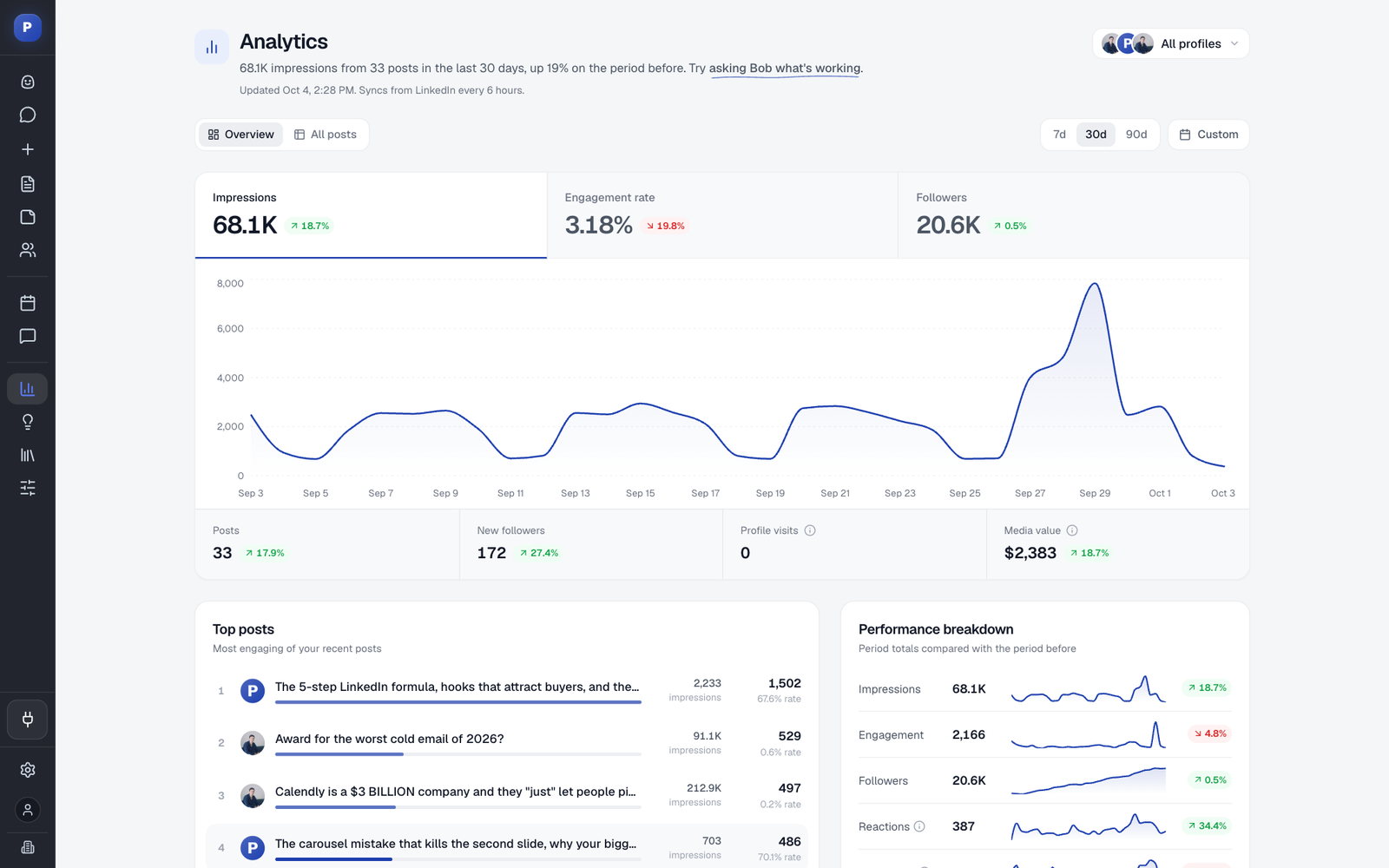
Postiv is a LinkedIn-first content workspace for you, your team and your AI agent. The analytics side tracks personal profiles and company pages in one dashboard, and it sits next to the drafts, calendar and Bob, our AI content partner. The idea is that analytics next to your drafts gets used every week, while analytics in a separate tool gets checked once a quarter.
What it tracks:
- Every post: impressions, reactions, comments, reposts, saves, engagements and engagement rate, with reach, sends, link clicks and video plays in the post detail where LinkedIn reports them. Sort by any column and filter by text, image, carousel or video.
- Growth over time: impressions, engagement rate and followers charted over 7, 30 or 90 days or a custom range, with every headline number compared to the previous period.
- Top posts and outliers: your best posts of the period, plus the ones that beat your own average reach or engagement, or your usual results for that format. It is your baseline, not an industry benchmark.
- Followers and profile visits: total followers, net new followers and profile visits, so you can see which weeks of posting grew the audience.
- History: connect a profile and Postiv imports up to 12 months of posts through LinkedIn's official analytics access, including posts you wrote directly on LinkedIn.
- Team view: switch between connected profiles or read all accounts together once two or more profiles are connected.
- Ask Bob: ask in plain words which posts did best this month or which formats get engagement, and Bob answers with your data and a chart.
- Your own AI assistant: the MCP server lets Claude or ChatGPT read your summary, top posts, outliers and single-post numbers. More on that in our LinkedIn MCP server page.
Data source: LinkedIn's official analytics API, refreshed automatically. No browser extension and no spreadsheet uploads.
Pros:
- Official data access, so no account risk from scraping.
- Outliers are measured against your own history, which is the comparison that changes what you post next.
- Analytics lives next to writing and the LinkedIn post scheduler, so the loop from measuring to drafting is short.
- Personal profiles and company pages read side by side.
Cons:
- LinkedIn-first. If you need one dashboard that spans many networks, a suite covers more ground.
- No follower demographics for personal profiles, because LinkedIn does not share them with any outside tool.
- Company page posts show no saves, because LinkedIn does not report them.
- It compares you with your own baseline, not with an industry benchmark.
2. LinkedIn native analytics
Best for: anyone who wants a free, authoritative baseline.
LinkedIn's own analytics is where every number starts. It covers personal profiles and company pages, it is free, and it is the only place that shows personal-profile follower demographics such as industry, seniority and location. If you post once or twice a week to a single account, it may be all you need.
Data source: first-party LinkedIn.
Pros:
- Free and always available.
- The most complete source for audience demographics.
- No third party touches your account.
Cons:
- One profile or page at a time.
- Post numbers are opened one post at a time, with no table to sort.
- No comparison against your own average, so spotting an outlier is manual.
- It is separate from the place where you write and schedule.
3. Hootsuite
Best for: social teams that already run several networks from one suite.
Hootsuite appears on all five of the competitor lists we reviewed, and for good reason: it is a multi-network suite with LinkedIn analytics inside it, read through the official API. According to third-party comparisons, personal profile support was added in July 2025, which closed a gap for creators and founders who post from their own accounts.
Data source: official API.
Pros:
- Covers many networks in one place, so one report can span LinkedIn and everything else.
- Official data access.
- Familiar to many marketing teams and agencies.
Cons:
- Broad by design, so LinkedIn analytics is one module among many.
- Less opinionated about what to post next than a LinkedIn-first tool.
- Setup and reporting can feel heavy for a solo founder.
4. Buffer
Best for: creators and small teams who want light scheduling with basic stats.
Buffer is a scheduling tool with analytics attached. It reads LinkedIn through the official API and covers profiles and pages. Comparisons describe its LinkedIn stats as basic, which is a strength if you want a simple, calm tool and a limitation if you want to dig into why a post worked.
Data source: official API.
Pros:
- Simple to start with and easy to explain to a team.
- Official data access.
- Good fit if scheduling is the main job and analytics is a bonus.
Cons:
- Basic stats rather than deep analysis.
- Limited help turning numbers into the next post.
5. Sprout Social
Best for: enterprise teams and company page reporting.
Sprout Social is a premium social suite. Its LinkedIn reporting centers on company pages, and comparisons highlight views such as organic versus paid followers. It reads data through the official API, which makes it a safe choice for compliance-minded teams.
Data source: official API.
Pros:
- Strong page-level reporting and governance for larger teams.
- Official data access.
- Reports that are easy to hand to stakeholders.
Cons:
- Built for pages and enterprise workflows, so founders with a personal profile get less from it.
- Overkill for a small team or a single account.
6. Taplio
Best for: creators who want benchmarks and a LinkedIn growth toolkit.
Taplio is a LinkedIn growth tool that combines content ideas, scheduling and analytics for personal profiles. One comparison says it benchmarks your posts against a pool of roughly 60,000 posts, which is a useful outside reference if you have no history of your own yet.
Data source: one comparison reports unofficial access rather than the official API. LinkedIn has taken action against scraping-based tools in the past, so ask any such vendor how its access works and what happens to your history if that access changes.
Pros:
- Built for LinkedIn creators.
- Outside benchmarks help when you are just starting.
- Content ideas and analytics in one product.
Cons:
- The data access model carries platform risk, as the Shield story below shows.
- Aimed at personal profiles more than company pages or teams.
7. AuthoredUp
Best for: LinkedIn-native creators who like working inside the feed.
AuthoredUp is a Chrome extension that adds a writing and analytics layer on top of LinkedIn. It supports post comparisons, covers profiles and pages, and can import your GDPR data archive, which is a handy way to bring old history into the tool. Cross-profile views are available.
Data source: a browser extension collects the metrics, and comparisons describe the access as read-only. Extensions work from your logged-in session, so review the data-source section below before you rely on one.
Pros:
- Works where you already spend your time on LinkedIn.
- GDPR archive import can bring in history from before you joined.
- Post comparisons and cross-profile views.
Cons:
- Browser-extension access is the model LinkedIn has been tightening against.
- It lives in the browser, so it follows you only where the extension is installed.
8. Metricool
Best for: small teams that want lightweight multi-brand scheduling and reporting.
Metricool is a social scheduler and reporting tool for several brands. It was one of the day-one launch partners for LinkedIn's Member Post Analytics API, which means its access to personal profile analytics is sanctioned by LinkedIn. We could not confirm further LinkedIn-specific details from public comparisons, so run a trial and check how deep the LinkedIn reporting goes for your use case.
Data source: official API partner.
Pros:
- Sanctioned LinkedIn access.
- Handy for people who juggle several brands on a lean setup.
Cons:
- LinkedIn is one network among many.
- Check the depth of LinkedIn post analysis in a trial before committing.
9. Socialinsider
Best for: competitor benchmarking on company pages.
Socialinsider focuses on benchmarking. Comparisons describe it as strong for pages, with competitor analysis built in, and it reads data through the official API. If your question is "how do we compare to the five companies we compete with", it is purpose-built for that.
Data source: official API.
Pros:
- Competitor benchmarking is the core feature.
- Official data access.
- Good for presentation-ready reports.
Cons:
- Aimed at pages and benchmarking more than at day-to-day writing.
- Less useful if you only want to understand your own posts.
10. Planable
Best for: social teams that need content approval and clean reports.
Planable is a collaboration and approval tool with analytics and reporting. Comparisons describe a competitor benchmark of up to five accounts and CSV export. It focuses on company pages. The data source is not clearly stated in the comparisons we reviewed, so ask the vendor directly.
Data source: not clearly stated.
Pros:
- Strong approval and collaboration workflow.
- Competitor benchmark and CSV export for reports.
Cons:
- Analytics is secondary to workflow.
- Personal-profile depth is limited compared with creator-focused tools.
Try the analytics side of Postiv
If you want to see your own posts ranked against your own average, start your 7-day free trial. Connect a profile, let the import run, and your dashboard fills with up to 12 months of history.
Official API vs browser extension: why the data source matters
Every LinkedIn analytics tool has to get your numbers from somewhere. There are three routes, and they differ in risk.
Official API. LinkedIn gives approved tools sanctioned access. In July 2025, LinkedIn launched its Member Post Analytics API, which gave approved third-party tools direct access to personal profile analytics. Buffer, Hootsuite and Metricool were among the day-one launch partners. Tools on the official route are the safest long-term bet because LinkedIn sanctions the access rather than tolerating it.
Browser extension. An extension reads your analytics from your logged-in browser session. It works until LinkedIn or the browser store decides it should not. This is the model Shield used. Shield has shut down, with its founders saying both Google and LinkedIn made clear it could not continue as it was built. If you used it, our guide to Shield alternatives covers how to move your history.
Unofficial API or scraping. Some tools reach LinkedIn data through unofficial calls. LinkedIn has said on the record that it takes action to prevent member information from being scraped, so tools in this group carry the same kind of risk as extensions.
What this means for you. The data source decides three things. First, whether your history survives, because a tool that loses access cannot keep refreshing your numbers. Second, whether your account is exposed to a platform crackdown. Third, how complete the numbers are, because official access exposes some fields and not others. When you evaluate a tool, ask one question: "Is your LinkedIn access sanctioned by LinkedIn?" A clear yes is a good sign. A vague answer is a warning.
Personal profile vs company page: what any tool can actually see
LinkedIn decides what it shares with outside tools, and it shares more for company pages than for personal profiles. That limit applies to every third-party tool, not just ours.
Personal profile. Third-party tools can show per-post numbers such as impressions, reactions, comments and reposts, plus followers and profile visits over time, and your post history. They cannot show follower demographics (industry, seniority, location) because LinkedIn does not give them to any outside tool. You can still see them inside LinkedIn. A tool that promises personal-profile follower demographics is estimating them, so treat those numbers as a guess.
Company page. LinkedIn shares more page-level data with outside tools, such as follower count and daily follower growth. One difference: LinkedIn does not report saves for company page posts.
Two comparison pages we reviewed list follower demographics for personal profiles as if they were exact. Given what LinkedIn shares, we would treat that claim with caution and ask the vendor where the data comes from.
Reporting across many profiles (agencies and teams)
Once you manage more than one profile, three things change. You need a way to read several profiles together, a shared history so a new hire does not start from zero, and a clear answer to whose numbers you are looking at.
For a founder with a company page, the useful view is both side by side: the personal profile that gets the reach and the page that carries the brand. Postiv supports this by connecting personal profiles and company pages in one dashboard, where you can switch between each connected profile or read all accounts together to see which formats lift results across the team.
Agencies have a further need: client workspaces that keep each client's data separate while staff move between them. If that is you, see how Postiv works for agencies. If you report across many networks, not only LinkedIn, a suite such as Hootsuite or Sprout Social is the more natural base, and our guide to social media analytics tools across every platform compares that wider field.
Which LinkedIn metrics actually matter
A tool is only as useful as the numbers you act on. A short list covers most decisions:
- Impressions tell you how often a post was shown. It is a reach number, not an audience number. Our guide on what an impression means on LinkedIn explains the difference.
- Engagement rate is engagements divided by impressions. You can check a single post with the free LinkedIn engagement rate calculator.
- Saves often say more about usefulness than likes do. See why saves beat likes on LinkedIn.
- Follower growth and profile visits show whether posting turns into audience.
- Outliers against your own average show what to repeat. A post at 1.2% engagement is a win if you usually sit at 0.8%, whatever an industry average says.
For a deeper method, read how to analyze content performance. If you are curious about LinkedIn's own score for professional presence, the SSI score explained is a good companion read.
How to choose a LinkedIn analytics tool
Work through these in order:
- Start with the data source. Prefer official API access. Treat extension and scraping access as a risk you take on knowingly.
- Match the account type. Personal-profile analytics and company-page analytics are not the same job. Check that the tool does the one you need.
- Decide if you need a suite or a specialist. If LinkedIn is one of six channels, a suite makes sense. If LinkedIn is the channel, a LinkedIn-first tool goes deeper.
- Check how it handles several profiles. A cross-profile view and a shared history matter once a team posts.
- Ask whether the numbers lead to action. A dashboard that ends at charts is a report. A tool that tells you which posts beat your average and helps you draft the next one is a workflow.
- Test with your own history. Connect a real profile in a trial and see whether the import is complete.
If you want to look at your own posts in this way, our LinkedIn analytics tool for profiles and company pages is built around exactly that loop.
What is the best analytics tool for LinkedIn?
The best LinkedIn analytics tool is the one that matches your account type and data needs. For founders, teams and agencies who want analytics next to writing and scheduling, Postiv is our pick. For a free baseline, use LinkedIn native analytics. For multi-network reporting, use Hootsuite, Sprout Social or Buffer. Prefer tools that read data through the official API.
Can ChatGPT analyze LinkedIn?
ChatGPT can analyze LinkedIn data you export and paste in, but it cannot read your account on its own. With an MCP connection such as Postiv's LinkedIn MCP server, ChatGPT or Claude can read your real analytics: a summary for any period, daily performance, top posts and outliers, and the numbers behind a single post. You then ask questions in plain language and get answers from your actual data. The setup takes a few minutes: see how to connect ChatGPT to LinkedIn.
Does LinkedIn have built-in analytics?
Yes. LinkedIn shows analytics for personal profiles and company pages, including impressions, reactions, comments, reposts and follower trends, and it is the only place that shows personal-profile follower demographics. The limits are practical: you open one post at a time, see one profile or page at a time, and get no comparison against your own average. That is where third-party tools help.
Is there a free LinkedIn analytics tool?
LinkedIn's own analytics is free and the right baseline for any account. Some third-party tools offer free tiers with basic stats, and many offer a free trial. If you outgrow native analytics because you manage several profiles or want comparisons over time, a paid tool earns its place. We do not rank on price in this guide, because the right tool depends on your account setup.
How do I track LinkedIn analytics for multiple accounts?
Use a tool that connects several profiles and pages to one workspace and lets you switch between them or read them together. Look for official API access, a cross-profile view and a shared history. Postiv does this once several profiles share a workspace, and suites such as Hootsuite and Sprout Social cover it across networks. Native LinkedIn analytics only shows one profile or page at a time.
More quick answers
Can a LinkedIn analytics tool show follower demographics for a personal profile?
No tool can read them through official access. LinkedIn does not share follower demographics such as industry, seniority or location for personal profiles with third-party tools. You can still see them inside LinkedIn. A tool that promises these numbers for a personal profile is estimating them, so treat them as a rough guess.
Why does the data source of a LinkedIn analytics tool matter?
Tools that read LinkedIn through the official API are sanctioned by LinkedIn and stay working. Tools built on browser extensions or session scraping depend on access LinkedIn can restrict, and Shield shut down for that reason. The data source decides how reliable your history is and how much risk your account carries.
The bottom line
If you want a free start, use LinkedIn native analytics and look at your last ten posts this week. If you want a tool that connects the numbers to what you write next, pick a LinkedIn-first workspace with official data access. If you report across many networks, pick a suite. In all three cases, ask about the data source first.
Postiv is built for the middle case: analytics, drafting and scheduling for you, your team and your AI agent, for B2B teams of up to about 200 employees. Start your 7-day free trial, connect your profile, and see your best posts side by side with your own average.