Repurpose.io is a good tool for one job. It watches a connected account and republishes each new short video to other networks, resized and without watermarks, so if you post a lot of short video and want it cross-posted automatically, you can stay. The best Repurpose.io alternatives for LinkedIn start from a different job.
This guide is for B2B founders, marketers and agencies who already have long-form content, such as webinars, podcasts, YouTube videos, blog posts and PDFs, and want it to become LinkedIn posts and carousels. That is more a writing and design job than a distribution one, and it is the LinkedIn side of content repurposing software. Postiv is the pick for it, with five other tools that each cover part of the job. We checked every competitor price and feature below in October 2026.
Quick picks by need:
- Long-form content into LinkedIn posts and carousels, for teams and agencies: Postiv, which can repurpose content into LinkedIn posts in each person's voice
- Drafts from a recording, published elsewhere: Castmagic
- AI-cut short clips from a long recording: Opus Clip
- One executive who would rather be interviewed than write: Supergrow
- Creator who wants an idea library and engagement tools: Taplio
- Simple, low-cost scheduling with a free plan: Buffer
- Short video copied to other video networks automatically: stay on Repurpose.io
Repurpose.io pricing in 2026
Repurpose.io is a trigger-based video and image distribution tool. It watches a connected source such as TikTok, Instagram, YouTube, Google Drive or Dropbox and republishes new posts to other networks. Plans are flat and scale with accounts per social network rather than users. If you are checking Repurpose.io pricing, this is what its pricing page shows (checked on 20 October 2026).
| Plan | Monthly price | Yearly price | Accounts per network | Published videos |
|---|---|---|---|---|
| Starter | $35 | $349 a year | Up to 3 | 5,000 a month |
| Pro | $79 | $790 a year | Up to 10 | Unlimited |
| Agency | $179 | $1,790 a year | Up to 25 | Unlimited |
What else to know before you budget:
- A trial, not a free plan. The trial runs 14 days or 10 published videos, whichever comes first, and the site says no credit card is needed until you upgrade (we did not test signup). It allows one account per platform, and YouTube cannot be a source. A separate 90-day trial publishes to YouTube only.
- Teams. Its own pages say it has no client approval workflow and no white-label option. No user or seat limits are shown.
- Publishing pace. "As soon as possible" mode checks the source about every 2 hours and publishes at most the last 3 new videos per check. Schedule mode allows up to 5 slots a day.
- Older plan cards. A few audience pages still show older plans. This table follows the pricing page.
Repurpose.io review in short
On its own documentation, it works for what it is built to do. You connect accounts through official APIs and build a workflow, and it then detects each new post, resizes it for the destination, removes platform watermarks and publishes or schedules it. Content has to start on a connected source platform, since there is no direct file upload.
On LinkedIn it publishes video to personal profiles and company pages, single images, image carousels of 2 to 20 images (added on 28 September 2026) and a first comment. The documentation does not say whether a carousel goes out as a native document post, so test that first. Release notes for June and July 2026 each list LinkedIn reconnect or stability fixes, which is another reason to check the connection during the trial.
What Repurpose.io does well
- Hands-free distribution. Connect a source once and every new post is detected, resized per destination and republished, with platform watermarks removed.
- Wide platform coverage. Its supported-platforms table lists 22 integrations, with Zoom, Twitch and podcast RSS feeds as sources and LinkedIn, X, Pinterest, Threads and Bluesky as destinations.
- Clips and templates. A built-in snippet tool, plus templates that turn 16:9 into 9:16 or 1:1 (no AI highlight detection is shown).
- Flat plans by account count. The Agency plan covers up to 25 accounts per network, with one workflow per client.
Choose Repurpose.io if you publish a lot of short video, it already lives on TikTok, Instagram or YouTube, and you want it copied to LinkedIn and other networks without re-uploading. Most of the tools below do a different job.
Why teams look for Repurpose.io alternatives
People who search for a repurpose io alternative for LinkedIn usually run into one of these limits, all taken from Repurpose.io's own documentation.
- No text posts. Text is the core LinkedIn format, and Repurpose.io does not publish it.
- Content must exist elsewhere first. It republishes what was already created and posted on a connected source, and it does not write or design the content.
- Little writing help. The only AI writing shown is limited AI captions, with no LinkedIn-specific copy, ideas or planning.
- Carousels are republished images. There is no slide designer, and LinkedIn carousel support is new.
- No approvals or client portal. Posts have no approval step, and no client portal or folders are shown.
- No LinkedIn analytics, API or MCP shown. Its public feedback board lists requests for MCP or API access and a Zapier integration, but the official site shows none of them.
None of these is a flaw for its core audience, but they matter when the goal is LinkedIn text posts and carousels from long-form content.
Example: one 30-minute webinar, four kinds of tool
Take one 30-minute webinar recording and a LinkedIn profile to feed. It is a generic example, not a benchmark.
| Kind of tool | Example | What you give it | What comes out | What you still do |
|---|---|---|---|---|
| Cross-poster | Repurpose.io | The finished video on a connected source | The video, or snippets you define, on LinkedIn and other networks, resized | Write the text posts and carousel elsewhere |
| Clipper | Opus Clip | The recording | Short captioned vertical clips | Write the text posts and carousel elsewhere |
| Recording-to-text tool | Castmagic | The recording | A transcript, LinkedIn post drafts, carousel slides | Copy or download them, then publish elsewhere |
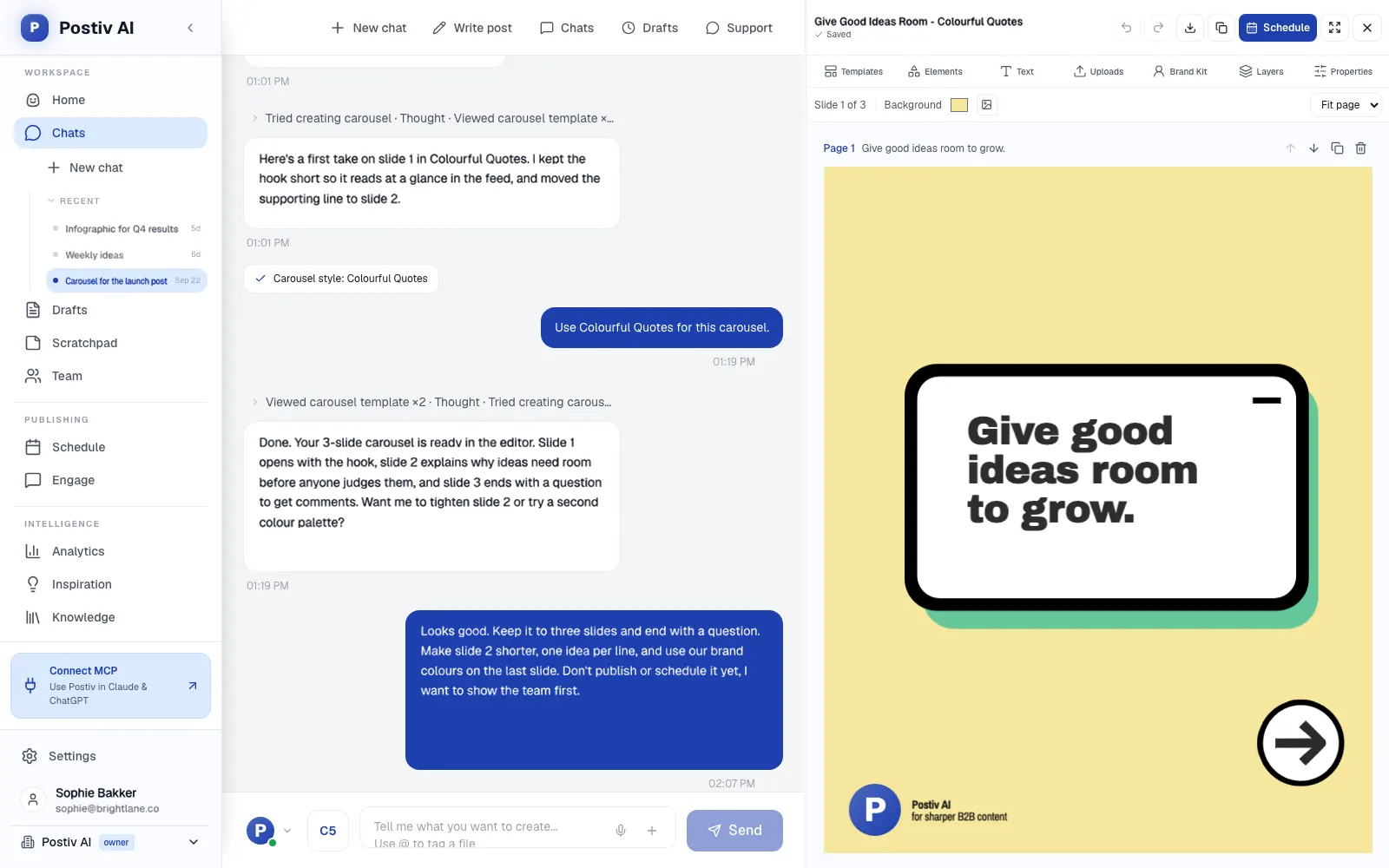
| LinkedIn content workspace | Postiv | The video link, or the transcript as a document | LinkedIn posts and a carousel in the speaker's voice | Review, schedule and send for approval |
A video tool and a LinkedIn content workspace do different jobs, so you can combine them, with a few clips for reach and a steady run of posts and carousels from the same ideas. Our playbook on how to repurpose video content for LinkedIn walks through the steps, and the guide to repurposing content with AI covers prompts and workflows.
Repurpose.io alternatives at a glance
Prices sit in each tool's section below. "Not shown" means the vendor's pages do not list it, not that it is impossible, so verify before you buy.
| Tool | What it does with a long video | LinkedIn text posts | LinkedIn carousels | Publishes to LinkedIn | MCP | Best for |
|---|---|---|---|---|---|---|
| Repurpose.io (baseline) | Republishes finished video, resized. Manual snippets only | No | Republishes image carousels of 2 to 20 images | Yes: video, images, carousels | Not shown | Cross-posting short video |
| Postiv | Reads the video link or transcript and drafts posts and carousels | Yes, in each profile's voice | Yes, editor plus AI carousels | Yes, profiles and company pages | Yes, plus REST API | B2B teams and agencies turning long-form content into LinkedIn posts |
| Castmagic | Transcribes it, then drafts posts and a carousel | Yes | Yes, numbered slides | Not shown | Read-only Claude connector | Podcasters and webinar hosts who publish elsewhere |
| Opus Clip | Cuts captioned vertical clips | Not shown | Not shown | Video clips only, Pro and up | Yes, plan gate unclear | Clips from webinars and podcasts |
| Supergrow | Lists repurposing from YouTube, articles and PDFs | Yes | Yes | Yes, via official API | Yes, every plan | Executives and small leadership teams |
| Taplio | No video processing shown | Yes, AI from Growth | AI-generated from your posts | Yes | Yes, every plan | Creators who want an idea library |
| Buffer | No video processing | Yes | No carousel designer | Yes | Yes, AI-tool integrations | Simple, low-cost scheduling |
The 6 best Repurpose.io alternatives
1. Postiv
Postiv is a LinkedIn-first content workspace for B2B teams, agencies, freelancers and founders. Bob, Postiv's AI content partner, drafts posts and carousels in each person's own voice from the content you already have.
Best for: founders, marketing teams, freelancers and agencies with webinars, podcasts, videos, blogs and PDFs who want LinkedIn posts and carousels from them, from a few clients up to hundreds.
What it does well:
- Turns what you already have into LinkedIn content. Give Postiv a blog URL, a PDF or a video link and it pulls out the key ideas and drafts posts and carousels from them. The knowledge base also takes Notion pages, forwarded newsletters, your website, and Word, PowerPoint and Excel files.
- Voice per profile. Every LinkedIn profile has its own writing style, knowledge and content pillars. Bob drafts in that voice and quotes the knowledge base instead of inventing examples.
- Carousels and infographics in the same tool. A carousel editor with templates, a brand kit and up to 30 slides exports a PDF that publishes as a LinkedIn document post, and Bob also drafts AI carousels and infographics. The LinkedIn carousel generator lets you try the carousel step alone.
- Native video, as you upload it. Postiv publishes video you upload to LinkedIn profiles and company pages, next to the posts and carousels drafted from it.
- Scheduling through LinkedIn's official API. One calendar for every profile and company page, with no browser extension and no automated connection requests.
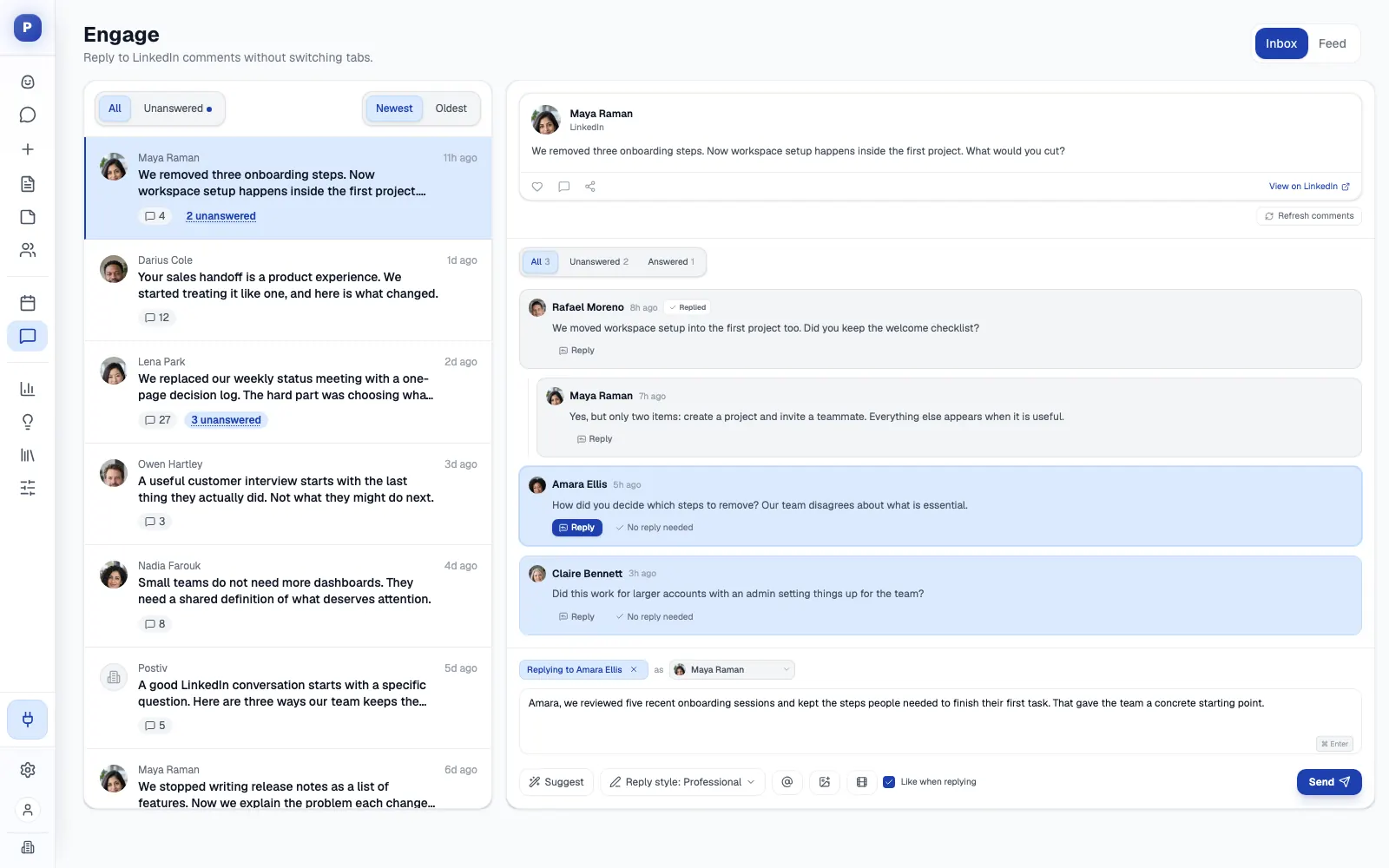
- Approvals. On agency workspaces, clients can approve through a link with no Postiv account, seeing the post as it will look on LinkedIn. An edit after approval sends it back for review.
- A workspace per client. Each client gets their own profiles, company pages, knowledge, brand kit and writing styles, and agency teammates reach all of them from the agency account. See Postiv for agencies.
- MCP and API. The LinkedIn MCP works with Claude, ChatGPT, Cursor, Claude Code and Codex. An assistant can search the knowledge base, create and edit posts, generate carousels, schedule content (approvals still apply) and read analytics. A public REST API is available too.
Where it is not the fit: if your main job is cutting short video and cross-posting it to other video networks, pick a video tool such as Repurpose.io or Opus Clip.
Every plan starts with a 7-day free trial, and the plans are on the pricing page.
2. Castmagic
Castmagic turns a recording into written content. Its pricing page lists Hobby at $29 a month ($239 a year), Starter at $69 ($579 a year) and Team at $199 ($1,669 a year), plus sales-led Business and Scale plans. Hours of audio and video are a library total (30, 100 or 400), not a monthly reset.
On LinkedIn: it writes posts from the transcript in your voice and drafts carousels in a canvas editor. Publishing or scheduling to LinkedIn is not shown. The site says to copy posts into your own scheduler or push them out through Zapier.
Best for: podcasters, webinar hosts and executives who record calls and want drafts out of them.
Strengths: it starts from what was actually said, takes audio, video and links from YouTube, Zoom and Google Drive, and imports new episodes from RSS feeds. It also has a brand voice panel, a space per client and a read-only Claude connector.
Weaknesses: every workflow starts from a recording. There is no free plan, and its pages disagree on whether a trial exists. API access starts at Starter, and no approval link for clients without an account is shown.
Pick it over Postiv if you only need drafts from recordings and already have somewhere to schedule them.
3. Opus Clip
Opus Clip is an AI clipper, and its pricing page lists a Free plan with 60 credits a month (one credit is a minute of source video), Starter at $15 a month and Pro from $29 a month, or $14.50 a month billed yearly, per pack of 300 credits.
On LinkedIn: it publishes finished video clips only, and posting and scheduling need Pro. The connection is listed as "LinkedIn Business", so company pages look supported, but a personal profile is not shown. Text posts and carousels are not shown.
Best for: webinar and podcast hosts who want a steady stream of short captioned clips.
Strengths: the AI finds the best moments in a long video, cuts them, scores each one and adds animated captions. It publishes to nine networks from Pro, has a free plan, and offers an MCP with 29 tools and an API.
Weaknesses: it handles video only. Pro teams stop at 4 seats, and one email can own only one team, so agencies cannot run separate workspaces per client from one login. No approval workflow or LinkedIn analytics is shown. Its pricing table gates the MCP to Pro and Business while its MCP page says free to start, so confirm the plan.
Pick it over Postiv if the goal is clips from long recordings, not posts or carousels.
4. Supergrow
Supergrow is a LinkedIn content platform for individuals and teams. Pro is $39 a month ($31 billed yearly) for one account, and Teams is $199 ($189 yearly) for five accounts, and Enterprise is custom. Every plan has a 7-day trial and none is free.
On LinkedIn: it writes posts in your voice (Content DNA), includes a carousel maker on every plan, and schedules through LinkedIn's official API. Its pricing page lists repurposing from YouTube, articles and PDFs, and Postcast turns a short AI interview into several posts.
Best for: executives and small leadership teams.
Strengths: voice-trained generation and interview-style capture, plus an MCP on every plan.
Weaknesses: approvals are on Teams only and the public API is Enterprise only. The pricing page shows no agency plan. See our Supergrow alternatives guide.
Pick it over Postiv if you are one executive or a small leadership team and interview-led capture appeals more than client workspaces.
5. Taplio
Taplio is a LinkedIn growth suite with plans at Starter $39, Growth $69 and Pro $199 a month ($32, $49 and $149 billed yearly), a 7-day trial and no free plan. AI writing starts on Growth with 250 AI credits a month.
On LinkedIn: it writes posts with AI from Growth, whose tools include a repurpose option, generates carousels from your posts on Growth and above, and schedules on every plan. No video processing is shown.
Best for: creators who want a viral-post library, analytics and engagement tools.
Strengths: a library of 5M+ inspiration posts, with analytics, an API and an MCP on every plan.
Weaknesses: AI is metered and gated to Growth and above, its carousels are auto-generated rather than designed in a full editor, and Pro adds outreach features such as auto-DMs and bulk connection requests. See our Taplio alternatives guide.
Pick it over Postiv if you are a creator who wants an idea library more than approvals or client workspaces.
6. Buffer
Buffer is a multi-channel scheduler with a permanent Free plan (3 channels, 10 scheduled posts per channel), Essentials at $5 per channel a month billed yearly ($6 monthly) and Team at $10 ($12 monthly). Paid plans have a 14-day trial.
On LinkedIn: it schedules text and image posts to profiles and company pages and supports a first comment on paid plans. There is no carousel designer, only a Canva import. Its pricing page shows no trigger-based republishing like Repurpose.io's, so it replaces the scheduling half of the job.
Best for: people who post across many networks and want simple, low-cost scheduling.
Strengths: a free plan, a mature queue and calendar, and Claude, ChatGPT and Cursor integrations on every plan. Team adds unlimited team members and approval workflows.
Weaknesses: the AI assistant is generic, it cannot ingest PDFs or transcripts, LinkedIn profiles get basic analytics only, and agencies pay per channel, with no client-isolated workspaces listed. See our Buffer alternatives guide.
Pick it over Postiv if your posting spans many networks and you write each post yourself.
Repurpose.io vs Postiv for LinkedIn
Repurpose.io is the better video cross-poster, while writing and designing for LinkedIn is where Postiv is stronger. The table below runs through the differences.
| If you need | Repurpose.io | Postiv |
|---|---|---|
| Short video copied to other networks automatically | Built for it: detects new posts, resizes, removes watermarks | Publishes the native video you upload to LinkedIn profiles and company pages |
| LinkedIn text posts from long-form content | Not supported | Core use: drafts from links, PDFs, videos, your website, Notion and newsletters |
| Carousels | Republishes image carousels made elsewhere | Editor, AI carousels and infographics, exported as PDF documents |
| A person's voice | Limited AI captions | A writing style per profile |
| Approvals | None for posts | Approvers per profile, plus a client approval link with no account on agency workspaces |
| Client separation | Agency plan: up to 25 accounts per network, one workflow per client | A workspace per client with its own profiles, knowledge, brand kit and styles |
| MCP and API | Not shown | MCP plus a public REST API |
Which Repurpose.io alternative should you pick?
- Stay on Repurpose.io if your core job is copying short video from TikTok, Instagram or YouTube to other networks.
- Choose Opus Clip if you want AI to cut clips out of long recordings.
- Choose Castmagic if you want drafts from recordings and already have a place to publish them.
- Supergrow or Taplio fit if you are one executive or creator.
- Choose Buffer for simple scheduling across many networks, with a free plan.
- Choose Postiv if the source is long-form content and the output is LinkedIn posts and carousels, especially for a team or for clients. It comes with a voice per profile, approvals, a workspace per client and an MCP.
Frequently Asked Questions
How much does Repurpose.io cost per month?
Repurpose.io has three plans on its pricing page (checked 20 October 2026). Starter is $35 a month, Pro is $79 and Agency is $179, and billed yearly they cost $349, $790 and $1,790 a year, about 17% less. Plans are flat and scale with accounts per social network (up to 3, 10 and 25) rather than with users. There is no permanent free plan, only a trial of 14 days or 10 published videos that the site says needs no credit card.
Does Repurpose.io really work?
On its own documentation, yes, for what it is built to do. You connect accounts through official APIs and build a workflow, and it detects new posts, resizes them for each destination, removes platform watermarks and publishes or schedules them. For LinkedIn it publishes video to personal profiles and company pages, plus single images and image carousels added in late September 2026. It does not publish LinkedIn text posts, and its AI writing is limited to captions. Release notes from June and July 2026 list LinkedIn reconnect fixes, so test the connection during the trial.
Is Repurpose.io safe to use?
Going by its own pages, you connect each account through the platform's official API, and creators can connect their own accounts through an invite link that uses OAuth, so passwords are not shared. Repurpose.io then publishes on your behalf, either soon after it detects a new post (it checks about every 2 hours) or on a schedule of up to 5 slots a day. No seat or user structure is shown, so ask how access works before you connect client accounts. The trial allows 1 account per platform, which is enough to test the connection first.
Is there a free Repurpose.io alternative?
Two tools in this guide have a permanent free plan. Buffer's covers up to 3 channels and 10 scheduled posts per channel, with LinkedIn as one of the channels. Opus Clip's gives 60 credits a month, but free accounts cannot post to social platforms, and LinkedIn posting needs Pro. Postiv, Supergrow and Taplio offer 7-day free trials. Castmagic shows no free plan, and its pages disagree on whether a trial exists. Repurpose.io itself has a 14-day or 10-video trial and a separate 90-day trial that publishes to YouTube only.
What is the best Repurpose.io alternative for LinkedIn?
Postiv is the best Repurpose.io alternative for LinkedIn if your source is long-form content such as webinars, podcasts, YouTube videos, blogs and PDFs, and your output is LinkedIn posts and carousels. It drafts in each person's own voice, schedules to profiles and company pages, sends posts for client approval and keeps a separate workspace per client. Opus Clip suits short video clips, Castmagic gives you drafts from recordings to publish elsewhere, and Buffer handles plain scheduling.
Can Repurpose.io post text or carousels to LinkedIn?
It does not support LinkedIn text posts, but it can publish video to personal profiles and company pages, single images and image carousels of 2 to 20 images (the carousels arrived in its 28 September 2026 release), and it can add a first comment. The carousel has to be made elsewhere, and the documentation does not say whether it goes out as a native document post or as a multi-image post. Check the workflow builder before you plan around it.
Does Repurpose.io have an MCP or API?
Neither is shown on the official site. Its public feedback board lists open ideas for connecting it to AI tools through MCP or an API and for a Zapier integration, but ideas on that board are not a confirmed roadmap. Among the alternatives, Postiv has an MCP server and a public REST API, Opus Clip has an MCP with 29 tools and an API, Supergrow and Taplio have an MCP on every plan, Castmagic has a read-only Claude connector and an API on higher plans, and Buffer has AI-tool integrations on every plan.
What are the main Repurpose.io competitors?
They fall into three groups, video clippers such as Opus Clip, schedulers such as Buffer, and LinkedIn writing tools such as Postiv, Castmagic, Supergrow and Taplio. Which group counts as a competitor depends on the job. Repurpose.io copies finished short video between networks, so for that job the nearest rivals are clippers and schedulers, while for LinkedIn text posts and carousels from long-form content the writing tools are the competitors.