
If you are evaluating content marketing automation tools, you probably already know the pain: an empty content calendar, hours lost to copy-pasting across channels, and zero clarity on which posts actually drive pipeline. The right platform pays for itself in week one by collapsing four jobs (ideation, drafting, scheduling, reporting) into a single workflow. The wrong one drains your card for features you never use.
This guide is built for buyers, not researchers. We cut through the noise on the 12 platforms most B2B teams actually shortlist in 2026, with honest pricing, real use-case fit, and a clear pick for every team size. By the end you will know exactly which tool to put on a trial today.
Whether you are trying to scale content creation as a solopreneur or streamline operations for an entire agency, the right automation stack makes the difference between sporadic output and a predictable content engine.
This guide moves beyond generic feature lists to provide a detailed, practical breakdown of the best tools available. We’ve organized them by primary function:
- Content Creation & Ideation: Tools like Jasper and Semrush that help generate and refine content.
- Distribution & Scheduling: Platforms such as Hootsuite, Buffer, and Sprout Social for publishing across channels.
- Analytics & Performance: Solutions like Metricool for tracking what works. For a dedicated comparison of reporting platforms, see our best social media analytics tools guide.
- Workflow & Collaboration: Tools like StoryChief and CoSchedule that organize your team's efforts.
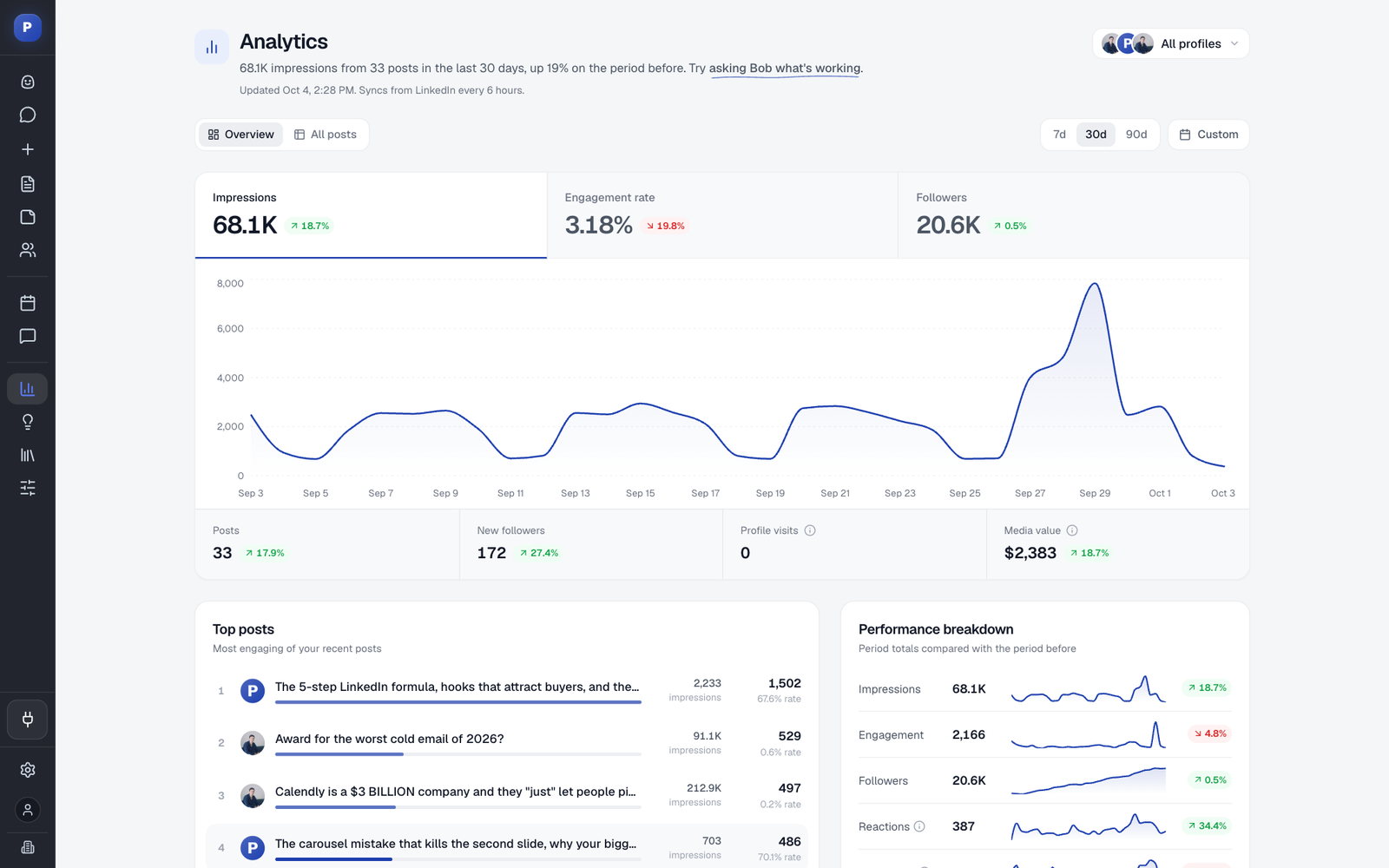
Each review includes an honest assessment of its strengths and limitations, ideal use cases, pricing insights, and screenshots to show you exactly how it works. We’ll also highlight Postiv AI as a powerful, LinkedIn-focused automation solution for building authority and generating leads.
While this article focuses on the content-specific side of automation, it’s helpful to understand the bigger picture. For a broader view, a detailed marketing automation software comparison can clarify how these tools fit into a complete marketing stack. Our goal is to equip you with the information needed to select the right platform, streamline your workflow, and finally achieve consistent, high-impact content marketing without the burnout. Let’s find the right tool for you.
Quick Picks: Best Content Marketing Automation Tool by Use Case
If you do not want to read 4,000 words, here are the picks most B2B buyers land on after a free trial:
- Best for LinkedIn-first B2B (founders, consultants, agencies): Postiv AI. Brand-trained AI writer plus one-click carousels at €99/month.
- Best all-in-one with CRM: HubSpot Marketing Hub. Content, email, and pipeline attribution under one roof.
- Best for SEO-driven content teams: Semrush Content Toolkit. Keyword data and AI drafts in one platform.
- Best for multi-channel publishing at scale: StoryChief. Draft once, publish everywhere with approvals.
- Best free or low-budget pick: Buffer. Pay only for the channels you use, starting at $5 per channel billed yearly ($6 billed monthly).
- Best for agencies managing 10 or more brands: Sprout Social. Deep analytics and unified inbox from $199 per seat per month billed annually.
- Best for content and marketing agencies managing multiple clients: Postiv AI. A separate workspace per client, each with its own voice, knowledge base and brand assets.
Pricing and full breakdowns for each tool below. Skip to the comparison table if you prefer a side-by-side view.
What Is Content Marketing Automation?
Content marketing automation is the practice of using software to handle repetitive, time-consuming tasks throughout the content lifecycle. Rather than manually drafting every social post, copy-pasting across platforms, or compiling analytics in a spreadsheet, automation tools take over the mechanical work so your team can invest energy where it matters most: strategy, storytelling, and audience relationships.
In practical terms, content marketing automation covers four core stages:
- Ideation and Research: AI-powered tools analyze trending topics, competitor content, and keyword data to surface content ideas backed by real search demand.
- Creation and Drafting: Brand-trained AI writers generate first drafts, outlines, and even visual assets like carousels, dramatically reducing time-to-publish.
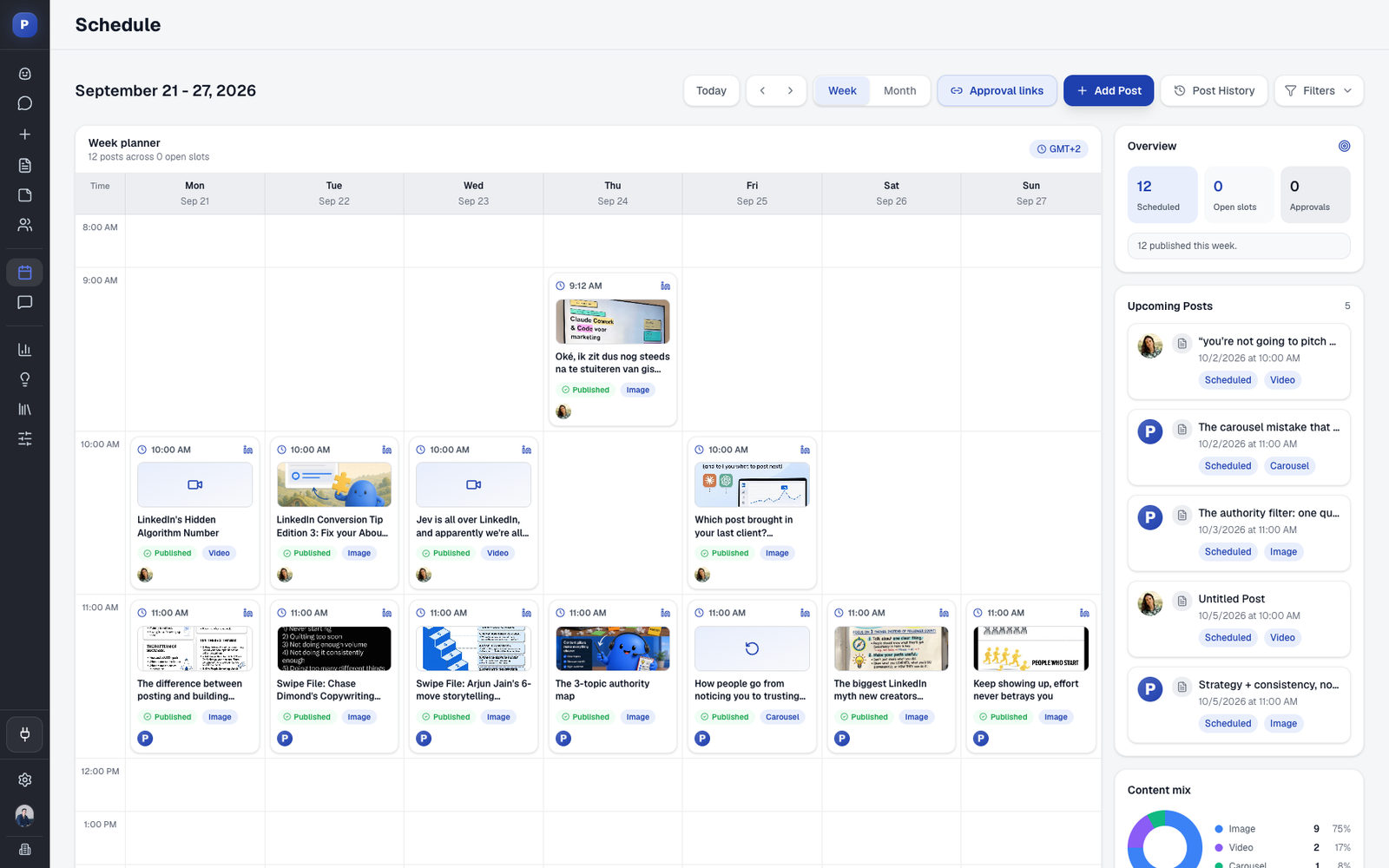
- Distribution and Scheduling: Multi-channel schedulers publish your content at optimal times across LinkedIn, email, blogs, and other platforms without manual intervention. For LinkedIn-specific workflows, a dedicated LinkedIn post scheduler with carousel support, weekly posting slots you fill from your drafts, and client approvals typically outperforms a general-purpose multi-platform tool.
- Analytics and Optimization: Dashboards consolidate performance data from every channel, automatically generating reports and flagging underperforming content for updates.
The distinction between general marketing automation (email sequences, lead scoring, CRM workflows) and content marketing automation is important. Content-specific tools focus on the creative pipeline: helping you produce, distribute, and measure content at scale. They complement broader marketing automation platforms rather than replacing them.
For teams already investing in content but struggling to maintain consistency, automation is the bridge between having a strategy and actually executing it. If you are still building your foundational plan, start with our guide on how to create a content strategy before selecting tools.
Content Marketing Automation vs. Marketing Automation: Don't Buy the Wrong Tool
This is the most common mistake buyers make: shopping in the wrong category. The terms get used interchangeably, but the products solve different problems.
- Marketing automation platforms (HubSpot, ActiveCampaign, Marketo, Klaviyo, Brevo) are built around the lead lifecycle. They handle email sequences, lead scoring, form routing, CRM workflows, and revenue attribution. The unit of work is a contact in a database.
- Content marketing automation tools (Postiv AI, Jasper, StoryChief, Buffer, Sprout Social, CoSchedule) are built around the content lifecycle. They handle ideation, drafting, design, multi-channel scheduling, and content performance reporting. The unit of work is a post, article, or asset.
Most growing teams need both, but they enter the stack at different times. If you have no consistent content output yet, start with a content tool. There is nothing for a marketing automation platform to nurture leads with. If you have content but cannot tie it to revenue, add a marketing automation platform on top. For the wider AI stack across CRM, SEO, design and writing, see the best AI tools for marketing. The 12 tools below are content-side tools; we cover the broader marketing automation category separately. If you are specifically automating LinkedIn (content scheduling, outreach, or both), our dedicated guide to the best LinkedIn automation tools ranks 15 platforms by safety, pricing, and use case.
The ROI of Content Marketing Automation
Before diving into individual tools, it is worth addressing the question every decision-maker asks: is this investment worth it?
The short answer is yes, but only if you approach it with clear goals and measurement. Companies with documented content automation workflows report an average return of $3 in revenue for every $1 invested in content. The return compounds over time as published content continues to attract organic traffic and generate leads months or even years after publication.
Beyond revenue, the operational gains are equally significant:
- Time savings: Marketing teams typically reclaim 6-10 hours per week by automating scheduling, cross-posting, and reporting tasks.
- Consistency: Automated publishing eliminates the "feast or famine" posting pattern that tanks algorithmic reach on platforms like LinkedIn.
- Scalability: A team of three can maintain the output cadence of a team of ten when the right tools handle formatting, distribution, and recycling.
- Better measurement: Centralized dashboards make it straightforward to tie content efforts to pipeline and revenue, something that only 36% of marketers feel they can do accurately today.
The key is to measure what matters. If you want a deeper dive into connecting content efforts to revenue, our guide to measuring content marketing ROI walks through the exact formulas, attribution models, and dashboards you need.
1. Postiv AI
For B2B professionals, founders, and agencies where LinkedIn is the primary battleground for authority and lead generation, Postiv AI stands out as a purpose-built solution. It consolidates the entire LinkedIn content workflow into a single, cohesive platform, eliminating the need to juggle multiple disconnected tools for ideation, writing, design, and scheduling. This integrated approach makes it one of the most efficient content marketing automation tools specifically for the LinkedIn ecosystem.
At its core is a brand-trained AI writer, nicknamed "Bob," that learns your distinct voice and subject matter expertise. You can feed it past content, web articles, PDFs, or even YouTube links, and it generates drafts that sound like you, not a generic chatbot. This capability is paired with a one-click carousel designer, turning text posts or long-form content into professional, on-brand carousels in minutes, a process that manually takes much longer.
Key Takeaway: Postiv AI excels by combining a brand-specific AI writer with a native carousel builder and team collaboration features, making it a powerful engine for consistently publishing high-quality, authority-building content on LinkedIn with minimal friction.
Standout Features and Use Cases
- Brand-Trained AI: The AI writer ingests your existing assets (documents, posts, website content) to produce drafts that maintain your unique tone and perspective. This is ideal for executives and personal brands who need to scale their presence without losing authenticity.
- Integrated Carousel Designer: Create and export polished carousels (PDF or images) directly within the platform using on-brand templates. This is a significant time-saver for marketers and agencies who frequently produce visual content.
- Team & Agency Workflow: The platform supports multi-profile scheduling, role-based permissions, and approval workflows. This structure is perfect for agencies managing client accounts or marketing teams collaborating on a corporate presence.
- Account-Safe Scheduling: Postiv AI uses official API access (OAuth) and avoids risky browser automation, ensuring your LinkedIn account remains secure and compliant with the platform’s terms of service.
Pricing and Access
Postiv AI offers a 7-day free trial to test its full capabilities. Paid plans are structured for different user types:
- Pro Plan: €99/month for individual creators and solopreneurs.
- Team Plan: €229/month, which includes 3 seats (~€76/seat) for small teams.
- Enterprise/Agency: Custom pricing with features like white-labeling and dedicated onboarding.
Pros & Cons
Pros:
- All-in-one workflow reduces tool switching and administrative tasks.
- AI learns your specific voice, ensuring brand consistency.
- Built-in features for team collaboration and agency management.
- Focus on LinkedIn compliance and account safety.
Cons:
- Highly specialized for LinkedIn; not a solution for cross-platform publishing on other networks.
- Requires an initial investment of time to "train" the AI with your content for best results.
Website: https://postiv.ai
2. HubSpot Marketing Hub (and Content Hub)
HubSpot positions itself not just as a tool but as an entire marketing ecosystem built around its core CRM. Its strength lies in providing an end-to-end view of the customer journey, from the first blog post they read to the final deal closing. This makes it one of the most powerful content marketing automation tools for teams that need to demonstrate direct revenue impact from their content efforts.

The platform’s visual workflow builder is a standout feature, allowing marketers to create intricate, multi-step automation sequences. A user could, for example, trigger a personalized email nurture sequence after someone downloads an ebook, then add them to a specific ad audience, and finally create a task for a sales rep once they visit the pricing page-all without manual intervention.
Key Features & Use Cases
- Integrated CMS (Content Hub): Build and manage your blog, website pages, and landing pages with built-in SEO recommendations and AI-powered tools like Content Remix to repurpose existing assets.
- Revenue Attribution: Connect content performance directly to closed deals and pipeline value, answering the perennial question of content ROI.
- Multi-Channel Automation: Automate actions across email, social media, internal notifications, and CRM data updates from a single interface.
Pricing and Limitations
- Pricing: The Marketing Hub has a free tier with basic tools. Paid plans start at $18/month (billed annually) for the Starter tier, but advanced automation and reporting are in the Professional ($800/month) and Enterprise ($3,600/month) tiers. Pricing is contact-based, so it can become expensive for large databases.
- Limitations: For small teams or those solely focused on social media scheduling, HubSpot can be overkill. Its all-in-one nature means you might pay for features you don't use, and significant onboarding may be required to get the most value. Developing a solid content marketing strategy for a small business is crucial before investing in such a comprehensive system.
Best For: Mid-size to enterprise B2B marketing teams that need deep CRM integration and robust reporting to tie content directly to sales outcomes.
3. Semrush Content Toolkit (Content Marketing Platform)
Semrush approaches content marketing automation from an SEO-first perspective. While other platforms focus on the customer journey, Semrush's strength is in using its vast competitive and keyword data to inform every stage of the content lifecycle, from ideation to optimization and performance tracking. This makes it an essential tool for teams whose primary goal is to win organic search traffic.
Instead of just automating distribution, Semrush automates the research and briefing process. Its tools can analyze top-ranking content for a target keyword and generate a detailed SEO Content Template. This template outlines recommended word count, readability scores, semantically related keywords, and backlink sources, effectively creating a data-driven blueprint for writers to follow and rank.
Key Features & Use Cases
- Topic Research & Ideation: Discover content ideas based on competitor strategies and audience search behavior, ensuring you create content people are actively looking for.
- AI-Assisted Drafting (ContentShake AI): Use AI to generate drafts, outlines, or paragraphs based on the data-backed SEO recommendations, speeding up the initial writing process.
- Content Auditing & Optimization: Automatically audit your existing website content to identify pages that need to be updated, merged, or removed for better SEO performance.
Pricing and Limitations
- Pricing: While Semrush has a free account with limited functionality, the full Content Toolkit features are part of its paid plans, starting with the Pro plan at $139.95/month. More extensive usage limits and features are in the Guru ($249.95/month) and Business ($499.95/month) plans.
- Limitations: Semrush is not a full-funnel automation system like HubSpot; its automation is concentrated on the SEO and content creation phases. The platform can be costly, especially for teams that need multiple user seats, and its core value is tied directly to having a strong SEO-focused content marketing strategy for a small business.
Best For: SEO-driven content teams and agencies that need to produce high-ranking content at scale and require data to justify their content decisions.
4. Jasper
Jasper has established itself as a leading AI content platform designed to help marketing teams produce on-brand content at scale. Its core function is automating the initial drafting and idea generation process, acting as a force multiplier for content creators. Where it excels is in its ability to be trained on a company’s specific brand voice, product knowledge, and style guides, ensuring that all AI-generated copy aligns with established brand standards.

Unlike general-purpose AI writers, Jasper is built for marketing workflows. Teams can create campaigns, collaborate on documents, and use a vast library of templates for specific formats like blog posts, ad copy, and social media updates. This makes it a powerful content marketing automation tool for the creation phase, allowing teams to overcome writer's block and standardize their output across multiple channels and contributors.
Key Features & Use Cases
- Brand Voice & Knowledge: Train the AI on your company’s unique style, tone, and factual information to generate content that sounds authentically yours and is factually accurate.
- Marketing-Focused Templates: Access a wide range of pre-built templates for creating everything from AIDA-framework ad copy to long-form blog posts and email newsletters.
- Team Collaboration: Use workspaces and campaign folders to manage multiple projects, provide feedback, and maintain brand governance across the entire marketing team.
Pricing and Limitations
- Pricing: Jasper offers a Creator plan starting at $39/seat/month (billed annually) for individuals. Teams plans, which include the crucial brand voice and collaboration features, start at $99/month. A Business tier with advanced features and security is available with custom pricing.
- Limitations: The quality of the output is heavily dependent on the quality of the initial setup. A significant upfront investment in configuring the Brand Voice and Knowledge base is required for best results. It automates content creation, not distribution or analytics, requiring integration with other tools. For a deeper dive into this category, see this guide to top AI content creation tools.
Best For: Content teams aiming to scale copy production for blogs, ads, and social media while maintaining strict brand consistency and a unified voice.
5. StoryChief
StoryChief is a content distribution powerhouse built for teams that need to "write once, publish everywhere." Its core function is to eliminate the tedious work of copying, pasting, and reformatting content for different channels. This makes it an ideal content marketing automation tool for agencies and marketing teams managing multiple blogs, social media profiles, and email newsletters simultaneously, ensuring brand consistency with less manual effort.

The platform centers around a collaborative editor where a piece of content is created. From there, it can be pushed directly to various CMS platforms (like WordPress or Webflow), sent as an email newsletter, and atomized into social media posts for platforms like LinkedIn, Twitter, and Facebook. This centralized approach simplifies campaign management and provides a single source of truth for every content asset.
Key Features & Use Cases
- One-Click Multi-Channel Publishing: Draft an article and instantly publish it to your website CMS, employee advocacy channels, email marketing software, and social networks.
- Editorial Collaboration & Approval: The built-in workflow allows writers, editors, and clients to collaborate, leave comments, and formally approve content before it goes live.
- Centralized Content Calendar: Plan and visualize all your content campaigns across every channel in a single, unified calendar for better strategic oversight.
Pricing and Limitations
- Pricing: StoryChief offers team-oriented plans starting at $100/month for the Team plan, which includes 4 users. The Agency plan starts at $300/month. There is no free tier, but a 7-day free trial is available.
- Limitations: Its strength in multi-channel distribution might be more than what a solopreneur or a small team focused on a single channel needs. The price point is geared toward teams, and those with a simple workflow might find it over-featured for their requirements.
Best For: Content agencies and mid-sized marketing teams that need to streamline their content creation, approval, and multi-channel distribution processes.
6. Hootsuite
Hootsuite is one of the most established names in social media management, focusing on centralizing content distribution and team collaboration across multiple networks. While not a full-funnel system like HubSpot, it serves as a powerful content marketing automation tool specifically for the social media distribution and monitoring phase. Its strength is in providing large teams with the governance and workflows needed to manage a high volume of social content efficiently and securely.

The platform excels at organizing complex publishing schedules. For example, a marketing manager can use the Bulk Composer to upload a CSV file with hundreds of posts for an entire campaign, schedule them for optimal times, and then assign them to a team member for a final review before they go live. This removes the manual grind of copy-pasting posts across different channels and times.
Key Features & Use Cases
- Centralized Publishing & Inbox: Schedule unlimited posts across all connected social accounts from a single calendar view and manage incoming messages and comments in one unified inbox.
- Bulk Composer: Prepare and schedule up to 350 posts at once by uploading a spreadsheet, a huge time-saver for campaigns and evergreen content distribution.
- Team Governance & Approvals: Create custom approval workflows, assign permissions, and track team activity, which is essential for regulated industries or brands with strict voice guidelines.
Pricing and Limitations
- Pricing: Hootsuite offers a Standard plan at $99 per user per month (billed annually) for up to 10 social accounts, a Professional plan at $199 with unlimited accounts, and an Advanced plan at $399. Enterprise plans with advanced security and analytics are custom-priced.
- Limitations: The cost can escalate quickly for teams, and some of the most valuable features, like advanced analytics and ad management, are locked behind higher-tier plans or are paid add-ons. For individuals or small businesses focused solely on a single platform like LinkedIn, it may offer more than is needed.
Best For: Marketing teams and agencies that manage a wide range of social media channels and require robust scheduling, approval workflows, and centralized monitoring.
7. Sprout Social
Sprout Social is a premium social media management platform that excels in team collaboration, customer care, and deep analytics. While many tools focus purely on scheduling, Sprout Social treats social media as a core business function, combining publishing with listening and engagement. This makes it a powerful content marketing automation tool for brands that need to manage a high volume of interactions and demonstrate the business impact of their social efforts.

The platform’s unified Smart Inbox is a key differentiator, consolidating all incoming messages and mentions from every profile into a single, manageable stream. Teams can assign messages as tasks, apply custom tags for reporting, and collaborate on responses without stepping on each other's toes. This transforms social media from a simple broadcast channel into a real-time customer service and lead generation pipeline.
Key Features & Use Cases
- Configurable Publishing Workflows: Automate post scheduling with configurable queues, a visual calendar, and the ability to upload content in bulk via CSV. Approval workflows ensure brand consistency.
- Advanced Analytics & Social Listening: Go beyond basic metrics with competitive analysis, trend identification, and stakeholder-ready reports that can be exported easily.
- Unified Inbox for Customer Care: Manage all incoming messages, comments, and mentions in one place, enabling fast and coordinated team responses.
Pricing and Limitations
- Pricing: Sprout Social offers several tiers, starting with the Standard plan at $199 per seat per month billed annually ($249 billed monthly). The Professional plan is $299 per seat billed annually ($399 billed monthly), and the Advanced plan is $399 billed annually ($499 billed monthly), with additional costs for more users. A 30-day free trial is available.
- Limitations: The price point is a significant barrier for solopreneurs or small teams. Its extensive feature set, while powerful, can be overwhelming if your primary need is simple content scheduling. Add-on modules for premium analytics and listening also increase the overall investment.
Best For: Mid-market to enterprise companies and agencies that require robust collaboration, detailed reporting, and integrated customer care across multiple social profiles.
8. Buffer
Buffer is a highly approachable and streamlined social media management platform, perfect for small teams and solopreneurs who prioritize simplicity and efficiency. Its strength is its clean, queue-based scheduling system, which automates the distribution of content at pre-set times, ensuring a consistent presence without constant manual oversight. This makes it a great entry-point into the world of content marketing automation tools.
Unlike more complex, all-in-one systems, Buffer focuses on doing one job exceptionally well: getting your content published across social channels with minimal fuss. Its intuitive interface and browser extension allow for quick content sharing from anywhere on the web, directly into your queue. This simplicity is its core advantage over more feature-heavy platforms.
Key Features & Use Cases
- Queue-Based Scheduling: Set a posting schedule once and add content to your queue. Buffer automatically publishes it at the next available slot, ideal for maintaining a steady content rhythm.
- First-Comment & AI Tools: Schedule the first comment on Instagram and LinkedIn posts to add hashtags or links. The platform also includes a basic AI assistant to help generate post ideas.
- Pay-Per-Channel Model: The flexible pricing structure allows you to pay only for the channels you need, making it cost-effective for brands with a smaller social footprint.
Pricing and Limitations
- Pricing: Buffer offers a free plan with basic publishing for up to three channels. Paid plans start with the Essentials plan at $5/month per channel billed yearly ($6 billed monthly), with team and agency plans available for collaboration.
- Limitations: Its analytics and social listening capabilities are less robust compared to enterprise-grade tools, and Buffer doesn't support native LinkedIn carousel creation. While Sprout Social offers comprehensive features for social media management, you might also be interested in exploring some of the best Sprout Social alternatives to compare options. For those focused on a single platform like LinkedIn, it's also helpful to learn how to automate LinkedIn posts with specialized tools, or compare a LinkedIn-first Buffer alternative that adds AI carousels and voice learning.
Best For: Solopreneurs, small businesses, and marketing teams looking for a simple, reliable, and affordable tool for social media publishing and basic analytics.
9. CoSchedule (Social Calendar and Marketing Suite)
CoSchedule brings order to content chaos by centering its entire workflow around a unified marketing calendar. Its core value proposition is providing teams with a single source of truth for all marketing activities, from blog post production to social media campaigns. This calendar-first approach makes it an excellent content marketing automation tool for organizations struggling with cross-channel visibility and campaign coordination.

The platform’s standout automation feature is ReQueue, which automatically finds optimal times to re-share your best evergreen content. You fill a queue with your top-performing posts, and CoSchedule intelligently fills gaps in your social media schedule. This ensures your profiles remain active and your most valuable content gets continuous exposure without constant manual effort.
Key Features & Use Cases
- Unified Marketing Calendar: See all projects, tasks, social messages, and content in one place, filterable by team member, project, or type.
- ReQueue Evergreen Automation: Build a library of evergreen social posts that are automatically recycled to fill your content calendar, maximizing content lifespan.
- Marketing Suite for Campaigns: Manage complex marketing campaigns with dedicated project management tools, coordinating tasks and assets from ideation to launch.
Pricing and Limitations
- Pricing: The Social Calendar starts at $19 per user/month (billed annually). The more comprehensive Marketing Suite, which includes project management features, requires a custom quote from their sales team.
- Limitations: While the calendar is powerful, some of the most advanced automation and team management capabilities are locked behind the higher-priced, sales-quoted Marketing Suite. For teams needing only social scheduling, it may be more feature-rich than necessary, while those needing deep CRM integration will find it less robust than an all-in-one like HubSpot.
Best For: Content-heavy marketing teams that need a strong organizational tool to manage a high volume of content and social media activity across multiple channels.
10. Loomly
Loomly is a social media management platform that prioritizes structured content planning, collaboration, and approval workflows. It’s built for teams that need a clear, step-by-step process for creating and scheduling social content, from initial idea to final post. This makes it a strong choice among content marketing automation tools for organizations requiring strict brand oversight and a centralized asset library.

The platform guides users through a defined workflow: set post objectives, define the audience, select channels, draft copy with a live mockup, get feedback, receive approval, and schedule. This methodical approach minimizes errors and ensures all stakeholders are aligned before content goes live. Its post ideas feature, which offers suggestions based on trends and holidays, also helps teams overcome creative blocks.
Key Features & Use Cases
- Guided Content Creation: A step-by-step calendar wizard that ensures all necessary components of a post are considered, from hashtags to audience targeting.
- Team Collaboration & Approval Flows: Assign roles, leave comments directly on post mockups, and track a post’s status from "Draft" to "Approved" to prevent unauthorized publishing.
- Centralized Asset Management: A shared library for storing photos, videos, post templates, and notes, ensuring brand consistency across all social media channels.
Pricing and Limitations
- Pricing: Plans start with the Base tier at $26/month (billed annually) for 2 users and 10 social accounts. The Standard ($59/month) and Advanced ($129/month) tiers add features like advanced analytics and ad management. Yearly billing offers a discount.
- Limitations: Its analytics are not as deep as enterprise-level suites, making it less suitable for teams focused on complex performance tracking. Some users have also noted that recent pricing changes require a careful evaluation of which plan offers the best value for their specific needs.
Best For: Small to mid-sized marketing teams, agencies, and social media managers who need a highly structured, approval-based workflow for planning and publishing social content.
11. Later
Later is a visual-first social content planning and scheduling tool that excels for brands prioritizing Instagram, TikTok, and Pinterest. While its core design serves image and video-heavy platforms, its multi-channel scheduling and Link in Bio features make it a solid choice for teams who syndicate visual content to platforms like LinkedIn and Facebook. It’s one of the more accessible content marketing automation tools for visual-centric strategies.

The platform’s standout feature is its drag-and-drop Visual Planner, which allows users to see exactly how their content will look on an Instagram grid before it goes live. This workflow is ideal for maintaining a specific brand aesthetic. Its Link in Bio tool also turns a simple link into a clickable, commerce-friendly microsite, driving traffic directly from social profiles to product pages or blog posts.
Key Features & Use Cases
- Visual-First Scheduling: Plan and preview content for Instagram, TikTok, and Pinterest with a clear visual calendar to ensure a cohesive feed aesthetic.
- Link in Bio Microsites: Create a customizable landing page for your social bio, complete with clickable buttons and a shoppable media feed.
- Social Sets: Manage scheduling and analytics for multiple social media profiles (e.g., Instagram, Facebook, LinkedIn) together as a single group, which is ideal for agencies or multi-brand companies.
Pricing and Limitations
- Pricing: Later has no free plan, only a 14-day trial. Starter is $25/month ($18.75 billed yearly), with Growth ($50/month) and Scale ($110/month) adding more social sets, users and analytics.
- Limitations: Its primary focus on visual platforms means its features for text-heavy or conversation-driven networks like LinkedIn are less robust than specialized tools. The analytics and social listening capabilities are also lighter compared to enterprise-grade platforms like Sprout Social.
Best For: B2C brands, creators, and e-commerce businesses that rely heavily on visual content for platforms like Instagram and TikTok but also need a simple way to cross-post to other channels.
B2B teams that mainly publish on LinkedIn can compare LinkedIn-first alternatives to Later.
12. Metricool
Metricool is a versatile social media, blog, and ads management tool that shines for its analytics and reporting capabilities. It acts as a central dashboard for marketers who need to schedule content and then prove its value, making it a practical choice for agencies and small businesses focused on demonstrating results. Its strength is in consolidating performance data from multiple channels, including ad accounts, into a single, cohesive view.

The platform is particularly useful for competitor analysis and generating professional, automated reports. A user can connect their social profiles and ad accounts, schedule posts across networks, and then generate a branded PDF report that shows follower growth, engagement metrics, and ad spend performance with just a few clicks. This automated reporting saves significant time for agencies managing multiple clients or for in-house marketers preparing monthly updates.
Key Features & Use Cases
- Unified Analytics & Reporting: Connect social media, websites, and ad platforms (Google Ads, Meta Ads) to track performance in one place and generate automated, customizable reports.
- Competitor Tracking: Monitor the social media activity and growth of competitors to benchmark your own performance and spot content trends.
- Cross-Network Scheduling: Plan and schedule content for Instagram, Facebook, X (Twitter), LinkedIn, Pinterest, TikTok, and Google Business Profile from a single calendar.
Pricing and Limitations
- Pricing: Metricool offers a free plan with limitations on historical data and profiles. Paid plans are competitively priced, starting with the Starter plan at $18/month (billed annually) and scaling up to Team and Enterprise plans for agencies.
- Limitations: While its analytics are strong for its price point, it lacks the deep CRM integration and complex workflow automation found in enterprise-grade content marketing automation tools. Large teams may find its collaboration and governance features less robust than more expensive alternatives.
Best For: Freelancers, small business owners, and marketing agencies that need an affordable, all-in-one tool for scheduling, analytics, and generating client-ready reports.
Top 12 Content Marketing Automation Tools Comparison
| Product | ✨ Core features | ★ Quality / Impact | 💰 Pricing / Value | 👥 Target audience | ✨ USP |
|---|---|---|---|---|---|
| 🏆 Postiv AI | Brand-trained AI writer, one-click carousel designer, scheduler, analytics, content ingestion (PDF/Video/Web) | ★★★★☆ — fast creation; proven time & lead impact | €99/mo Pro; €229/mo Team (3 seats); Enterprise custom — 7‑day trial 💰💰 | 👥 B2B founders, marketers, sales teams, agencies | ✨ LinkedIn-first workflow, preserves brand voice, LinkedIn-compliant scheduling |
| HubSpot Marketing Hub | CRM-driven automation, CMS/Content Hub, social scheduling, SEO tools | ★★★★★ — enterprise-grade analytics & attribution | Tiered; scales with contacts; advanced tiers costly 💰💰💰 | 👥 Mid-market & enterprise marketing teams | ✨ Deep CRM–marketing alignment and multi-touch attribution |
| Semrush Content Toolkit | SEO research, topic briefs, ContentShake AI, optimization & audits | ★★★★☆ — strong SEO-backed suggestions | Tiered subscriptions; Content Toolkit usage limits 💰💰 | 👥 SEO/content teams and agencies | ✨ Keyword & competitive data powering content strategy |
| Jasper | AI copywriting, Brand Voice & Knowledge, templates, collaboration | ★★★★☆ — scalable, brand-governed outputs | Subscription tiers; brand features need setup 💰💰 | 👥 Marketing teams & agencies | ✨ Brand governance + multi-format copy scaling |
| StoryChief | One-click multi-channel publishing, campaign planning, SEO editor | ★★★☆☆ — efficient multi-destination workflows | Team plans; advanced features on higher tiers 💰💰 | 👥 Agencies & distributed content teams | ✨ Draft once, publish everywhere with approvals |
| Hootsuite | Publishing queues, bulk scheduling, governance & analytics | ★★★★☆ — broad channel coverage & mature workflows | Higher cost at scale; add-ons for enterprise features 💰💰💰 | 👥 Enterprises & social ops teams | ✨ Mature governance and cross-channel management |
| Sprout Social | Scheduling, approvals, advanced analytics, listening, unified inbox | ★★★★★ — best-in-class reporting & exports | Premium pricing; full package often sales-quoted 💰💰💰 | 👥 Large teams, agencies, customer-care ops | ✨ Deep analytics, social listening & stakeholder-ready reports |
| Buffer | Queue-based scheduling, browser extension, basic AI post generator | ★★★★☆ — simple, reliable UX | Pay-per-channel, affordable for small footprints 💰 | 👥 Solopreneurs & small teams | ✨ Simple UI and cost-effective per-channel model |
| CoSchedule | Unified marketing calendar, ReQueue evergreen automation, project coordination | ★★★★☆ — strong calendar-first planning | Marketing Suite quoted; higher tiers for full features 💰💰 | 👥 Teams focused on editorial/calendar coordination | ✨ ReQueue evergreen automation & unified content calendar |
| Loomly | Post ideas, mockups, approvals, brand asset management, scheduling | ★★★☆☆ — approachable planning & approvals | Transparent plans with yearly discounts 💰💰 | 👥 SMEs & structured marketing teams | ✨ Clear planning + approval workflows without heavy analytics |
| Later | Visual calendar, Social Sets, Link in Bio microsites, scheduling | ★★★☆☆ — visual-first, commerce-friendly UX | Tiered plans geared to visual platforms 💰💰 | 👥 Instagram/TikTok/YouTube-first brands (also posts to LinkedIn) | ✨ Visual workflow & microsite Link-in-Bio features |
| Metricool | Cross-network scheduling, ads integrations, competitor tracking, reports | ★★★★☆ — strong reporting for price | Competitive tiered pricing; premium analytics unlocked on paid plans 💰💰 | 👥 Small agencies & performance-focused teams | ✨ Ads + social analytics with automated report generation |
How to Implement Content Marketing Automation in 30 Days
Choosing a tool is only half the battle. Many teams sign up, poke around for a week, and then revert to their old manual habits. A structured rollout prevents this. Here is a practical 30-day implementation roadmap that works for teams of any size.
Week 1: Audit and Goal Setting
Before you configure anything, document your current content workflow from end to end. Map every manual step: who writes, who designs, who approves, who publishes, and who reports. Then identify the three biggest time sinks. These are the processes you automate first.
Set specific, measurable goals for your first 90 days of automation. Examples include: "reduce time from draft to publish by 50%," "increase posting frequency from 2x to 5x per week," or "generate monthly analytics reports in under 10 minutes instead of 2 hours."
Week 2: Tool Setup and Integration
Connect your chosen content marketing automation tools to your existing stack. At minimum, this means linking your social accounts, CMS, and analytics platforms. If you use a CRM like HubSpot or Salesforce, set up the integration so content-driven leads are tagged properly from day one.
This is also when you configure brand settings. Upload your brand voice guide, logo assets, color palette, and any content templates. For AI-powered tools like Postiv AI or Jasper, feed the system your best-performing past content so it can learn your tone and style.
Week 3: Pilot Run with Real Content
Don't go all-in on day one. Pick one content pillar and one channel, then run your entire workflow through the new tool: ideate, draft, design, approve, schedule, and publish. Track every friction point. Did the approval flow work? Was the AI output close to your brand voice? Did the scheduled post go live correctly?
This pilot phase gives you real data on what needs tweaking before you scale. It also builds team confidence in the new system.
Week 4: Scale and Optimize
Expand to your full publishing cadence and all active channels. Set up your automated reporting dashboards so you can track the impact from the start. Schedule a team retrospective at the end of the month to review what is working, what is not, and what workflows need adjustment.
The teams that succeed with automation are the ones that treat the first 30 days as a learning period, not a perfection period. Get the system running, gather data, and iterate.
Content Marketing Automation by Company Size
Not every team needs the same stack. Here is a quick breakdown of which tools and approaches make the most sense depending on your team size and budget.
Solopreneurs and Freelancers
When you are a team of one, simplicity and affordability are everything. You need tools that collapse multiple steps into one interface so you are not context-switching between five different apps.
Recommended stack: A specialized creation tool like Postiv AI for your primary channel (LinkedIn, for example), paired with a free-tier scheduler like Buffer or Metricool for secondary platforms. Total monthly cost: under $120.
Small Teams (2-10 People)
Small teams need collaboration features: approval workflows, shared content calendars, and role-based access. The biggest risk at this stage is inconsistency when multiple people are creating content without guardrails.
Recommended stack: A platform with built-in team features like Postiv AI (Team plan), Loomly, or CoSchedule, supplemented by Semrush for SEO-driven content planning. Total monthly cost: $150-$350.
Agencies and Enterprises
Large teams and agencies managing multiple brands require governance, white-labeling, and advanced analytics. Multi-client management, custom reporting, and API integrations become non-negotiable.
Recommended stack: HubSpot Marketing Hub or Sprout Social as the central platform, with StoryChief for multi-channel distribution and Postiv AI (Enterprise) for LinkedIn-specific content at scale. Total monthly cost: $500-$3,000+ depending on client volume.
For a broader comparison of tools at every price point, our guide to the best social media management software for small business covers the scheduling and analytics side in detail.
For Content and Marketing Agencies
Content agencies typically use three kinds of workflow automation tools: a creation tool that keeps each client's voice separate, an approval workflow clients can sign off on, and a shared calendar that shows every client's schedule in one view. The creation layer is where most stacks break, because a single workspace blurs tone, assets and knowledge between clients. Postiv AI gives every client a separate workspace with its own voice, knowledge base and brand assets, so drafts start in the right voice. Agency admins work across all client workspaces, clients can review and approve posts before they go live, and scheduling covers LinkedIn personal profiles and company pages. For a wider comparison, see the best social media management tools for agencies, or read how Postiv works for agencies.
Frequently Asked Questions About Content Marketing Automation Tools
What is content marketing automation?
Content marketing automation is the use of software to streamline repetitive tasks across the content lifecycle, including ideation, creation, distribution, scheduling, and performance analysis. Instead of manually publishing each post or compiling analytics reports by hand, automation tools handle these processes so your team can focus on strategy and creativity. The goal is not to remove the human element but to amplify it by eliminating low-value manual work.
How do I choose the right content marketing automation tool?
Start by identifying your single biggest bottleneck. Is it creating content fast enough? Distributing it across channels? Proving ROI to stakeholders? Once you know the core problem, evaluate tools based on four criteria: integration with your existing stack (CRM, CMS, analytics), ease of use for your specific team size, pricing scalability as you grow, and depth of features for your primary channels. Always run a free trial with a real content workflow before committing.
What is the ROI of content marketing automation?
Businesses that invest in content marketing automation typically reclaim 6-10 hours per week in manual tasks like scheduling, formatting, and reporting. On the revenue side, companies with documented automation workflows report an average return of $3 for every $1 invested, with compounding gains as content assets mature over 12-24 months. The specific ROI depends on your starting point, but even modest time savings compound significantly over a quarter. For a deeper framework, see our guide to measuring content marketing ROI.
Can small businesses afford content marketing automation tools?
Absolutely. Several platforms on this list offer free tiers or entry-level plans under $25/month. Buffer is free for up to three channels, Metricool has a free plan with basic analytics, and CoSchedule starts at $19/month. For LinkedIn-focused teams, Postiv AI offers a 7-day free trial with paid plans starting at EUR 99/month. The key is starting with one tool that addresses your biggest pain point rather than trying to automate everything at once.
What tasks can you automate in content marketing?
The most commonly automated tasks include: social media scheduling and cross-posting, email newsletter distribution, content calendar management, analytics reporting and dashboard generation, SEO auditing of existing content, first-draft generation with AI, approval workflows for team collaboration, and evergreen content recycling. The best practice is to automate execution while maintaining human oversight on strategy, brand voice, and final approval.
What is the difference between content marketing automation and marketing automation?
Content marketing automation tools focus on the creative pipeline: ideating, drafting, designing, scheduling, and reporting on content like blog posts, social posts, and newsletters. Marketing automation platforms (HubSpot, ActiveCampaign, Marketo) center on lead nurturing, email sequences, lead scoring, and CRM workflows. Most modern teams run both: content tools to produce assets, marketing automation to route the leads those assets generate.
How much do content marketing automation tools cost?
For most small businesses and solopreneurs, expect to spend $50 to $200 per month for a working stack: one creation tool (Postiv AI, Jasper, or Buffer Essentials) plus a free analytics layer. Mid-size teams typically budget $300 to $800 per month across a creation tool, a scheduler with approvals, and an SEO platform. Enterprise stacks with HubSpot or Sprout Social usually start at $1,500 per month and scale with contact volume and seat count.
Can AI fully automate content marketing?
Not yet, and probably not ever. AI handles first drafts, format conversion, scheduling, reporting, and SEO optimization at scale. It cannot replace strategic judgment, lived experience, original research, or the editorial taste that decides what to publish. The teams getting real ROI use AI to remove 60 to 80 percent of the production cycle, then invest the saved hours into strategy, audience engagement, and proprietary insights that AI cannot fabricate.
Should I use an all-in-one tool or several specialized tools?
Specialized tools beat all-in-one suites when you have a primary channel. If LinkedIn drives most of your pipeline, a LinkedIn-first tool like Postiv AI produces better posts and carousels than a generalist scheduler bolted on top of ten networks. All-in-one platforms make sense when you genuinely publish across five or more channels with similar volume, or when CRM and revenue attribution matter more than channel-specific polish.
What are the best content marketing automation tools for agencies?
The best content marketing automation tools for agencies handle three jobs: creating content in each client's voice, running client approvals, and scheduling across many accounts. Postiv AI is a strong pick for LinkedIn client work, with a separate workspace per client, client-specific voice, knowledge base and brand assets, approval workflows, and scheduling for personal profiles and company pages. Agencies that publish across many networks often add a multi-channel platform such as Sprout Social or Hootsuite. See our guide to the best social media management tools for agencies for a full comparison.
Choosing Your Content Marketing Automation Stack
We've explored a wide range of powerful content marketing automation tools, each designed to solve specific challenges in the content lifecycle. From all-in-one platforms like HubSpot to specialized distribution tools like Buffer and hyper-focused solutions like Postiv AI for LinkedIn, the right software exists to help you reclaim time and scale your efforts. The key isn't to adopt every tool, but to strategically build a stack that aligns with your specific goals, team size, and budget.
Your journey began by identifying bottlenecks in your content process. Now, armed with detailed insights into what each tool offers, you can make an informed decision. If repurposing existing content into new formats is a major part of your workflow, our dedicated content repurposing software comparison covers the best tools for that specific use case. Remember that the goal of automation is not to replace the human element of marketing, but to amplify it. These platforms should free you from repetitive, low-value tasks, allowing you to focus on strategy, creativity, and building genuine connections with your audience.
Key Takeaways and Next Steps
Making a choice can feel overwhelming. To simplify the process, start by re-evaluating your primary needs.
- For Solopreneurs and Small Teams: Your priority is efficiency and impact. A combination of a specialized creation tool like Postiv AI for your primary social channel (like LinkedIn) and a broader, free-tier scheduler like Metricool or Buffer can provide a powerful yet affordable starting point. For a deeper comparison of schedulers and all-in-one platforms at every price point, see our guide to the best social media management software for small business.
- For Growing B2B Companies: You need scalability and integration. A platform like HubSpot Marketing Hub can serve as your central nervous system, integrating with your CRM and sales activities. Supplement it with a content analytics tool like Semrush to ensure your strategy is data-driven.
- For Agencies and Large Marketing Teams: Your focus is on collaboration, approval workflows, and multi-channel management. Tools like Sprout Social, Loomly, or StoryChief are built for this, offering robust team features and client management capabilities that prevent chaos and ensure brand consistency.
A Framework for Selecting Your Tools
Before committing to a subscription, walk through these final checkpoints. This methodical approach will prevent buyer's remorse and ensure a smooth implementation.
- Define Your Core Problem: Are you struggling with consistent content creation? Is scheduling and distribution your biggest time sink? Or do you lack the data to prove content ROI? Pinpoint the single biggest problem you need to solve first.
- Run a Pilot Program: Nearly every tool on this list offers a free trial or a freemium plan. Take advantage of it. Assign a small, specific project to test the platform's real-world usability. Don't just click around; try to execute a complete workflow from start to finish.
- Assess Integration Capabilities: Your content marketing automation tools must communicate with each other and with your existing software (CRM, email marketing, project management). Check for native integrations or Zapier compatibility to avoid creating isolated data silos.
- Evaluate the User Experience (UX): If a tool is clunky and difficult to use, your team won't adopt it, no matter how powerful its features are. During the trial, pay close attention to the interface's intuitiveness. Is it a pleasure to use or a chore?
Ultimately, the best content marketing automation tool is the one that gets used. By starting small, focusing on your most significant pain point, and prioritizing usability, you can build a technology stack that not only automates tasks but actively contributes to your business's growth. The power lies not in the software itself, but in how you apply it to supercharge your team's talent and creativity.
Ready to conquer your LinkedIn content strategy? If you're a B2B founder, consultant, or sales leader looking to build authority and generate leads without spending hours a day on content, Postiv AI is your dedicated solution. Try Postiv AI today to experience how focused automation can turn your expertise into a consistent, high-impact presence on the world's most important professional network.