
Automating your LinkedIn posts means using dedicated software to get your content drafted, designed, and scheduled ahead of time. It’s how you build a consistent presence without the daily grind of manual posting. When done right, this approach turns your content from a nagging chore into a powerful system for building authority, especially when you bring in tools like a brand-trained AI and a slick carousel designer.
Why Automating Your LinkedIn Is Non-Negotiable
If you’ve ever tried to post on LinkedIn every single day, you know the cycle. One day, you’re full of ideas. The next, you’re staring at a blinking cursor, and pretty soon, your posting schedule goes off the rails. That inconsistency does more than you think—it slowly chips away at your professional authority and makes it nearly impossible to stay top-of-mind in a feed that never sleeps.
The real problem with manual posting isn't just the hours you lose; it's the opportunities that slip by. Every post you don't publish is a missed chance to connect with a potential client, share a critical insight, or just reinforce what you're known for. The pressure to be "on" all the time leads to serious creative fatigue, and even your best ideas start to feel flat.
Beyond Just Saving Time
Look, automating your LinkedIn content is about way more than just clawing back a few hours a week. It’s a strategic move to build a reliable content engine that runs for you, even when you’re busy with client work or, you know, taking a vacation. A smart workflow ensures your expertise is always being shared, building momentum and keeping you relevant.
This is where a proper automation platform is a game-changer. We're not just talking about a simple scheduler; we're talking about a complete operational flow.
You can also run that content workflow from an AI assistant through Postiv's LinkedIn MCP server. Our walkthrough shows how to connect Claude to LinkedIn with MCP, then research posts, create drafts, check analytics, and schedule approved content through Postiv.
- Systematic Content Creation: You can finally ditch the random brainstorming sessions and move to a structured process where ideas are methodically drafted, polished, and queued up.
- Consistent Brand Voice: A brand-trained AI is key here. It learns your unique tone and perspective, ensuring every post—from a quick text update to a detailed carousel—sounds exactly like you. This is the core of an AI LinkedIn post generator that writes in your voice: train it once on how you write, and every draft comes back on-brand instead of generic.
- Enhanced Visibility: Keeping a steady drumbeat of high-quality content not only engages your audience but also plays nicely with the LinkedIn algorithm, which favors active users.
This diagram shows just how simple and powerful this workflow can be, moving from the initial draft all the way to audience growth.
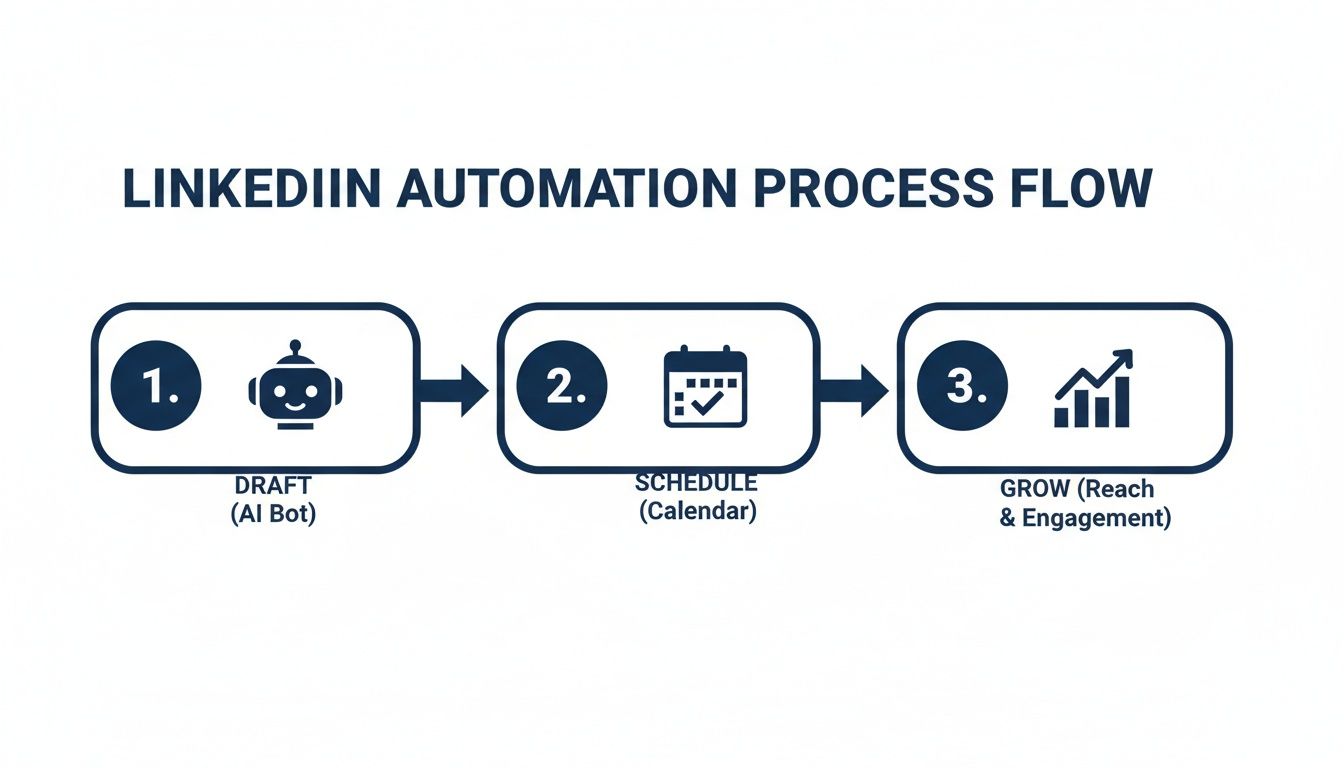
The magic is that each step builds on the last, creating a virtuous cycle where you're constantly producing content and learning from its performance.
The big shift happens when you stop thinking about "making a post" and start thinking about "building a system." That's when LinkedIn stops being an unpredictable daily task and becomes a dependable asset for your brand.
In the next sections, we'll get into the weeds of how to build this system from the ground up. We'll cover everything from teaching an AI to write in your voice to designing visuals that stop the scroll and scheduling it all safely. This is your playbook for turning what you know into real influence.
Build Your AI Content Engine
If you want to automate your LinkedIn content the right way, a generic AI tool just won't cut it. The point isn’t to pump out robotic, soulless posts faster. It’s to scale your voice, your expertise, and your unique point of view. That’s why the first real step is building a custom AI “content engine”—think of it as a specialized knowledge library for your brand.
A standard AI model is like a brilliant intern on their first day. They’re incredibly smart and have a ton of general knowledge, but they know absolutely nothing about your company, the nuances of your industry, or how you communicate with your audience. Building a content engine is how you train that intern, turning them into an expert partner who gets your brand inside and out.
What Goes into Your Knowledge Library
The quality of your AI-generated content hinges entirely on the information you feed it. Instead of letting the AI pull from the vast, generic internet, you’re going to give it your best, most valuable proprietary materials. This is how the AI truly learns your perspective, your terminology, and the insights that make you unique.
Start by rounding up your best intellectual property. This is a game of quality, not quantity.
- Your Core Frameworks: Got a signature consulting methodology or a unique process you teach clients? Upload it as a PDF. The AI can then reference it to break down your approach in future posts.
- Top-Performing Blog Posts: Feed it the links to your most successful articles. This is a masterclass for the AI on which topics your audience loves and what your writing sounds like at its absolute best.
- Client Case Studies: These are gold. They're packed with real-world results and the exact language your customers use. This helps the AI draft posts that speak directly to a prospect's biggest challenges.
- Podcast or Video Transcripts: If you host a podcast or have been interviewed, get those transcripts. There’s no better way to capture your natural speaking voice and conversational cadence.
This curated library becomes the single source of truth for all your content. Suddenly, the AI isn't just writing about a topic; it's writing about it from your specific angle, using your proprietary examples and data. You can see how an AI LinkedIn post generator uses this kind of information to craft compelling content.
The Training Process in Action
Let’s walk through a real-world scenario. Imagine a SaaS founder wants to create a steady stream of LinkedIn posts about her new project management tool. A generic AI, when prompted, would likely spit out something bland about "the benefits of organization." It's technically correct, but completely forgettable.
Now, let's say she builds a proper content engine. She uploads:
- A whitepaper on her proprietary "Agile-Hybrid" project management methodology (PDF).
- Links to three blog posts detailing specific customer success stories.
- A transcript from a recent webinar where she explained the product’s key differentiators.
With this knowledge base in place, a simple prompt like, "Draft a post about overcoming project bottlenecks," delivers something radically different. The AI can now pull specific concepts from her "Agile-Hybrid" framework, use a customer success story as a concrete example, and adopt the founder's confident, educational tone from the webinar.
The output is no longer a generic statement on productivity. It's a sharp, insightful post that reflects the founder's unique expertise and directly promotes their solution's value proposition without sounding like a sales pitch.
This strategic groundwork is essential, especially when you consider that 40% of B2B marketers see LinkedIn as their most critical channel for lead generation. By creating a content engine, your automated posts become consistent, high-quality touchpoints that keep you top-of-mind and cement your authority. This initial time investment in training your AI is what turns a simple automation tool into a reliable system for growth.
Putting Your Content Machine into Overdrive
Alright, you've done the prep work and built your knowledge library. This is where the real fun begins and your LinkedIn automation system truly comes to life. Forget staring at a blank screen, wondering what to write. Now, you’re in the driver's seat, directing a well-trained AI to produce high-quality drafts based on your expertise.
The secret sauce is the collaboration between you and the AI. A simple prompt gets the wheels turning, but a strategic prompt is what produces incredible results. You're no longer asking a generic AI for generic content; you're telling it to tap into the specific resources you've already provided.

From Vague Ideas to Sharp Drafts
Think of prompting less like a command and more like a conversation with a brilliant but hyper-literal assistant. Let’s go back to our SaaS founder. She’s already trained her AI on her company's unique "Agile-Hybrid" methodology and a handful of powerful customer case studies.
Her prompts can now be laser-focused:
- A so-so prompt: "Write a post about project management."
- A killer prompt: "Using the 'Agile-Hybrid' framework document, draft a short post on the top 3 mistakes teams make when adopting new workflows. Pull in the success metrics from the 'Client X' case study to highlight the payoff when they get it right."
See the difference? That level of specificity is what separates generic, forgettable content from truly authoritative posts. The AI isn't just pulling ideas out of thin air; it's weaving your proprietary information into a compelling narrative. The draft it produces already feels like it came from you.
The point isn't to have the AI do 100% of the work. The goal is to let it handle the heavy lifting—the research, structuring, and initial drafting—so you can come in and apply that final 10% of human polish and personality.
Turning Words into Eye-Catching Visuals
A solid text-only post is good, but let's be honest: LinkedIn is a visual platform. Content with images or carousels grabs attention and drives engagement. In fact, posts with images typically see 2x higher engagement. This is exactly where most automation workflows fall apart, forcing you to jump between a writing app and a separate design tool.
A truly integrated platform bridges this gap, letting you flow seamlessly from AI-generated text to a finished design. You can take a listicle or a how-to guide that the AI just drafted and, with a click, convert it into a professional-looking carousel.
This isn't just about speed; it's about maintaining brand consistency without the headache.
- Branded Templates: Your company's colors, fonts, and logos are already loaded. Just apply your brand kit to a template.
- Effortless Conversion: The text from your draft automatically flows into the carousel slides, instantly creating a visual storyboard.
- Quick Tweaks: Drag and drop elements, adjust a line of text, or swap out an image. It's all right there.
A task that used to eat up an hour or more in a design program now takes just a few minutes. This agility means you can easily mix up your content formats—from quick text updates to in-depth carousels—without ever sacrificing quality. For more tips on making your content pop, check out our guide on formatting LinkedIn posts.
Manual vs. AI-Powered: A Quick Comparison
The difference in efficiency isn't just incremental; it’s a total game-changer. Looking at the old way versus an integrated AI approach side-by-side really puts the time savings into perspective.
| Content Stage | Manual Workflow (Estimated Time) | AI-Powered Workflow (Estimated Time) |
|---|---|---|
| Ideation | 30-60 minutes of brainstorming | 5-10 minutes of prompting |
| Drafting | 45-90 minutes of writing and editing | 10-15 minutes of AI generation and refinement |
| Visual Design | 60-120 minutes in a design tool | 15-20 minutes using branded templates |
| Total Time | 2.5 - 4.5 hours per post | 30 - 45 minutes per post |
The numbers speak for themselves. This isn't just about making things faster; it's about building a scalable system. With the right setup, you can produce an entire week's worth of high-quality, varied content in the time it used to take to perfect just one post. To explore different platforms that can help you achieve this, you might want to review some of the best social media automation tools available.
Schedule Posts Safely and Effectively
You’ve got your content drafted and designed, and now it’s time for the final, crucial step: getting it in front of your audience. But how you schedule your posts is just as important as what you post. The wrong approach won't just kill your reach; it could put your entire LinkedIn account on the line. This is where understanding the huge difference between a risky bot and a safe, LinkedIn-compliant tool becomes absolutely critical.

The real goal here is to automate LinkedIn posts in a way that plays by the platform's rules. I've seen too many accounts get flagged because they used a shady tool that scraped the website or relied on unauthorized browser extensions. LinkedIn’s algorithm is smart—it spots that kind of activity a mile away and brings the hammer down.
On the flip side, safe automation platforms use modern, secure authentication methods like OAuth. They interact with LinkedIn through its official channels, which is the only way to ensure your account stays in good standing.
A compliant scheduling tool should act like a human assistant, not a spam bot. It respects posting limits, mimics natural activity patterns, and prioritizes the long-term health of your account over short-term gains.
Choosing the Right Scheduling Platform
When you're looking at different tools, safety has to be your number one priority. If a platform is promising to automate everything from connection requests to direct messages, consider that a massive red flag. LinkedIn is actively cracking down on that kind of aggressive, spammy behavior.
A much smarter approach is to look for tools that focus specifically on content creation and scheduling, like these best LinkedIn scheduling tools. These are almost always the safer bet, even if you start with a free LinkedIn scheduler before upgrading. Our guide on the best LinkedIn automation tools takes a much deeper look into compliant options that can help you scale your content without putting your account at risk. If you want a side-by-side comparison of the actual creation features, pricing, and voice-training capabilities, our review of the best LinkedIn post creator tools ranks 12 platforms by workflow, safety, and value.
From my experience, here are the non-negotiable features you should look for in a safe and effective scheduling tool:
- Official API Integration: The platform should be upfront about using LinkedIn's official API for posting. This is the gold standard for compliance.
- OAuth Authentication: When you connect your account, it should send you over to LinkedIn to log in securely. It should never ask you for your password directly on its own site.
- Activity Pacing: A good tool will intelligently space out your posts. It won't just blast everything out at once, which is a dead giveaway to the algorithm that you're using a bot.
- Focus on Content, Not Outreach: Steer clear of platforms that bundle content scheduling with automated DMs, profile views, or connection requests. That’s where you get into dangerous territory.
Choosing a tool with these features helps you build a workflow that's not just efficient but also sustainable. It protects the asset you've worked so hard to build—your professional reputation. For a broader shortlist that compares LinkedIn-specialized tools against general-purpose options, see our guide to the best social media management software for small business. If you also want to map out the wider content stack (drafting, design, multi-channel scheduling, and analytics), our content marketing automation tools comparison covers the full picture.
Advanced Scheduling Tactics for Maximum Impact
Once you’ve got a safe tool locked in, you can start getting strategic. It's not just about being active; it's about being smart with your timing and consistency to boost your visibility and keep that content pipeline full.
For B2B founders and consultants, this means posting consistently without suffering from creative burnout. Imagine scheduling carousels and posts that hit optimal times across different time zones, cutting through the noise when 10,000+ job apps are submitted every minute on the platform. Tools that emphasize safety with LinkedIn-compliant scheduling and activity pacing are what keep accounts healthy long-term. You can find more industry benchmarks and stats by exploring the full report on LinkedIn automation trends.
This consistency is what builds real momentum. Here are a few tactics I've seen work incredibly well:
- Establish Recurring Content Themes: This is a game-changer. Assign a theme to each day of the week—like "Mindset Monday," "Tech Tuesday," or "Framework Friday." It simplifies your planning and gives your audience a predictable rhythm to look forward to.
- Use a Content Queue: Instead of scheduling every single post for a specific date and time, just add your finished posts to a queue. The tool can then automatically publish them at pre-set optimal times, ensuring you always have content going out, even if you take a week off.
- Manage Multiple Profiles from One Dashboard: If you're an agency or a marketing manager handling executive accounts, a centralized dashboard is a lifesaver. It lets you schedule content across multiple profiles securely without having to juggle a dozen different logins.
By combining safe technology with smart scheduling tactics, you create a powerful system that ensures your best ideas consistently reach the right people at exactly the right time. If you want to see this end-to-end, our LinkedIn post scheduler bundles AI drafting, carousel scheduling, Company Page support, and a visual content calendar into one workflow.
Measure Performance and Refine Your Strategy
Automating your LinkedIn posts is a huge time-saver, but if you're not tracking what happens next, you're just publishing content into the void. The real magic happens when you build a feedback loop: measure what works, figure out why it works, and then feed those insights right back into your creation process. This is how you move from just broadcasting to building a smart, self-improving content engine.
Once your posts start going out, it's time to dig into the data. Knowing how to measure content performance is what separates a good strategy from a great one. The goal here is to get past vanity metrics like raw impression counts and focus on the numbers that actually tell you something useful.
Identifying Key Performance Indicators
First things first: you need to decide what "success" actually means for you on LinkedIn. Is it about building authority? Driving traffic to your website? Generating leads? Your specific goals will determine which metrics are worth obsessing over.
Instead of getting swamped by data, zero in on a few key indicators.
- Engagement Rate: This is your core health check. You find it by calculating
(Likes + Comments + Reposts) / Impressions. It tells you, plain and simple, if the people who see your content actually care about it. A healthy engagement rate is a sign you're on the right track. - Click-Through Rate (CTR): If your posts contain links—to blog articles, landing pages, you name it—then CTR is non-negotiable. This number shows what percentage of viewers were compelled enough to actually click, directly tying your content to off-platform actions.
- Comment Quality and Sentiment: Don't just count the comments; read them. Are you getting thoughtful questions and genuine discussion, or just a lot of "Great post!" replies? Meaningful comments are a clear indicator that you're not just posting, you're building a community.
Track these metrics over a few weeks, and patterns will start to emerge. You’ll quickly see which topics and formats consistently get a reaction, giving you a data-backed blueprint for what to create next.
Using Data to Train Your AI and Sharpen Prompts
Here’s where you close the loop and make your automation truly intelligent. The performance data you’re gathering is the perfect training material for your AI.
Let's say your analytics reveal that posts framed as "common mistakes to avoid" pull in 35% higher engagement than your "best practices" content. That's pure gold.
Now you can take your best-performing posts and feed them back into your AI’s knowledge base. It will start to learn the specific hooks, structures, and calls-to-action that have already proven to resonate with your audience.
This insight also completely changes how you write your prompts. You can move from generic instructions to highly specific commands.
- Before: "Draft a post about our Agile-Hybrid framework."
- After: "Draft a post about the #1 mistake leaders make when implementing a new workflow. Frame it from our Agile-Hybrid framework's perspective, and use a hook similar to our top-performing post from last month."
See the difference? This approach ensures the AI generates content that’s already optimized for performance, because it’s based on what you know works.
Optimizing Your Posting Schedule
Finally, your analytics will tell you exactly when your audience is listening. While most scheduling tools offer suggestions based on general platform activity, your own data is always the ultimate source of truth.
Look for trends. Do your top-performing posts consistently go live on Tuesday mornings? Or maybe Thursday afternoons see a spike in clicks?
Use this information to fine-tune your scheduling queue. It’s a simple tweak, but it ensures your best content gets published when the maximum number of people are online to see it, amplifying the impact of your entire system.
Scale Your Automation for Teams and Clients
When you're first getting started, running one LinkedIn profile is more than enough to handle. But if you’re at an agency or on a marketing team, the real headache begins when you try to scale that process across multiple executives or a full client list. Before you know it, you're drowning in a mess of spreadsheets and email chains, trying to juggle different brand voices, get approvals, and schedule posts for each account. It’s pure chaos.
This is exactly why a centralized system is a non-negotiable. You need to bring every account you manage under one roof. The right platform lets you oversee everything from a single, organized dashboard and securely connect multiple LinkedIn profiles without ever asking for a password. Instead, you use safe, modern OAuth authentication, which clients and executives love.
This shift takes your workflow from scattered and stressful to buttoned-up and professional. You can draft one great piece of content and then easily schedule it across an entire leadership team’s profiles, keeping the brand’s message perfectly consistent.
Establishing Simple and Clear Approval Workflows
One of the biggest bottlenecks in managing LinkedIn for others is the approval process. If this gets jammed up, your entire content calendar grinds to a halt. Without a clear system, drafts disappear into inboxes, feedback is a jumbled mess, and brilliant content ends up sitting on the shelf.
A truly effective workflow brings this whole approval dance inside your automation tool. Forget about emailing Word docs back and forth. You can assign a draft directly to your client or boss for review.
- Assign Drafts: When a post is ready for eyes, tag the right person to review it directly within the platform.
- Centralized Feedback: They get a notification and can drop in comments or hit 'approve' all in one spot. No more chasing down feedback.
- Track Status: A quick glance tells you which posts are good to go, which are waiting for review, and which need a few tweaks.
This creates a clean, visible audit trail. You'll never have to dig through your inbox again to figure out if that carousel got the green light.
Think of it as a content assembly line. The AI and your designers build the components, and your approval workflow is the quality control that ensures everything is put together correctly before it ships. This is how you maintain brand integrity and keep your clients happy.
Managing Access and Roles Securely
In any team environment, you don’t want everyone to have the keys to the kingdom. A junior writer shouldn't have the same permissions as the account director or the agency owner. This is where role-based access becomes your best friend for preventing headaches and costly mistakes.
You can set up very specific permissions for each person on your team. This controls who can connect new accounts, who has the final say on approving posts, and who can only submit drafts for review.
A structured system like this ensures a post meant for Client A never accidentally shows up on Client B’s profile. For an agency juggling a dozen high-profile accounts, this kind of control isn’t just a nice-to-have—it’s absolutely essential for running a professional and efficient operation.
Answering Your Top Questions About LinkedIn Automation
Jumping into a new workflow always comes with questions, and that's especially true when automation is involved. It’s smart to be thorough before you dive in. Let's clear up some of the most common things people ask when they start thinking about automating their LinkedIn posts.
Is It Actually Safe to Automate Posts on LinkedIn?
Yes, it is—if you're using the right kind of tool. This is the most important part to get right.
Safe platforms connect to LinkedIn using the official API and secure OAuth authentication. Think of this as the "approved" way to interact with LinkedIn. These tools play by the rules, never ask for your password, and stick to content scheduling, which LinkedIn allows.
The tools you need to avoid are the ones that act like rogue browser extensions or scripts. They often scrape the site and try to mimic human behavior to send spammy connection requests or messages. That's the kind of activity that gets an account flagged fast. A compliant tool is all about content, not aggressive, rule-breaking outreach. If you're currently using a tool that feels risky, our guide to the best Taplio alternatives breaks down which platforms use safe, API-based authentication. If you were relying on Kleo's Chrome extension before LinkedIn shut it down, our Kleo alternatives guide covers 10 safe replacements with honest pricing. Users coming from Supergrow who want deeper AI personalization should check our Supergrow alternatives guide for tools that go beyond templated output.
Won't My Content Sound Like a Robot if I Use AI?
That's a fair concern, but it usually comes from bad experiences with generic AI tools. Your content will only sound robotic if the AI has no idea who you are or what you stand for.
Modern platforms solve this by letting you create a custom knowledge library. You can feed it your own content—things like past articles, white papers, PDFs, and even transcripts from your videos or podcasts.
When you train an AI on your own material, it learns your voice, your tone, and your expertise. It stops being a generic content generator and starts being a creative partner that gets your style. The goal isn't to have the AI do 100% of the work. It's to have it do 80% of the heavy lifting, leaving you to add that final 20% of human nuance and polish.
A well-trained AI doesn't replace your voice; it scales it. Remember, the quality of the insights you feed the AI directly shapes the quality of the content it helps you create.
How Do I Automate Content for Several Different Profiles?
Managing content for a whole team of executives or a roster of clients can get messy fast. This is where you need a tool specifically built for that multi-profile workflow.
Platforms designed for teams and agencies let you securely connect multiple LinkedIn accounts into one central dashboard. No more logging in and out all day.
From that single hub, you can draft a post once and then schedule it across different profiles. You can even choose to publish it everywhere at the same time or stagger the posts to hit the best times for each person's unique audience. This is a game-changer for keeping a leadership team's messaging consistent or just managing client accounts way more efficiently.
Ready to build a reliable content engine that saves you hours every week? With Postiv AI, you can train your own AI, design stunning carousels, and schedule posts safely—all in one place. Start your free trial today.



