

If you're just looking for the short answer, here it is: the main LinkedIn post character limit is 3,000 characters. This applies to both personal profile updates and company page posts, giving you plenty of room to share detailed stories or expert insights right in the feed.
But if you want to get the most out of the platform, you know it's about more than just one number.
Your Quick Reference Guide to All LinkedIn Character Limits
To really make an impact on LinkedIn, you have to work within the specific limits for every single piece of content. From your headline to your comments, each field has its own character count that shapes how you build your brand and connect with your network. Getting these numbers down is the first step to creating a truly professional and effective presence.
For a quick visual breakdown, this graphic covers the limits for some of the most visible spots on your profile.
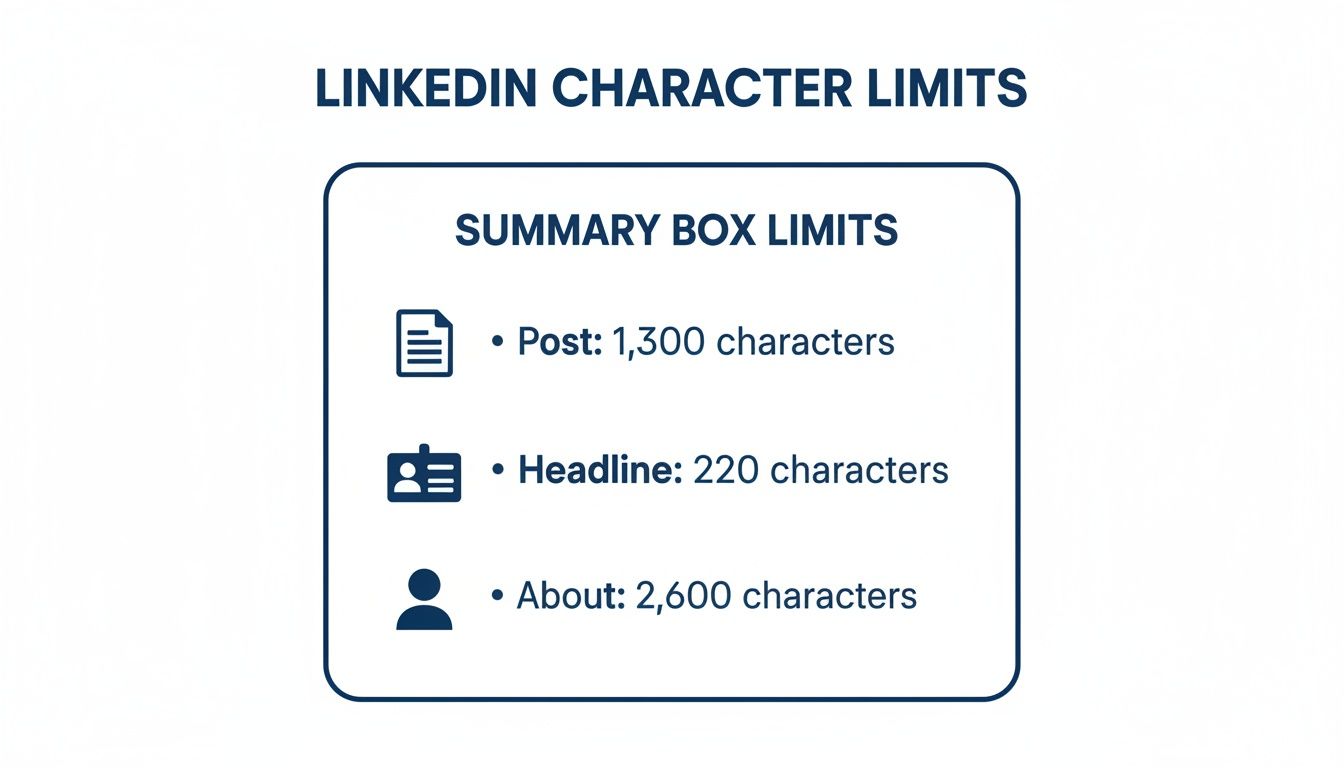
As you can see, the limits are all over the map—from a tight headline to a much more spacious "About" section. To give you the complete picture, I've put together a comprehensive table with all the critical character limits you need to know.
Speaking of a polished presence, character counts are only half the battle. Your visuals matter just as much. For exact image sizes, video limits, and carousel dimensions, check our LinkedIn post specs cheat sheet, our complete LinkedIn post size guide, and these excellent LinkedIn graphic size guidelines.
LinkedIn Character Limits at a Glance
This table is your go-to summary for the current character limits across LinkedIn's key features. Use it for a quick check, and then jump to the detailed sections later in this guide for more strategic advice on how to make every character count.
| LinkedIn Feature | Character Limit | Strategic Takeaway |
|---|---|---|
| Personal Post | 3,000 | Enough space for deep dives, but hook readers early before the "see more" cutoff. |
| Company Update | 3,000 | Similar to personal posts; ideal for brand storytelling and detailed announcements. |
| Post Comment | 1,250 | Plenty of room for thoughtful replies and adding real value to conversations. |
| Headline | 220 | Your most important real estate. Make it keyword-rich and descriptive. |
| "About" Section | 2,600 | Your professional story. Use it to detail your value and expertise. |
| Article Title | 100 | Your headline needs to be compelling and clear to earn the click. |
| Article Body | 125,000 | Essentially unlimited. Perfect for long-form thought leadership. |
| InMail/Message | 1,900 (Subject: 200) | Keep messages concise and to the point to respect the recipient's time. |
| Hashtags | 3-5 recommended | While you can use more, a few highly relevant hashtags perform best. |
Think of this table as your cheat sheet. Bookmark this page so you can come back anytime you're crafting content and need a quick reminder of your available space.
Mastering the 3,000-Character LinkedIn Post Limit
The 3,000-character limit for a LinkedIn post is probably one of the most generous and useful allowances in social media. It applies to both your personal profile and your company page posts, giving you a massive canvas to share detailed insights, tell a compelling story, or deliver real value right in the feed. This isn't just for a quick update; it's enough space for genuine thought leadership.
This extra room is a fairly recent change. Back in 2021, LinkedIn more than doubled the post character count from 1,300 to 3,000, which completely changed the game for content strategy. The move allowed people to publish what is essentially short-form articles directly on the platform, keeping users engaged without sending them off to an external blog. You can read more about this strategic shift and what it means for creators.
Just remember, that 3,000-character cap includes everything—letters, numbers, punctuation, spaces, and even emojis. Every single keystroke counts, so writing efficiently is key to making the most of the space.

The Critical First Impression: The “See More” Cutoff
Even though you have 3,000 characters to play with, your audience only sees a tiny preview at first. On most devices, LinkedIn cuts your post off after about 200–210 characters, hiding the rest behind a "...see more" link. This makes the opening lines of your post the most valuable real estate you have.
Think of your first two or three sentences as the hook. Their entire job is to spark enough curiosity to get someone to click that link, turning a passive scroller into an active reader. If you don't grab their attention right away, the rest of your brilliant post will simply go unread.
Pro Tip: Always write your hook first. Start with a provocative question, a surprising statistic, or a bold claim. Treat those first 200 characters like a headline for the rest of your post.
Want to see those opening lines exactly as they'll appear next to your profile photo, name, and headline? Run your draft through our free LinkedIn post mockup generator before you publish.
Structuring Longer Posts for Readability
Once you've hooked them, the battle isn't over. How you structure the rest of your post is crucial for keeping them engaged. Nobody wants to read a giant, intimidating wall of text. To hold a reader's attention through a 1,000+ character post, you have to make it easy to scan and visually appealing.
Here are a few simple formatting techniques to break up your text and guide the reader’s eye:
- Short Paragraphs: Stick to one to three sentences per paragraph. This creates white space, which makes the content feel much less overwhelming.
- Bulleted or Numbered Lists: These are perfect for organizing key points, steps, or takeaways, especially when you bold the key phrase with a LinkedIn bold text generator to guide the eye. The human eye is naturally drawn to lists, making them easy to digest.
- Strategic Emojis: A few well-placed emojis can add visual flair and break up the text. Just don't overdo it—you want to maintain a professional tone.
By mastering the hook and structuring your content for an easy read, you can use every bit of that 3,000-character limit to build your authority and start some really meaningful conversations.
Finding the Optimal Length for Maximum Engagement
While LinkedIn gives you a generous 3,000 characters for a post, using every last one is rarely a good idea. Just because you can write a mini-essay doesn’t mean you should. The real secret is understanding that the best post length isn't about hitting the maximum; it's about matching your word count to what you want to achieve.
Different lengths get different results. A short, punchy post is great for racking up quick likes and shares. On the other hand, a more detailed analysis is what you need to spark thoughtful comments and genuine discussion. Making sure your post's length fits your objective is a core part of any solid content plan.
The Engagement Sweet Spot
So, what's the magic number? Even though the official limit is 3,000 characters, research into what actually works on the platform tells a different story. The best-performing posts are almost always much shorter.
Multiple studies have pinpointed an engagement sweet spot somewhere between 800 and 2,000 characters, though the ideal number really depends on your audience and your goal. Some recent reports get even more specific, suggesting that posts aimed at deep engagement do best around 1,300–2,000 characters. If you're chasing viral shares, however, you'll want to stay in the much shorter 150–300 character range.
The big takeaway here is that there's no single "best" length for everything. It's all about choosing the right length for the job.
Key Insight: Don’t automatically write long posts. Before you start, ask yourself: what reaction am I trying to get? Sometimes a powerful question or a quick, valuable tip can generate far more buzz than a long-winded story. Brevity is a powerful tool.
Matching Post Length to Your Goal
To put this into practice, always think about your content's purpose before you start writing. This simple step ensures every character is working for you, helping you make the biggest impact possible.
Here’s a quick framework to help guide you:
- For quick visibility and shares (150–300 characters): This is your go-to for bold statements, quick tips, or snappy questions. The idea is to make it incredibly easy to read, digest, and share in a split second.
- For sparking conversation (800–1,500 characters): This length is perfect for sharing a personal story, offering a unique take on a topic, or breaking down a complex idea into a few key points. It gives you enough room to provide substance that encourages people to stop and write a thoughtful comment.
- For establishing authority (1,500–2,000+ characters): Save the longer posts for when you're delivering serious value, like a mini-guide, a detailed case study, or a deep analysis. These posts are designed to position you as a true expert in your field.
To really get this right, you'll want to build a LinkedIn content strategy that guides your decisions on length and topic. And remember, structure is everything for longer posts—check out our guide on formatting LinkedIn posts for tips on making your content easy to read and scan.
Beyond the Feed: Mastering Other LinkedIn Character Limits
Getting a handle on the main LinkedIn post character limit is a solid first step, but your work isn't done there. LinkedIn is much more than just the main feed, and to really make an impact, you need to know the rules for other key areas like comments, articles, and messages.
Each one has its own set of constraints that changes how you should approach it. A comment, for instance, isn't just a quick reply; it's a mini-platform to showcase your expertise. And a LinkedIn Article? That's your chance to move beyond a simple update and establish yourself as a true thought leader. If you ignore these formats, you're leaving a lot of potential engagement on the table.
Making the Most of the LinkedIn Comment Limit
The comment section is one of the most underrated features on the platform. You get a surprisingly generous 1,250 characters to work with, which is plenty of room to add real substance to a conversation. This is not the place for a simple "Great post!"
Instead, use that space to:
- Offer a counterpoint: Respectfully challenge an idea and back it up with solid reasoning.
- Add a detailed example: Share a personal story or a quick case study that builds on the original post's point.
- Ask a thoughtful question: Dig deeper than the surface-level topic to spark more discussion.
Honestly, a well-written, detailed comment can sometimes get more eyeballs than a post, quickly positioning you as a go-to expert in your field.
Going In-Depth with LinkedIn Articles
Ever have a big idea that just won't fit within the 3,000-character post limit? That's exactly what LinkedIn Articles are for. This feature is built for long-form, comprehensive content, giving you a massive canvas to work with.
The limits for articles are huge:
- Article Title: You have 100 characters to write a headline that grabs attention and makes people want to click.
- Article Body: A whopping 125,000 characters. That's enough to publish what are essentially full-blown blog posts without ever leaving the platform.
This is the perfect spot for your detailed how-to guides, deep-dive industry analysis, or major company announcements that just need more context than a standard post allows.
Strategic Insight: You have to think about LinkedIn's different features as separate tools, each with its own character limit. An article body can hold an entire essay, while comments are capped at 1,250 characters, and InMail messages have their own unique limits. As many marketing pros will tell you, this means you can't just copy-paste content; you have to tailor it to the format. You can learn more about how these different limits should shape your strategy by exploring LinkedIn’s complete character guide.
Optimizing Your Profile Within Character Constraints
While the main feed gets most of the glory, your LinkedIn profile is the bedrock of your professional brand. Every single section is a chance to shape your narrative, but each one has its own character limit you have to work with. Getting this right is absolutely crucial for making a strong first impression.
Your profile isn't just a static resume; it's a living, breathing tool for building your network. For anyone using the platform for outreach, fine-tuning these sections is a non-negotiable step in any solid strategy for generating leads from LinkedIn.
Crafting a Compelling Headline
Your headline is, without a doubt, the most valuable real estate on your entire profile. You've only got 220 characters to make an impact. This tiny snippet follows you everywhere—in search results, next to your comments, and in every connection request you send.
Don't just stick your job title there and call it a day. Use this space to spell out your value. A fantastic formula to follow is: [Your Role] | Helping [Target Audience] achieve [Desired Result]. This simple shift turns a boring title into a magnetic pitch that tells people exactly what you do and who you do it for.
Telling Your Story in the About Section
Think of the "About" section as your professional autobiography. LinkedIn gives you a generous 2,600 characters to dive into your expertise, your mission, and what makes you tick. This is your prime opportunity to connect with people on a more human level.
A word of advice: nobody wants to read a giant wall of text. Break up your About section into short, punchy paragraphs. Use bullet points to highlight your key skills or biggest wins, and always wrap it up with a clear call to action. Keep it scannable and interesting.
Kick things off with a powerful opening that sums up who you are and what you offer. From there, you can weave in details about your professional journey, your passions, and the specific problems you love to solve. This is where you build the kind of personal connection a traditional resume never could.
Highlighting Achievements in Your Experience
For each job listed in your Experience section, you get 2,000 characters to describe your responsibilities and—more importantly—your accomplishments. The biggest mistake people make here is just copying and pasting job duties from a formal description.
Instead, zero in on quantifiable results. Use bullet points and lead with strong action verbs. Frame everything in terms of what you actually achieved, like "Boosted team efficiency by 15% through a new workflow" or "Oversaw a project portfolio valued at $2.5M." This approach gives tangible proof of your impact and makes every single character pull its weight.
Strategic Use of Hashtags and Mentions
Think of hashtags and mentions as your post's distribution engine. They're powerful tools for getting your content in front of the right people, but you have to use them thoughtfully. While they don't count toward your main LinkedIn post character limit, their impact is all about precision and relevance.
The right hashtags get your post into specific topic feeds, connecting you with users who are interested in what you have to say but aren't in your immediate network. Likewise, mentioning other users or companies is a direct way to loop them in, which can seriously boost visibility. The key is to be strategic, not just noisy. An undisciplined approach can look spammy and actually hurt your post's performance.
Finding the Right Balance with Hashtags
You can stuff a post with dozens of hashtags, but you absolutely shouldn't. The sweet spot for getting real engagement is much smaller. Most experts agree that 3 to 5 highly relevant hashtags is the way to go. This gives LinkedIn's algorithm clear signals about your content, helping it find the perfect audience without making you look like you're just keyword-stuffing.
For the best results, try using a mix of different hashtag types:
- Broad tags: Grab one or two popular tags like
#Marketingor#Leadershipto join much larger conversations. - Niche tags: Add specific tags like
#B2BContentStrategyto connect with a more focused, high-intent audience. - Branded tags: If it makes sense, include a unique tag for your brand or a campaign, like
#YourCompanyUpdates.
A common mistake I see is people only using massive hashtags with millions of followers. It's easy for your post to get completely lost in that sea of content. Niche hashtags often give you much better visibility with an audience that's genuinely engaged.
Professional Etiquette for Mentions
Tagging another user or company is the most direct way to pull them into a conversation. When you mention someone, they get a notification, which often prompts a like, comment, or share—instantly exposing your post to their network.
But with great power comes great responsibility. Only mention people or companies that are truly relevant to what you're posting. Did you quote an expert? Tag them. Collaborating on a project? Tag your partners. Referencing a company's latest report? Tag the company. Just don't tag people randomly to grab their attention. It's poor form, and it can backfire by damaging your professional reputation.
Essential Tools for Writing and Checking Your Content
Let's be honest: nobody has time to manually count characters. It's tedious, slows you down, and takes the fun out of creating content. Thankfully, you don't have to. There are plenty of great tools out there to help you write killer content that fits perfectly within every LinkedIn character limit.
Simple, browser-based character counters are perfect for a quick spot-check. You just copy and paste your text, and it instantly gives you the character count. I find these are especially handy when I'm tweaking my profile headline or "About" section and need to make sure I haven't gone over before hitting save.

Having a go-to tool like this, whether it's a simple website or a dedicated app, is a smart move for anyone who posts regularly. It just eliminates those last-minute scrambles to trim down your text.
AI-Powered Writing Assistants
If you're looking for something that does more than just count, a free LinkedIn post generator or full AI writing assistant is a game-changer. These platforms are designed to be a true partner in your content creation process, helping you brainstorm ideas, draft entire posts, and polish your writing to make it more engaging.
Many social media schedulers also have character counters built right in, which is incredibly useful. As you type, you'll see a warning when you're getting close to the limit for a specific platform. It’s a great feature if you’re batch-creating content for the week ahead.
The best tools, though, are the ones that combine content creation with real performance data. For example, using an AI LinkedIn post generator helps you create on-brand posts that are the right length from the very beginning. A platform like Postiv AI not only drafts compelling copy but also shows you analytics on what content lengths and styles resonate most with your audience. This turns a simple character limit from a frustrating restriction into a real strategic tool.
Frequently Asked Questions
Figuring out the character limits on LinkedIn can be a real headache, especially when you're in the middle of writing a killer post. I've put together some quick answers to the questions I hear most often about the linkedin post character limit and other tricky constraints. Think of this as your go-to cheat sheet.
Knowing these rules inside and out is crucial. It’s the difference between a message that lands perfectly and one that gets awkwardly cut off.
Do Spaces and Emojis Count Toward the Limit?
Yes, they absolutely do. When LinkedIn says "characters," it means everything: letters, numbers, punctuation, symbols, and yes, even the spaces between your words. Emojis count too, so be mindful of how many you sprinkle in.
This is especially important for those super-short fields, like your profile headline. Every single character is prime real estate there, and you don't want to waste any of it.
What Happens If I Exceed a Character Limit?
Don't worry, LinkedIn won't let you accidentally post something that's too long. The platform is designed to stop you in your tracks. Usually, the text field will simply stop accepting new characters once you hit the ceiling.
If you try to paste in a chunk of text that's over the limit, you’ll get an error or a red-highlighted character count telling you to trim it down. You'll have to edit your text to fit before you can save or post.
How Do Links Affect the Character Count in a Post?
This is a great question and a common source of confusion. When you first paste a URL into the post editor, you'll see it temporarily add to your character count. But watch what happens next.
Once LinkedIn generates that nice-looking link preview box, it removes the URL string from your post's body. This means the URL itself does not count against your 3,000-character limit for the main post. You get all that space back for your actual message.
Best Practice: I always recommend placing your links at the very end of your post. It just looks cleaner and keeps the reader focused on your message without a long, distracting URL breaking up the flow.
Ready to stop counting characters and start creating great content? Postiv AI can help you write on-brand posts, build eye-catching carousels, and schedule everything for when your audience is most active. It’s time to build your authority without the guesswork. Explore Postiv AI today.



