An AI LinkedIn Post Generator makes crafting polished LinkedIn updates a breeze. In seconds, it delivers engaging hooks, tailored body text, and clean formatting, freeing you from manual drafting and scheduling headaches.
If you want to see how these generators stack up against full LinkedIn post creator platforms with scheduling, brand-voice training, and analytics, compare the best LinkedIn post creator tools before you commit to a workflow.
Quick Overview Of AI LinkedIn Post Generator
Many professionals rely on these platforms to keep their content calendar full without burning out.
Small marketing teams often save 5 hours each week by automating outlines, drafts, and edits.
- Improved engagement rates thanks to compelling hooks and clear structure
- Consistent publishing cadence without juggling calendars
- Significant time savings by handling drafting and revisions
Some tools even churn out multiple post variants so you can A/B test different hooks and layouts.
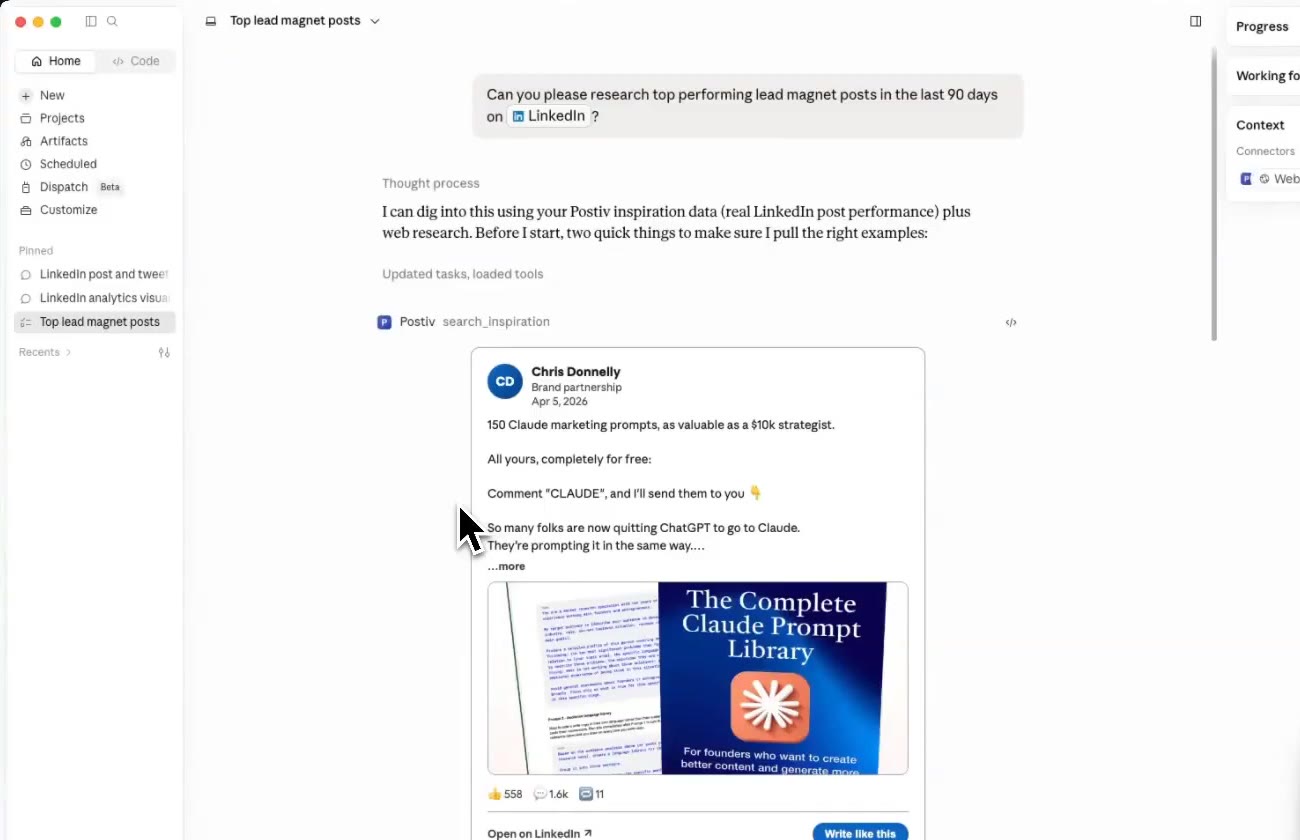
The screenshot below shows how Postiv AI brings drafts, design templates, and scheduling into one dashboard.

You’ll spot performance predictions and best-time-to-publish suggestions at a glance.
Benefits You Can Expect
AI-driven tools often include tone and style recommendations that match your target audience.
They’ll also pinpoint peak engagement windows so your posts land when readers are most active.
Recent studies reveal that carousels and videos deliver up to 5× more engagement compared to plain text. disciplined A/B testing of hooks can push interaction rates up by 30–40%. Read the full research on LinkedIn engagement findings on Hootsuite.
- Craft attention-grabbing hooks in an instant
- Draft post bodies that sound like you
- Recommend formats like carousels or videos to maximize reach
LinkedIn Engagement Metrics For AI Generated Posts
Below is a snapshot of how different AI-enhanced formats boost engagement on LinkedIn:
| Format | Engagement Improvement |
|---|---|
| Carousels | 5× |
| Videos | 5× |
| Text-Only | Baseline |
This data shows the clear advantage of mixing in visual and interactive formats with your text updates.
Why It Matters
Keeping a steady posting rhythm builds audience trust and sends positive signals to LinkedIn’s algorithm.
- Drives a steady flow of profile visits and new followers
- Reinforces your authority as a thought leader
- Enables rapid messaging tweaks based on real analytics
Small teams report a 30% jump in overall engagement by standardizing quality and timing. And with automated A/B testing in place, click rates can climb by 40% on average.
By offloading repetitive writing tasks, you focus on crafting bigger ideas and strategy—while AI keeps the content machine humming.
Understanding The Key Concepts
AI LinkedIn post generators slip right into your content plan, freeing you to focus on bigger-picture strategy. They rely on advanced models to draft messages that feel like your own. In practice, this means you save hours on rewriting and dodge editor’s fatigue. If you want to see this in action before committing to any tool, try our free LinkedIn post generator to create a post from any topic in seconds.
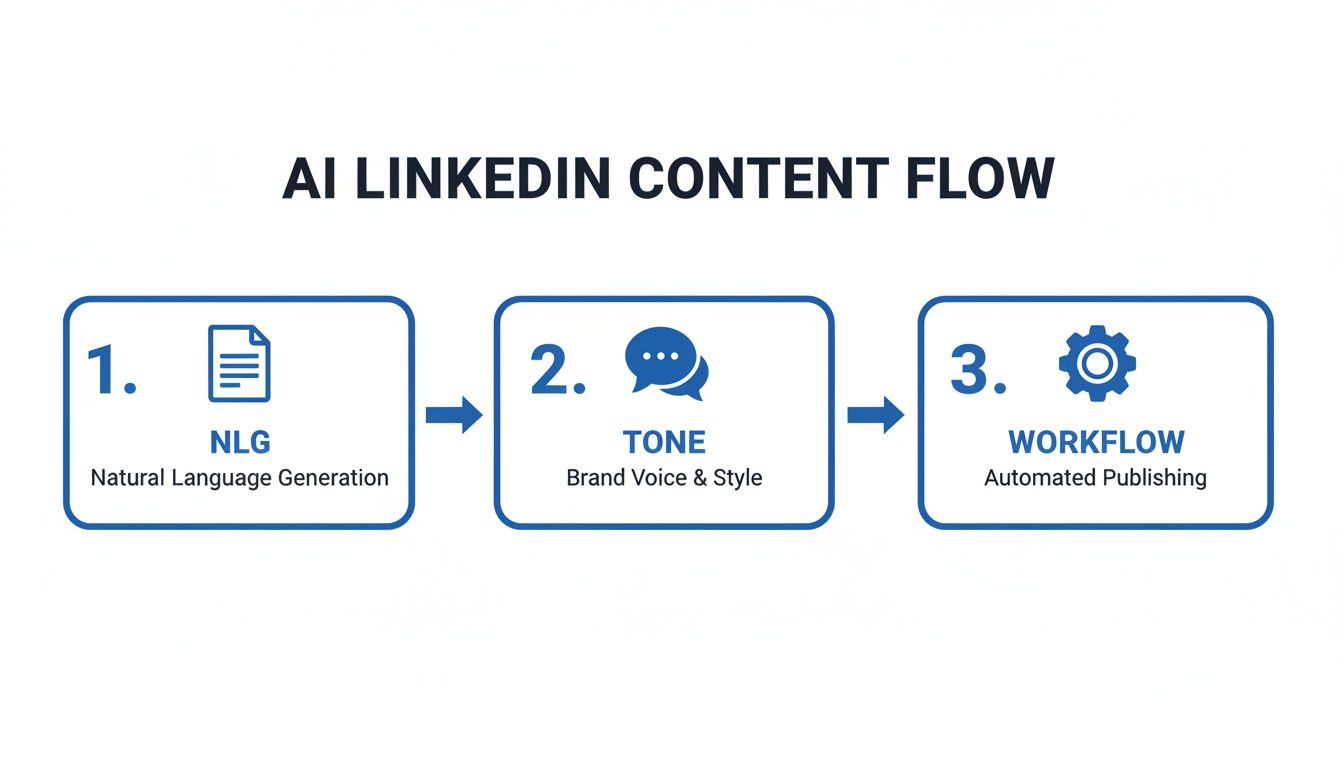
- Natural Language Generation turns brief prompts into polished copy
- Machine Learning mirrors your tone and style
- Workflow Integrations plug directly into LinkedIn’s publishing tools
These tools go further than text generation. They’ll suggest ideal formats—multi-slide carousels when you need storytelling depth or single-image updates for quick announcements. When the generator recommends a carousel, you can hand the topic off to one of the best LinkedIn carousel makers to turn it into a publish-ready PDF in under five minutes.
- Carousel prompts spark visual engagement
- Single-Image ideas drive concise takeaways
Natural Language Generation Explained
Think of natural language generation as a recipe builder for text. You supply the ingredients—key points or data—and the system cooks up a post that reads like you wrote it. Behind the scenes, models train on millions of examples, learning patterns in phrasing, rhythm, and structure.
Key Insight AI analyzes your top-performing posts and proposes fresh hooks automatically.
- Models dissect word choice and flow
- Training data blends your history with industry examples
For instance, drop in a simple outline of talking points. The tool expands each bullet into a smooth narrative.
- Detailed prompts yield targeted messaging
- Minimal guidance sparks creative phrasing
You decide the tone—formal for executives or chatty for your community—so your posts never sound generic.
Integration With LinkedIn Workflow
These generators hook into LinkedIn via API or scheduled-post endpoints, letting you draft, schedule, and publish all in one place. Scheduling modules even recommend peak times based on past engagement.
- Automatic scheduling syncs with calendars
- Real-time analytics highlight top-performing posts
Postiv AI, for example, links with Google Calendar and Outlook to prevent overlapping campaigns.
- Syncs with Google Calendar and Outlook
- Coordinates posts around events and launches
That smooth handoff cuts down on copy-paste errors and keeps your team in sync.
What AI Can’t Handle Alone
AI isn’t perfect at hyper-specific references or breaking news. It may invent details or slip up on internal acronyms. Human review is essential to catch those subtleties.
- Acronym blunders
- Contextual mismatches
Pairing AI drafts with your expert edits ensures every post is accurate, on-brand, and resonant.
You might be interested in our guide on writing standout LinkedIn posts in our article on how to write LinkedIn posts.
Stay tuned for detailed case studies. Your content journey starts here.
This foundation demystifies the mechanics of an AI LinkedIn post generator. Next, we will explore the technical steps behind model training, prompt design, and end-to-end workflows.
How AI LinkedIn Post Generator Works
Imagine having a writing partner who’s digested millions of LinkedIn updates and industry articles. At its heart, an AI LinkedIn post generator combines a well-trained language model with samples from your own content library. The result? Fresh, audience-ready posts that reflect your voice without sounding generic.
By examining patterns in timing, phrasing, and engagement hooks, the system learns which formats spark conversation. It then applies those insights to every draft, giving you a head start on compelling LinkedIn updates.
Model Training And Fine Tuning
The journey starts with a general-purpose language model—think GPT—that’s then sharpened on LinkedIn-specific text. From there, it’s fine-tuned using:
- Public posts from top-performing sectors
- Your brand’s approved style guides
- Recent industry trend reports
- Engagement data and feedback loops
This layered approach crafts a model that “knows” your brand. You end up editing less and posting more consistently.
Prompt And Response Flow
When you feed the tool a simple prompt, here’s what happens:
- It reviews your profile for style cues
- It pulls in real-time trends to suggest attention-grabbing openings
- It generates multiple versions so you can A/B test
- It tweaks tone to match your selected mood
In just a few clicks, you’ll have 3–5 polished drafts, each with a forecasted engagement score.
Workflow Integrations
Once drafts are ready, you can hook them into your favorite tools:
- Google Calendar or Outlook for scheduling
- Zapier or Integromat to automate cross-app tasks
- Analytics dashboards to track performance
These connections keep your content pipeline humming across teams and platforms.
Real World Example
Let’s say Postiv AI grabs your last 10 posts and relevant industry keywords before you type anything. Behind the scenes, it builds a JSON payload like this:
{"prompt": "Announce our Q3 sales milestone", "tone": "enthusiastic", "variants": 3}
Here’s the magic in action:
- Three unique hooks appear in seconds
- Each variant adopts your brand’s formal tone
- Optimal posting slots are scheduled based on historical data
“I cut my posting time by 60% while boosting engagement by **35%.” — Marketing Manager
That’s how AI speeds up idea generation and keeps quality high.
Key Insights
- Models blend public data with your private content
- Thoughtful prompt design drives creativity and tone
- Integrations tie drafting directly to analytics
Scheduling And Analytics
Finally, the scheduling engine pinpoints the best time windows using past performance. On the analytics side, you’ll see:
- Visual charts that update hourly
- Click rates, follower growth, and engagement trends
- Easy CSV exports for deeper analysis
Understanding this end-to-end flow sets you up to choose the right AI LinkedIn post generator--one that streamlines posting and delivers reliable results. For a broader look at how AI post generators compare to outreach and lead generation platforms, check out our full guide to the best LinkedIn automation tools. If you're currently using Taplio and wondering whether a different AI generator might fit your needs better, see our comparison of the best Taplio alternatives. Coming from Kleo's Chrome extension instead? Our Kleo alternatives guide compares 10 tools that cover AI writing, scheduling, and carousel design. And if Supergrow's templated AI output is what pushed you to look for something better, our Supergrow alternatives comparison covers 10 tools with honest pricing breakdowns.
Prefer to work from Claude instead of another editor? This tutorial explains how to connect Claude to LinkedIn with MCP so Claude can use Postiv to research, draft, schedule, and analyze your content.
Key Features To Evaluate
Finding the right AI LinkedIn post generator boils down to checking whether its features match your goals. The right mix can boost your reach, cut down on busywork, and keep your messaging on point.
Here are five critical areas to explore when sizing up different tools:
- Brand voice customization that mirrors your tone
- Advanced analytics with real-time performance metrics
- Post scheduling and calendar integration
- Variant generation for A/B testing campaigns
- Team collaboration controls for approvals and roles
Brand Voice Customization
Your posts should sound like you, not like a machine. A solid AI tool—like Postiv AI—can study your past LinkedIn updates or brand guidelines and then adapt its outputs to match those nuances. This is exactly what an AI LinkedIn post generator that writes in your voice does: it trains on how you actually write, then drafts new posts that carry your tone across text and carousels.
Ask Yourself:
- Can it learn from my existing posts?
- Are there tone presets and custom glossaries I can tweak?
- How detailed is the style-editing interface?
Advanced Analytics And Tracking
Numbers tell a story. Look for platforms with live dashboards that chart engagement rates, click-throughs, and follower growth so you know exactly what’s landing with your network.
Key Questions:
- Which metrics can I export for deeper dives?
- Does it support cohort analysis for ongoing experiments?
- Are there benchmarks to compare against competitors?
Below Is A Pricing Comparison For Typical AI LinkedIn Post Generator Plans
This image highlights entry, mid-tier, and enterprise plans—showing how unlimited posts and analytics land in the mid tier, while CRM integrations await in enterprise packages.
Below is a breakdown of common pricing tiers across the market:
Pricing Plans For AI LinkedIn Post Generators
This table lays out typical plan tiers, price brackets, and standout features to help you zero in on what suits your needs.
| Plan Tier | Price Range | Features |
|---|---|---|
| Entry | $19–$39 | Limited monthly posts, basic analytics, email support |
| Mid-Tier | $29–$65 | Unlimited posts, advanced dashboards, A/B testing |
| Enterprise | $199+ | Multi-user CRM integration, role-based permissions |
Use this snapshot to weigh cost versus functionality before committing.
Post Scheduling And Integration
Queueing content weeks in advance frees you to focus on what matters. Syncs with Google Calendar, Outlook, or project tools ensure everyone on your team is in the loop.
Questions To Consider:
- Can I import my editorial calendar directly?
- Does it suggest ideal posting times?
- Are there alerts for scheduling conflicts?
Variant Generation For Split Testing
Testing different headlines or hooks can lift engagement by up to 40%. The best tools spin out 3–5 versions of a single prompt, scoring each so you know which approach clicks.
Remember that by 2025, many solutions will offer:
- Entry plans at $19–$39 per month
- Mid-tier plans at $29–$65 per month with unlimited posts and analytics
- Enterprise tiers starting at $199+ for full CRM and team support
Dive into more details on pricing tiers in this MagicPost pricing guide.
Team Collaboration Controls
When multiple hands touch a campaign, you need clear permissions, approval workflows, and comment threads. Agencies especially value the ability to assign editors, reviewers, and publishers across client accounts.
This setup keeps brand voice consistent and prevents accidental publishes. Audit logs capture changes so you can trace every edit.
“A generator with built-in collaboration cut our review cycle in half,” says a content manager.
Feature Evaluation Tips
Save time by scoring each feature against your core criteria—brand voice, analytics depth, and team workflow needs. Then, take advantage of free trials to test voice matching, calendar syncs, and variant scoring before you commit.
Best Practices And Common Pitfalls

An AI LinkedIn post generator can shave hours off your content calendar. That said, a quick human review ensures every fact and tone cue stays true to your brand.
“Combining AI drafts with human editing cuts errors and maintains brand voice.”
Crafting Custom Templates
Templates are like the blueprint of your unique voice. You define:
- Opening lines that hook readers
- Hashtag bundles tailored to your niche
- Closing calls to action that spark conversation
With these in place, you avoid bland, one-size-fits-all prompts and put a familiar stamp on every draft.
Human Checkpoints And Fact Accuracy
After the AI spins out its first version, bring in a real person. This reviewer:
- Verifies dates, names, and statistics
- Adjusts tone to match your brand guidelines
- Flags any questionable claims before scheduling
A simple loop of “AI draft → human edit → approval” slashes errors and steers clear of LinkedIn’s low-quality filters.
Leveraging A/B Testing
Rather than guessing what resonates, let data decide. Here’s a quick workflow:
- Generate 3–5 variants with different hooks
- Pick two top contenders and schedule them at peak hours
- Track clicks, comments, and shares
- Turn the winner into your new template
Over time, you’ll build a catalog of high-engagement formats.
Syncing With Content Calendars
Plug your AI drafts into a shared calendar—Google Calendar, Trello, or your team’s favorite planning tool. This lets you:
- Set reminders for final reviews
- Coordinate posts around product launches or events
- See your weekly cadence at a glance
A synchronized schedule prevents last-minute scrambles and duplicate topics.
Common Mistakes To Avoid
- Relying on default prompts that produce generic copy
- Skipping fact-checks, which undermines credibility
- Ignoring tone edits and harming your brand consistency
- Posting during low-traffic windows and missing engagement
To maximize lead generation from LinkedIn content, plan posts that link to relevant resources. You might be interested in our guide on converting engagement into real business outcomes: Learn more about generating leads from LinkedIn in our article How to Generate Leads from LinkedIn.
Real-World Case Example
A sales director was posting three times a week using raw AI prompts. After introducing a custom template and a quick fact-check, results spiked instantly.
| Metric | Improvement |
|---|---|
| Time Saved | 3 hours weekly |
| Engagement Increase | 27% more comments |
| Error Reduction | 100% drop in mistakes |
“Postiv AI with a review loop is a game changer for credibility,” says the Sales Director.
Additional Tips For Success
- Rotate text, carousel, and video formats to keep your feed dynamic
- Monitor hashtag performance and lean into top performers
- Adapt post timings for different time zones and audience routines
Putting It All Together
Keep a shared style guide so new team members get up to speed fast. Schedule monthly reviews of your analytics and refine templates based on what’s working. This ongoing cycle of creation, testing, and tweaking ensures your AI-assisted LinkedIn strategy evolves alongside your audience.
Final Thoughts
AI can accelerate your LinkedIn workflow—but it’s not a hands-off solution. Blend automated drafts with human insight, test variations relentlessly, and respect LinkedIn’s quality standards. That combination will keep your content sharp, on-brand, and engaging.
How To Choose The Right Option
Finding the right AI LinkedIn post generator starts with a clear picture of your goals and budget. First, jot down the features you can’t live without—think analytics, brand voice controls, and seamless integrations. This checklist will guide you toward tools that match your needs rather than overwhelm you with extras.
Key Criteria to Compare
- Budget Limits: Ensure pricing fits your spending plan
- Transparent Fees: No surprises on the invoice
- CRM & Calendar Integrations: Look for native support
- Brand-Voice Customization: Deep editing and tone options
- Real-Time Analytics: Dashboards you can trust
- Collaboration Workflow: Approval chains and permissions
Vendor Evaluation Checklist
Next, layer in a simple rating system to see where each platform shines—or stumbles. Give each vendor a score from 1 to 5 on these points:
- Pricing tiers aligned with your budget
- Integration tests for Google Calendar, Outlook, and your CRM
- Flexibility of brand-voice controls and post templates
- Depth of analytics: Are real-time trend alerts available?
- Collaboration settings: Can you assign roles and set approvals?
- Hands-on trial: Interface intuitiveness and support quality
Once you tally scores, patterns emerge. You’ll quickly spot tools that are overhyped versus those built for your workflow.
“We reduced scheduling errors by 50% after switching to a generator that synced with our CRM.”
Why Postiv AI Stands Out
After running the numbers, Postiv AI consistently lands at the top. Its brand-trained AI writer absorbs your past posts and writing guides to mirror your tone—cutting editing time by 60%.
| Feature | Postiv AI | Typical Generator |
|---|---|---|
| Brand Voice Learning | Learns from past posts and styleguides | Limited presets and tone sliders |
| CRM & Calendar Integrations | Native support for Google and Outlook | Requires third-party connectors |
| Analytics & Reporting | Live dashboards with trend alerts | Basic, delayed metrics |
| Collaboration Controls | Role-based access and approval chains | Mono-user or simple comments |
Beyond the specs, Postiv AI’s pricing structure is refreshingly clear. You can kick off a trial, dive into real workflows, and decide without hidden clauses.
Check out our guide on AI Content Creation Tools for more insights.
In practice, run a one-week campaign with each candidate tool. Measure reach, click-through rates, and time saved. Then, weigh fit, cost, and support quality. That way, you’ll roll out the winner smoothly—and keep your team both productive and happy.
FAQ
What Is an AI LinkedIn Post Generator And How Does It Differ From Scheduling Tools?
An AI LinkedIn Post Generator learns from your past updates to draft new content that feels like you. It goes beyond simple queuing by suggesting attention-grabbing hooks, fine-tuning tone, and even flagging peak posting times.
- Mimics your unique style based on previous posts
- Generates multiple variants so you can test what works
Picture this: three hook options appear in seconds, you pick the top performer, and you’re free to focus on bigger-picture strategy while automation handles the writing and timing.
How Accurate And Reliable Are AI-Generated LinkedIn Posts?
In tests, many systems hit around 85% relevance. Still, a quick human review helps ensure brand alignment and factual precision.
- Verify all facts and numbers
- Match the tone to your target audience
- Tweak length to stay consistent with your voice
- Monitor A/B outcomes to fine-tune future prompts
A short sanity check normally catches any odd phrasing or data slips before you hit publish.
Maintaining Your Brand Voice
Keep your signature style intact by feeding the tool a style guide or a portfolio of high-performing posts. Postiv AI studies your best updates to replicate your voice accurately.
- Set up a glossary of key terms
- Lock templates to enforce consistent structure
These simple measures stop content from sounding generic and preserve your brand’s personality.
Testing And Optimization
A/B testing transforms AI drafts into winning posts. Release different versions during peak hours, then track clicks, comments, and shares to see what sticks.
- Rotate opening lines to identify the strongest hook
- Compare concise updates with deeper reflections
- Experiment with varied hashtag sets to expand reach
By logging these results, you’ll learn which formats resonate most and build a playbook for future success.
“Testing two hooks boosted comments by 25%.” — Growth Lead
Ready to streamline your LinkedIn workflow? Give Postiv AI a spin for AI-powered drafting, scheduling, and analytics all in one place—and start your free trial today.