Think of your LinkedIn profile as more than just a digital resume. It’s your lead generation engine. When you get it right, your profile becomes a magnet for your ideal clients, answering their biggest questions and positioning you as the go-to solution before you even send a single message.
This is a fundamental shift: moving from a passive summary of your career to an active tool for conversion. It's the absolute bedrock of a successful B2B strategy on LinkedIn. If you're still building out the broader plan, start with our complete LinkedIn marketing strategy for B2B and then come back here for the lead generation deep dive.
Build a Profile That Actually Generates Leads
Before you even think about posting content or sending a connection request, you need to turn your profile into a compelling resource for your target audience. I always tell clients to think of it as their digital storefront.
Does it immediately tell a potential client how you solve their problems? Or does it just list your old job titles? That distinction is everything.
Your personal profile and Company Page are your core assets. They build the social proof, authority, and clarity that make prospects want to talk to you. If you skip this step, it's like building a house on sand. All your outreach and content efforts will eventually come crashing down.
Optimize Your Personal Profile for Conversion
Your personal profile is almost always the first touchpoint. A prospect sees your comment on a post, gets a message from you, and what's the first thing they do? They click to see who you are. This is your chance to make a killer first impression.
The goal isn't just to look professional; it's to be relentlessly client-centric. Every single part of your profile should be crafted to speak directly to your ideal customer profile (ICP).
Here’s where to focus:
- Your Headline: Ditch the boring job title. Seriously. Use a formula that immediately shows your value, like "I help [Your ICP] achieve [Desired Outcome] by [Your Method/Solution]." For example, a SaaS founder could use: "Helping B2B Marketing Teams Double Their MQLs with AI-Powered Content Automation." See the difference?
- The About Section: This is your mini landing page. Hook them in the first sentence by calling out a major pain point. Then, walk them through your solution, drop in some social proof (client results are gold here), and finish with a clear call-to-action. Something like, "DM me for a free content strategy audit" works wonders.
- The Featured Section: This is prime real estate right at the top of your profile—use it! Pin your best stuff here. It could be a powerful case study, a link to a webinar you hosted, or an insightful carousel post. This is your highlight reel.
Architect Your Company Page for Authority
While your personal profile creates that one-on-one connection, your Company Page is all about building brand credibility. It’s the central hub for your business, reinforces your messaging, and is a huge trust signal for any prospect checking you out.
A well-tended page shows your business is active, legitimate, and a serious player in your industry. The stats back this up. An incredible 89% of B2B marketers use LinkedIn for lead generation, and the platform is a staggering 277% more effective for this than other major social networks. When a prospect sees a cohesive and professional company presence, it validates every message your team sends.
Your LinkedIn profile isn't about you. It's about what you can do for your ideal client. Shift your language from "I am..." to "I help you achieve..." and watch your inbound interest grow.
Getting your page optimized is pretty straightforward. Make sure your tagline nails your value proposition. Use the "About" section to tell your company's story and mission. And keep it active! Post company updates, celebrate team wins, and share relevant industry news. This activity builds trust with your followers over time.
If you're really serious about this, you might consider some of the more advanced tools. Wondering if it's time to upgrade? We break down the pros and cons in our guide on whether LinkedIn Premium is worth it. A strong company page, working in tandem with a sharp personal profile, creates a formidable foundation for any B2B lead gen strategy.
Define Your Ideal Customer Profile Before Anything Else
Here's the mistake I see most often: people rush to post and pitch before they've decided exactly who they're trying to reach. Every part of a winning LinkedIn for B2B lead generation strategy, from your headline to your content pillars to your ad targeting, hangs off a single decision: who is your ideal customer?
Your ideal customer profile (ICP) is the fictional-but-specific company and person you serve best. Get specific. "B2B companies" is not an ICP. "Heads of RevOps at 50-to-200-person SaaS companies in North America who are scaling their outbound team" is.
To build yours, answer these:
- Firmographics: What industry, company size, and revenue band do your best clients share?
- The buyer's role: Who actually feels the pain and who signs off on the budget? In B2B these are often different people.
- The buying committee: Most B2B deals involve 6 to 10 stakeholders. Your content needs to give your champion the language to sell your solution internally to finance, IT, and leadership.
- The trigger event: What just happened in their business that makes your solution urgent right now (a funding round, a new hire, a missed target)?
Write this down and keep it next to you. From this point on, every post you write and every connection you send should make one specific person think, "this was written for me." That is the difference between content that gets polite likes and content that fills your calendar.
Create Content That Sparks Real Conversations
An optimized profile is your foundation, but your content is what builds the house. Every single post is a chance to show you know your stuff, solve a tiny piece of your prospect's puzzle, and earn their trust long before you ever ask for a meeting. This is the new playbook for LinkedIn for B2B lead generation—you attract, you don't just chase. For a complete walkthrough of the entire process from profile to pipeline, see our step-by-step guide on how to generate leads from LinkedIn.
Forget the generic company news and bland industry roundups. Your content needs to be the spark that ignites a genuine business conversation. It has to make your ideal client stop the endless scroll, think for a second, and maybe even see their own challenges in a whole new light.
When you get this right, your content feed becomes your most valuable sales asset, working for you 24/7.
The Content Framework That Pulls In Leads
The best content doesn't just talk at people; it speaks directly to their biggest headaches. The goal here is to build a library of resources that consistently answers the questions your prospects are already Googling. Think of it less like "posting on social media" and more like building an educational hub, one insightful piece at a time.
To pull this off, you need to mix things up. The data is clear: variety is king for keeping people engaged. For instance, posts with images tend to get double the comments, and videos? They can rack up five times more engagement than a simple text post. It’s not about becoming a master of every format overnight, but about picking the right tool for the right message.
These are the heavy hitters for B2B that you should focus on:
- Text-Only Posts: Never underestimate the power of a well-crafted text post. They're perfect for sharing a strong opinion, telling a quick story, or breaking down a complex idea into simple, scannable bits. The secret sauce is sharp writing and plenty of white space.
- Carousels (PDFs): Think of these as mini-presentations that let you go deep on a topic, and these LinkedIn carousel examples show what strong ones look like. Carousels are an amazing way to repurpose webinar slides, share a helpful checklist, or walk people through a step-by-step process. They hold attention like nothing else and get shared like crazy.
- Video Content: Whether it's a quick tip filmed on your phone or a polished interview, video forges a personal connection faster than anything. If you really want to make an impact, try going live—live videos can see up to 24 times more engagement than pre-recorded clips.
The most effective content on LinkedIn does one thing exceptionally well: it gives away valuable insights for free. When you generously share your expertise, you build trust and create a natural pull for prospects who need your paid solution.
Identifying Your Core Content Pillars
Posting about random topics is a surefire way to get lost in the noise. Instead, you need to define three to five "content pillars." These are the core themes you'll return to again and again, all of which should tie directly to your ideal customer's pain points and the solutions you offer.
Let's say you're a cybersecurity consultant targeting small businesses. Your pillars might look something like this:
- Threat Awareness: Highlighting common but easily overlooked security risks.
- Practical Protection: Sharing actionable tips for securing company data and devices.
- Compliance Simplified: Breaking down complex regulations like GDPR or CCPA into plain English.
- Client Stories: Showcasing (anonymized) examples of how you helped a business recover from a breach.
Once you have your pillars nailed down, brainstorming content ideas becomes a breeze. Every idea gets mapped back to a core topic, keeping your content focused, relevant, and consistent. That's how you build a reputation as the go-to expert in your space.
Streamlining How You Create and Schedule Content
On LinkedIn, consistency is what separates the pros from the amateurs. The platform's own data shows that companies posting weekly see twice as much engagement as those that post randomly. But being consistent doesn't mean you have to be chained to your desk. You just need a smart workflow.
This is where a dedicated tool can completely change the game. Using a platform like Postiv AI, for example, lets you draft posts in your own voice, design on-brand carousels from easy-to-use templates, and schedule everything in advance. If you're comparing options, our guide on how to schedule your LinkedIn content breaks down the best tools for it. You can knock out an entire week's worth of high-quality content in a single afternoon. This lets you maintain a powerful presence without stealing time from actual sales calls.
And if you're new to video, our guide on how to post a video to LinkedIn will get you past the technical hurdles so you can focus on your message.
To help you plan, here's a simple framework to organize your content pillars and make sure you're hitting all the right notes with your audience.
B2B LinkedIn Content Pillar Framework
This framework helps you diversify your content to engage prospects at every stage of their buying journey, from just becoming aware of a problem to actively seeking a solution like yours.
| Content Pillar | Objective | Format Examples | Frequency |
|---|---|---|---|
| Problem/Awareness | Educate prospects on a pain point they might not fully recognize. | Text post with a shocking statistic, carousel outlining "5 mistakes to avoid." | 2x per week |
| Solution/Education | Provide actionable advice and frameworks to solve the problem. | How-to video, detailed text post with a numbered list, insightful carousel. | 2x per week |
| Social Proof/Authority | Build trust and demonstrate your expertise and results. | Client testimonial (text or video), case study breakdown, post celebrating a win. | 1x per week |
By following this kind of structured approach, your content transforms from a random collection of posts into a strategic system. It becomes a reliable engine for LinkedIn for B2B lead generation, warming up cold audiences and bringing qualified, inbound leads straight to you.
Master Proactive Outreach That People Actually Welcome
Creating great content is fantastic for pulling in leads, but let's be honest—predictable growth comes from getting proactive. The trick is to design outreach that feels human and personal, not like another generic blast from a robot. This is where your LinkedIn for B2B lead generation strategy shifts from passive attraction to active, thoughtful engagement.
We’re going way beyond the lazy, empty connection request here. The goal is to build multi-touch campaigns that blend connection notes, strategic InMail, and genuine interaction with a prospect's own content. It’s all about starting real conversations, not just pitching.
The Foundation of Smart Outreach
Before you even think about sending a message, you have to know exactly who you're talking to and what they care about. Firing off templates blindly is the fastest way to get ignored. The foundation of any outreach that actually gets a reply is deep personalization and a crystal-clear value proposition.
It all starts with identifying the right people. A tool like LinkedIn Sales Navigator is non-negotiable for this. It lets you build incredibly specific lead lists based on criteria like industry, company size, job title, and even what they've been up to on the platform recently.
Here's a simple way to think about how your content fuels this outreach workflow.
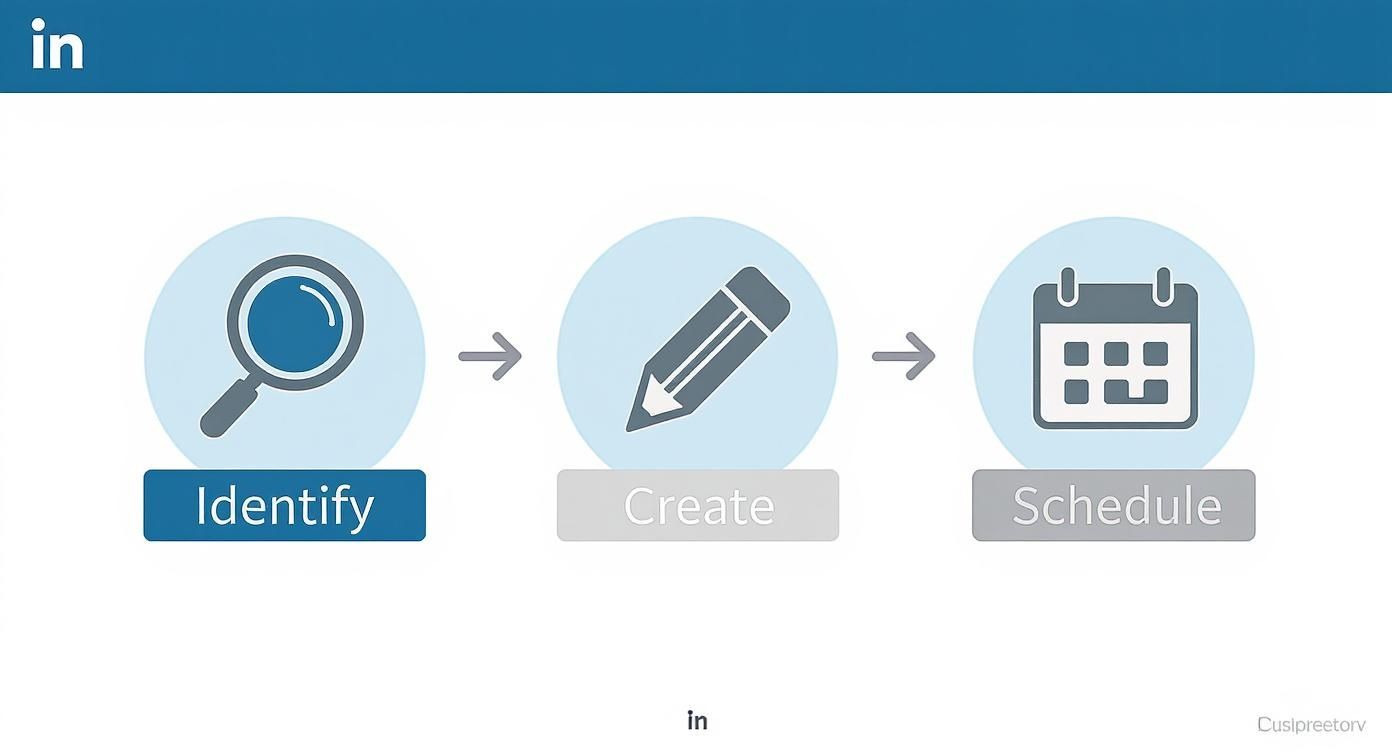
This breaks it down into three core activities: figuring out who you're targeting, creating content that speaks directly to their problems, and then getting it in front of them consistently.
Crafting a Multi-Touch Outreach Sequence
A single message is easy to miss. A thoughtful, multi-touch sequence, on the other hand, shows you're persistent and genuinely interested. The idea is to pop up on your prospect’s radar in a few different, helpful ways over a week or two, building familiarity before you ever ask for a meeting.
The data backs this up. Professionals are far more likely to engage after they've seen you around a few times. Think of it as the difference between a cold call and a warm introduction.
Here’s a field-tested five-touch sequence you can steal and adapt:
- Touch 1 (Day 1): Engage with their content. Find a recent post and leave a thoughtful, relevant comment—something more than "great post!"
- Touch 2 (Day 1): Send the connection request. Keep the note brief and reference your engagement. "Hi [Name], really enjoyed your post on [Topic]. Would be great to connect and follow your insights."
- Touch 3 (Day 3): Send a value-first InMail. After they accept, send a message that gives without asking. This could be a link to a helpful article, a case study relevant to their industry, or an invite to a free webinar.
- Touch 4 (Day 7): Another light engagement. Like or comment on another one of their posts or something their company shared. Stay on their radar.
- Touch 5 (Day 10): Make the gentle ask. Now you can send a follow-up InMail that connects your solution to a potential pain point. Frame it as a question: "Curious if your team has explored [Your Solution Area] to tackle [Common Problem]?"
This cadence respects their time while keeping you top of mind. It works.
Personalization That Actually Works
Let's be clear: personalization is more than just using a [First Name] mail merge. Real personalization shows you’ve done your homework, and it's the single biggest thing that separates welcomed outreach from spam.
The goal of your outreach isn't to make a sale in the first message. It’s to earn the right to have a conversation. Lead with value, show genuine interest, and sales opportunities will follow.
Here are a few simple ways to add meaningful personalization that I've seen get great results:
- Reference a recent post: "I saw your article on AI in marketing—your point about data privacy was spot on."
- Mention a mutual connection: "I see we're both connected with Jane Doe. I worked with her at [Company] and always valued her insights."
- Comment on a company win: "Congrats on your company's recent funding round! That's a huge milestone."
- Note their event attendance: "Saw you were at the SaaS Growth conference last week. Hope you found it as valuable as I did!"
Yes, this takes a minute or two of research per person. But it dramatically increases your reply rate because it proves you see them as an individual, not just another name on a spreadsheet.
Scale Your Reach with Targeted LinkedIn Ads
Organic content and personal outreach are the foundation of any solid LinkedIn strategy. They build trust and warm up relationships. But when you’re ready to really hit the accelerator and scale your lead gen predictably, it's time to bring in LinkedIn Ads.
Think of it this way: paid ads give you a level of precision that organic efforts just can't touch. It’s the difference between hoping the right people stumble across your content and placing your best message directly in front of them.
For a lot of B2B teams, the ad platform can seem a bit daunting at first. But once you get the hang of it, it becomes an incredibly powerful machine for filling your pipeline, getting more eyes on your content, and driving real, measurable growth.
Picking the Right Ad Formats for B2B
LinkedIn gives you a whole menu of ad formats, but for B2B lead generation, a few are clear winners. You want to choose the format that directly supports your goal, which is almost always about capturing qualified leads, not just getting a few vanity clicks.
These are the workhorses I see delivering the best results:
- Sponsored Content: These are the native ads you see right in the LinkedIn feed. They're fantastic for promoting your best-performing content—think case studies, webinar recordings, or a killer blog post—to a much wider, yet highly specific, audience. The idea is to lead with value, which then makes the conversion feel natural.
- Sponsored Messaging: This format (which you might remember as Sponsored InMail) lets you slide directly into your target audience's inbox. It's personal and can be a game-changer for high-value offers like demo requests or consultation calls. Just be careful not to overdo it, or you risk coming across as spammy.
- Lead Gen Forms: This isn't really an ad format on its own, but a feature you attach to your ads. When someone clicks your call-to-action, a form pops up instantly, pre-filled with their LinkedIn profile info. This tiny change makes a massive difference by reducing friction. LinkedIn's own data shows an average conversion rate of 13%—that’s a world away from your typical landing page performance.
The Real Power is in the Targeting
This is where LinkedIn Ads truly shines. No other platform lets you zero in on a professional audience with this kind of pinpoint accuracy. You can go so far beyond basic demographics and build audiences based on what actually matters in a B2B sale.
Just think about how granular you can get:
- Job Title: Target "Chief Financial Officers" or "Heads of Marketing."
- Company Size: Focus on startups with 11-50 employees or enterprises with over 10,000.
- Industry: Show your ads only to people in "Computer Software" or "Financial Services."
- Member Groups: Reach members of niche groups like "SaaS Growth Hacks."
- Skills: Target users who list "Project Management" or "Data Analysis" on their profiles.
The most successful ad campaigns don't try to be everything to everyone. They pick a very specific, high-value audience and craft a message that speaks directly to that audience's biggest pain points.
A Real-World Scenario: Promoting a Webinar
Let's make this tangible. Imagine your SaaS company just ran a great webinar on "AI-Powered Sales Forecasting." Now, you want to use that recording as a lead magnet.
Here’s how you’d play it out:
- Define Your Audience: Your ideal customer is a Sales Director or VP of Sales. They work at a mid-market tech company (51-500 employees) located in North America. You'll use LinkedIn’s targeting filters to build this exact audience.
- Pick Your Ad Format: You'll go with a Sponsored Content campaign, using a short, punchy video clip from the webinar to grab attention. And you’ll definitely attach a Lead Gen Form to it.
- Write the Ad Copy: The headline needs to be direct and highlight the benefit. Something like: "Stop Guessing. Start Forecasting with AI." The ad text will then hit on a key pain point: "Tired of bad forecasts derailing your quarter? This 30-min session shows you how to predict revenue with 95% accuracy using AI."
- Set the Budget: You’ll start with a modest daily budget to test the waters and see what kind of CPL you're getting. If you need a hand figuring out your numbers, our guide on LinkedIn advertising costs is a great resource.
- Create the Offer: Your call-to-action is "Watch Now." The moment someone clicks, that pre-filled Lead Gen Form appears. Once they hit submit, they land on a simple thank you page with a link to the webinar. Easy.
This is the kind of value-first, targeted approach that makes LinkedIn Ads so effective. You're no longer just spending money on ads; you're making a direct investment in growing your sales pipeline.
Qualify Your Leads So Sales Time Goes to the Right People
Generating leads is only half the job. If you send every name that comes through your inbox or a Lead Gen Form straight to your sales team, you'll burn hours on people who were never going to buy. Lead qualification is the filter that keeps your pipeline clean and your closers focused.
You don't need a complicated system. A simple lead-scoring model does the trick by combining two things: how well someone fits your ICP and how much intent they've shown.
- Fit (who they are): Score each lead against your ideal customer profile. Right industry, right company size, right job title and seniority? Each match adds points. A wrong-fit lead, no matter how engaged, rarely closes.
- Intent (what they've done): Weight real actions. A like is worth little. A thoughtful comment, a resource download, a reply to your DM, or a demo request signals genuine buying interest. Let those behaviors push the score up.
A lead that scores high on both fit and intent is a sales-qualified lead (SQL) and deserves a fast, personal follow-up. High fit but low intent? Keep nurturing them with content. High intent but poor fit? Be polite, but don't let it eat your sales hours.
This is also where your content does double duty. The more your posts educate and pre-sell, the warmer your leads arrive, which means a higher share of them clear your qualification bar before a single sales call.
Master LinkedIn Lead Gen Forms (The Highest-Converting Asset on the Platform)
Once your organic engine is humming, LinkedIn Lead Gen Forms are the single most efficient way to capture leads at scale. When a prospect taps your call-to-action, a form appears already filled in with their LinkedIn profile data, so they submit in one tap without typing a thing. That removed friction is why LinkedIn reports an average conversion rate around 13%, far above a typical landing page.
But the form is only as good as how you set it up. Here's what consistently lifts results:
- Use fewer fields: Every extra field costs you submissions. Ask only for what your sales team genuinely needs to follow up, usually name, work email, company, and role.
- Offer a real incentive: People trade their details for value. A practical guide, a webinar recording, a benchmark report, or a free audit converts far better than a vague "learn more."
- Put privacy front and center: A one-line note on how you'll use their data and a clear opt-in builds trust and keeps you compliant.
- Write a strong thank-you and CTA: Don't waste the post-submit moment. Deliver the asset instantly and point them to a next step, like booking a call.
- Route leads to your CRM fast: Speed-to-lead wins B2B deals. Connect the form to your CRM or a notification so follow-up happens in minutes, not days.
Treat the form as the bottom of a value-first funnel: attract with content, warm up with engagement, then let the form catch the people who are ready to raise their hand.
Measure What Matters to Scale Your Success
You can't improve what you don't measure. All the content creation and outreach in the world won't build a predictable pipeline if you're just flying blind. This is where we turn all that hard work into a repeatable system for LinkedIn for B2B lead generation. If you would rather see the individual tactics broken out one by one than as a single funnel, our guide to LinkedIn lead generation strategies compares nine of them side by side on cost, complexity, and time to results.
It's easy to get caught up in vanity metrics like likes and views. They feel good, but they don't pay the bills. True success is found in the numbers that directly connect your LinkedIn efforts to actual business outcomes.
Tracking the KPIs That Drive Revenue
If you want to scale, you have to focus on the key performance indicators (KPIs) that map the entire journey from a simple connection to a closed deal. These are the metrics that tell the real story of your ROI.
Here are the core numbers I recommend tracking every single week:
- Connection Acceptance Rate: Think of this as your first major health check. If your rate is low (under 20%), it’s a big red flag that something is off with your targeting or your connection message. You should be aiming for 30% or higher.
- Outreach Reply Rate: How many of your new connections actually respond to your first message? This number directly reflects how well your personalization and value proposition are landing.
- Content-Driven Profile Views: This is a fantastic indicator. It tells you how many people see your content and are curious enough to click through to your profile. Are you sparking genuine interest?
- Sales Qualified Leads (SQLs): Here it is—the metric that matters most. How many conversations that started on LinkedIn have turned into legitimate, pipeline-worthy opportunities for your sales team?
Building Your Simple Analytics Dashboard
You don't need a fancy, expensive BI tool to get going. Honestly, a simple spreadsheet that pulls data from LinkedIn Analytics and your CRM is often all you need to get a clear picture. The goal is to see how your activities influence your outcomes.
For example, you can use LinkedIn's built-in analytics for post engagement and profile views. Then, just manually log your outreach numbers and any resulting SQLs into your spreadsheet or CRM. This simple setup immediately shows you what’s working and what isn't.
Tracking your metrics isn't about creating more work for yourself. It’s about gaining the clarity to make confident decisions, like doubling down on a content style that drives profile views or killing an outreach message that has a terrible reply rate.
Analyzing Data to Make Smarter Decisions
With this data in hand, you can finally start asking the right questions. Did that carousel post about client results generate more inbound DMs than your text-only posts? Is your reply rate higher when you mention a mutual connection in your first message?
This is where the real growth happens. It allows you to systematically tweak and refine your approach based on what the numbers are telling you. For instance, if you notice your connection acceptance rate is high but your reply rates are in the gutter, you know the problem isn't your targeting—it's your messaging after they connect.
This repeatable loop of measuring, analyzing, and adjusting is what will transform your LinkedIn presence from a bunch of random activities into a predictable lead generation channel. You stop guessing and start building a scalable engine for business growth.
Common Questions About LinkedIn Lead Generation
Let's be honest, trying to master LinkedIn for B2B lead generation can feel like you're trying to solve a puzzle. You know all the pieces are there, but how do they fit together? I get asked the same handful of questions all the time, so let's clear the air and get you some straight answers.
Personal Profile or Company Page? Which One Matters More?
This is probably the biggest one. The short answer? You absolutely need both. They just do different jobs.
Think of your personal profile as your digital handshake. It’s where you build real, one-on-one connections and have actual conversations. It's the human side of your business. Your Company Page, on the other hand, is your brand's digital headquarters. It’s for building authority, showcasing social proof, and sharing company-wide updates.
A potential customer will almost always check out both before they decide to trust you. Neglecting one is like showing up to a meeting missing a shoe—it just looks incomplete.
How Often Should I Actually Be Posting?
People get really hung up on finding the "perfect" posting frequency. Forget perfection; aim for consistency. The data is pretty clear: companies that post weekly see twice the engagement.
A great starting point is to share something valuable three to five times a week. This keeps you visible and top-of-mind with your network without flooding their feeds. Quality over quantity always wins, but consistent quality is the real secret.
How Much Time Does This Really Take Every Day?
Look, you're busy. I get it. The good news is you don't need to live on LinkedIn to see results. All you need is about 30 minutes of focused activity each day.
Here’s a simple way to break it down:
- 10 minutes: Engage with your network. Drop thoughtful comments on a few key posts and like relevant content.
- 10 minutes: Send a handful of personalized connection requests and follow-up messages.
- 10 minutes: Share your own content and, just as importantly, reply to the comments you get.
The goal isn't to spend hours aimlessly scrolling. It’s about being intentional. A consistent daily habit will always beat spending a whole afternoon on the platform once a week.
Is Sales Navigator Actually Worth the Money?
For anyone who's truly serious about generating leads on LinkedIn, the answer is a resounding yes. The free version is fine for casual networking, but Sales Navigator is a completely different tool built for prospecting.
Its advanced search filters are the real game-changer. You can dial in your exact ideal customer profile with scary precision, which saves you countless hours of digging around manually.
Here's how I think about it: Free LinkedIn is like fishing with a single rod and hoping the right fish happens to swim by. Sales Navigator is like having a top-of-the-line fish finder that shows you exactly where your target prospects are gathering. It turns outreach from a game of chance into a repeatable, predictable process.
How Do You Actually Generate B2B Leads From LinkedIn?
Boil it down to four moves. First, define your ideal customer profile so everything you do points at one specific buyer. Second, optimize your profile so visitors instantly understand how you solve their problem. Third, publish content that answers your buyers' real questions, which pulls in inbound interest. Fourth, layer value-first outreach and, once organic works, LinkedIn Lead Gen Form ads on top. Attract first, then convert.
What Is the 5-5-5 Rule for LinkedIn Success?
It's a consistency framework: 5 quality posts a week, sustained for at least 5 weeks to build algorithm momentum, with 5 clear brand signals in every post (tone, visual identity, message clarity, a CTA, and relevance to your audience). For lead generation, the magic isn't any single post. It's the recognizable, steady presence that turns passive scrollers into people who trust you enough to start a conversation.
How Do You Qualify Leads From LinkedIn?
Use a simple lead-scoring model that combines fit and intent. Match each lead against your ICP (industry, company size, role) and weight their actions, like commenting, downloading a resource, or booking a call. High fit plus high intent equals a sales-qualified lead worth a fast, personal follow-up. Everyone else goes into nurture so your sales team only spends time on people genuinely ready to buy.
Do LinkedIn Lead Gen Forms Work for B2B?
Yes, they're one of the highest-converting tools on the platform. Because the form pre-fills a prospect's profile data, they submit in a single tap, which is why LinkedIn reports roughly a 13% average conversion rate, well above most landing pages. Keep the fields minimal, offer a genuinely useful incentive, and route every submission straight to your CRM so follow-up happens in minutes.
Ready to create converting LinkedIn content without the guesswork? Postiv AI combines a brand-trained AI writer with powerful design and scheduling tools, helping you turn your ideas into authority-building posts in minutes. Learn how Postiv AI can upgrade your content strategy.
More Questions
How do you generate B2B leads from LinkedIn?
Start by defining your ideal customer profile, then build an inbound engine: optimize your profile to convert visitors, publish content that answers your buyers' real questions, and engage thoughtfully in their feeds. Layer in value-first outreach and, once organic works, LinkedIn Lead Gen Form ads. The goal is to attract qualified leads who already trust you, not chase cold prospects with automation.
How do you qualify B2B leads from LinkedIn?
Use a lightweight lead-scoring model. Match each lead against your ideal customer profile (industry, company size, role, seniority) and weight their actions, like commenting, downloading a resource, or booking a call. A profile-fit match plus a high-intent action signals a sales-qualified lead. Anything below that threshold goes into nurture so your sales time stays focused on people ready to buy.