Think of an impression on LinkedIn this way: it’s a digital head-nod. Your post just showed up in someone's feed. That’s it.
They didn't have to stop scrolling, click, or even really notice it. The moment it loaded on their screen, whether on a phone or a desktop, it counted as one impression. It's the digital equivalent of someone walking past a billboard on the highway—they had the chance to see your message, and that's the first step to everything else.
Your Quick Guide to LinkedIn Impressions
If you've ever found yourself staring at your LinkedIn analytics, trying to make sense of all the numbers, you're in good company. One of the most basic, yet most confusing, metrics is the humble "impression." It's the very foundation of your content's journey, the first signal that you're even in the game.
So, what does that really mean for you? Let’s go back to the real world for a second. Imagine you're at a huge conference. An impression is like someone catching a glimpse of you from across the room. They haven't walked over to talk, they haven't shaken your hand, but for a split second, they were aware you were there. Each impression is one of those fleeting moments of visibility.
Why This Metric Is Your Starting Point
Getting a handle on impressions is non-negotiable because it’s a direct measure of your content’s initial distribution. It's the raw number of times LinkedIn's algorithm gave your post a shot by putting it in front of users. This simple number tells you a few important things:
- Brand Awareness: The more impressions you get, the more professionals are seeing your name, your face, and your ideas. Over time, that builds familiarity and recall.
- Algorithm Feedback: Impressions are the algorithm's first report card on your content. A strong start with impressions often signals to LinkedIn that your post is worth showing to more people.
- Top-of-Funnel Health: If you're using LinkedIn for business, impressions are the very top of your marketing funnel. It's the total number of chances you had to grab someone's attention and pull them in.
Every single time your post appears in a feed, it counts. That's your starting line for getting seen on a platform with over 310 million monthly active users—a seriously crowded room. While a typical post might get around 500 impressions, the average impression rate was 9.50% in 2024, a number that can skyrocket for popular accounts or posts that really hit a nerve. For a deeper dive into these numbers, you can explore the full 2024 industry report.
An impression isn't a guarantee of engagement, but engagement is impossible without an impression. It's the ticket to the game; what you do with that ticket is what determines your success.
Impressions Versus Reach, Views, and Clicks
Diving into LinkedIn analytics can feel like trying to decipher a secret code. You're staring at a dashboard full of terms like impressions, reach, views, and clicks. They all sound similar, but each one tells a very different story about your content's performance. Getting these straight is the key to figuring out what's actually working.
Let's use a simple analogy to clear things up. Imagine you've set up a booth at a bustling industry conference.
- Impressions are the total number of times people walked past your booth. It doesn't matter who they are. If one person walks by in the morning and circles back in the afternoon, that's counted as two impressions.
- Reach is the number of unique individuals who saw your booth. That person who passed by twice? They only count as one person in your reach total.
- Clicks are the people who didn't just walk by—they stopped, took a brochure, and actually engaged with what you had to offer.
This is a great way to picture how impressions are just the first, broadest measure of visibility, with reach and views being more specific slices of that pie.
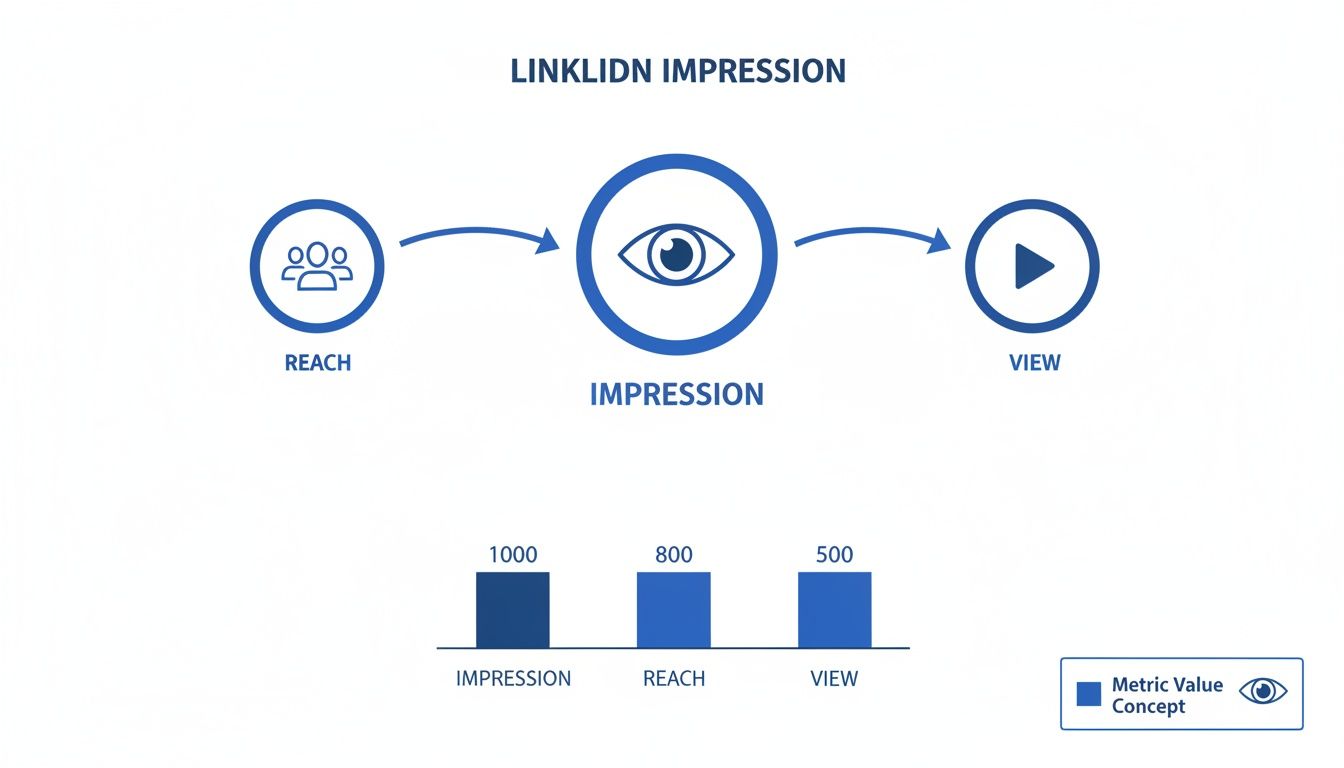
As you can see, impressions will always be your biggest number, because it's the raw count of how many times your content was served up.
The Key Distinctions in Your Data
Each of these metrics gives you a unique piece of the puzzle. Impressions tell you about opportunity—how many times your content was potentially seen. Reach measures audience size—the number of unique humans who saw it. Clicks and other engagements get at intent—the people who were interested enough to take action.
Here’s a practical example. Say you have a post with 2,000 impressions but only 1,500 reach. What does that tell you? It means that, on average, people in your audience saw that post about 1.3 times. This isn't necessarily a bad thing. Repetition can be great for brand recall and reinforcing a message, and it often means the algorithm thinks your content is relevant enough to serve it again to the same people.
Impressions tell you how wide you cast your net. Reach tells you how many fish were in that part of the ocean. Clicks tell you how many fish actually bit the hook.
It’s also crucial to distinguish impressions from views. On LinkedIn, an impression is counted every single time your post appears in someone's feed. Views usually refer to the unique people who saw the post. So, a post with 1,000 impressions but only 800 views means that 20% of those appearances were repeat exposures to the same users—something that happens all the time with LinkedIn's algorithm.
Interestingly, engagement rates calculated using impressions have jumped by 44% year-over-year, which shows that more and more marketers are paying attention to this top-of-the-funnel metric. If you want to dive deeper, you can discover more insights about post performance.
Once you get a feel for these nuances, you can stop just reporting numbers and start telling the real story of your content's journey across the LinkedIn ecosystem.
The 3 Types of LinkedIn Impressions
Not all impressions are created equal. LinkedIn actually breaks them down into three distinct categories, and understanding the difference is essential for diagnosing what's driving your visibility.
Organic Impressions
These are the impressions your content earns naturally—without paying a dime. When you publish a post and it shows up in your connections' feeds because the algorithm decided it was relevant, that's an organic impression. This is the bread and butter for most LinkedIn creators and the type you should focus on growing first.
The key drivers of organic impressions are your content quality, posting consistency, and how quickly you earn early engagement. A strong LinkedIn content strategy is the single biggest lever you can pull here.
Viral Impressions
Viral impressions happen when someone outside your immediate network sees your content because a connection of theirs engaged with it. For example, if a colleague likes your post and that action causes it to appear in their contacts' feeds, those extra eyeballs are viral impressions.
This is where the compounding effect kicks in. A single comment from a well-connected person can expose your post to thousands of new professionals who have never heard of you. It's the LinkedIn version of word-of-mouth.
Paid Impressions
Paid impressions come from LinkedIn's advertising platform—Sponsored Content, Message Ads, and other promoted formats. You're essentially paying LinkedIn to guarantee your content appears in front of a specific target audience.
While organic and viral impressions are "free," paid impressions give you control over exactly who sees your content and when. For B2B campaigns with a defined audience, they can be a powerful complement to your organic efforts.
| Impression Type | Source | Cost | Best For |
|---|---|---|---|
| Organic | Algorithm serves your post to connections and followers | Free | Building consistent authority and brand awareness |
| Viral | Someone's engagement exposes your post to their network | Free | Expanding reach beyond your existing audience |
| Paid | LinkedIn ad placements (Sponsored Content, etc.) | Pay-per-impression or click | Targeted campaigns with specific audience criteria |
Where to Find Your Impression Data on LinkedIn
Alright, so you understand what impressions are. Now, where do you actually find these numbers? Theory is great, but putting it into practice is what gets results.
Thankfully, LinkedIn doesn't hide this data. Whether you're curious about a specific post, your personal profile's overall performance, or a Company Page you manage, the analytics are just a few clicks away. Knowing where to look is the first step to making smarter decisions about your content.
Let's start with the easiest one: a single post.
Go to any post you've shared. Right underneath it, you'll see a little graph icon or some text showing the impression count, like "2,500 impressions." Click on that.
Boom. You’re now looking at the dashboard for that specific post. It’s your mission control for that piece of content.
As you can see, Impressions are listed right at the top, separate from reactions, comments, and shares. This gives you an instant read on its initial visibility.
Locating Analytics for Your Profile and Company Page
Checking stats post-by-post is useful for quick feedback, but you also need a bird's-eye view to see the bigger picture. Are your numbers trending up or down over the month? LinkedIn provides broader analytics dashboards for this.
1. For Personal Profiles (with Creator Mode On): If you've switched on Creator Mode, your profile gets a dedicated analytics suite. Just head to your profile page and look for the "Analytics" section right under your headline. This dashboard rolls up your data—including post impressions—and lets you view it over the last 7, 14, 28, 90, or 365 days. It's a fantastic tool for tracking your personal brand's growth.
2. For Company Pages: If you're an admin for a Company Page, go to the page and click the "Analytics" tab in the main menu. From the dropdown, select "Updates" to see how your page's content is performing. You can filter by date ranges to measure brand awareness campaigns or track your content marketing efforts over time.
By regularly checking these dashboards, you get the full story of your visibility on the platform. It’s how you can effectively analyze your content performance and figure out what your audience actually wants to see. After all, knowing what an impression means on LinkedIn is only half the battle—the real value comes from seeing and acting on your own numbers.
Why Impressions Are More Than Just a Vanity Metric
It’s easy to write off a high impression count as a "vanity metric"—a number that looks good on a report but doesn’t really move the needle. But on a professional network like LinkedIn, that’s a mistake. Think of impressions as the very first step in your entire marketing funnel. They're the seeds of brand awareness you're planting with every single post.
Imagine you’re building a reputation in a new city. Before anyone will do business with you, they need to see you around town. They need to see your face at local events and hear your name pop up in conversations. Each impression on LinkedIn is the digital version of that—a quick moment of visibility that slowly builds familiarity and recognition.

From Visibility to Trust
In B2B, sales cycles are often long, and trust is everything. This is where that consistent visibility really pays off. A potential client is far more likely to accept your connection request or open your InMail if they recognize your name from their feed. That recognition isn't an accident; it's the direct result of racking up thousands of impressions over weeks and months.
This foundation of awareness paves the way for real business outcomes. With the average global engagement rate hovering around 3.8%, you need a lot of eyeballs just to get a conversation started. And considering 68% of B2B marketers upped their LinkedIn activity last year, cutting through the noise is tougher than ever. Consistent impressions are your way in. For more context, check out these recent LinkedIn performance statistics.
This constant presence does more than just build name recognition—it builds authority. When your content regularly shows up in someone's feed, it subconsciously positions you as an active, knowledgeable voice in your field.
Impressions aren't just about being seen; they're about being remembered. In a long sales cycle, that brand recall can be the one thing that separates you from a competitor when it's finally time to buy.
Connecting Impressions to Real Business Goals
A high impression count is often the first sign of a healthy, growing audience. As more people see your content, a natural percentage will get curious, check out your profile, follow you, or send a connection request. This isn't just about growing your follower count; it's about expanding the pool of potential leads you can reach with all your future content.
So, how can you diagnose what your impression numbers are trying to tell you about your strategy? This simple table can help.
What Your Impression Count Might Be Telling You
| Impression Level | Potential Meaning | Next Steps |
|---|---|---|
| High Impressions | Your topics and post formats are hitting the mark with both the algorithm and your audience. | Double down on what's working. Look at your top-performing posts and identify common themes or styles to replicate. |
| Low Impressions | Your content might not be grabbing enough attention in the first hour, or your timing could be off. | Experiment with different posting times, try more eye-catching visuals, and work on writing scroll-stopping opening lines. |
| Inconsistent Impressions | You're probably posting sporadically, or the quality of your content is all over the place. | Get into a consistent rhythm (aim for 3-5 times per week) and commit to a high standard for every single post. |
Ultimately, a strong impression count creates the opportunity for everything else to happen. Without that initial visibility, you get no clicks, no comments, no leads, and no sales. It's the essential first domino to fall. Understanding this is key to accurately measuring your social media ROI, where awareness always comes first.
Why Impressions Matter Even More for B2B Marketing
If you’re in B2B, impressions carry a disproportionate amount of weight compared to consumer-focused platforms. The reason is simple: your audience is smaller, more specialized, and significantly more valuable per person. A single impression landing in front of the right decision-maker can be worth more than 10,000 impressions scattered across an irrelevant audience.
The Cost of Paid Visibility in B2B
To understand just how valuable organic impressions are, look at what they cost when you have to pay for them. The average cost-per-mille (CPM) on LinkedIn—that’s the cost per 1,000 paid impressions—is roughly $26.91 USD, and in competitive B2B verticals like SaaS, cybersecurity, or enterprise software, it regularly climbs past $30. Meanwhile, organic posts averaged 811 impressions in early 2024, a 16% jump from the year before. Every one of those organic impressions is free exposure you didn’t have to write a check for.
For founders and small teams running lean, this math is hard to ignore. A consistent organic content strategy can deliver the same visibility as thousands of dollars in ad spend—without the spend.
Personal Profiles Are Your B2B Secret Weapon
Here’s a stat that changes how smart B2B teams think about impressions: content from personal profiles generates roughly 2.75x more impressions and an incredible 5x more engagement compared to the exact same content posted from a Company Page. People connect with people, not logos.
This is why executive branding has become a core pillar of B2B content strategy. When a VP of Sales or a founder shares their perspective from a personal profile, it doesn’t just feel more authentic—the algorithm actively rewards it with broader distribution. Each post from a personal profile acts as a powerful endorsement that funnels awareness and credibility back to the business.
For B2B teams, the takeaway is clear: empower your leadership team to post from their own profiles. Their collective impressions become a force multiplier for your company’s visibility—without competing against the algorithmic headwinds that Company Pages face.
Impression Velocity: The B2B Signal That Matters Most
Beyond total impressions, B2B marketers should pay attention to impression velocity—how fast your content accumulates impressions in the first 60 minutes after publishing. A post that racks up a thousand impressions in its first hour has a dramatically better chance of reaching a wider audience than one that takes all day to hit the same number.
That initial burst of activity is a critical signal to the LinkedIn algorithm. It reads the early momentum as proof that your content is immediately interesting, which prompts it to show it to a broader audience—creating a snowball effect that can push your post well beyond your network.
For B2B content, where your audience is often online in specific windows (think Tuesday through Thursday, 9-11 AM in your target timezone), nailing the publish time is directly tied to maximizing this velocity.
Benchmark Your B2B Impressions by Network Size
One of the trickiest questions in B2B is what "good" looks like relative to your network. Here’s a practical framework for setting expectations:
| Network Size (Connections) | Typical Impressions Per Post | Strong Performance Goal |
|---|---|---|
| Under 500 | 200 - 500 | 500+ |
| 500 - 2,500 | 500 - 1,500 | 1,500+ |
| 2,500 - 10,000+ | 2,000 - 5,000 | 5,000+ |
A handy rule of thumb: a decent B2B post will generate impressions equivalent to about 5-10% of your follower count. Seasoned creators who have fine-tuned their content and engagement habits often see 20-30%. The key is to stop comparing yourself to influencers in consumer niches and instead track your own progress month over month.
In B2B, the quality of your impressions always outweighs the quantity. 1,000 impressions landing with your ideal customer profile (ICP) are infinitely more powerful than 10,000 impressions with a totally irrelevant audience. Your content strategy is the filter that determines which one you get.
Ready to Boost Your LinkedIn Impressions? Here’s How.
Alright, so you know what an impression is. That’s step one. Now, let's get down to the fun part: actually getting more of them. This isn't about trying to trick the LinkedIn algorithm. It's about understanding what it wants and giving it exactly that—content that's so good, it has to be shared.
Let's walk through some real-world tactics that will get you more visibility.
The foundation of it all is surprisingly simple: create genuinely useful content. Your goal should be to solve a real problem or offer a fresh perspective that your audience hasn't heard a dozen times before. A post that delivers actual value is your ticket to earning the early engagement that tells the algorithm, "Hey, show this to more people."
Nail Your Content Format and Timing
On LinkedIn, how you say something can be just as important as what you say. The algorithm definitely plays favorites, and certain formats get more love because they keep people scrolling on the platform.
- Go Visual: It's no secret—posts with images get way more attention. But if you really want to step it up, try carousels. Uploading a PDF as a document creates a swipeable carousel that’s perfect for telling a story or breaking down a complex idea. They work wonders for increasing "dwell time," a huge signal to LinkedIn that your content is valuable.
- Upload Video Directly: Don't just paste a YouTube link. Upload your video files right to LinkedIn. Native videos autoplay in the feed, making them almost impossible to ignore. The algorithm rewards this big time.
- Run a Poll: Polls are one of the easiest ways to get people to interact. That quick click gives your post an immediate engagement bump, helping it pick up steam right out of the gate.
Timing is everything, especially in those first few hours. If your post gets a good amount of interaction shortly after you publish it, LinkedIn takes that as a sign to push it out to a wider audience. Try posting when your network is most likely to be online, which for most of us is during the workday.
Play the Engagement Game—Smartly
Engagement isn’t just something that happens to you; it’s something you actively create. What you do after you post can make or break its reach.
Your work isn't done when you publish a post; it's just beginning. Responding to comments quickly not only builds community but also signals to the algorithm that your content is sparking a valuable conversation worth showing to more people.
Make it a rule to reply to every single comment, especially within the first hour or two. Every reply you leave is another signal to the algorithm that your post is active and interesting, which helps keep it visible in the feed for longer.
Hashtags are also a key part of the puzzle. Think of them as signposts that tell LinkedIn what your content is about. Using a smart mix of broad and niche hashtags—3-5 is a good range—helps people outside your immediate network discover your posts. To see how these tactics fit into a broader strategy, it's worth learning how to improve social media engagement across the board.
Finally, you have to be consistent. Showing up regularly tells LinkedIn you're a serious contributor. Over time, a steady posting schedule builds momentum and trains both your audience and the algorithm to pay attention to what you have to say. For a deeper dive into these strategies, check out our complete guide to https://postiv.ai/blog/impressions-on-linkedin.
Answering Your Top Questions About LinkedIn Impressions
Alright, now that we've covered what impressions are and how to get more of them, let's dig into some of the questions I hear all the time. Think of this as the final piece of the puzzle, where we clear up any lingering confusion about how visibility really works on LinkedIn.
These are the details that separate the pros from the amateurs, so let's get them sorted.
Are Impressions the Most Important Metric on LinkedIn?
No, but they are the most foundational. Think of it like building a house. Impressions are the foundation you pour. You can't put up walls (engagement) or a roof (conversions) without that solid base of visibility. It's your starting line—a raw measure of your brand awareness and potential audience size.
While things like clicks, comments, and shares tell you a lot more about your content's quality, they simply can't happen without impressions first. A smart strategy uses impressions to cast a wide net and then focuses on great content to turn that attention into something more meaningful. Ultimately, the "most important" metric depends entirely on what you want that specific post to achieve.
Why Are My LinkedIn Impressions So Low?
If your impression count feels stubbornly low, it usually comes down to a few common culprits. The biggest one? Your post probably isn't getting enough love in that critical first hour after you hit "publish." If people aren't engaging right away, the LinkedIn algorithm assumes it's not very interesting and stops showing it to a wider audience.
Other potential reach-killers include:
- Bad Timing: You’re posting when your audience is asleep or commuting.
- External Links in the Post: LinkedIn wants to keep users on its platform, so it often throttles the reach of posts with links in the main text. (Pro tip: Put them in the first comment instead).
- Weak Hashtags: Using generic or irrelevant hashtags that don't connect your content to the right conversations.
- Boring Content: Let's be honest, text-only posts are fighting an uphill battle. Visuals like images, carousels, and especially native video almost always perform better. If you want to boost impressions, learning how to make video marketing on LinkedIn and upload native videos is a fantastic place to start.
Does Seeing My Own Post Count as an Impression?
Yep, it sure does. Every single time a post loads in a feed—even if it's your own—LinkedIn counts it as one impression. This is how most social platforms do it.
It might feel a little like you're inflating your own numbers, but the impact is so tiny it’s not worth losing sleep over. The real power of impressions is in tracking broad trends over time. Don't sweat the small stuff; focus on whether your overall visibility is heading in the right direction from one post to the next.
Key Takeaway: The goal isn't a perfect, sterile impression number. It's a consistently growing one. Use the metric to see what's working and double down on the content that expands your reach.
What Is a Good Number of Impressions for a LinkedIn Post?
This is the million-dollar question, and the answer is... it depends. A "good" number is completely relative to the size of your network, your industry, and the kind of content you're sharing. Instead of chasing some universal magic number, you're much better off setting your own benchmarks.
But, if you need a general rule of thumb, a great starting goal is to aim for an impression count that is 2x to 5x your total number of followers. So, if you have 1,000 followers, a post that gets 2,000 to 5,000 impressions is doing quite well. Viral posts, of course, can blow this out of the water, sometimes hitting 10x or even 100x your follower count.
My advice? Stop fixating on a single number. Instead, track your average impressions per post each month. The real win is seeing that average steadily climb as you refine your content strategy.
Are Impressions the Same as Views on LinkedIn?
No—and this is one of the most common mix-ups. An impression is counted every time your post appears on a screen, including repeat appearances to the same person. Views (or "members reached") count the number of unique individuals who actually saw it. So if one person scrolls past your post three times in a week, that's three impressions but only one view.
In practice, your impression count will always be higher than your view count. The gap between the two tells you how much repeat exposure your content is getting, which is useful information for understanding how the algorithm is distributing your posts.
Is 1,000 Impressions on LinkedIn Good?
It depends on the size of your network, but for most professionals, 1,000 impressions is a solid starting point. If you have fewer than 500 connections, 1,000 impressions means your content reached well beyond your immediate network—that's a strong signal.
As a general benchmark, aim for 2x to 5x your follower count per post. So if you have 500 followers, 1,000 impressions is right in the sweet spot. The key is consistency: track your average over time rather than obsessing over any single post. For ideas on creating the kind of content that consistently hits these numbers, check out our engagement post ideas that are proven to drive visibility.
What Does Impression Mean in LinkedIn Analytics?
In your LinkedIn analytics dashboard, the impression count is the total number of times your content was served to a user's screen. It appears both at the individual post level (click the graph icon below any post) and at the profile/page level in your broader analytics.
For Company Pages, you'll find impression data under Analytics > Updates. For personal profiles with Creator Mode enabled, it's rolled into your profile analytics section. This number is the starting point for calculating other key metrics like your engagement rate (total engagements divided by impressions) and your click-through rate (clicks divided by impressions).
People Also Ask: LinkedIn Impressions
What is a good number of impressions on LinkedIn?
It depends entirely on the size of your network and your niche, so there's no universal magic number. For individual professionals posting from personal profiles, 1,000 to 5,000 impressions on a solid post is a strong result—it means your content is breaking beyond your immediate circle and reaching new, relevant people. Company Pages tend to have a harder time with organic visibility; for them, consistently hitting 500 to 1,000 impressions on a standard update is respectable, while well-established pages with large followings can aim for 10,000+.
The most useful benchmark, though, is your own trajectory. Rather than chasing someone else's viral post, focus on whether your average impressions per post are growing month over month. A rising average is the clearest sign that your content strategy is working. And remember: engagement rate (likes + comments + shares divided by impressions) matters more than raw impressions. A post with 2,000 impressions and 100 genuine comments is vastly more valuable than one with 20,000 impressions and two likes.
Are impressions a good thing on LinkedIn?
Yes—impressions are a positive signal that LinkedIn's algorithm is distributing your content and putting it in front of people. High impressions mean your post earned visibility, which is the essential first step before anything else can happen: clicks, comments, shares, profile visits, or inbound leads.
That said, impressions alone don't tell the full story. They measure reach potential, not impact. A post with sky-high impressions but zero engagement means people saw it and kept scrolling—your content was visible but not compelling enough to make anyone stop. The real signal of content quality is what happens after the impression: did people engage? The healthiest content strategy produces consistently high impressions and a strong engagement rate. Think of impressions as the fuel and engagement as the fire—you need both.
What does 500 impressions mean on LinkedIn?
It means your post appeared in 500 people's feeds. Each of those 500 appearances is a separate moment where someone had the opportunity to see your content, whether they stopped to read it or scrolled right past. Keep in mind that 500 impressions doesn't necessarily mean 500 different people—if one person saw your post twice, that counts as 2 of those 500 impressions.
For context, 500 impressions is a perfectly normal result for someone with a smaller network (under 500 connections) or for a Company Page post. Even if only 20 people engage out of those 500 impressions, you still have a 4% engagement rate, which is above the platform average. The number becomes more meaningful when you track it over time: if your posts used to average 200 impressions and now consistently hit 500, your visibility is clearly growing. That's the trend that matters.
Are LinkedIn impressions the same as views?
No, and this is one of the most common points of confusion. Impressions count every single time your post appears on a screen, including repeat appearances to the same person. If one person scrolls past your post three times in a week, that's three impressions. Views (sometimes labeled "unique views" or "members reached") count the number of unique individuals who saw your content—so that same person scrolling past three times counts as just one view.
For video content specifically, the distinction is even sharper. A video impression is logged the moment the video appears in someone's feed, but a video view is only counted after someone watches for at least 3 seconds with at least 50% of the player visible on screen. This makes views a much stronger signal of genuine interest than a passive impression.
In practice, your impression count will always be higher than your view count. The gap between them tells you how much repeat exposure your content is getting—useful information for understanding whether your post is reaching new audiences or being resurfaced to the same group.
Ready to turn your LinkedIn ideas into authority-building content in minutes? Postiv AI combines a brand-trained AI writer, a carousel designer, and scheduling analytics into one seamless workflow. Stop staring at a blank screen and start creating posts that convert. Try Postiv AI today and see the difference.